



# What is nnDetection?
Simultaneous localisation and categorization of objects in medical images, also referred to as medical object detection, is of high clinical relevance because diagnostic decisions depend on rating of objects rather than e.g. pixels.
For this task, the cumbersome and iterative process of method configuration constitutes a major research bottleneck.
Recently, nnU-Net has tackled this challenge for the task of image segmentation with great success.
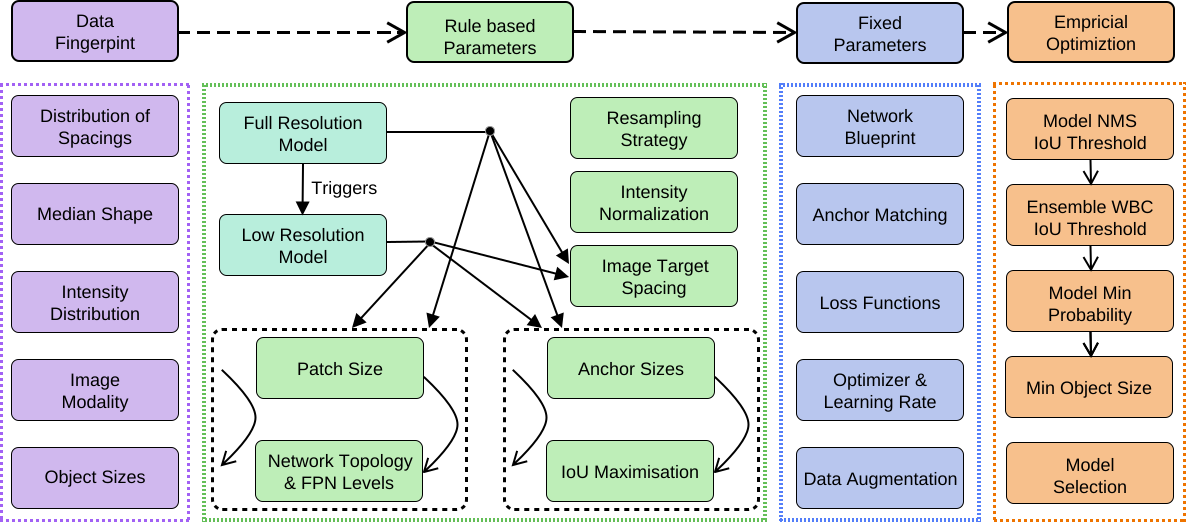
Following nnU-Net’s agenda, in this work we systematize and automate the configuration process for medical object detection.
The resulting self-configuring method, nnDetection, adapts itself without any manual intervention to arbitrary medical detection problems while achieving results en par with or superior to the state-of-the-art.
We demonstrate the effectiveness of nnDetection on two public benchmarks, ADAM and LUNA16, and propose 10 further public data sets for a comprehensive evaluation of medical object detection methods.
# Installation
## Docker
The easiest way to get started with nnDetection is the provided is to build a Docker Container with the provided Dockerfile.
Please install docker and [nvidia-docker2](https://docs.nvidia.com/datacenter/cloud-native/container-toolkit/install-guide.html) before continuing.
All projects which are based on nnDetection assume that the base image was built with the following tagging scheme `nnDetection:[version]`.
To build a container (nnDetection Version 0.1) run the following command from the base directory:
```bash
docker build -t nndetection:0.1 --build-arg env_det_num_threads=6 --build-arg env_det_verbose=1 .
```
(`--build-arg env_det_num_threads=6` and `--build-arg env_det_verbose=1` are optional and are used to overwrite the provided default parameters)
The docker container expects data and models in its own `/opt/data` and `/opt/models` directories respectively.
The directories need to be mounted via docker `-v`. For simplicity and speed, the ENV variables `det_data` and `det_models` can be set in the host system to point to the desired directories. To run:
```bash
docker run --gpus all -v ${det_data}:/opt/data -v ${det_models}:/opt/models -it --shm-size=24gb nndetection:0.1 /bin/bash
```
Warning:
When running a training inside the container it is necessary to [increase the shared memory](https://stackoverflow.com/questions/30210362/how-to-increase-the-size-of-the-dev-shm-in-docker-container) (via --shm-size).
## Source
1. Install CUDA (>10.1) and cudnn (make sure to select [compatible versions](https://docs.nvidia.com/deeplearning/cudnn/support-matrix/index.html)!)
2. [Optional] Depending on your GPU you might need to set `TORCH_CUDA_ARCH_LIST`, check [compute capabilities](https://developer.nvidia.com/cuda-gpus) here.
3. Install [torch](https://pytorch.org/) (make sure to match the pytorch and CUDA versions!) (requires pytorch >1.7+)
4. Install [torchvision](https://github.com/pytorch/vision) (make sure to match the versions!)
5. Clone nnDetection, `cd [path_to_repo]` and `pip install -e .`
6. Upgrade hydra to next release: `pip install hydra-core --upgrade --pre`
7. Set environment variables (more info can be found below):
- `det_data`: [required] Path to the source directory where all the data will be located
- `det_models`: [required] Path to directory where all models will be saved
- `OMP_NUM_THREADS=1` : [required] Needs to be set! Otherwise bad things will happen... Refer to batchgenerators documentation.
- `det_num_threads`: [recommended] Number processes to use for augmentation (at least 6, default 12)
- `det_verbose`: [optional] Can be used to deactivate progress bars (activated by default)
- `MLFLOW_TRACKING_URI`: [optional] Specify the logging directory of mlflow. Refer to the [mlflow documentation](https://www.mlflow.org/docs/latest/tracking.html) for more information.
Note: nnDetection was developed on Linux => Windows is not supported.
Test Installation
Run the following command in the terminal (!not! in pytorch root folder) to verify that the compilation of the C++/CUDA code was successfull:
```bash
python -c "import torch; import nndet._C; import nndet"
```
To test the whole installation please run the Toy Data set example.
Maximising Training Speed
To get the best possible performance we recommend using CUDA 11.0+ with cuDNN 8.1.X+ and a (!)locally compiled version(!) of Pytorch 1.7+
# nnDetection
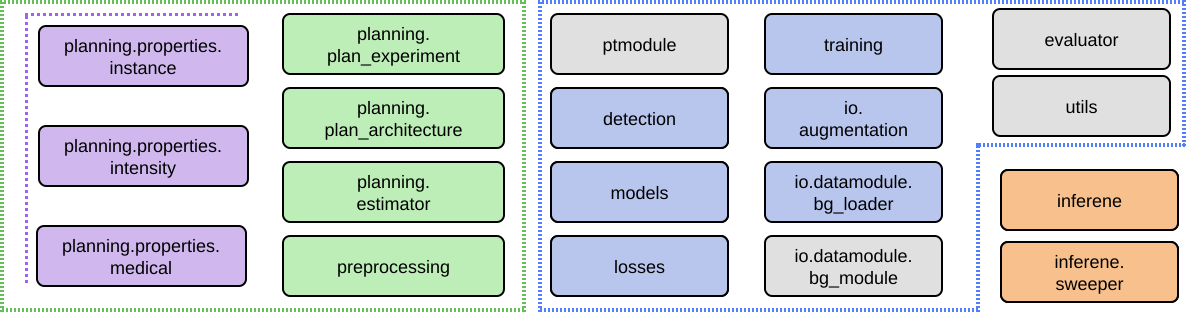
nnDetection Module Overview
nnDetection uses multiple Registries to keep track of different modules and easily switch them via the config files.
***Config Files***
nnDetection uses [Hydra](https://hydra.cc/) to dynamically configure and compose configurations.
The configuration files are located in `nndet.conf` and can be overwritten to customize the behavior of the pipeline.
***AUGMENTATION_REGISTRY***
The augmentation registry can be imported from `nndet.io.augmentation` and contains different augmentation configurations. Examples can be found in `nndet.io.augmentation.bg_aug`.
***DATALOADER_REGISTRY***
The dataloader registry contains different dataloader classes to customize the IO of nnDetection.
It can be imported from `nndet.io.datamodule` and examples can be found in `nndet.io.datamodule.bg_loader`.
***PLANNER_REGISTRY***
New plans can be registered via the planner registry which contain classes to define and perform different architecture and preprocessing schemes.
It can be imported from `nndet.planning.experiment` and example can be found in `nndet.planning.experiment.v001`.
***MODULE_REGISTRY***
The module registry contains the core modules of nnDetection which inherits from the [Pytorch Lightning](https://github.com/PyTorchLightning/pytorch-lightning) Module.
It is the main module which is used for training and inference and contains all the necessary steps to build the final models.
It can be imported from `nndet.ptmodule` and example can be found in `nndet.ptmodule.retinaunet`.
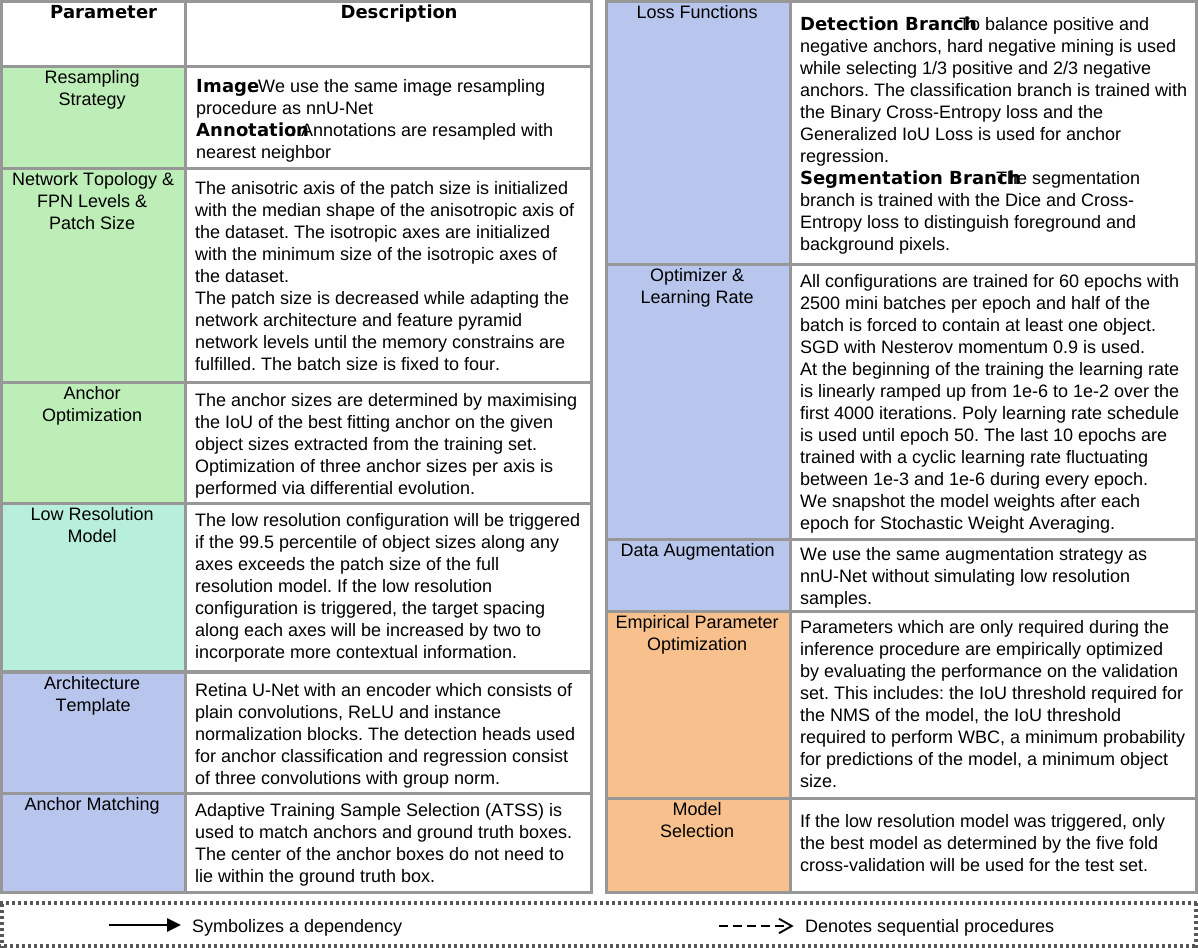
nnDetection Functional Details
# Experiments & Data
The data sets used for our experiments are not hosted or maintained by us, please give credit to the authors of the data sets.
Some of the labels were corrected in data sets which we converted and can be downloaded.
The `Experiments` section has an overview of multiple guides which explain the preparation of the data sets.
## Toy Data set
Running `nndet_example` will automatically generate an example data set with 3D squares and sqaures with holes which can be used to test the installation or experiment with prototype code (it is still necessary to run the other nndet commands to process/train/predict the data set).
```bash
# create data to test installation/environment (10 train 10 test)
nndet_example
# create full data set for prototyping (1000 train 1000 test)
nndet_example --full [--num_processes]
```
The full problem is very easy and the final results should be near perfect.
After running the generation script follow the `Planning`, `Training` and `Inference` instructions below to construct the whole nnDetection pipeline.
## Experiments
Besides the self-configuring method, nnDetection acts as a standard interface for many datasets.
We provide guides to prepare all datasets from our evaluation to the correct and make it easy to reproduce our resutls.
Furthermore, we provide pretrained models which can be used without investing large amounts of compute to rerun our experiments (see Section `Pretrained Models`).
### Results
| | | |
|:--------:|:--------:|:--------:|
| | [nnDetection v0.1](./docs/results/nnDetectionV001.md) | |
### Guides
| | | |
|:----------------------------------------------------------------:|:-------------------------------------------------:|:---------------------------------------:|
| [Task 003 Liver](./projects/Task001_Decathlon/README.md) | [Task 011 Kits](./projects/Task011_Kits/README.md) | [Task 020 RibFrac](./projects/Task020_RibFrac/README.md) |
| [Task 007 Pancreas](./projects/Task001_Decathlon/README.md) | [Task 012 LIDC](./projects/Task012_LIDC/README.md) | [Task 021 ProstateX](./projects/Task021_ProstateX/README.md) |
| [Task 008 Hepatic Vessel](./projects/Task001_Decathlon/README.md) | [Task 017 CADA](./projects/Task017_CADA/README.md) | [Task 025 LymphNodes](./projects/Task025_LymphNodes/README.md) |
| [Task 010 Colon](./projects/Task001_Decathlon/README.md) | [Task 019 ADAM](./projects/Task019_ADAM/README.md) | [Task 016 Luna](./projects/Task016_Luna/README.md) |
## Adding New Data sets
nnDetection relies on a standardized input format which is very similar to the [nnU-Net](https://github.com/MIC-DKFZ/nnUNet) format and allows easy integration of new data sets.
More details about the format can be found below.
### Folders
All data sets should reside inside `Task[Number]_[Name]` folder inside the specified detection data folder (et the path to this folder with the `det_data` environment flag).
To avoid conflicts with our provided pretrained models we recommend to use task numbers starting from 100.
An overview is provided below ([Name] symbolise folder, `-` symbolise files, indents refer to substructures)
```text
${det_data}
[Task000_Example]
- dataset.yaml # dataset.json works too
[raw_splitted_data]
[imagesTr]
- case0000_0000.nii.gz # case0000 modality 0
- case0000_0001.nii.gz # case0000 modality 1
- case0001_0000.nii.gz # case0001 modality 0
- case0000_0001.nii.gz # case0001 modality 1
[labelsTr]
- case0000.nii.gz # instance segmentation case0000
- case0000.json # properties of case0000
- case0001.nii.gz # instance segmentation case0001
- case0001.json # properties of case0001
[imagesTs] # optional, same structure as imagesTr
...
[labelsTs] # optional, same structure as labelsTr
...
[Task001_Example1]
...
```
### Data set Info
`dataset.yaml` or `dataset.json` provides general information about the data set:
Note: [Important] Classes and modalities start with index 0!
```yaml
task: Task000D3_Example
name: "Example" # [Optional]
dim: 3 # number of spatial dimensions of the data
# Note: need to use integer value which is defined below of target class!
target_class: 1 # [Optional] define class of interest for patient level evaluations
test_labels: True # manually splitted test set
labels: # classes of data set; need to start at 0
"0": "Square"
"1": "SquareHole"
modalities: # modalities of data set; need to start at 0
"0": "CT"
```
### Image Format
nnDetection uses the same image format as nnU-Net.
Each case consists of at least one 3D nifty file with one modalityand are saved in the `images` folders.
If multiple modalities are available, each modalities uses a separate file and the sequence at the end of the name indicates the modality (corresponds to the number specified in the data set file).
An example with two modalities could look like this:
```text
- case001_0000.nii.gz # Case ID: case001; Modality: 0
- case001_0001.nii.gz # Case ID: case001; Modality: 1
- case002_0000.nii.gz # Case ID: case002; Modality: 0
- case002_0001.nii.gz # Case ID: case002; Modality: 1
```
If multiple modalities are available, please check beforehand if they need to be registered and perform registration befor nnDetection preprocessing. nnDetection does (!)not(!) include automatic registration of multiple modalities.
### Label Format
Labels are encoded with two files per case: one nifty file which contains the instance segmentation and one json file which includes the "meta" information of each instance.
The nifty file hould contain all annotated instances where each instance has a unique number and are in consecutive order (e.g. 0 ALWAYS refers to background, 1 refers to the first instance, 2 refers to the second instance ...)
`case[XXXX].json` label files need to provide the class of every instance in the segmentation. In this example the first isntance is assigned to class `0` and the second instance is assigned to class `1`:
```json
{
"instances": {
"1": 0,
"2": 1
}
}
```
Each label file needs a corresponding json file to define the classes.
## Using nnDetection
The following paragrah provides an high level overview of the functionality of nnDetection and which commands are available.
A typical flow of commands would look like this:
```text
nndet_prep -> nndet_unpack -> nndet_train -> nndet_consolidate -> nndet_predict
```
Eachs of this commands is explained below and more detailt information can be obtained by running `nndet_[command] -h` in the terminal.
### Planning & Preprocessing
Before training the networks, nnDetection needs to preprocess and analyze the data.
The preprocessing stage normalizes and resamples the data while the analyzed properties are used to create a plan which will be used for configuring the training.
nnDetectionV0 requires a GPU with approximately the same amount of VRAM you are planning to use for training (i.e. we used a RTX2080TI; no monitor attached to it) to perform live estimation of the VRAM used by the network.
Future releases aim at improving this process...
```bash
nndet_prep [tasks] [-o / --overwrites]
# Example
nndet_prep 000
# Script
# /experiments/preprocess.py - main()
```
`-o` option can be used to overwrite parameters for planning and preprocessing (refer to the onfig files to see all parameters). A typical usecase is to increase or decrease `prep.num_processes` (number of processes used for cropping) and `prep.num_processes_processing` (number of processes used for resampling) depending on the size/number of modalities of the data and available RAM. The current values are fairly save if 64GB of RAM is available.
After planning and preprocessing the resulting data folder structure should look like this:
```text
[Task000_Example]
[raw_splitted]
[raw_cropped] # only needed for different resampling strategies
[imagesTr] # stores cropped image data; contains npz files
[labelsTr] # stores labels
[preprocessed]
[analysis] # some plots to visualize properties of the underlying data set
[properties] # sufficient for new plans
[labelsTr] # labels in original format (original spacing)
[labelsTs] # optional
[Data identifier; e.g. D3V001_3d]
[imagesTr] # preprocessed data
[labelsTr] # preprocessed labels (resampled spacing)
- {name of plan}.pkl e.g. D3V001_3d.pkl
```
Befor starting the training copy the data (Task Folder, data set info and preprocessed folder are needed) to a SSD (highly recommended) and unpack the image data with
```bash
nndet_unpack [path] [num_processes]
# Example (unpack example with 6 processes)
nndet_unpack ${det_data}/Task000D3_Example/preprocessed/D3V001_3d/imagesTr 6
# Script
# /experiments/utils.py - unpack()
```
### Training and Evaluation
After the planning and preprocessing stage is finished the training phase can be started.
The default setup of nnDetection is trained in a 5 fold cross-validation scheme.
First, check which plans were generated during planning by checking the preprocessing folder and looking for the pickled plan files. In most cases only the defaul plan will be generated (`D3V001_3d`) but there might be instances (e.g. Kits) where the low resolution plan will be generated too (`D3V001LR1_3d`).
```bash
nndet_train [task] [-o / --overwrites] [--sweep]
# Example (train default plan D3V001_3d and search best inference parameters)
nndet_train 000 --sweep
# Script
# /experiments/train.py - train()
```
Use `-o exp.fold=X` to overwrite the trained fold, this should be run for all folds `X = 0, 1, 2, 3, 4`!
The `--sweep` option tells nnDetection to look for the best hyparameters for inference by empirically evaluating them on the validation set.
Sweeping can also be performed later by running the following command:
```bash
nndet_sweep [task] [model] [fold]
# Example (sweep Task 000 of model RetinaUNetV001_D3V001_3d in fold 0)
nndet_sweep 000 RetinaUNetV001_D3V001_3d 0
# Script
# /experiments/train.py - sweep()
```
Evaluation can be invoked by the following command (requires access to model and preprocessed data):
```bash
nndet_eval [task] [model] [fold] [--test] [--case] [--boxes] [--seg] [--instances] [--analyze_boxes]
# Example (evaluate and analyze box predictions of default model)
nndet_eval 000 RetinaUNetV001_D3V001_3d 0 --boxes --analyze_boxes
# Script
# /experiments/train.py - evaluate()
# Note: --test invokes evaluation of the test set
# Note: --seg, --instances are placeholders for future versions and not working yet
```
### Inference
After running all folds it is time to collect the models and creat a unified inference plan.
The following command will copy all the models and predictions per fold and by adding the `sweep` options the empiricaly hyperparameter optimization across all fold can be started.
This will generate a unified plan for all models which will be used during inference.
```bash
nndet_consolidate [task] [model] [--overwrites] [--consolidate] [--num_folds] [--no_model] [--sweep_boxes] [--sweep_instances]
# Example
nndet_consolidate 000 RetinaUNetV001_D3V001_3d --sweep_boxes
# Script
# /experiments/consolidate.py - main()
```
For the final test set predictions simply select the best model according to the validation scores and run the prediction command below.
Data which is located in `raw_splitted/imagesTs` will be automatically preprocessed and predicted by running the following command:
```bash
nndet_predict [task] [model] [--fold] [--num_models] [--num_tta] [--no_preprocess]
# Example
nndet_predict 000 RetinaUNetV001_D3V001_3d --fold -1
# Script
# /experiments/predict.py - main()
# Note: --num_models is not supported by default
```
If a self-made test set was used, evaluation can be performed by invoking `nndet_eval` as described above.
## nnU-Net for Detection
Besides nnDetection we also include the scripts to prepare and evaluate nnU-Net in the context of obejct detection.
Both frameworks need to be configured correctly before running the scripts to assure correctness.
After preparing the data set in the nnDetection format (which is a superset of the nnU-Net format) it is possible to export it to nnU-Net via `scripts/nnunet/nnunet_export.py`. Since nnU-Net needs task ids without any additions it may be necessary to overwrite the task name via the `-nt` option for some dataets (e.g. `Task019FG_ADAM` needs to be renamed to `Task019_ADAM`).
Follow the usual nnU-Net preprocessing and training pipeline to generate the needed models.
Use the `--npz` option during training to save the predicted probabilities which are needed to generate the detection results.
After determining the best ensemble configuration from nnU-Net pass all paths to `scripts/nnunet/nnunet_export.py` which will ensemble and postprocess the predictions for object detection.
Per default the `nnU-Net Plus` scheme will be used which incorporates the empirical parameter optimization step.
Use `--simple` flag to switch to the `nnU-Net` basic configuration.
## Pretrained models
**Coming Soon**
# FAQ
GPU requirements
nnDetection v0.1 was developed for GPUs with at least 11GB of VRAM (e.g. RTX2080TI, TITAN RTX).
All of our experiments were conducted with a RTX2080TI.
While the memory can be adjusted by manipulating the correct setting we recommend using the default values for now.
Future releases will refactor the planning stage to improve the VRAM estimation and add support for different memory budgets.
Error: Undefined CUDA symbols when importing `nndet._C`
Please double check CUDA version of your PC, pytorch, torchvision and nnDetection build!
Follow the installation instruction at the beginning!
Error: No kernel image is available for execution"
You are probably executing the build on a machine with a GPU architecture which was not present/set during the build.
Please check [link](https://developer.nvidia.com/cuda-gpus) to find the correct SM architecture and set `TORCH_CUDA_ARCH_LIST`
approriately (e.g. check Dockefile for example).
Make sure to delete all caches before rebulding!
Training with bounding boxes
The first release of nnDetection focuses on 3d medical images and Retina U-Net.
As a consequence training (specifically planning and augmentation) requrie segmentation annotations.
In many cases this limitation can be circumvented by converting the bounding boxes into segmentations.
Mask RCNN and 2D Data sets
2D data sets and Mask R-CNN are not supported in the first release.
We hope to provide these sometime in the future.
Multi GPU Training
Multi GPU training is not officially supported yet.
Inference and the metric computation are not properly designed to support these usecases!
Prebuild package
We are planning to provide prebuild wheels in the future but no prebuild wheels are available right now.
Please use the provided Dockerfile or the installation instructions to run nnDetection.
# Cite
If you use nnDetection for your project/research/work please cite the following paper:
```text
Coming Soon
```
# Acknowledgements
nnDetection combines the information from multiple open source repositores we wish to acknoledge for their awesome work, please check them out!
## [nnU-Net](https://github.com/MIC-DKFZ/nnUNet)
nnU-Net is self-configuring method for semantic segmentation and many steps of nnDetection follow in the footsteps of nnU-Net.
## [Medical Detection Toolkit](https://github.com/MIC-DKFZ/medicaldetectiontoolkit)
The Medical Detection Toolkit introduced the first codebase for 3D Object Detection and multiple tricks were transferred to nnDetection to assure optimal configuration for medical object detection.
## [Torchvision](https://github.com/pytorch/vision)
nnDetection tried to follow the implementations of torchvision to make it easy to understand for everyone coming from the 2D (and video) detection scene. As a result we used some of the core modules of the torchvision implementation.