# DragDiffusion
DragDiffusion 模型,利用扩散模型进行基于点的交互式图像编辑,允许用户将图像中的任意点“拖动”到目标位置,以精确控制姿势、形状、表情和布局。
## 论文
`DragDiffusion: Harnessing Diffusion Models for Interactive Point-based Image Editing`
- https://arxiv.org/abs/2306.14435
- CVPR 2024
## 模型结构
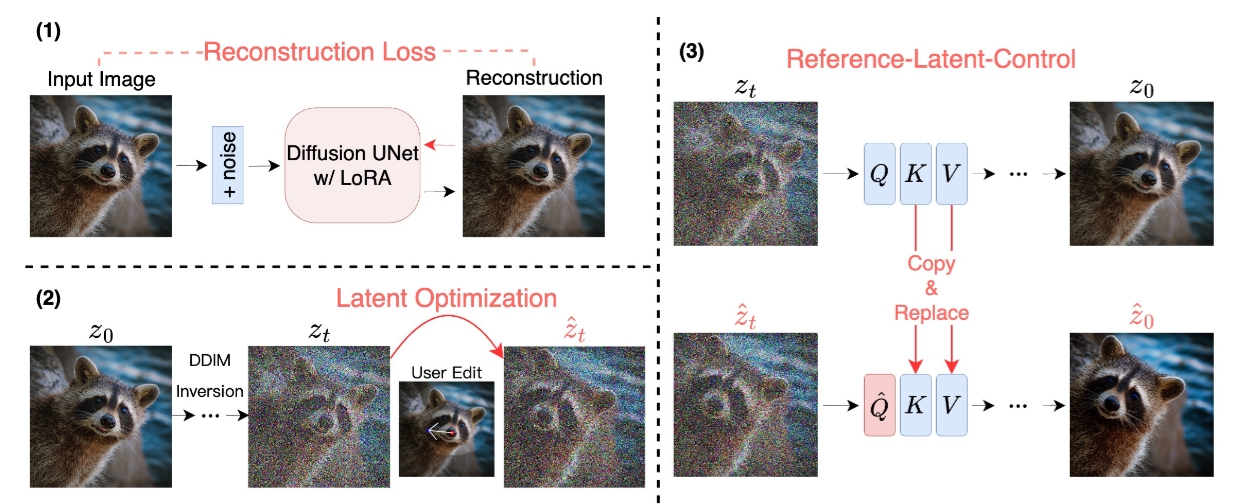
DragDiffusion
## 算法原理
DragDiffusion 算法受 DragGAN 的启发,把编解码的图像重建部分利用上大规模预训练扩散模型,极大提升了基于点的交互式编辑在现实世界场景中的适用性。
(1)先通过LoRA微调SD模型,数据集为用户输入的图像。目的是在编辑过程中(其实也是生成过程)更好的保留输入图像中物体和风格特征。\
(2)通过运动监督(Motion Supervision)和点跟踪(Point Tracking)实现对扩散 latent 进行优化,确保多步迭代过程中更加的精准和有效。\
(3)在最后一步去噪的过程中为了保证统一以及质量,从 MasaCtrl 中汲取灵感,提出利用自注意力模块的属性来引导去噪过程。
在编辑过程中,需要增加正则项确保非编辑区域(编辑mask区域外)不变。
## 环境配置
```
mv dragdiffusion_pytorch dragdiffusion # 去框架名后缀
# docker的-v 路径、docker_name和imageID根据实际情况修改
# pip安装时如果出现下载慢可以尝试别的镜像源
```
### Docker(方法一)
```
docker pull image.sourcefind.cn:5000/dcu/admin/base/pytorch:2.1.0-ubuntu20.04-dtk24.04.2-py3.10 # 本镜像imageID为:2f1f619d0182
docker run -it -v /path/your_code_data/:/path/your_code_data/ -v /opt/hyhal/:/opt/hyhal/:ro --shm-size=16G --privileged=true --device=/dev/kfd --device=/dev/dri/ --group-add video --network=host --name docker_name imageID bash
cd /your_code_path/dragdiffusion
pip install -r requirements.txt
```
### Dockerfile(方法二)
```
cd /your_code_path/dragdiffusion/docker
docker build --no-cache -t codestral:latest .
docker run -it -v /path/your_code_data/:/path/your_code_data/ -v /opt/hyhal/:/opt/hyhal/:ro --shm-size=16G --privileged=true --device=/dev/kfd --device=/dev/dri/ --group-add video --network=host --name docker_name imageID bash
cd /your_code_path/dragdiffusion
pip install -r requirements.txt
```
### Anaconda(方法三)
关于本项目DCU显卡所需的特殊深度学习库可从[光合](https://developer.hpccube.com/tool/)开发者社区下载安装。
```
DTK驱动: dtk24.04.2
python: python3.10
pytorch: 2.1.0
```
`Tips:以上DTK驱动、python、pytorch等DCU相关工具版本需要严格一一对应`
其它非深度学习库参照requirements.txt安装:
```
pip install -r requirements.txt
```
## 数据集
测试数据集 [DragBench](https://github.com/Yujun-Shi/DragDiffusion/releases/download/v0.1.1/DragBench.zip) 或者从 [`SCNet`](http://113.200.138.88:18080/aidatasets/dragbench) 上下载。\
下载后放在 ./drag_bench_evaluation/drag_bench_data 并解压,文件构成:
DragBench
--- animals
------ JH_2023-09-14-1820-16
------ JH_2023-09-14-1821-23
------ JH_2023-09-14-1821-58
------ ...
--- art_work
--- building_city_view
--- ...
--- other_objects
## 训练
推理中有一步LoRA微调,详情见webui。
## 推理
可视化webui推理:
```
python drag_ui.py --listen
```
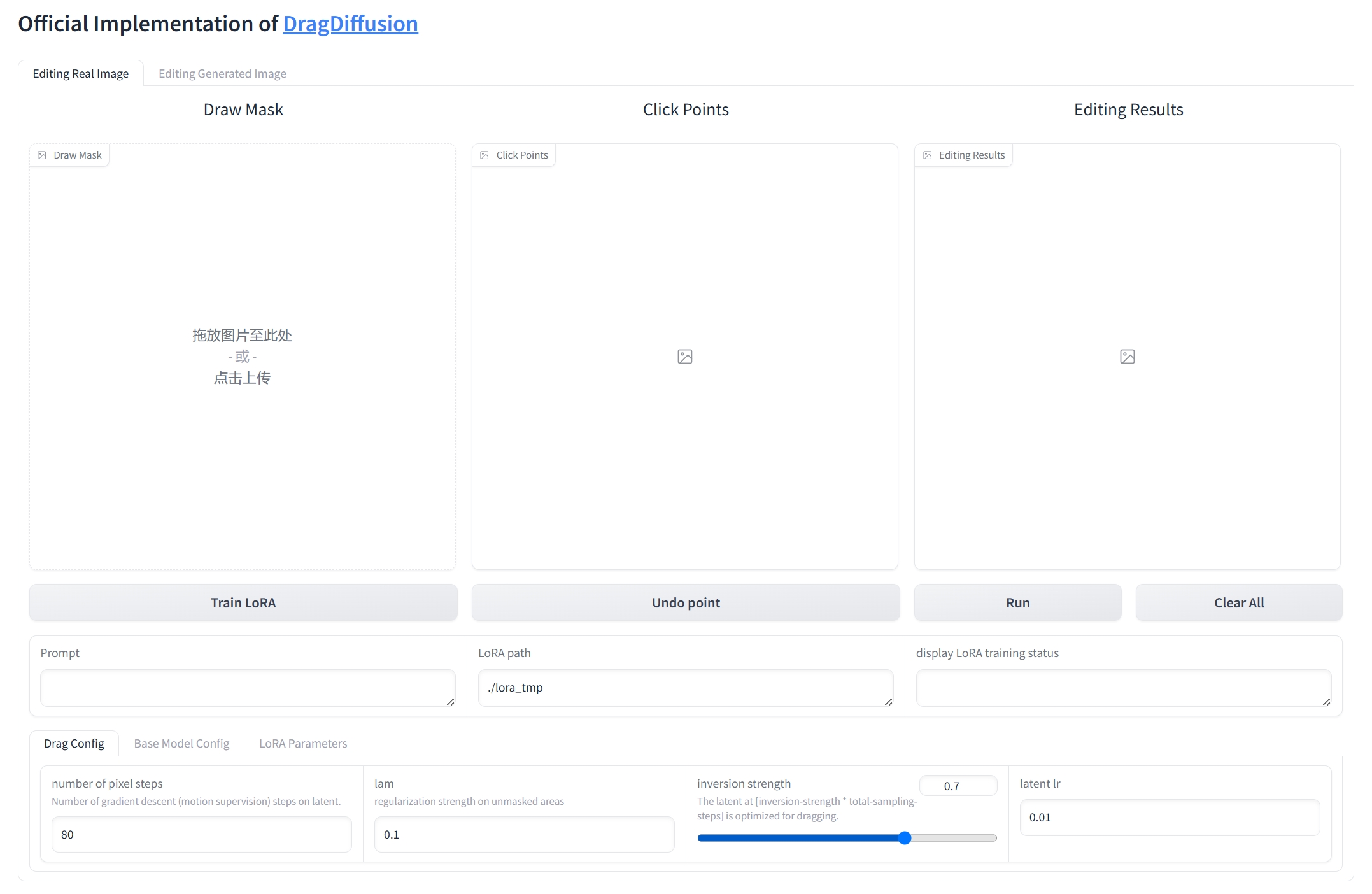
webui界面
1、上传图片;\
2、输入提示;\
3、LoRA训练;\
4、通过鼠标选择要编辑的区域;\
5、通过鼠标标记点位;\
6、运行。\
ps:Drag以及LoRA的一些参数自行视情况修改。
## result
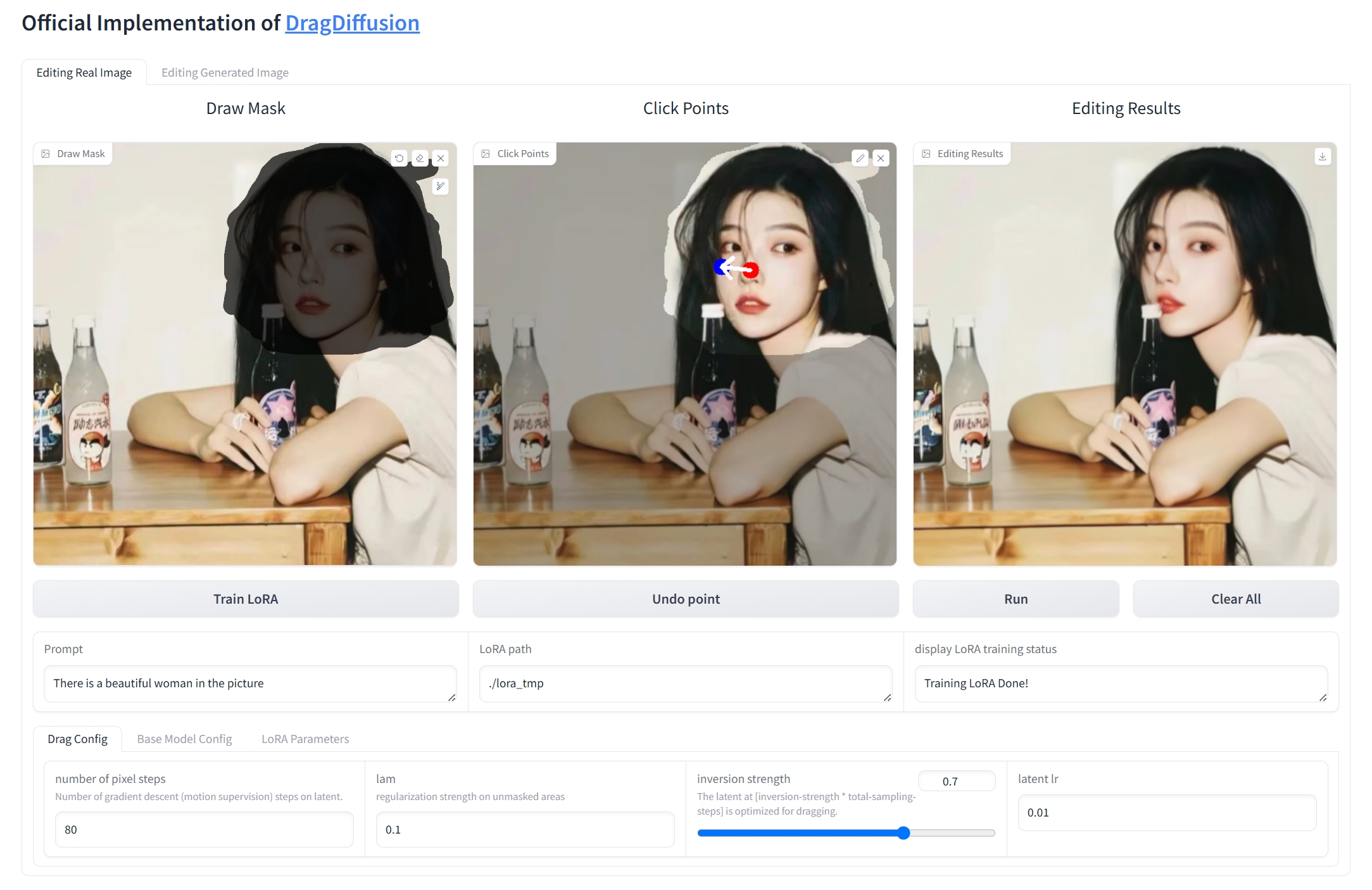
推理结果
### 精度
测试集 `DragBench`,如上所述下载并解压好。
```
python run_lora_training.py
python run_drag_diffusion.py
python run_eval_similarity.py
# ps:上述脚本的一些文件路径自行根据情况修改
```
| 加速卡 | lpips | clip sim |
| :-----| :----- | :---- |
| K100_AI | 0.115 | 0.977 |
## 应用场景
### 算法类别
`AIGC`
### 热点应用行业
`零售,制造,电商,医疗,教育`
## 源码仓库及问题反馈
- https://developer.sourcefind.cn/codes/modelzoo/dragdiffusion_pytorch
## 参考资料
- https://github.com/XingangPan/DragDiffusion