[](https://github.com/magicpdf/Magic-PDF)
[](https://github.com/magicpdf/Magic-PDF)
[](https://github.com/magicpdf/Magic-PDF/tree/main/LICENSE)
[](https://github.com/magicpdf/Magic-PDF/issues)
[](https://github.com/magicpdf/Magic-PDF/issues)
[English](README.md) | [简体中文](README_zh-CN.md)
# Magic-PDF
## 简介
Magic-PDF 是一款将 PDF 转化为 markdown 格式的工具。支持转换本地文档或者位于支持S3协议对象存储上的文件。
主要功能包含
- 支持多种前端模型输入
- 删除页眉、页脚、脚注、页码等元素
- 符合人类阅读顺序的排版格式
- 保留原文档的结构和格式,包括标题、段落、列表等
- 提取图像和表格并在markdown中展示
- 将公式转换成latex
- 乱码PDF自动识别并转换
- 支持cpu和gpu环境
- 支持windows/linux/mac平台
https://github.com/magicpdf/Magic-PDF/assets/11393164/618937cb-dc6a-4646-b433-e3131a5f4070
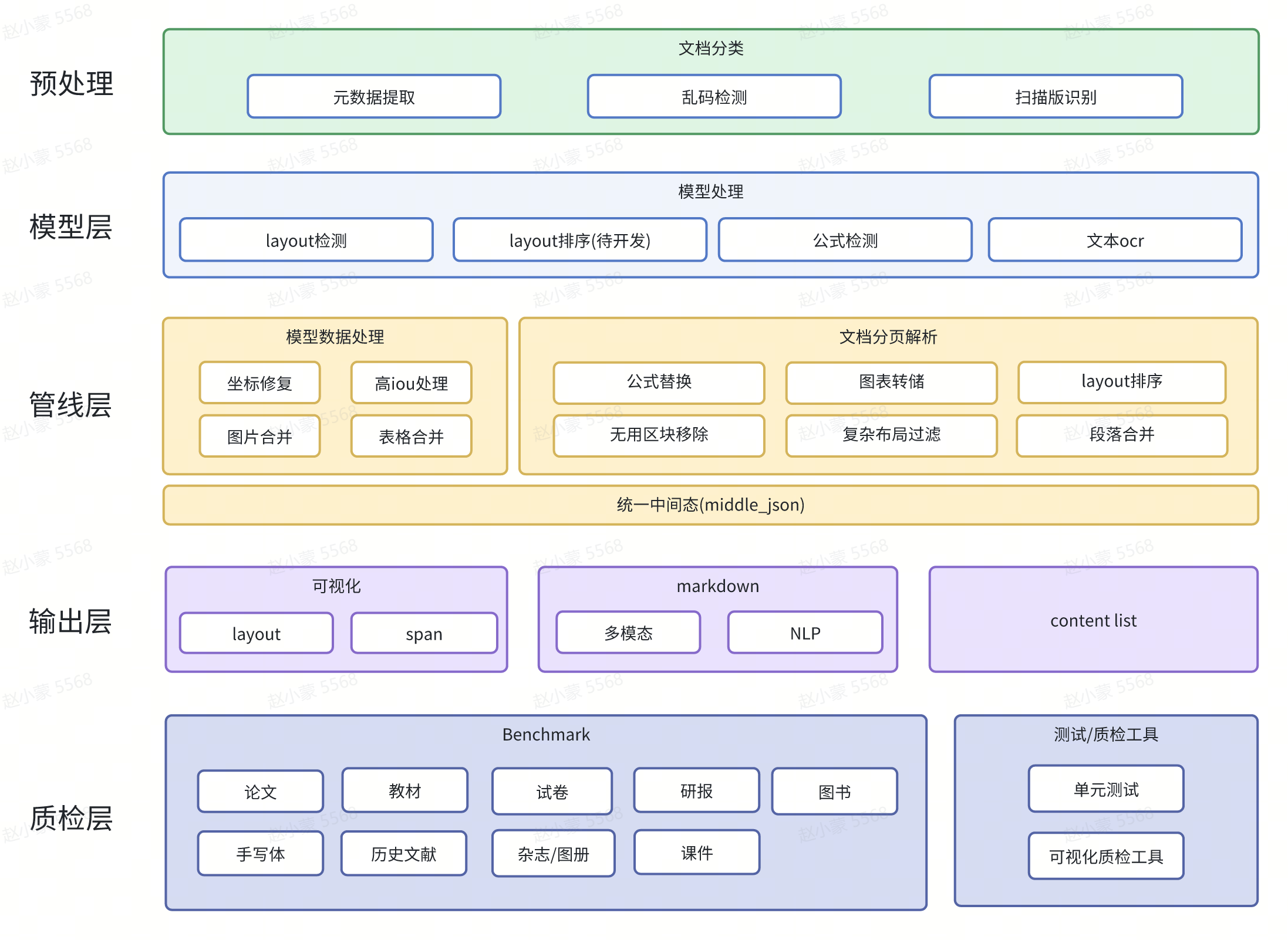
## 项目全景
## 流程图
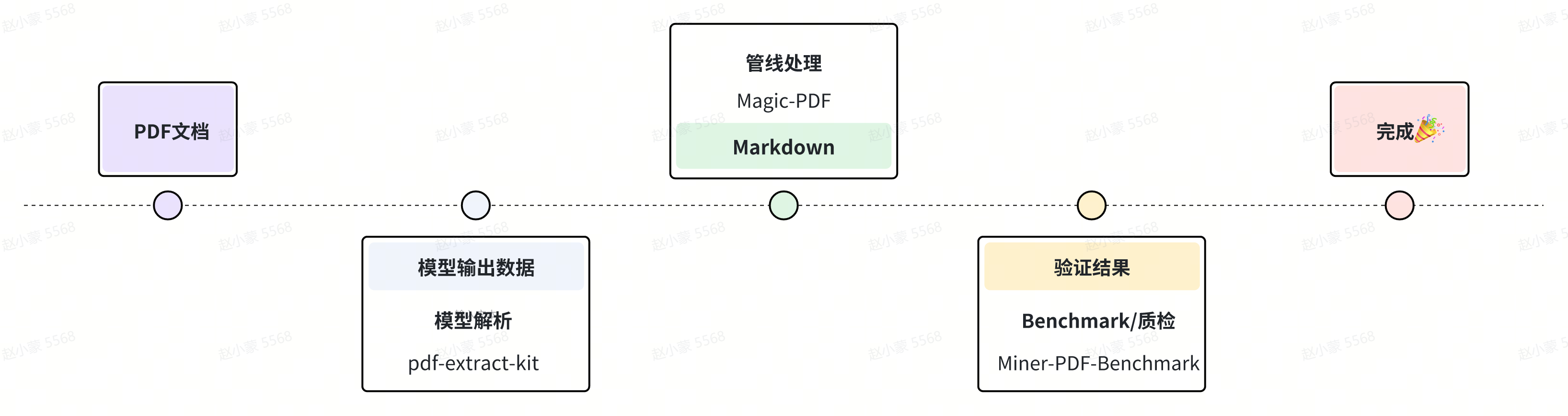
### 子模块仓库
- [pdf-extract-kit](https://github.com/wangbinDL/pdf-extract-kit)
- [Miner-PDF-Benchmark](https://github.com/opendatalab/Miner-PDF-Benchmark)
## 上手指南
### 配置要求
python 3.9+
### 使用说明
#### 1. 安装Magic-PDF
```bash
pip install magic-pdf
```
#### 2. 通过命令行使用
###### 直接使用
```bash
cp magic-pdf.template.json to ~/magic-pdf.json
magic-pdf pdf-command --pdf "pdf_path" --model "model_json_path"
```
###### 更多用法
```bash
magic-pdf --help
```
#### 3. 通过接口调用
###### 本地使用
```python
image_writer = DiskReaderWriter(local_image_dir)
image_dir = str(os.path.basename(local_image_dir))
jso_useful_key = {"_pdf_type": "", "model_list": model_json}
pipe = UNIPipe(pdf_bytes, jso_useful_key, image_writer)
pipe.pipe_classify()
pipe.pipe_parse()
md_content = pipe.pipe_mk_markdown(image_dir, drop_mode="none")
```
###### 在对象存储上使用
```python
s3pdf_cli = S3ReaderWriter(pdf_ak, pdf_sk, pdf_endpoint)
image_dir = "s3://img_bucket/"
s3image_cli = S3ReaderWriter(img_ak, img_sk, img_endpoint, parent_path=image_dir)
pdf_bytes = s3pdf_cli.read(s3_pdf_path, mode=s3pdf_cli.MODE_BIN)
jso_useful_key = {"_pdf_type": "", "model_list": model_json}
pipe = UNIPipe(pdf_bytes, jso_useful_key, s3image_cli)
pipe.pipe_classify()
pipe.pipe_parse()
md_content = pipe.pipe_mk_markdown(image_dir, drop_mode="none")
```
详细实现可参考 [demo.py](https://github.com/magicpdf/Magic-PDF/blob/master/demo/demo.py)
## 版权说明
[LICENSE.md](https://github.com/magicpdf/Magic-PDF/blob/master/LICENSE.md)
## 鸣谢
- [PaddleOCR](https://github.com/PaddlePaddle/PaddleOCR)
- [PyMuPDF](https://github.com/pymupdf/PyMuPDF)