[](https://github.com/opendatalab/MinerU)
[](https://github.com/opendatalab/MinerU)
[](https://github.com/opendatalab/MinerU/issues)
[](https://github.com/opendatalab/MinerU/issues)
[](https://badge.fury.io/py/magic-pdf)
[](https://pepy.tech/project/magic-pdf)
[](https://pepy.tech/project/magic-pdf)
[English](README.md) | [简体中文](README_zh-CN.md)
# MinerU
## 简介
MinerU 是一款一站式、开源、高质量的数据提取工具,主要包含以下功能:
- [Magic-PDF](#Magic-PDF) PDF文档提取
- [Magic-Doc](#Magic-Doc) 网页与电子书提取
# Magic-PDF
## 简介
Magic-PDF 是一款将 PDF 转化为 markdown 格式的工具。支持转换本地文档或者位于支持S3协议对象存储上的文件。
主要功能包含
- 支持多种前端模型输入
- 删除页眉、页脚、脚注、页码等元素
- 符合人类阅读顺序的排版格式
- 保留原文档的结构和格式,包括标题、段落、列表等
- 提取图像和表格并在markdown中展示
- 将公式转换成latex
- 乱码PDF自动识别并转换
- 支持cpu和gpu环境
- 支持windows/linux/mac平台
https://github.com/opendatalab/MinerU/assets/11393164/618937cb-dc6a-4646-b433-e3131a5f4070
## 项目全景
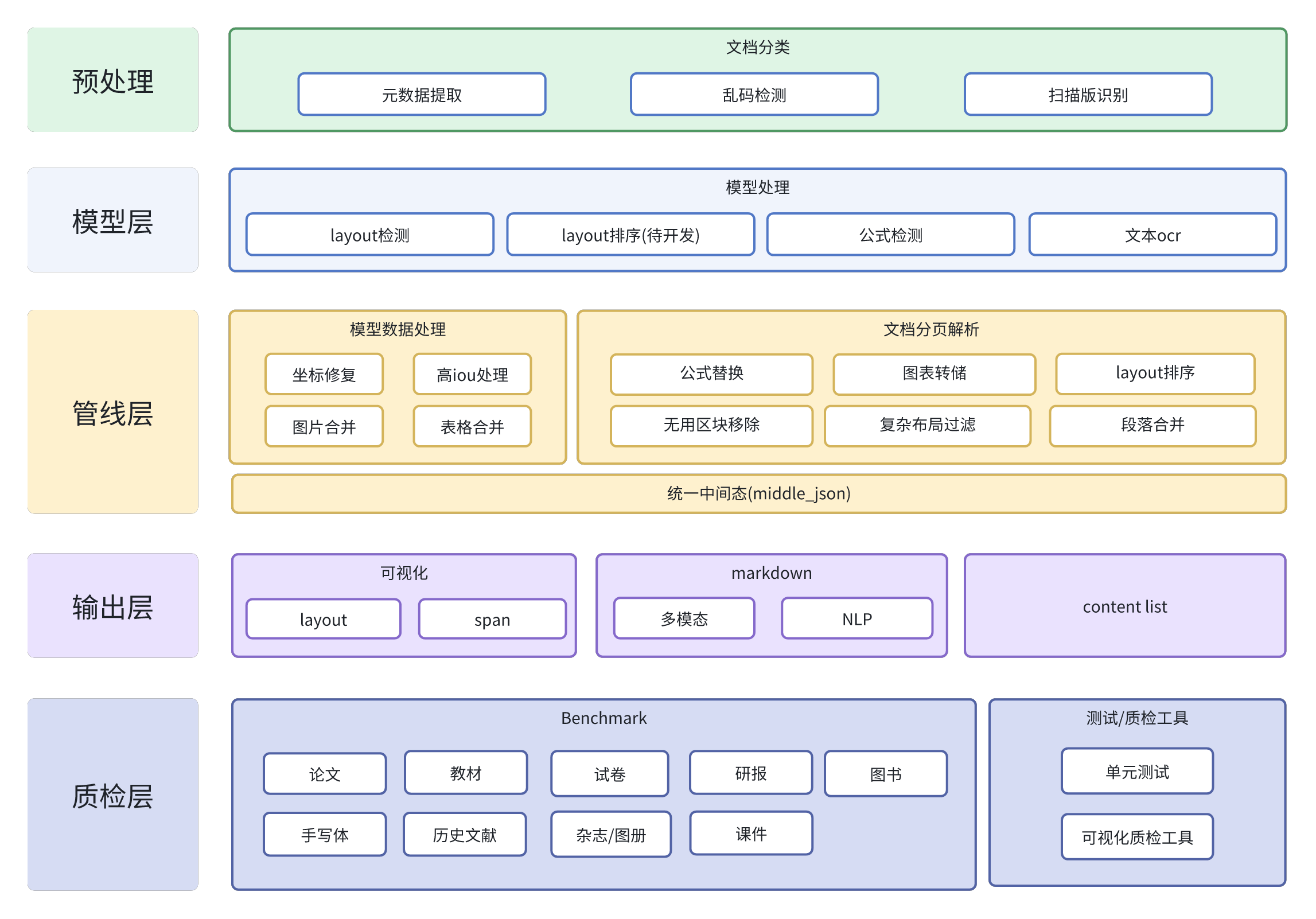
## 流程图

### 子模块仓库
- [PDF-Extract-Kit](https://github.com/opendatalab/PDF-Extract-Kit)
- 高质量的PDF内容提取工具包
## 上手指南
### 配置要求
python >= 3.9
推荐使用虚拟环境,venv和conda皆可。
开发基于python 3.10,如果在其他版本python出现问题请切换至3.10。
### 使用说明
#### 1. 安装Magic-PDF
```bash
# 如果只需要基础功能(不含内置模型解析功能)
pip install magic-pdf
# or
# 完整解析功能(含内置高精度模型解析功能)
pip install magic-pdf[full-cpu]
# 另外需要安装依赖 detectron2
# detectron2需要编译安装,自行编译安装可以参考https://github.com/facebookresearch/detectron2/issues/5114
# 或直接使用我们编译好的的whl包,不同系统请自行选择适配包安装
# windows
pip install https://github.com/opendatalab/MinerU/raw/master/assets/whl/detectron2-0.6-cp310-cp310-win_amd64.whl
# linux
pip install https://github.com/opendatalab/MinerU/raw/master/assets/whl/detectron2-0.6-cp310-cp310-linux_x86_64.whl
# macOS(Intel)
pip install https://github.com/opendatalab/MinerU/raw/master/assets/whl/detectron2-0.6-cp310-cp310-macosx_10_9_universal2.whl
# macOS(M1/M2/M3)
pip install https://github.com/opendatalab/MinerU/raw/master/assets/whl/detectron2-0.6-cp310-cp310-macosx_11_0_arm64.whl
```
#### 2. 下载模型权重文件
详细参考[如何下载模型文件](docs/how_to_download_models.md)
下载后请将models目录拷贝到空间较大的ssd磁盘目录
#### 3. 拷贝配置文件并进行配置
```bash
# 拷贝配置文件到根目录
cp magic-pdf.template.json ~/magic-pdf.json
```
在magic-pdf.json中配置"models-dir"为模型权重文件所在目录
```json
{
"models-dir": "/tmp/models"
}
```
#### 4. 通过命令行使用
###### 直接使用
```bash
magic-pdf pdf-command --pdf "pdf_path" --inside_model true
```
程序运行完成后,你可以在"/tmp/magic-pdf"目录下看到生成的markdown文件,markdown目录中可以找到对应的xxx_model.json文件
如果您有意对后处理pipeline进行二次开发,可以使用命令
```bash
magic-pdf pdf-command --pdf "pdf_path" --model "model_json_path"
```
这样就不需要重跑模型数据,调试起来更方便
###### 更多用法
```bash
magic-pdf --help
```
#### 5. 使用CUDA或MPS进行加速
###### CUDA
需要根据自己的CUDA版本安装对应的pytorch版本
```bash
# 使用gpu方案时,需要重新安装对应cuda版本的pytorch,例子是安装CUDA 11.8版本的
pip install --force-reinstall torch==2.3.1 torchvision==0.18.1 --index-url https://download.pytorch.org/whl/cu118
```
同时需要修改配置文件magic-pdf.json中"device-mode"的值
```json
{
"device-mode":"cuda"
}
```
###### MPS
使用macOS(M系列芯片设备)可以使用MPS进行推理加速
需要修改配置文件magic-pdf.json中"device-mode"的值
```json
{
"device-mode":"mps"
}
```
#### 6. 通过接口调用
###### 本地使用
```python
image_writer = DiskReaderWriter(local_image_dir)
image_dir = str(os.path.basename(local_image_dir))
jso_useful_key = {"_pdf_type": "", "model_list": model_json}
pipe = UNIPipe(pdf_bytes, jso_useful_key, image_writer)
pipe.pipe_classify()
pipe.pipe_parse()
md_content = pipe.pipe_mk_markdown(image_dir, drop_mode="none")
```
###### 在对象存储上使用
```python
s3pdf_cli = S3ReaderWriter(pdf_ak, pdf_sk, pdf_endpoint)
image_dir = "s3://img_bucket/"
s3image_cli = S3ReaderWriter(img_ak, img_sk, img_endpoint, parent_path=image_dir)
pdf_bytes = s3pdf_cli.read(s3_pdf_path, mode=s3pdf_cli.MODE_BIN)
jso_useful_key = {"_pdf_type": "", "model_list": model_json}
pipe = UNIPipe(pdf_bytes, jso_useful_key, s3image_cli)
pipe.pipe_classify()
pipe.pipe_parse()
md_content = pipe.pipe_mk_markdown(image_dir, drop_mode="none")
```
详细实现可参考 [demo.py](demo/demo.py)
# Magic-Doc
## 简介
Magic-Doc 是一款支持将网页或多格式电子书转换为 markdown 格式的工具。
主要功能包含
- Web网页提取
- 跨模态精准解析图文、表格、公式信息
- 电子书文献提取
- 支持 epub,mobi等多格式文献,文本图片全适配
- 语言类型鉴定
- 支持176种语言的准确识别
https://github.com/opendatalab/MinerU/assets/11393164/a5a650e9-f4c0-463e-acc3-960967f1a1ca
https://github.com/opendatalab/MinerU/assets/11393164/0f4a6fe9-6cca-4113-9fdc-a537749d764d
https://github.com/opendatalab/MinerU/assets/11393164/20438a02-ce6c-4af8-9dde-d722a4e825b2
## 项目仓库
- [Magic-Doc](https://github.com/InternLM/magic-doc)
优秀的网页与电子书提取工具
## 感谢我们的贡献者
 ## 版权说明
[LICENSE.md](LICENSE.md)
本项目目前采用PyMuPDF以实现高级功能,但因其遵循AGPL协议,可能对某些使用场景构成限制。未来版本迭代中,我们计划探索并替换为许可条款更为宽松的PDF处理库,以提升用户友好度及灵活性。
## 致谢
- [PaddleOCR](https://github.com/PaddlePaddle/PaddleOCR)
- [PyMuPDF](https://github.com/pymupdf/PyMuPDF)
- [fast-langdetect](https://github.com/LlmKira/fast-langdetect)
- [pdfminer.six](https://github.com/pdfminer/pdfminer.six)
# 引用
```bibtex
@misc{2024mineru,
title={MinerU: A One-stop, Open-source, High-quality Data Extraction Tool},
author={MinerU Contributors},
howpublished = {\url{https://github.com/opendatalab/MinerU}},
year={2024}
}
```
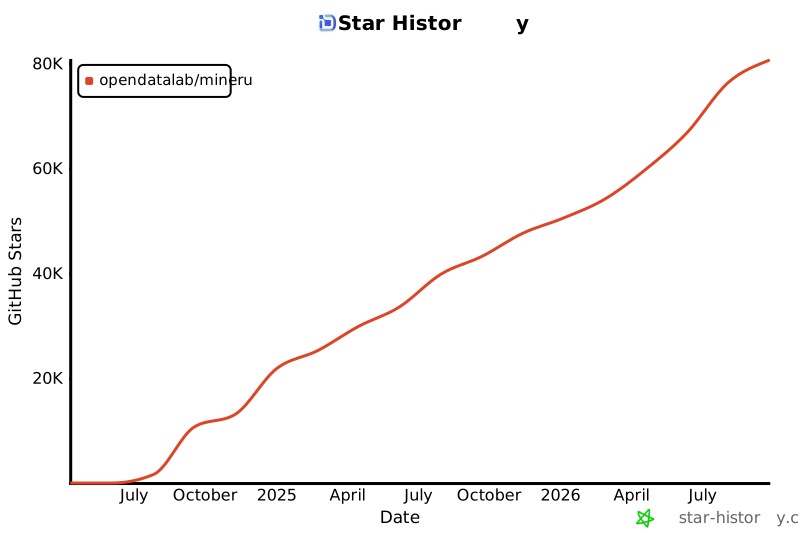
# Star History
## 版权说明
[LICENSE.md](LICENSE.md)
本项目目前采用PyMuPDF以实现高级功能,但因其遵循AGPL协议,可能对某些使用场景构成限制。未来版本迭代中,我们计划探索并替换为许可条款更为宽松的PDF处理库,以提升用户友好度及灵活性。
## 致谢
- [PaddleOCR](https://github.com/PaddlePaddle/PaddleOCR)
- [PyMuPDF](https://github.com/pymupdf/PyMuPDF)
- [fast-langdetect](https://github.com/LlmKira/fast-langdetect)
- [pdfminer.six](https://github.com/pdfminer/pdfminer.six)
# 引用
```bibtex
@misc{2024mineru,
title={MinerU: A One-stop, Open-source, High-quality Data Extraction Tool},
author={MinerU Contributors},
howpublished = {\url{https://github.com/opendatalab/MinerU}},
year={2024}
}
```
# Star History