# Baichuan
## 论文
无
## 模型结构
Baichuan系列模型是由百川智能开发的开源大规模预训练模型,包含7B和13B等规模。其中,Baichuan-7B在大约1.2万亿tokens上训练的70亿参数模型,支持中英双语,上下文窗口长度为4096。Baichuan-13B是由百川智能继Baichuan-7B之后开发的包含130亿参数模型,它在高质量的语料上训练了1.4万亿tokens,超过LLaMA-13B 40%,是当前开源 13B 尺寸下训练数据量最多的模型。此外,百川智能还发布了对齐模型(Baichuan-13B-Chat),具有很强的对话能力。
模型具体参数:
| 模型名称 | 隐含层维度 | 层数 | 头数 | 词表大小 | 总参数量 | 训练数据(tokens) | 位置编码 | 最大长 |
| -------- | -------- | -------- | -------- | -------- | -------- | -------- | -------- | -------- |
| Baichuan-7B | 4,096 | 32 | 32 | 64,000 | 7,000,559,616 | 1.2万亿 | RoPE | 4096 |
| Baichuan-13B | 5,120 | 40 | 40 | 64,000 | 13,264,901,120 | 1.4万亿 | ALiBi | 4096 |
## 算法原理
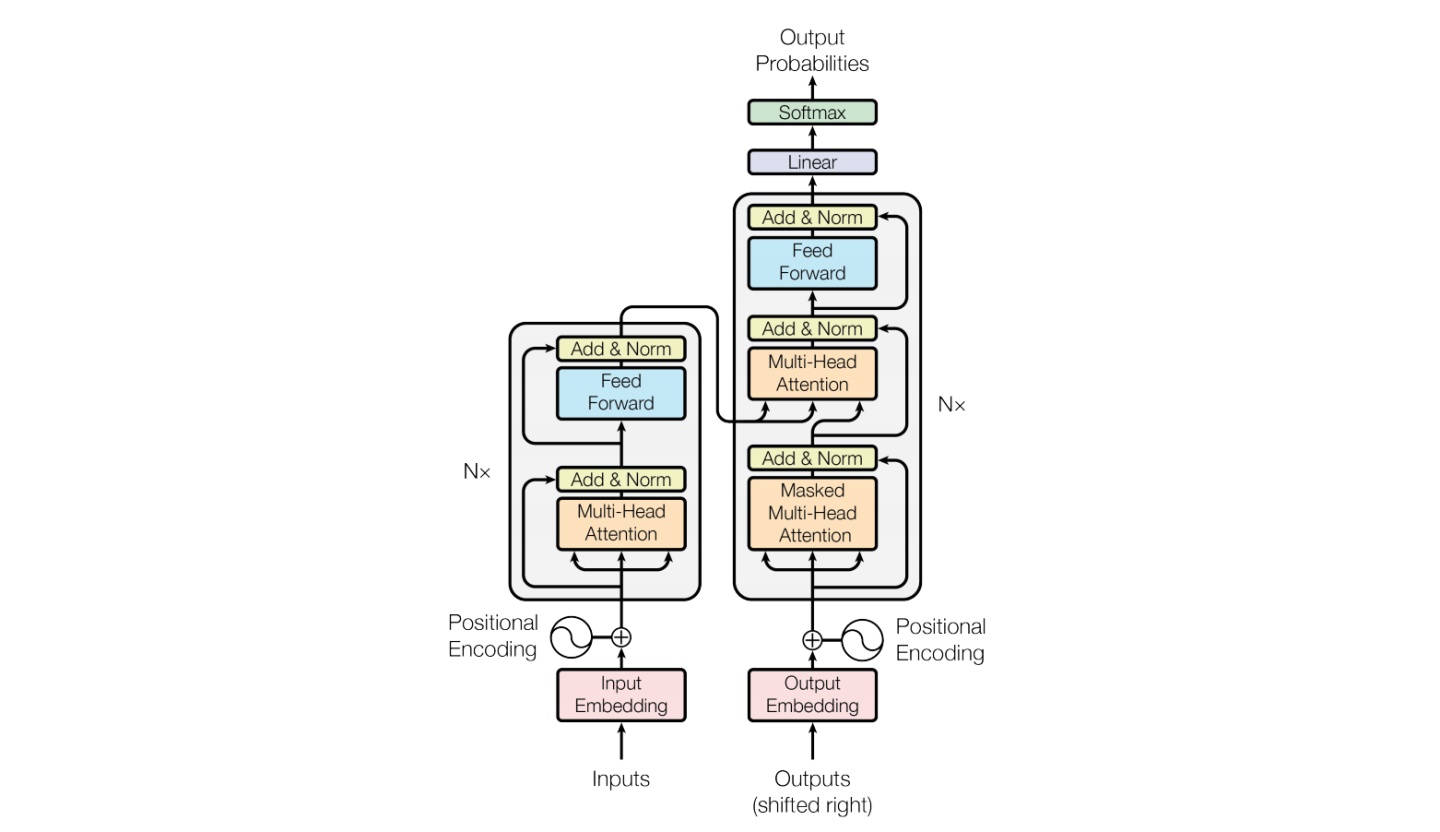
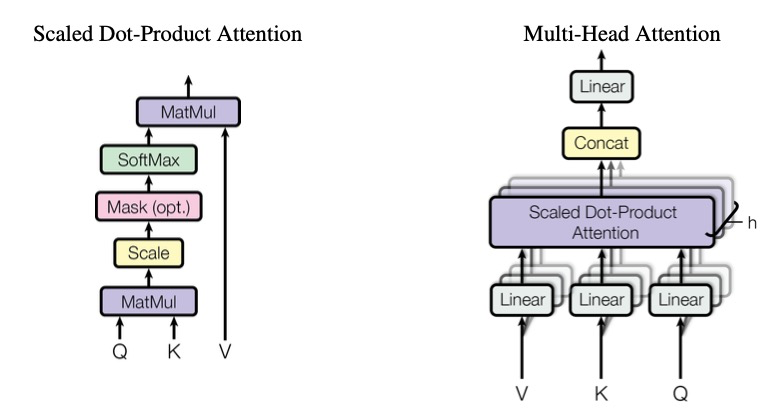
Baichuan整体模型基于标准的Transformer结构,采用了和LLaMA一样的模型设计。其中,Baichuan-7B在结构上采用Rotary Embedding位置编码方案、SwiGLU激活函数、基于RMSNorm的Pre-Normalization。Baichuan-13B使用了ALiBi线性偏置技术,相对于Rotary Embedding计算量更小,对推理性能有显著提升。
## 环境配置
### Docker(方式一)
推荐使用docker方式运行,提供拉取的docker镜像:
```
docker pull image.sourcefind.cn:5000/dcu/admin/base/pytorch:1.13.1-centos7.6-dtk-23.04-py38-latest
docker run -dit --network=host --name=baichuan --privileged --device=/dev/kfd --device=/dev/dri --ipc=host --shm-size=16G --group-add video --cap-add=SYS_PTRACE --security-opt seccomp=unconfined -u root --ulimit stack=-1:-1 --ulimit memlock=-1:-1 image.sourcefind.cn:5000/dcu/admin/base/pytorch:1.13.1-centos7.6-dtk-23.04-py38-latest /bin/bash
docker exec -it baichuan /bin/bash
```
安装docker中没有的依赖:
```
pip install -r requirements.txt -i http://mirrors.aliyun.com/pypi/simple/ --trusted-host mirrors.aliyun.com
```
#### Dockerfile(方式二)
```
docker build -t baichuan:latest .
docker run -dit --network=host --name=baichuan --privileged --device=/dev/kfd --device=/dev/dri --ipc=host --shm-size=16G --group-add video --cap-add=SYS_PTRACE --security-opt seccomp=unconfined -u root --ulimit stack=-1:-1 --ulimit memlock=-1:-1 baichuan:latest
docker exec -it baichuan /bin/bash
```
### Conda(方式三)
1. 创建conda虚拟环境:
```
conda create -n chatglm python=3.8
```
2. 关于本项目DCU显卡所需的工具包、深度学习库等均可从[光合](https://developer.hpccube.com/tool/)开发者社区下载安装。
- [DTK 23.04](https://cancon.hpccube.com:65024/1/main/DTK-23.04.1)
- [Pytorch 1.13.1](https://cancon.hpccube.com:65024/4/main/pytorch/dtk23.04)
- [Deepspeed 0.9.2](https://cancon.hpccube.com:65024/4/main/deepspeed/dtk23.04)
Tips:以上dtk驱动、python、deepspeed等工具版本需要严格一一对应。
3. 其它依赖库参照requirements.txt安装:
```
pip install -r requirements.txt -i http://mirrors.aliyun.com/pypi/simple/ --trusted-host mirrors.aliyun.com
```
### 注意
由于dtk版本的deepspeed目前最高是0.9.2因此需要进入虚拟环境修改一些版本判断
```
#到虚拟环境下对应的python/site-packages注释掉一些版本判断
site-packages/accelerate/accelerator.py 文件
287 #if not is_deepspeed_available():
288 # raise ImportError("DeepSpeed is not installed => run `pip install deepspeed` or build it from source.")
289 #if compare_versions("deepspeed", "<", "0.9.3"):
290 # raise ImportError("DeepSpeed version must be >= 0.9.3. Please update DeepSpeed.")
site-packages/transformers/utils/versions.py 文件
43 #if not ops[op](version.parse(got_ver), version.parse(want_ver)):
44 # raise ImportError(
45 # f"{requirement} is required for a normal functioning of this module, but found {pkg}=={got_ver}.{hint}"
46 # )
```
## 数据集
输入数据为放置在项目[data](.data)目录下的 json 文件,用--dataset选项指定(参考下面示例),多个输入文件用`,`分隔。json 文件示例格式和字段说明如下:
```
[
{
"instruction": "What are the three primary colors?",
"input": "",
"output": "The three primary colors are red, blue, and yellow."
},
....
]
```
json 文件中存储一个列表,列表的每个元素是一个sample。其中instruction代表用户输入,input是可选项,如果开发者同时指定了instruction和input,会把二者用\n连接起来代表用户输入;output代表期望的模型输出。本仓库的[data](./data)目录下预置了一些可用于Baichuan模型指令微调训练的公开数据集:
```
./data/alpaca_gpt4_data_zh.json
./data/alpaca_gpt4_data_en.json
./data/alpaca_data_zh_51k.json
./data/alpaca_data_en_52k.json
./data/oaast_sft_zh.json
./data/oaast_sft.json
...
```
数据集的使用方法请参考 [data/README.md](data/README_zh.md) 文件。
注意:请配置[./src/llmtuner/hparams/data_args.py](src/llmtuner/hparams/data_args.py)中L38的dataset_dir路径;
### 模型下载
Hugging Face模型下载地址:
[Baichuan-7B](https://huggingface.co/baichuan-inc/Baichuan-7B)
[Baichuan-13B-Base](https://huggingface.co/baichuan-inc/Baichuan-13B-Base)
[Baichuan-13B-Chat](https://huggingface.co/baichuan-inc/Baichuan-13B-Chat)
## 训练
### 全参数微调训练
1. 单机训练
```
bash run-full.sh
```
您可以根据自己的需求,更改其中的batch size大小、模型路径、数据集及deepspeed配置文件等。
注意:以上实例中加载的预训练模型为对齐模型,所以--template 参数被设置为`baichuan`; 若您加载的预训练模型为基座(base)模型,请设置为`--template default`
2. 多机训练
```
cd multi_node
```
进入节点1,根据环境修改hostfile,保证两节点文件路径一致,配置相同,按需修改run-13b-sft.sh中--mca btl_tcp_if_include enp97s0f1,enp97s0f1改为ip a命令后对应节点ip的网卡名,numa可以根据当前节点拓扑更改绑定,微调命令:
```
bash run-13b-sft.sh
```
### LoRA微调训练
1. 单机训练
```
bash run-lora.sh
```
您可以根据自己的需求,更改其中的batch size大小、模型路径、数据集、deepspeed配置文件、lora_ran及lora_target等。请使用 python src/train_bash.py -h 查看全部可选项。
2. 多机训练
```
cd multi_node
```
进入节点1,根据环境修改hostfile,保证两节点文件路径一致,配置相同,按需修改run-13b-sft.sh中--mca btl_tcp_if_include enp97s0f1,enp97s0f1改为ip a命令后对应节点ip的网卡名,numa可以根据当前节点拓扑更改绑定,微调命令:
```
bash run-7b-sft-lora.sh
```
## 推理
### 命令行测试
```bash
python src/cli_demo.py \
--model_name_or_path path_to_model \
--template default \
--finetuning_type lora \
--checkpoint_dir path_to_checkpoint
```
注意:对于所有“基座”(Base)模型,--template 参数可以是 default 或者 baichuan任意值。但“对话”(Chat)模型请务必使用baichuan。
## Result
## 精度
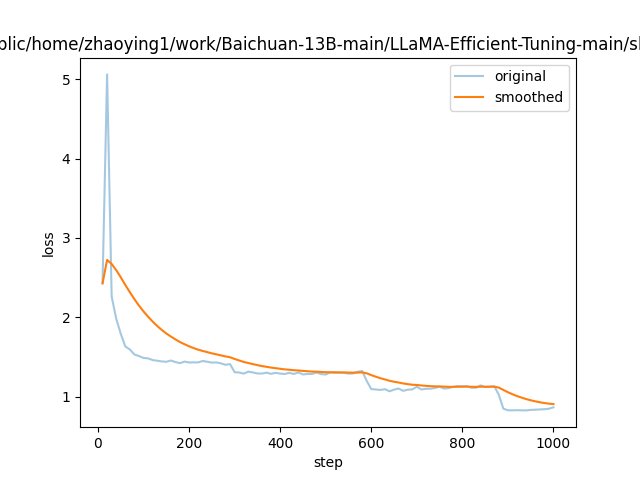
- 以下为我们基于baichuan-13b-base模型进行全参数指令微调测试的loss收敛情况:
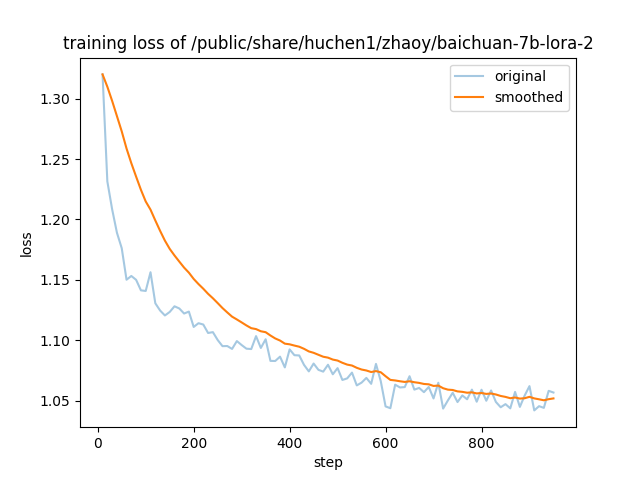
- 以下为我们基于baichuan-7b-base模型进行LoRA指令微调测试的loss收敛情况:
## 应用场景
### 算法类别
`对话问答`
### 热点应用行业
`医疗,教育,科研,金融`
## 源码仓库及问题反馈
- https://developer.hpccube.com/codes/modelzoo/baichuan-pytorch
## 参考资料
- [https://github.com/hiyouga/LLaMA-Efficient-Tuning](https://github.com/hiyouga/LLaMA-Efficient-Tuning/)
- [https://github.com/baichuan-inc/Baichuan-13B](https://github.com/baichuan-inc/Baichuan-13B)