# MultiDiffusion: Fusing Diffusion Paths for Controlled Image Generation
## Overview
[MultiDiffusion: Fusing Diffusion Paths for Controlled Image Generation](https://arxiv.org/abs/2302.08113) by Omer Bar-Tal, Lior Yariv, Yaron Lipman, and Tali Dekel.
The abstract of the paper is the following:
*Recent advances in text-to-image generation with diffusion models present transformative capabilities in image quality. However, user controllability of the generated image, and fast adaptation to new tasks still remains an open challenge, currently mostly addressed by costly and long re-training and fine-tuning or ad-hoc adaptations to specific image generation tasks. In this work, we present MultiDiffusion, a unified framework that enables versatile and controllable image generation, using a pre-trained text-to-image diffusion model, without any further training or finetuning. At the center of our approach is a new generation process, based on an optimization task that binds together multiple diffusion generation processes with a shared set of parameters or constraints. We show that MultiDiffusion can be readily applied to generate high quality and diverse images that adhere to user-provided controls, such as desired aspect ratio (e.g., panorama), and spatial guiding signals, ranging from tight segmentation masks to bounding boxes.
Resources:
* [Project Page](https://multidiffusion.github.io/).
* [Paper](https://arxiv.org/abs/2302.08113).
* [Original Code](https://github.com/omerbt/MultiDiffusion).
* [Demo](https://huggingface.co/spaces/weizmannscience/MultiDiffusion).
## Available Pipelines:
| Pipeline | Tasks | Demo
|---|---|:---:|
| [StableDiffusionPanoramaPipeline](https://github.com/huggingface/diffusers/blob/main/src/diffusers/pipelines/stable_diffusion/pipeline_stable_diffusion_panorama.py) | *Text-Guided Panorama View Generation* | [🤗 Space](https://huggingface.co/spaces/weizmannscience/MultiDiffusion)) |
## Usage example
```python
import torch
from diffusers import StableDiffusionPanoramaPipeline, DDIMScheduler
model_ckpt = "stabilityai/stable-diffusion-2-base"
scheduler = DDIMScheduler.from_pretrained(model_ckpt, subfolder="scheduler")
pipe = StableDiffusionPanoramaPipeline.from_pretrained(model_ckpt, scheduler=scheduler, torch_dtype=torch.float16)
pipe = pipe.to("cuda")
prompt = "a photo of the dolomites"
image = pipe(prompt).images[0]
image.save("dolomites.png")
```
While calling this pipeline, it's possible to specify the `view_batch_size` to have a >1 value.
For some GPUs with high performance, higher a `view_batch_size`, can speedup the generation
and increase the VRAM usage.
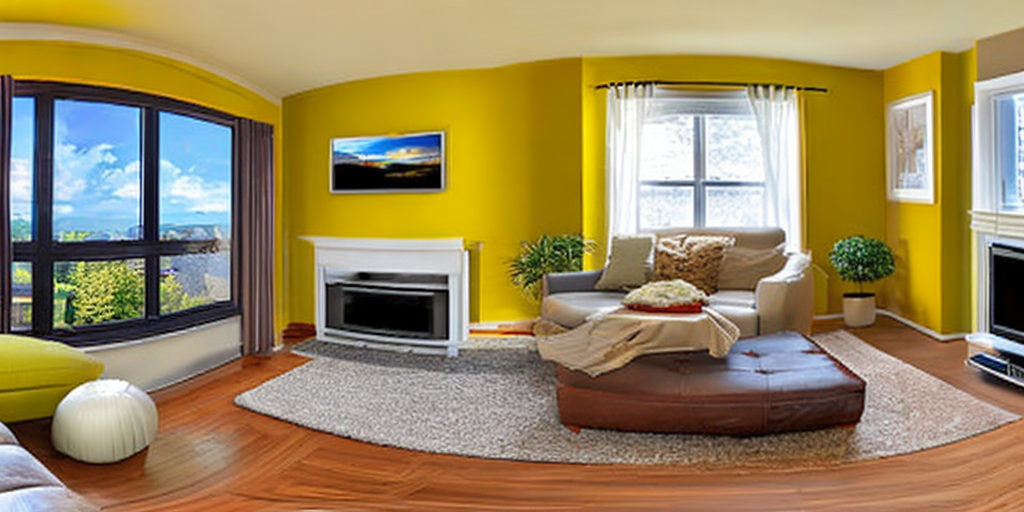
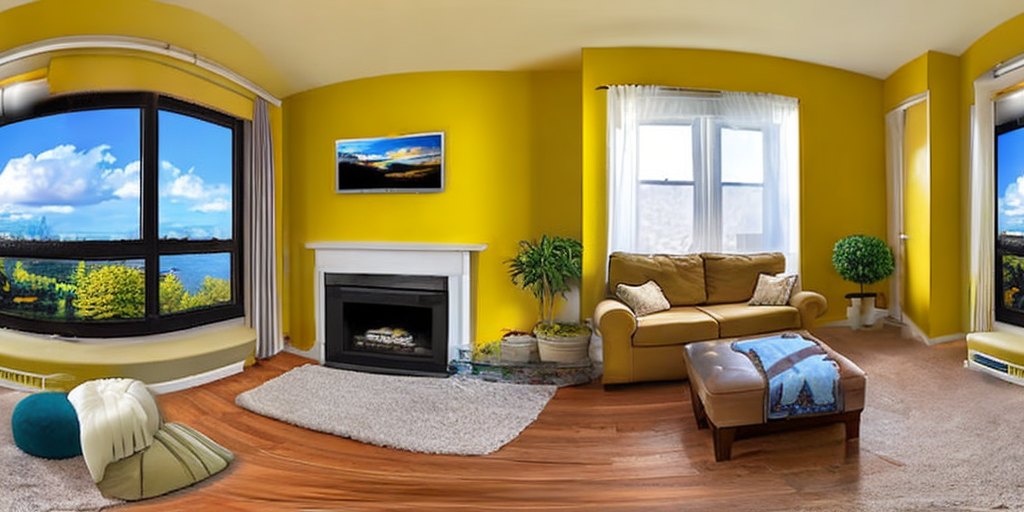
Circular padding is applied to ensure there are no stitching artifacts when working with
panoramas that needs to seamlessly transition from the rightmost part to the leftmost part.
By enabling circular padding (set `circular_padding=True`), the operation applies additional
crops after the rightmost point of the image, allowing the model to "see” the transition
from the rightmost part to the leftmost part. This helps maintain visual consistency in
a 360-degree sense and creates a proper “panorama” that can be viewed using 360-degree
panorama viewers. When decoding latents in StableDiffusion, circular padding is applied
to ensure that the decoded latents match in the RGB space.
Without circular padding, there is a stitching artifact (default):
With circular padding, the right and the left parts are matching (`circular_padding=True`):
## StableDiffusionPanoramaPipeline
[[autodoc]] StableDiffusionPanoramaPipeline
- __call__
- all