# Z-Image
## 论文
[z-Image](https://arxiv.org/abs/2511.22699)
## 模型简介
Z-Image 是一个强大的、高效的图像生成模型,具有 6B 参数。目前有三个变体:
**🚀Z-Image-Turbo** – Z-Image 的精简版本,仅用 8 NFEs(函数评估次数)即可匹配或超越领先的竞争对手。它在企业级 H800 GPU 上提供 ⚡️亚秒级推理延迟⚡️,并且可以轻松适应 16G 显存的消费设备。它在逼真图像生成、双语文本渲染(英文和中文)以及稳健的指令遵循方面表现出色。
**🧱 Z-Image-Base** – 非精简的基础模型。通过发布此检查点,我们旨在解锁社区驱动的微调和自定义开发的全部潜力。
**✍️ Z-Image-Edit** – 专门针对图像编辑任务进行微调的 Z-Image 变体。它支持创意的图像到图像生成,并具有出色的指令跟随能力,允许基于自然语言提示进行精确编辑。
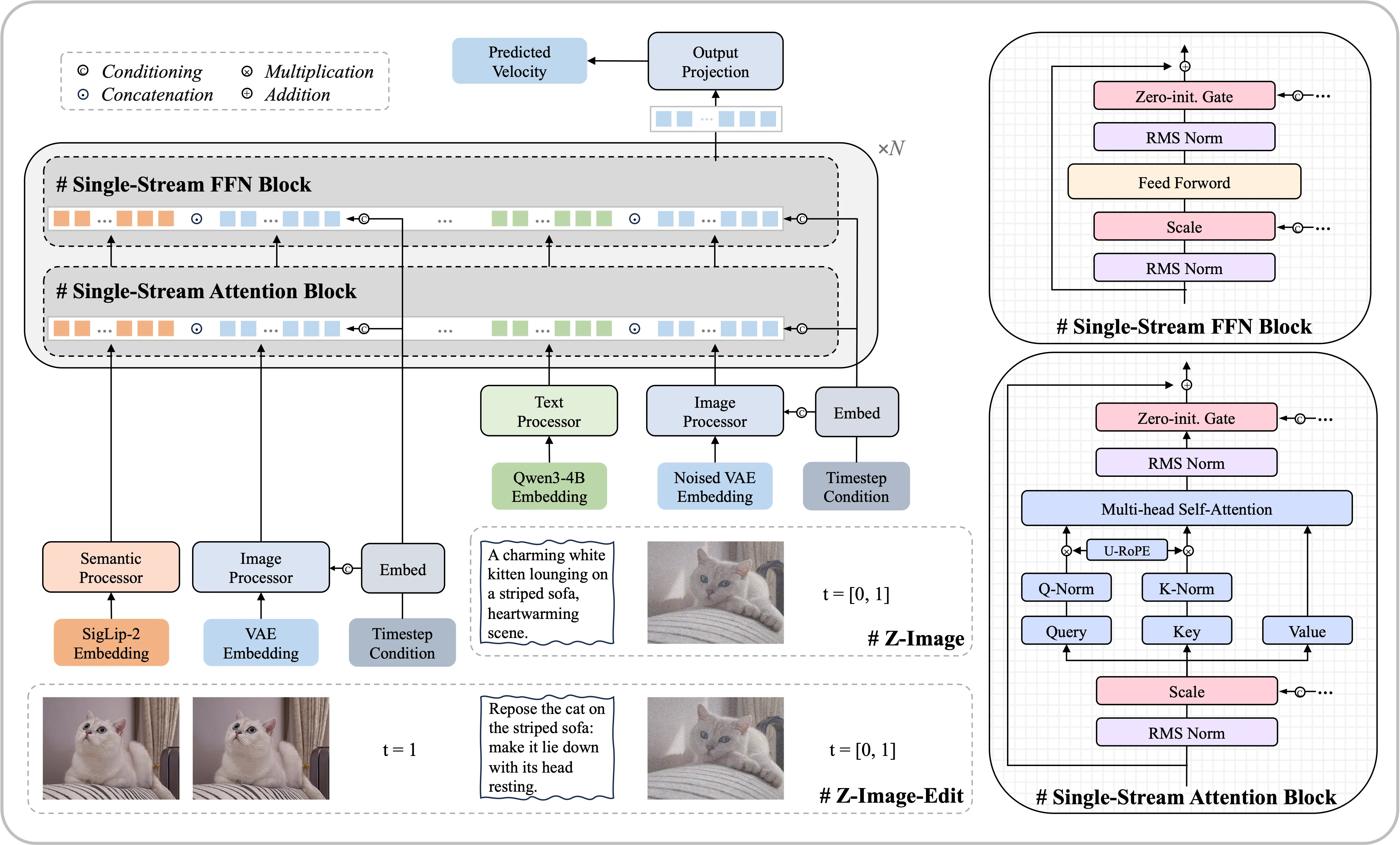
**模型架构**
我们采用了一种可扩展的单流DiT(S3-DiT)架构。在这种设置中,文本、视觉语义标记和图像VAE标记在序列级别上被连接起来,作为统一的输入流,与双流方法相比,最大化了参数效率。
## 环境依赖
| 软件 | 版本 |
| :------: | :------: |
| DTK | 25.04.2 |
| python | 3.10.12 |
| transformers | >=4.57.1 |
| vllm | 0.9.2+das.opt1.dtk25042 |
| torch | 2.5.1+das.opt1.dtk25042 |
| triton | 3.1+das.opt1.3c5d12d.dtk25041 |
| flash_attn | 2.6.1+das.opt1.dtk2504 |
| flash_mla | 1.0.0+das.opt1.dtk25042 |
推荐使用镜像:
- 挂载地址`-v`根据实际模型情况修改
```bash
docker run -it --shm-size 60g --network=host --name z-image --privileged --device=/dev/kfd --device=/dev/dri --device=/dev/mkfd --group-add video --cap-add=SYS_PTRACE --security-opt seccomp=unconfined -u root -v /opt/hyhal/:/opt/hyhal/:ro -v /path/your_code_path/:/path/your_code_path/ image.sourcefind.cn:5000/dcu/admin/base/vllm:0.9.2-ubuntu22.04-dtk25.04.2-py3.10 bash
```
更多镜像可前往[光源](https://sourcefind.cn/#/service-list)下载使用。
关于本项目DCU显卡所需的特殊深度学习库可从[光合](https://developer.sourcefind.cn/tool/)开发者社区下载安装。
## 数据集
暂无
## 训练
暂无
## 推理
### pytorch
#### 单机推理
```python
# 可参考run.sh脚本
import torch
from diffusers import ZImagePipeline
# 1. Load the pipeline
# Use bfloat16 for optimal performance on supported GPUs
pipe = ZImagePipeline.from_pretrained(
"/home/dengjb/download/Tongyi-MAI/Z-Image-Turbo",
torch_dtype=torch.bfloat16,
low_cpu_mem_usage=False,
)
pipe.to("cuda")
# [Optional] Attention Backend
# Diffusers uses SDPA by default. Switch to Flash Attention for better efficiency if supported:
# pipe.transformer.set_attention_backend("flash") # Enable Flash-Attention-2
# pipe.transformer.set_attention_backend("_flash_3") # Enable Flash-Attention-3
# [Optional] Model Compilation
# Compiling the DiT model accelerates inference, but the first run will take longer to compile.
# pipe.transformer.compile()
# [Optional] CPU Offloading
# Enable CPU offloading for memory-constrained devices.
# pipe.enable_model_cpu_offload()
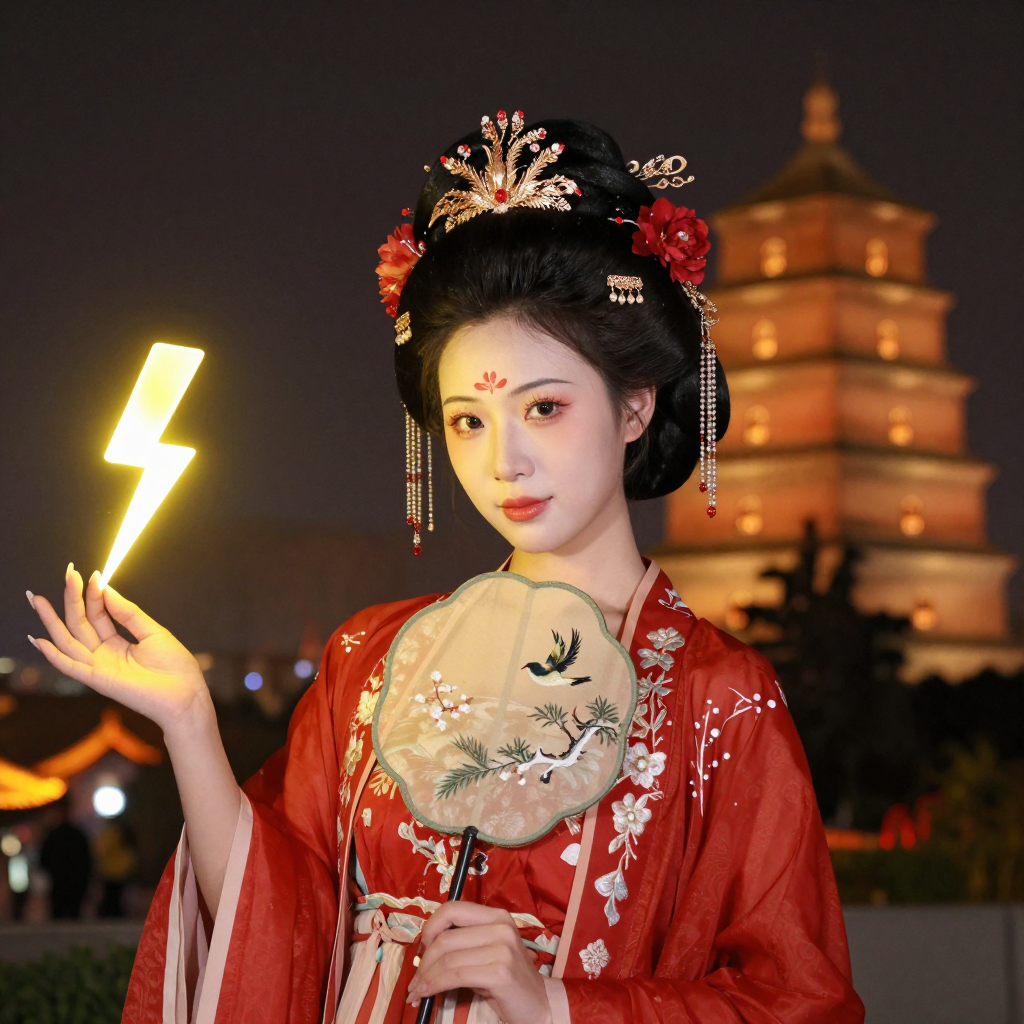
prompt = "Young Chinese woman in red Hanfu, intricate embroidery. Impeccable makeup, red floral forehead pattern. Elaborate high bun, golden phoenix headdress, red flowers, beads. Holds round folding fan with lady, trees, bird. Neon lightning-bolt lamp (⚡️), bright yellow glow, above extended left palm. Soft-lit outdoor night background, silhouetted tiered pagoda (西安大雁塔), blurred colorful distant lights."
# 2. Generate Image
image = pipe(
prompt=prompt,
height=1024,
width=1024,
num_inference_steps=9, # This actually results in 8 DiT forwards
guidance_scale=0.0, # Guidance should be 0 for the Turbo models
generator=torch.Generator("cuda").manual_seed(42),
).images[0]
image.save("example.png")
```
## 效果展示
### 精度
DCU与GPU精度一致,推理框架:pytorch。
## 预训练权重
| 模型名称 | 权重大小 | DCU型号 | 最低卡数需求 |下载地址|
|:-----:|:----------:|:----------:|:---------------------:|:----------:|
| Z-Image-Turbo | 6B | BW1000 | 1 | [modelscope](https://modelscope.cn/models/Tongyi-MAI/Z-Image-Turbo) |
## 源码仓库及问题反馈
- https://developer.sourcefind.cn/codes/modelzoo/z-image_pytorch
## 参考资料
- https://github.com/Tongyi-MAI/Z-Image/tree/main