# X-Decoder
## 论文
`Generalized Decoding for Pixel, Image, and Language`
- https://arxiv.org/abs/2212.11270
## 模型结构
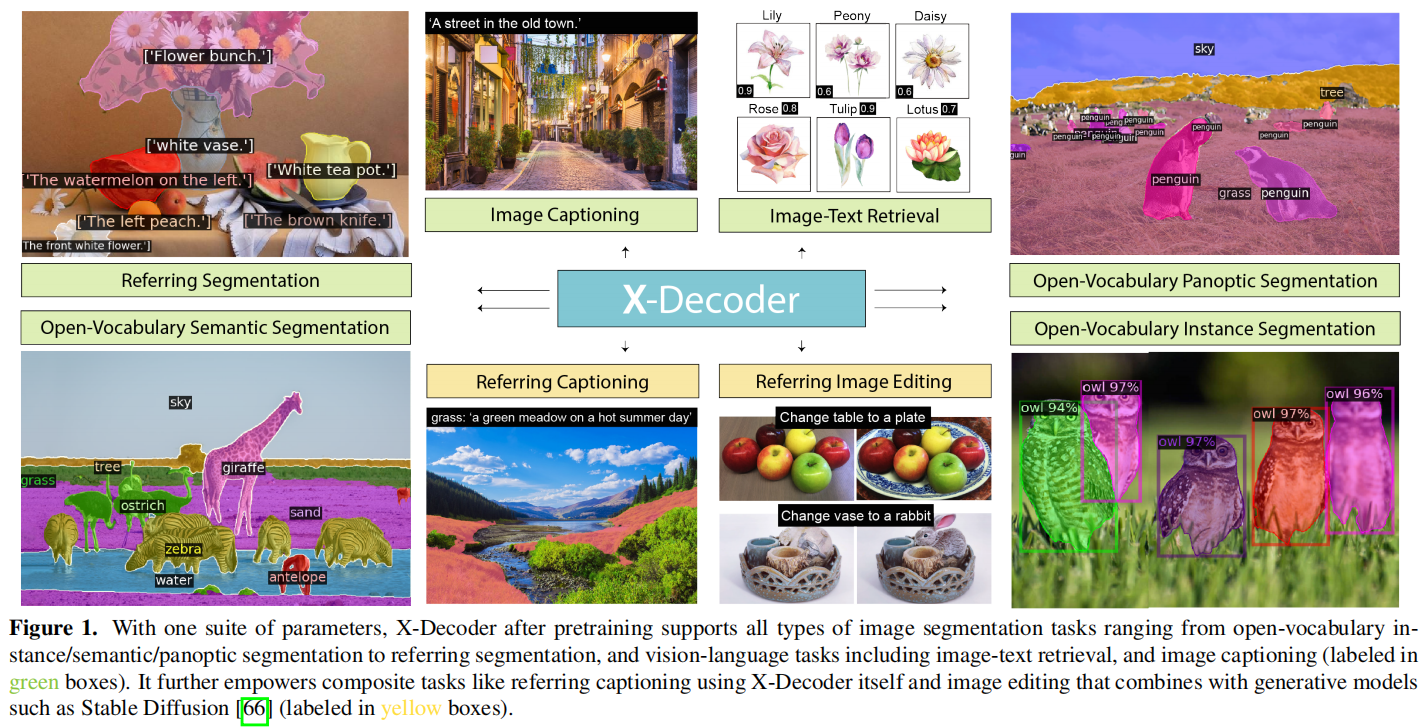
X-Decoder 通过一个统一的解码器结构,将像素级、图像级和语言级的任务集成在同一语义空间中,实现了不同视觉和视觉-语言任务的高效处理和协同学习。X-Decoder将两种类型的查询作为输入:
通用非语义查询和文本输入引导的语义查询,使解码器能够识别各种语言相关的视觉任务,在多项视觉任务性能均有很好的表现。
## 算法原理
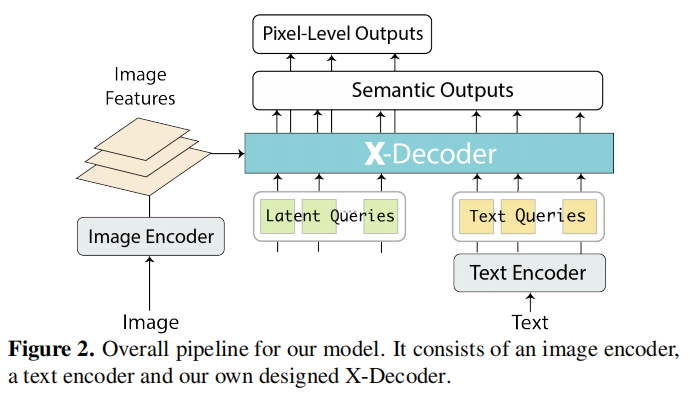
模型完整结构图如下,由一个图像编码器,一个文本编码器和本文自己设计的x解码器组成。X-Decoder 接受两种类型的输入查询:非语义查询(如图像特征)和语义查询(如从文本中提取的查询)。
这些查询被处理并传入模型,用于生成相应的输出。有了这些新设计,X-Decoder是第一个提供统一方式支持所有类型图像分割和各种视觉语言(VL)任务的模型。该设计实现了不同粒度任务之间的无缝交互,
并通过学习一个共同而丰富的像素级视觉语义理解空间来带来互利,无需任何伪标签。在对有限数量的分割数据和数百万图像文本对的混合集进行预训练后,X-Decoder在零样本和微调设置下都表现出对各种下游任务的强大可迁移性。
## 环境配置
### Docker(方法一)
此处提供[光源](https://www.sourcefind.cn/#/service-details)拉取docker镜像的地址与使用步骤,以及[光合](https://developer.hpccube.com/tool/)开发者社区深度学习库下载地址
```
docker pull image.sourcefind.cn:5000/dcu/admin/base/pytorch:2.1.0-ubuntu20.04-dtk24.04.2-py3.10
docker run -it --shm-size=128G -v /path/your_code_data/:/path/your_code_data/ -v /opt/hyhal:/opt/hyhal:ro --privileged=true --device=/dev/kfd --device=/dev/dri/ --group-add video --name xdecoder_mmcv bash # 为以上拉取的docker的镜像ID替换
cd /path/your_code_data/xdecoder_mmcv
pip install -r requirements/multimodal.txt -i https://mirrors.aliyun.com/pypi/simple/
pip install mmdet -i https://mirrors.aliyun.com/pypi/simple/
git clone https://github.com/cocodataset/panopticapi.git
cd panopticapi
pip install e .
```
### Dockerfile(方法二)
此处提供dockerfile的使用方法
```
docker build --no-cache -t xdecoder:latest .
docker run -it --shm-size=128G -v /path/your_code_data/:/path/your_code_data/ -v /opt/hyhal:/opt/hyhal:ro --privileged=true --device=/dev/kfd --device=/dev/dri/ --group-add video --name xdecoder_mmcv xdecoder bash
cd /path/your_code_data/xdecoder_mmcv
pip install -r requirements/multimodal.txt -i https://mirrors.aliyun.com/pypi/simple/
pip install mmdet -i https://mirrors.aliyun.com/pypi/simple/
git clone https://github.com/cocodataset/panopticapi.git
cd panopticapi
pip install e .
```
### Anaconda(方法三)
此处提供本地配置、编译的详细步骤,例如:
关于本项目DCU显卡所需的特殊深度学习库可从[光合](https://developer.hpccube.com/tool/)开发者社区下载安装。
```
DTK驱动:dtk24.04.2
python:python3.10
torch: 2.1.0
torchvision: 0.16.0
mmcv: 2.0.1
conda create -n xdecoder python=3.10
conda activate xdecoder
pip install torch-2.1.0+das.opt1.dtk24042-cp310-cp310-manylinux_2_28_x86_64.whl
pip install torchvision-0.16.0+das.opt1.dtk24042-cp310-cp310-manylinux_2_28_x86_64.whl
pip install mmcv-2.0.1+das.opt1.dtk24042-cp310-cp310-manylinux_2_28_x86_64.whl
```
`Tips:以上dtk驱动、python、torch等DCU相关工具版本需要严格一一对应`
其它依赖环境安装如下:
```
cd /path/your_code_data/xdecoder_mmcv
pip install -r requirements/multimodal.txt -i https://mirrors.aliyun.com/pypi/simple/
pip install mmdet -i https://mirrors.aliyun.com/pypi/simple/
git clone https://github.com/cocodataset/panopticapi.git
cd panopticapi
pip install e .
```
## 数据集
根据以下文档准备数据集[docs](https://github.com/open-mmlab/mmdetection/blob/main/docs/en/user_guides/dataset_prepare.md#coco-caption-dataset-preparation)
[数据集SCNet快速下载](http://113.200.138.88:18080/aidatasets/project-dependency/xdecoder_mmcv_data/-/tree/main?ref_type=heads)
下载后,根据上述docs链接中的方法进行数据处理
数据集目录如下:
```
data
├── ADEChallengeData2016
│ ├── ade20k_instance_train.json
│ ├── ade20k_instance_val.json
│ ├── ade20k_panoptic_train
│ │ ├── ADE_train_00000001.png
│ │ ├── ADE_train_00000002.png
│ │ ├── ...
│ ├── ade20k_panoptic_train.json
│ ├── ade20k_panoptic_val
│ │ ├── ADE_val_00000001.png
│ │ ├── ADE_val_00000002.png
│ │ ├── ...
│ ├── ade20k_panoptic_val.json
│ ├── annotations
│ │ ├── training
│ │ │ ├── ADE_train_00000001.png
│ │ │ ├── ADE_train_00000002.png
│ │ │ ├── ...
│ │ ├── validation
│ │ │ ├── ADE_val_00000001.png
│ │ │ ├── ADE_val_00000002.png
│ │ │ ├── ...
│ ├── annotations_instance
│ │ ├── training
│ │ │ ├── ADE_train_00000001.png
│ │ │ ├── ADE_train_00000002.png
│ │ │ ├── ...
│ │ ├── validation
│ │ │ ├── ADE_val_00000001.png
│ │ │ ├── ADE_val_00000002.png
│ │ │ ├── ...
│ ├── categoryMapping.txt
│ ├── images
│ │ ├── training
│ │ │ ├── ADE_train_00000001.jpg
│ │ │ ├── ADE_train_00000002.jpg
│ │ │ ├── ...
│ │ ├── validation
│ │ │ ├── ADE_val_00000001.jpg
│ │ │ ├── ADE_val_00000002.jpg
│ │ │ ├── ...
│ ├── imgCatIds.json
│ ├── objectInfo150.txt
│ │── sceneCategories.txt
├── coco
│ ├── annotations
│ │ ├── panoptic_train2017.json
│ │ ├── panoptic_train2017
│ │ ├── panoptic_val2017.json
│ │ ├── panoptic_val2017
│ │ ├── panoptic_semseg_train2017 (生成)
│ │ ├── panoptic_semseg_val2017 (生成)
│ │ ...
│ ├── train2017
│ ├── val2017
│ ├── test2017
│ ├── ...
│ ├── refcoco
│ │ ├── instances.json
│ │ ├── refs(google).p
│ │ └── refs(unc).p
│ ├── refcoco+
│ │ ├── instances.json
│ │ └── refs(unc).p
│ ├── refcocog
│ │ ├── instances.json
│ │ ├── refs(google).p
│ │ └── refs(umd).p
│ │── train2014
...
```
## 训练
无
## 推理
首先下载以下模型权重文件:
SCNet快速下载链接[xdecoder](http://113.200.138.88:18080/aimodels/findsource-dependency/xdecoder)
```
cd /path/your_code_data/xdecoder_mmcv
wget https://download.openmmlab.com/mmdetection/v3.0/xdecoder/xdecoder_focalt_last_novg.pt
wget https://download.openmmlab.com/mmdetection/v3.0/xdecoder/xdecoder_focalt_best_openseg.pt
```
### 单机单卡
如果无法连接外网可先将clip-vit-base-patch32下载到/path/your_code_data/xdecoder_mmcv/openai文件夹下
Huggingface下载 [openai/clip-vit-base-patch32](https://huggingface.co/openai/clip-vit-base-patch32)
SCNet快速下载链接 [clip-vit-base-patch32](http://113.200.138.88:18080/aimodels/clip-vit-base-patch32)
注:使用本地clip-vit-base-patch32权重,修改projects/XDecoder/xdecoder/language_model.py中的line18 :tokenizer='openai/clip-vit-base-patch32',修改为本地clip-vit-base-patch32文件夹路径
(1) Open Vocabulary Semantic Segmentation
```
cd projects/XDecoder
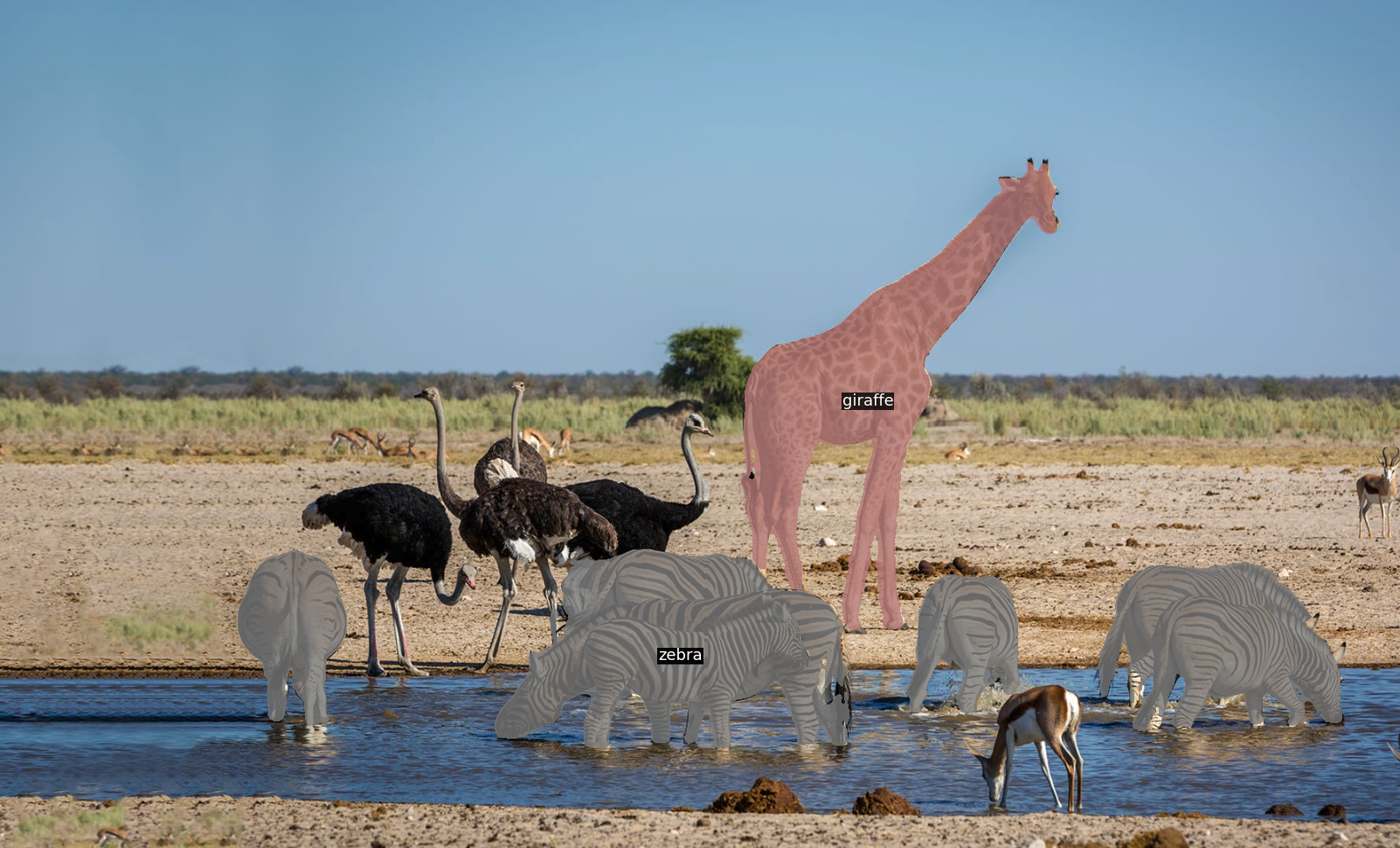
python demo.py ../../images/animals.png configs/xdecoder-tiny_zeroshot_open-vocab-semseg_coco.py --weights ../../xdecoder_focalt_last_novg.pt --texts zebra.giraffe
```
(2) Open Vocabulary Instance Segmentation
```
cd projects/XDecoder
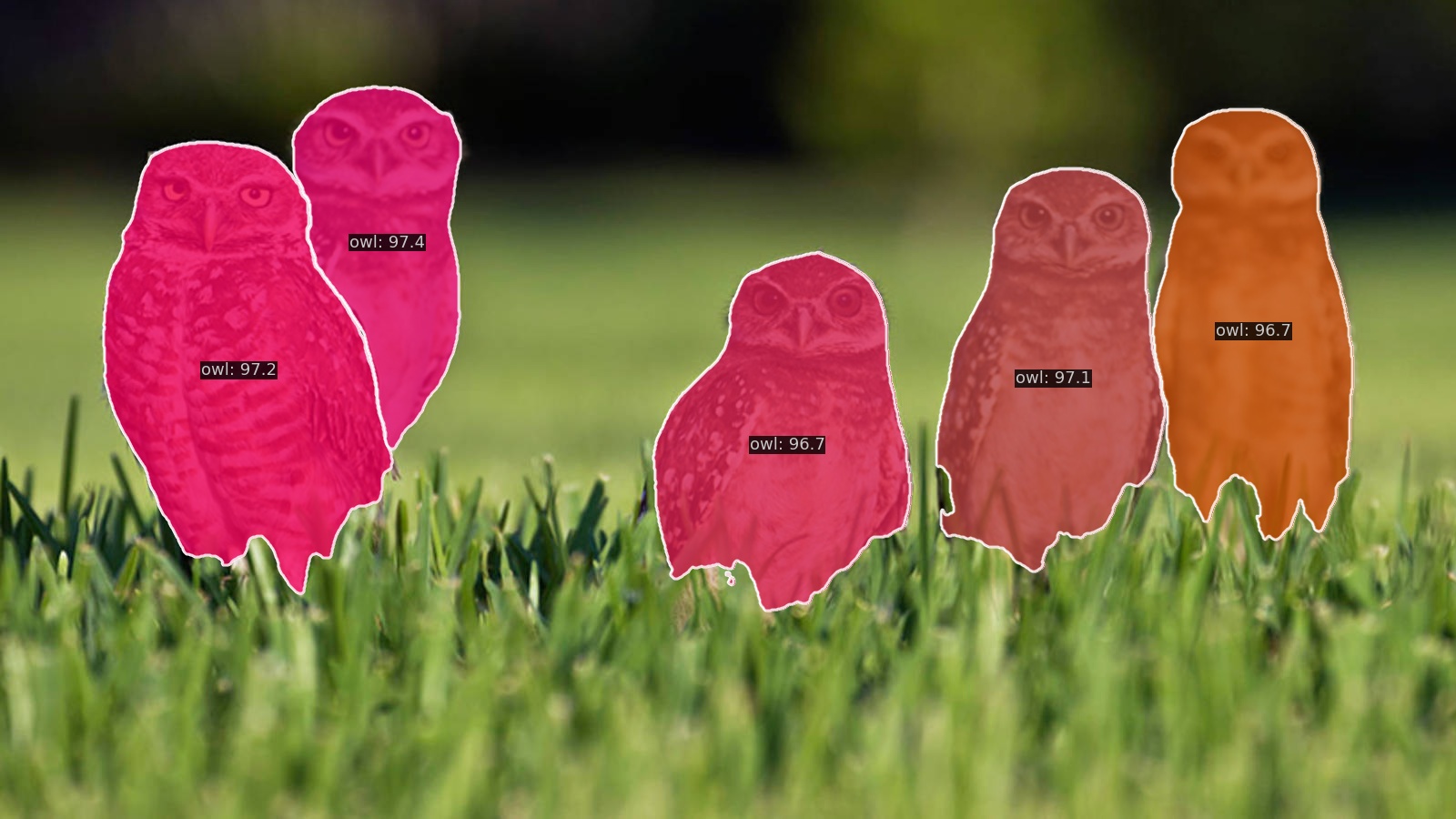
python demo.py ../../images/owls.jpeg configs/xdecoder-tiny_zeroshot_open-vocab-instance_coco.py --weights ../../xdecoder_focalt_last_novg.pt --texts owl
```
(3) Open Vocabulary Panoptic Segmentation
```
cd projects/XDecoder
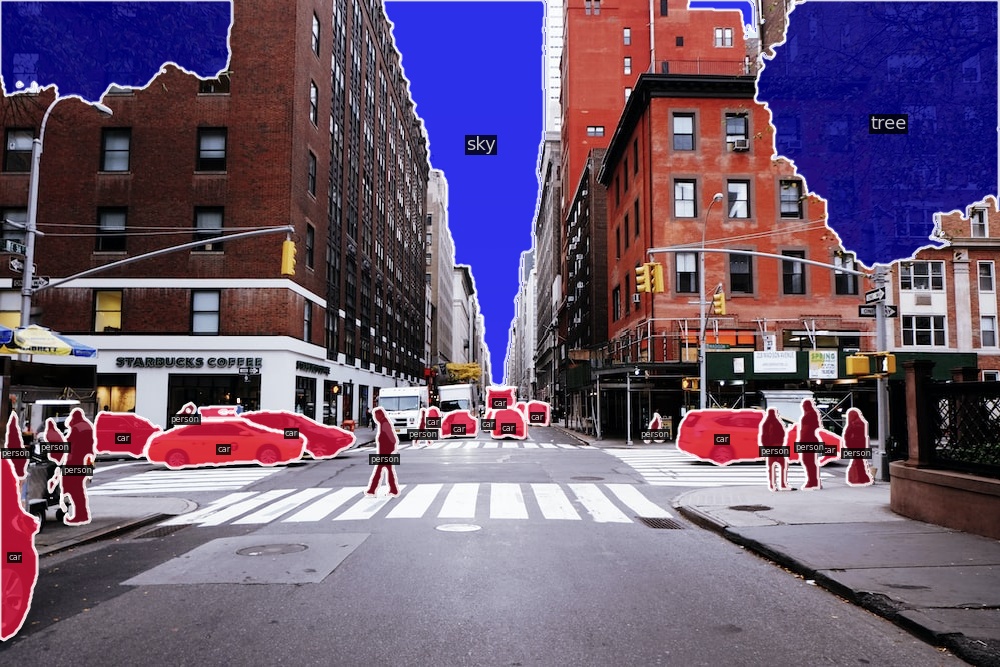
python demo.py ../../images/street.jpg configs/xdecoder-tiny_zeroshot_open-vocab-panoptic_coco.py --weights ../../xdecoder_focalt_last_novg.pt --text car.person --stuff-text tree.sky
```
(4) Referring Expression Segmentation
```
cd projects/XDecoder
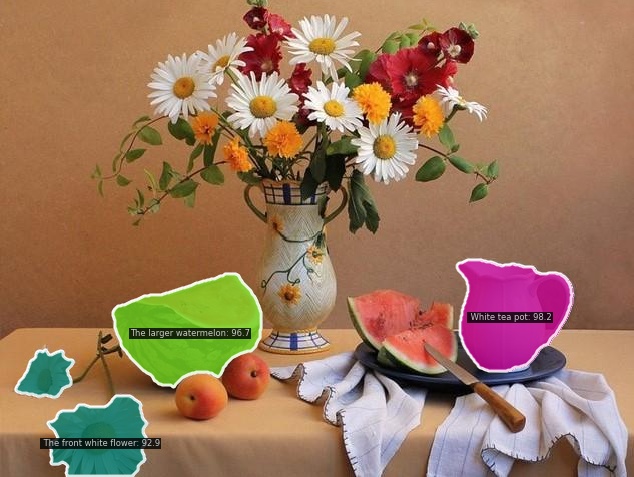
python demo.py ../../images/fruit.jpg configs/xdecoder-tiny_zeroshot_open-vocab-ref-seg_refcocog.py --weights ../../xdecoder_focalt_last_novg.pt --text "The larger watermelon. The front white flower. White tea pot."
```
(5) Image Caption
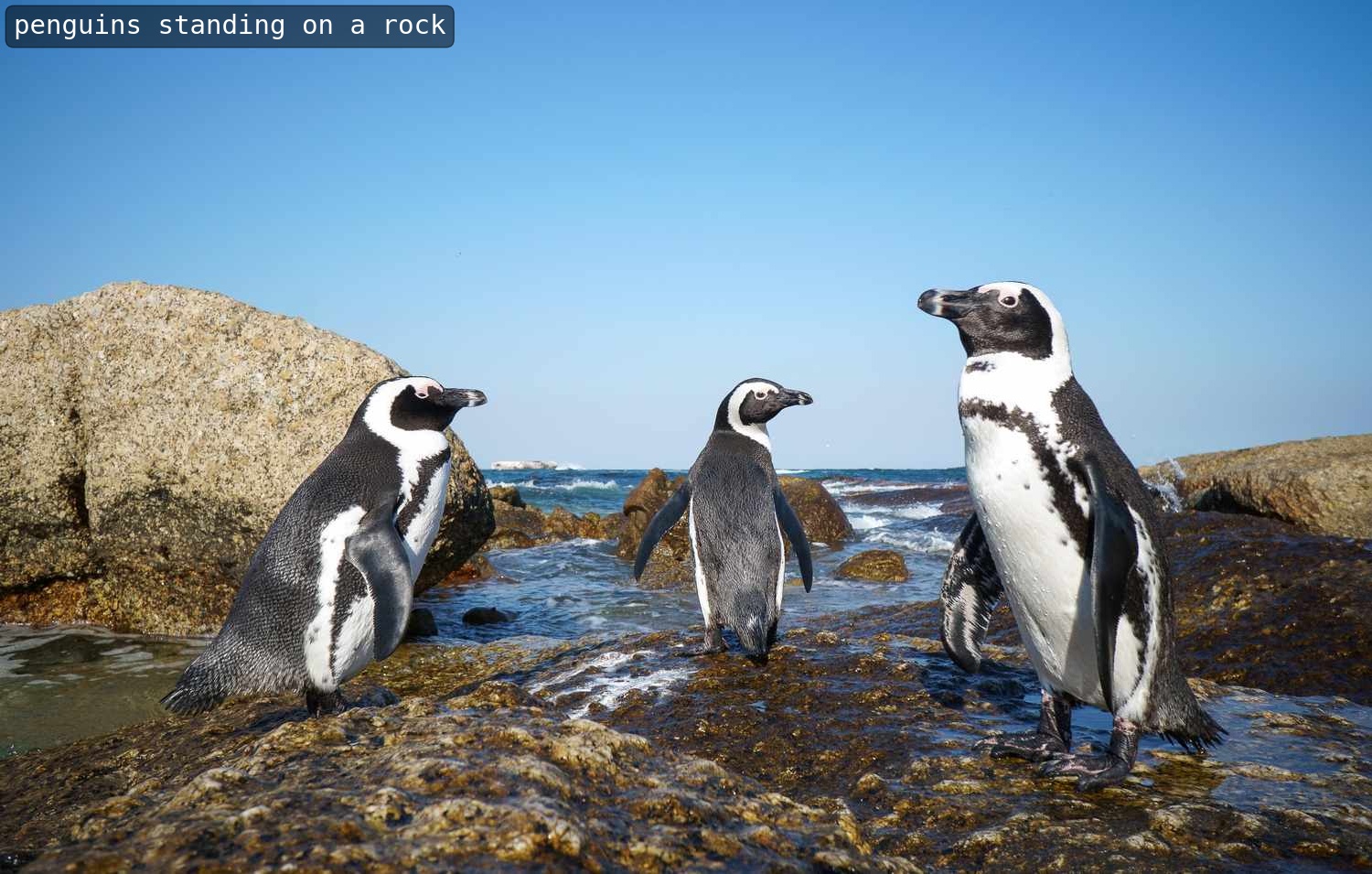
```
cd projects/XDecoder
python demo.py ../../images/penguin.jpeg configs/xdecoder-tiny_zeroshot_caption_coco2014.py --weights ../../xdecoder_focalt_last_novg.pt
```
(6) Referring Expression Image Caption
```
cd projects/XDecoder
python demo.py ../../images/fruit.jpg configs/xdecoder-tiny_zeroshot_ref-caption.py --weights ../../xdecoder_focalt_last_novg.pt --text 'White tea pot'
```
(7) Text Image Region Retrieval
```
cd projects/XDecoder
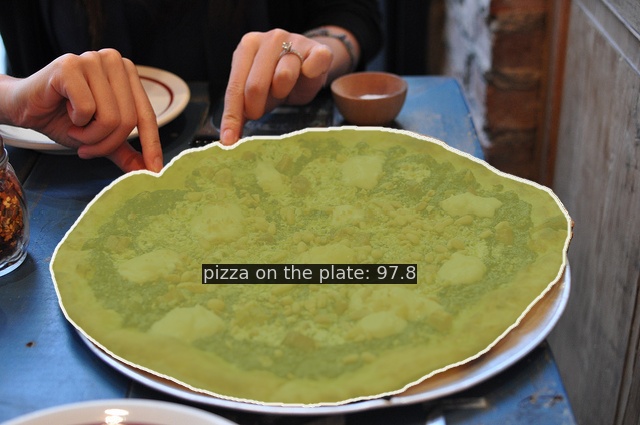
python demo.py ../../images/coco configs/xdecoder-tiny_zeroshot_text-image-retrieval.py --weights ../../xdecoder_focalt_last_novg.pt --text 'pizza on the plate'
```
### 单机多卡
(1) Semantic segmentation on ADE20K
```
HIP_VISIBLE_DEVICES=0,1,2,3 PYTHONPATH=/public/home/luopl/xdecoder_mmcv/projects/XDecoder ./tools/dist_test.sh projects/XDecoder/configs/xdecoder-tiny_zeroshot_open-vocab-semseg_ade20k.py xdecoder_focalt_best_openseg.pt 4 --cfg-options model.test_cfg.use_thr_for_mc=False
```
(2) Instance segmentation on ADE20K
```
HIP_VISIBLE_DEVICES=0,1,2,3 PYTHONPATH=/public/home/luopl/xdecoder_mmcv/projects/XDecoder ./tools/dist_test.sh projects/XDecoder/configs/xdecoder-tiny_zeroshot_open-vocab-instance_ade20k.py xdecoder_focalt_best_openseg.pt 4
```
(3) Panoptic segmentation on ADE20K
```
HIP_VISIBLE_DEVICES=0,1,2,3 PYTHONPATH=/public/home/luopl/xdecoder_mmcv/projects/XDecoder ./tools/dist_test.sh projects/XDecoder/configs/xdecoder-tiny_zeroshot_open-vocab-panoptic_ade20k.py xdecoder_focalt_best_openseg.pt 4
```
(4) Semantic segmentation on COCO2017
```
HIP_VISIBLE_DEVICES=0,1,2,3 PYTHONPATH=/public/home/luopl/xdecoder_mmcv/projects/XDecoder ./tools/dist_test.sh projects/XDecoder/configs/xdecoder-tiny_zeroshot_open-vocab-semseg_coco.py xdecoder_focalt_last_novg.pt 4 --cfg-options model.test_cfg.use_thr_for_mc=False
```
(5) Instance segmentation on COCO2017
```
HIP_VISIBLE_DEVICES=0,1,2,3 PYTHONPATH=/public/home/luopl/xdecoder_mmcv/projects/XDecoder ./tools/dist_test.sh projects/XDecoder/configs/xdecoder-tiny_zeroshot_open-vocab-instance_coco.py xdecoder_focalt_last_novg.pt 4
```
(6) Panoptic segmentation on COCO2017
```
HIP_VISIBLE_DEVICES=0,1,2,3 PYTHONPATH=/public/home/luopl/xdecoder_mmcv/projects/XDecoder ./tools/dist_test.sh projects/XDecoder/configs/xdecoder-tiny_zeroshot_open-vocab-panoptic_coco.py xdecoder_focalt_last_novg.pt 4
```
(7) Referring segmentation on RefCOCO
```
HIP_VISIBLE_DEVICES=0,1,2,3 PYTHONPATH=/public/home/luopl/xdecoder_mmcv/projects/XDecoder ./tools/dist_test.sh projects/XDecoder/configs/xdecoder-tiny_zeroshot_open-vocab-ref-seg_refcocog.py xdecoder_focalt_last_novg.pt 4 --cfg-options test_dataloader.dataset.split='val'
```
(8) Image Caption on COCO2014
在测试前需要安装jdk1.8,否则在测试过程中会提示 java does not exist
可参考以下安装步骤更换repos:
```
apt update
apt install -y openjdk-8-jdk
```
```
HIP_VISIBLE_DEVICES=0,1,2,3 PYTHONPATH=/public/home/luopl/xdecoder_mmcv/projects/XDecoder ./tools/dist_test.sh projects/XDecoder/configs/xdecoder-tiny_zeroshot_caption_coco2014.py xdecoder_focalt_last_novg.pt 4
```
## result
(1) Open Vocabulary Semantic Segmentation
(2) Open Vocabulary Instance Segmentation
(3) Open Vocabulary Panoptic Segmentation
(4) Referring Expression Segmentation
(5) Image Caption
(6) Referring Expression Image Caption
(7) Text Image Region Retrieval
### 精度
使用四张DCU-K100 AI卡推理
(1) Semantic segmentation on ADE20K
| Model | mIoU | mIOU(official) | Config |
|:------------:|:-------------------------:|------|------------|
| xdecoder_focalt_best_openseg.pt | 25.24 | 25.13 | [config](projects/XDecoder/configs/xdecoder-tiny_zeroshot_open-vocab-semseg_ade20k.py) |
(2) Instance segmentation on ADE20K
| Model | mIoU | mIOU(official) | Config |
|:------------:|:-------------------------:|------|------------|
| xdecoder_focalt_best_openseg.pt | 10.1 | 10.1 | [config](projects/XDecoder/configs/xdecoder-tiny_zeroshot_open-vocab-instance_ade20k.py) |
(3) Panoptic segmentation on ADE20K
| Model | mIoU | mIOU(official) | Config |
|:------------:|:-----:|------|------------|
| xdecoder_focalt_best_openseg.pt | 19.12 | 18.97 | [config](projects/XDecoder/configs/xdecoder-tiny_zeroshot_open-vocab-panoptic_ade20k.py) |
(4) Semantic segmentation on COCO2017
| Model | mIoU | mIOU(official) | Config |
|:------------:|:-----:|----------------|------------|
| xdecoder_focalt_last_novg.pt | 62.10 | 62.10 | [config](projects/XDecoder/configs/xdecoder-tiny_zeroshot_open-vocab-semseg_coco.py) |
(5) Instance segmentation on COCO2017
| Model | mIoU | mIOU(official) | Config |
|:------------:|:----:|------|------------|
| xdecoder_focalt_last_novg.pt | 39.8 | 39.7 | [config](projects/XDecoder/configs/xdecoder-tiny_zeroshot_open-vocab-instance_coco.py) |
(6) Panoptic segmentation on COCO2017
| Model | mIoU | mIOU(official) | Config |
|:------------:|:-----:|------|------------|
| xdecoder_focalt_last_novg.pt | 51.42 | 51.16 | [config](projects/XDecoder/configs/xdecoder-tiny_zeroshot_open-vocab-panoptic_coco.py) |
(7) Referring segmentation on RefCOCO
| Model | text mode | cIoU | cIOU(official) | Config |
|:------------:|:-----:|------|------------|---|
|xdecoder_focalt_last_novg.pt | select first | 58.8514 | 57.85 | [config](projects/XDecoder/configs/xdecoder-tiny_zeroshot_open-vocab-ref-seg_refcocog.py) |
(8) Image Caption on COCO2014
| Model | BLEU-4 | CIDER | Config |
|:------------:|:-----:|------|------------|
| xdecoder_focalt_last_novg.pt | 35.26 | 116.81 | [config](projects/XDecoder/configs/xdecoder-tiny_zeroshot_caption_coco2014.py) |
## 应用场景
### 算法类别
`图像分割`
### 热点应用行业
`科研,制造,医疗,家居,教育`
## 源码仓库及问题反馈
- https://developer.hpccube.com/codes/modelzoo/xdecoder_mmcv
## 参考资料
- https://github.com/open-mmlab/mmdetection/tree/main/projects/XDecoder