# VibeVoice
## 论文
`VibeVoice Technical Report`
- https://arxiv.org/abs/2508.19205
## 模型结构
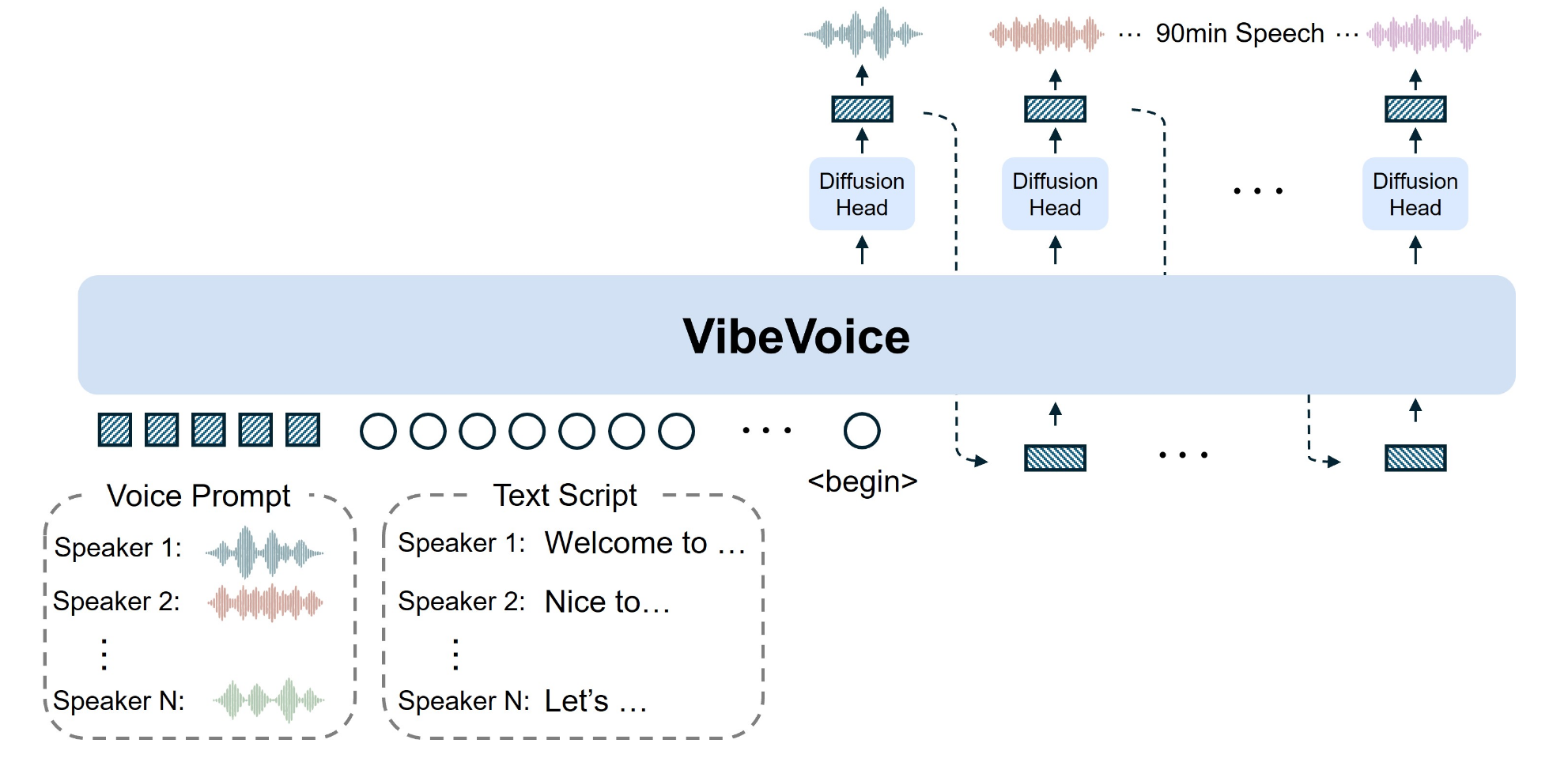
传统的文本转语音系统面临着几个长期难以克服的挑战:生成语音长度有限、多说话人支持不足、以及长语音中的音色漂移和语义断裂问题。 VibeVoice-1.5B 的出现,有效地解决了这些痛点。
- 超长语音生成:此前多数TTS模型只能合成60分钟以内的语音,并且在30分钟后通常会出现音质下降问题。VibeVoice-1.5B实现了单次生成90分钟高质量语音的能力,为有声书、播客等长内容制作打开了新天地。
- 多说话人支持:模型最多可模拟4位不同说话者的自然轮换对话,远超此前开源模型(如SesameAILabs-CSM、HiggsAudio-V2)最多支持2人的限制。
- 卓越的压缩效率:该模型对24kHz原始音频可实现3200倍的累计压缩率,其压缩效率是主流Encodec模型的80倍,同时仍能保持高保真语音效果。
## 算法原理
VibeVoice-1.5B的创新实现,得益于其多项前沿技术的结合:
- 双分词器协同工作:模型首创了声学(Acoustic)与语义(Semantic)双分词器架构。
- 声学分词器采用σ-VAE结构,负责保留声音特征并实现极致压缩,将24kHz原始音频压缩至3200分之一。
- 语义分词器则通过语音识别代理任务训练,确保对话的语义得以保留,有效解决了音色与语义不匹配的传统难题。
- 强大的基础模型:该模型基于1.5B参数的Qwen2.5语言模型,使其能够理解和处理复杂的文本上下文。
- 扩散解码器:在解码端,模型采用了1.23亿参数的扩散解码器,结合分类器自由引导和DPM-Solver算法,显著提升了音质与细节表现。
## 环境配置
### 硬件需求
DCU型号:K100_AI,节点数量:1台,卡数:1张。
`-v 路径`、`docker_name`和`imageID`根据实际情况修改
### Docker(方法一)
```
docker pull image.sourcefind.cn:5000/dcu/admin/base/pytorch:2.4.1-ubuntu22.04-dtk25.04.1-py3.10
docker run -it --shm-size 200g --network=host --name {docker_name} --privileged --device=/dev/kfd --device=/dev/dri --device=/dev/mkfd --group-add video --cap-add=SYS_PTRACE --security-opt seccomp=unconfined -u root -v /path/your_code_data/:/path/your_code_data/ -v /opt/hyhal/:/opt/hyhal/:ro {imageID} bash
cd /your_code_path/VibeVoice_pytorch
pip install -e .
pip install peft==0.17.0
apt update && apt install ffmpeg -y
```
### Dockerfile(方法二)
此处提供dockerfile的使用方法
```
docker build --no-cache -t VibeVoice:latest .
docker run -it --shm-size 200g --network=host --name {docker_name} --privileged --device=/dev/kfd --device=/dev/dri --device=/dev/mkfd --group-add video --cap-add=SYS_PTRACE --security-opt seccomp=unconfined -u root -v /path/your_code_data/:/path/your_code_data/ -v /opt/hyhal/:/opt/hyhal/:ro {imageID} bash
cd /your_code_path/VibeVoice_pytorch
pip install -e .
pip install peft==0.17.0
apt update && apt install ffmpeg -y
```
### Anaconda(方法三)
此处提供本地配置、编译的详细步骤,例如:
关于本项目DCU显卡所需的特殊深度学习库可从[光合](https://developer.sourcefind.cn/tool/)开发者社区下载安装。
```
DTK驱动:dtk25.04.1
python:python3.10
torch: 2.4.1+das.opt1.dtk25041
```
`Tips:以上dtk驱动、python、torch等DCU相关工具版本需要严格一一对应`
其它非深度学习库参照以下安装:
```
cd /your_code_path/VibeVoice_pytorch
pip install -e .
pip install numpy accelerate peft==0.17.0
apt update && apt install ffmpeg -y
```
## 数据集
暂无
## 训练
暂无
## 推理
- Usage 1: Launch Gradio demo
```
# 无法访问外网建议先添加HF镜像export HF_ENDPOINT=https://hf-mirror.com
# For 1.5B model
python demo/gradio_demo.py --model_path aoi-ot/VibeVoice-1.5B --share
# For Large model
python demo/gradio_demo.py --model_path aoi-ot/VibeVoice-Large --share
```
-Usage 2: Inference from files directly
```
# We provide some LLM generated example scripts under demo/text_examples/ for demo
# 1 speaker
python demo/inference_from_file.py --model_path aoi-ot/VibeVoice-Large --txt_path demo/text_examples/1p_abs.txt --speaker_names Alice
# or more speakers
python demo/inference_from_file.py --model_path aoi-ot/VibeVoice-Large --txt_path demo/text_examples/2p_music.txt --speaker_names Alice Frank
```
## result
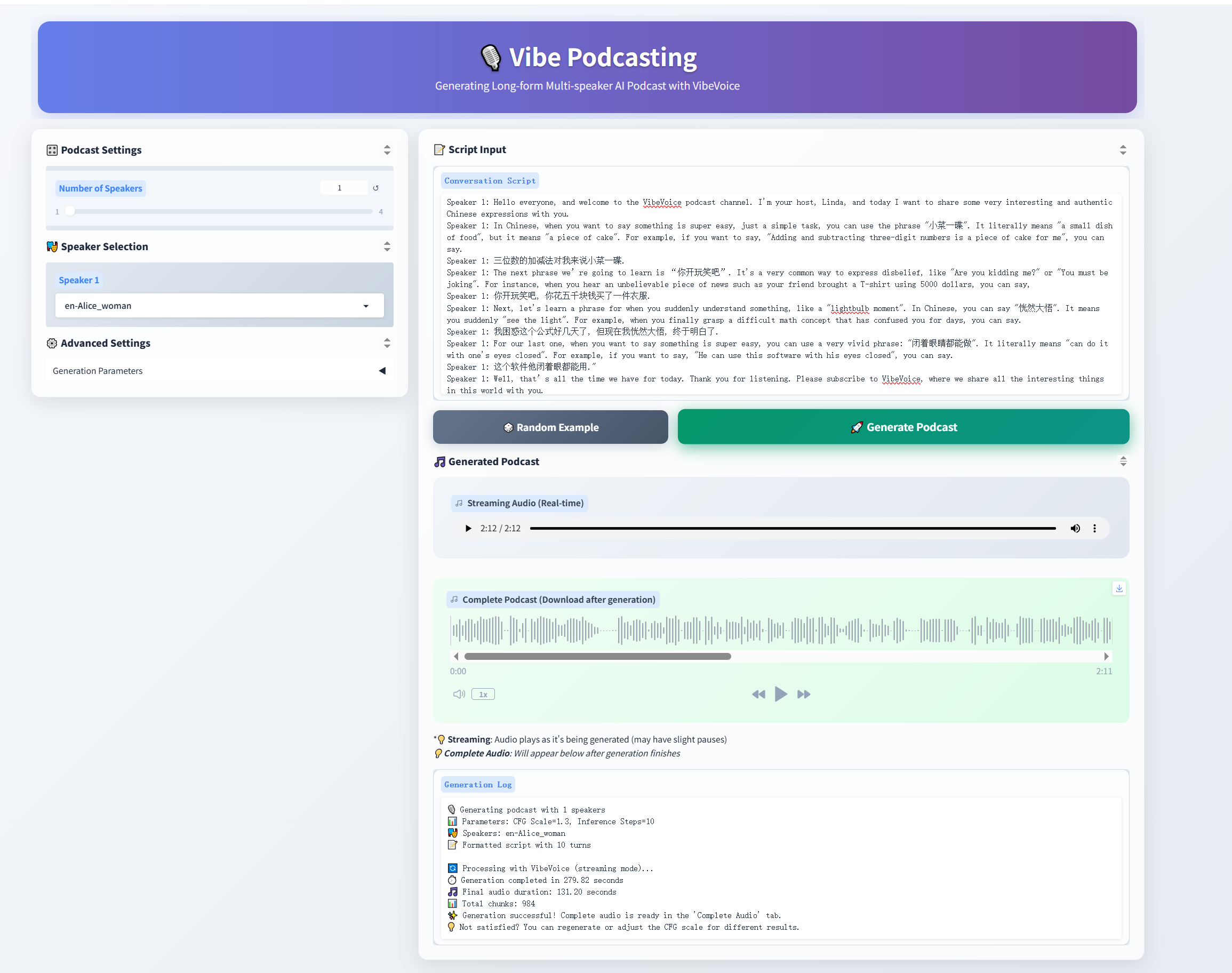
- Graio demo
- txt_path demo/text_examples/1p_abs.txt

### 精度
DCU与GPU精度一致,推理框架:pytorch。
## 应用场景
### 算法类别
`语音合成`
### 热点应用行业
`广媒,影视,动漫,医疗,家居,教育`
## 预训练权重
| Model | Context Length | Generation Length | Weight |
|-------|----------------|----------|----------|
| VibeVoice-1.5B | 64K | ~90 min | [HF link](https://huggingface.co/aoi-ot/VibeVoice-1.5B) |
| VibeVoice-Large| 32K | ~45 min | [HF link](https://huggingface.co/aoi-ot/VibeVoice-Large) |
## 源码仓库及问题反馈
- https://developer.sourcefind.cn/codes/modelzoo/vibevoice_pytorch
## 参考资料
- https://github.com/microsoft/VibeVoice