English | [简体中文](./README-CN.md)
Image Over Text: Transforming Formula Recognition Evaluation with Character Detection Matching
[[ Paper ]](https://arxiv.org/pdf/2409.03643) [[ Website ]](https://github.com/opendatalab/UniMERNet/tree/main/cdm)
[[Demo 🤗(Hugging Face)]](https://huggingface.co/spaces/opendatalab/CDM-Demo)
# Overview
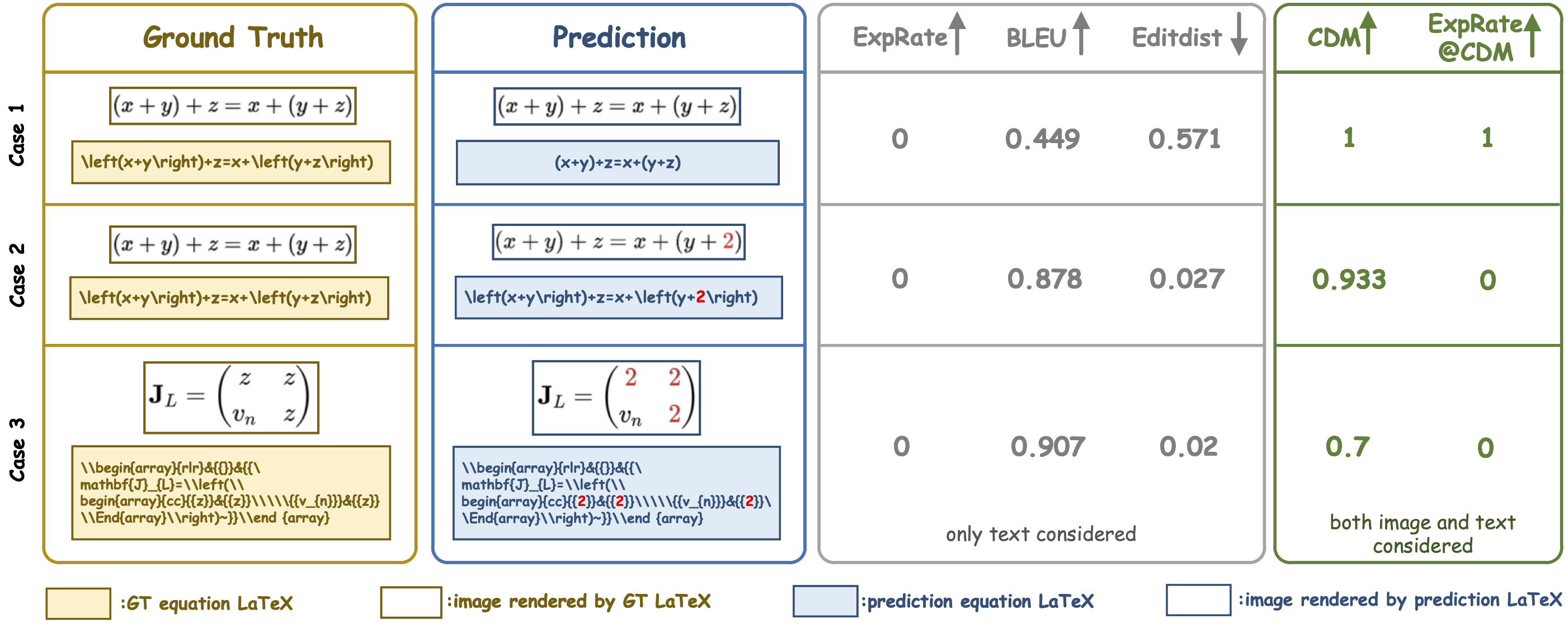
Formula recognition presents significant challenges due to the complicated structure and varied notation of mathematical expressions. Despite continuous advancements in formula recognition models, the evaluation metrics employed by these models, such as BLEU and Edit Distance, still exhibit notable limitations. They overlook the fact that the same formula has diverse representations and is highly sensitive to the distribution of training data, thereby causing the unfairness in formula recognition evaluation. To this end, we propose a Character Detection Matching (CDM) metric, ensuring the evaluation objectivity by designing a image-level rather than LaTex-level metric score. Specifically, CDM renders both the model-predicted LaTeX and the ground-truth LaTeX formulas into image-formatted formulas, then employs visual feature extraction and localization techniques for precise character-level matching, incorporating spatial position information. Such a spatially-aware and character-matching method offers a more accurate and equitable evaluation compared with previous BLEU and Edit Distance metrics that rely solely on text-based character matching.
Comparison between CDM and BLEU, Edit Distance metrics:
The algorithm flow of CDM is as follows:
CDM's character matching method based on rendered images provides more intuitive results and is not affected by the diversity of formula representations.
# Changelog
- 2025/09/28
- Fix some chinese formula issues.
- 2025/06/09
- Fix a bug in bbox match process.
- Update some parameters.
- 2025/06/05
- Support chinese formula evaluation.
- Upgrade process speed.
# Usage
## Try Online Demo
Try CDM on our online demo: [(Hugging Face)🤗](https://huggingface.co/spaces/opendatalab/CDM-Demo)
## Install CMD Locally
Given CDM's complex environment dependencies, we recommend trying it on Linux systems.
Nodejs, imagemagic, pdflatex are requried packages when render pdf files and convert them to images, here are installation guides.
### step.1 install nodejs
```
wget https://registry.npmmirror.com/-/binary/node/latest-v16.x/node-v16.13.1-linux-x64.tar.gz
tar -xvf node-v16.13.1-linux-x64.tar.gz
mv node-v16.13.1-linux-x64/* /usr/local/nodejs/
ln -s /usr/local/nodejs/bin/node /usr/local/bin
ln -s /usr/local/nodejs/bin/npm /usr/local/bin
node -v
```
### step.2 install imagemagic
the version of imagemagic installed by `apt-gt` usually be 6.x, so we also install it from source code.
```
git clone https://github.com/ImageMagick/ImageMagick.git ImageMagick-7.1.1
cd ImageMagick-7.1.1
./configure
make
sudo make install
sudo ldconfig /usr/local/lib
convert --version
```
### step.3 install latexpdf
```
apt-get update
sudo apt-get install texlive-full
```
### step.4 install python requriements
```
pip install -r requirements.txt
```
## install by docker
you can also install CDM by docker:
- build docker image
```
docker build -f DockerFile -t cdm:latest .
```
The process of building the image may take some time. If the terminal finally shows `Successfully tagged cdm:latest`, it indicates that the image has been built successfully.
- start a container
```
docker run -it cdm bash
```
At this point, the container has been started and the bash environment has been entered, allowing for the evaluation of CDM. If you want to establish a mapping when starting, you can add the parameter: `-v xxx:xxx`, so that the evaluation results are still saved on the host machine after exiting the container.
## Use CDM Locally
Should the installation goes well, you may now use CDM to evaluate your formula recognition results.
### 1. batch evaluation
- prepare input json
evaluate on UniMERNet results, use this convert script to get json file:
```
python convert2cdm_format.py -i {UniMERNet predictions} -o {save path}
```
otherwise, prepare a json file follow this format:
```
[
{
"img_id": "case_1", # optional key
"gt": "y = 2z + 3x",
"pred": "y = 2x + 3z"
},
{
"img_id": "case_2",
"gt": "y = x^2 + 1",
"pred": "y = x^2 + 1"
},
...
]
```
`Note that in json files, some special characters such as "\" need escaped character, for example "\begin" should be written as "\\begin".`
- evaluate:
```
python evaluation.py -i {path_to_your_input_json}
```
### 2. launch a gradio demo
```
python app.py
```