---
title: "Local vs Global Anomaly Detection"
description: "Compare local vs global anomaly detection methods for time series. Learn when to use univariate detection for independent metrics vs multivariate detection for correlated server data with Python examples."
icon: "chart-mixed"
---
## Overview
When monitoring multiple time series simultaneously, such as server metrics (CPU, memory, disk I/O), you need to choose between local and global anomaly detection strategies. This guide demonstrates:
- **Local (Univariate) Detection**: Analyzing each time series independently for isolated metric anomalies
- **Global (Multivariate) Detection**: Analyzing all time series collectively to detect system-wide failures
Both methods use TimeGPT's `detect_anomalies_online` with the `threshold_method` parameter. The main difference is whether anomalies are identified individually per series (local) or collectively across multiple correlated series (global).
For an introduction to real-time anomaly detection, see our [Real-Time Anomaly Detection guide](/anomaly_detection/real-time/introduction). To learn about parameter tuning, check out [Controlling the Anomaly Detection Process](/anomaly_detection/real-time/adjusting_detection).
## When to Use Each Method
### Use Local Detection When:
- Monitoring independent, uncorrelated metrics
- Each metric has distinct baseline behavior
- You need low computational overhead
- False positives in individual series are acceptable
### Use Global Detection When:
- Monitoring correlated server or system metrics
- System-wide failures affect multiple metrics simultaneously
- You need to detect coordinated anomalies (e.g., CPU spike + memory spike + network spike)
- Reducing false positives by considering metric relationships
## How to Detect Anomalies Across Multiple Time Series
[](https://colab.research.google.com/github/Nixtla/nixtla/blob/main/nbs/docs/capabilities/online-anomaly-detection/03_univariate_vs_multivariate_anomaly_detection.ipynb)
### Step 1: Set Up Your Environment
Import dependencies that you will use in the tutorial.
```python
import numpy as np
import pandas as pd
import matplotlib.pyplot as plt
from nixtla import NixtlaClient
```
Create a NixtlaClient instance. Replace 'my_api_key_provided_by_nixtla' with your actual API key.
```python
nixtla_client = NixtlaClient(
api_key='my_api_key_provided_by_nixtla'
)
```
### Step 2: Load the Dataset
This tutorial uses the SMD (Server Machine Dataset), a benchmark dataset for anomaly detection across multiple time series. SMD monitors abnormal patterns in server machine data.
We analyze monitoring data from a single server (machine-1-1) containing 38 time series. Each series represents a different server metric: CPU usage, memory usage, disk I/O, network throughput, and other system performance indicators.
```python
df = pd.read_csv(
'https://datasets-nixtla.s3.us-east-1.amazonaws.com/SMD_test.csv',
parse_dates=['ts']
)
df.unique_id.nunique()
```
Output:
```bash
38
```
### Step 3: Local and Global Anomaly Detection Methods
#### Method Comparison
| Aspect | Local (Univariate) | Global (Multivariate) |
|--------|-------------------|----------------------|
| **Analysis Scope** | Individual series | All series collectively |
| **Best For** | Independent metrics | Correlated metrics |
| **Computational Cost** | Low | Higher |
| **System-wide Anomalies** | May miss | Detects effectively |
| **Parameter** | `threshold_method='univariate'` | `threshold_method='multivariate'` |
#### Step 3.1: Local Method
Local anomaly detection analyzes each time series in isolation, flagging anomalies based on each series' individual deviation from its expected behavior. This approach is efficient for individual metrics or when correlations between metrics are not relevant. However, it may miss large-scale, system-wide anomalies that are only apparent when multiple series deviate simultaneously.
Example usage:
```python
anomaly_online = nixtla_client.detect_anomalies_online(
df[['ts', 'y', 'unique_id']],
time_col='ts',
target_col='y',
freq='h',
h=24,
level=95,
detection_size=475,
threshold_method='univariate' # local anomaly detection
)
```
Log output:
```bash
INFO:nixtla.nixtla_client:Validating inputs...
INFO:nixtla.nixtla_client:Preprocessing dataframes...
WARNING:nixtla.nixtla_client:Detection size is large. Using the entire series to compute the anomaly threshold...
INFO:nixtla.nixtla_client:Calling Online Anomaly Detector Endpoint...
```
Visualize the anomalies:
```python
# Utility function to plot anomalies
def plot_anomalies(df, unique_ids, rows, cols):
fig, axes = plt.subplots(rows, cols, figsize=(12, rows * 2))
for i, (ax, uid) in enumerate(zip(axes.flatten(), unique_ids)):
filtered_df = df[df['unique_id'] == uid]
ax.plot(filtered_df['ts'], filtered_df['y'], color='navy', alpha=0.8, label='y')
ax.plot(filtered_df['ts'], filtered_df['TimeGPT'], color='orchid', alpha=0.7, label='TimeGPT')
ax.scatter(
filtered_df.loc[filtered_df['anomaly'] == 1, 'ts'],
filtered_df.loc[filtered_df['anomaly'] == 1, 'y'],
color='orchid', label='Anomalies Detected'
)
ax.set_title(f"Unique_id: {uid}", fontsize=8)
ax.tick_params(axis='x', labelsize=6)
fig.legend(loc='upper center', ncol=3, fontsize=8, labels=['y', 'TimeGPT', 'Anomaly'])
plt.tight_layout(rect=[0, 0, 1, 0.95])
plt.show()
display_ids = ['machine-1-1_y_0', 'machine-1-1_y_1', 'machine-1-1_y_6', 'machine-1-1_y_29']
plot_anomalies(anomaly_online, display_ids, rows=2, cols=2)
```

*This figure highlights anomalies detected in four selected metrics. Each metric is analyzed independently, so anomalies reflect unusual behavior within that series alone.*
#### Step 3.2: Global Method
Global anomaly detection considers all time series collectively, flagging a time step as anomalous if the aggregate deviation across all series at that time exceeds a threshold. This approach captures systemic or correlated anomalies that might be missed when analyzing each series in isolation. However, it comes with slightly higher complexity and computational overhead, and may require careful threshold tuning.
Example usage:
```python
anomaly_online_multi = nixtla_client.detect_anomalies_online(
df[['ts', 'y', 'unique_id']],
time_col='ts',
target_col='y',
freq='h',
h=24,
level=95,
detection_size=475,
threshold_method='multivariate' # global anomaly detection
)
```
Log output:
```bash
INFO:nixtla.nixtla_client:Validating inputs...
INFO:nixtla.nixtla_client:Preprocessing dataframes...
WARNING:nixtla.nixtla_client:Detection size is large. Using the entire series to compute the anomaly threshold...
INFO:nixtla.nixtla_client:Calling Online Anomaly Detector Endpoint...
```
Visualize the anomalies:
```python
plot_anomalies(anomaly_online_multi, display_ids, rows=2, cols=2)
```
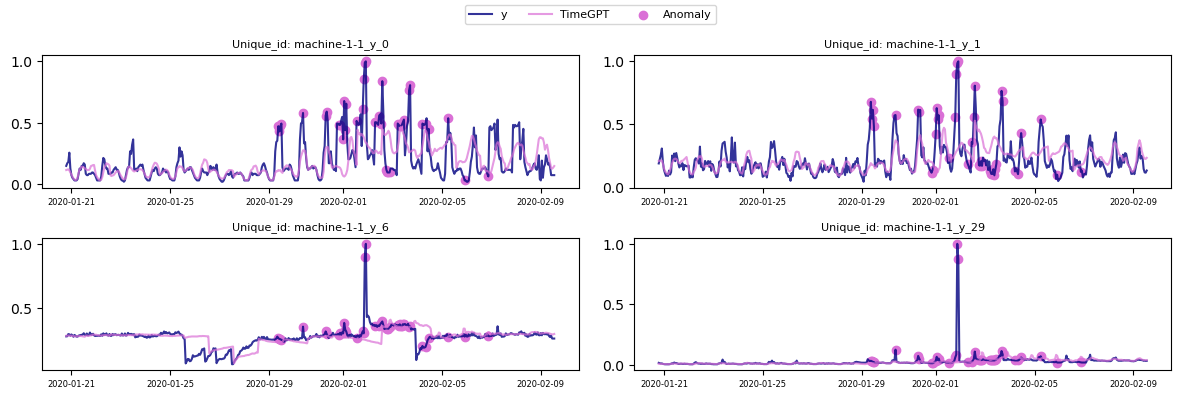
*In global mode, an anomaly is flagged when the combined deviation across these series reaches a threshold. This can reveal system-wide anomalies.*
In global anomaly detection, anomaly scores from all series at each time step are aggregated. A step is anomalous if the combined score exceeds the threshold. This reveals systemic anomalies that may go unnoticed if each series is considered alone.
## Real-World Use Cases
### Local Detection Examples:
- **Independent application metrics**: Response time, error rates, request counts for different microservices
- **IoT sensor networks**: Temperature sensors at different locations with no correlation
- **Business metrics**: Sales figures across different product categories
### Global Detection Examples:
- **Server monitoring**: CPU, memory, disk I/O, and network metrics from the same server
- **Distributed system health**: Correlated metrics across multiple nodes indicating cluster-wide issues
- **Manufacturing equipment**: Multiple sensor readings from a single machine indicating equipment failure
## Summary
- **Local:** Best for detecting anomalies in a single metric or uncorrelated metrics. Low computational overhead, but may overlook cross-series patterns.
- **Global:** Considers correlations across metrics, capturing system-wide issues. More complex and computationally intensive than local methods.
Both detection approaches use Nixtla's online anomaly detection method. Choose the strategy that best fits your use case and data characteristics.
## Frequently Asked Questions
**What's the difference between univariate and multivariate anomaly detection?**
Univariate (local) detection analyzes each time series independently using the `threshold_method='univariate'` parameter, while multivariate (global) detection analyzes all series together using `threshold_method='multivariate'`, considering correlations between metrics.
**When should I use global detection instead of local?**
Use global detection when your time series are correlated and system-wide failures affect multiple metrics simultaneously, such as monitoring CPU, memory, and network metrics from the same server.
**Does global detection increase computational cost?**
Yes, global detection requires analyzing relationships across all time series, making it more computationally intensive. However, it can reduce overall false positives by considering metric correlations.
**Can I run both local and global detection?**
Yes, you can run both methods and compare results. Local detection may catch metric-specific anomalies while global detection identifies system-wide issues.