# Squeezeformer_tensorflow
## 论文
Squeezeformer: An Efficient Transformer for Automatic Speech Recognition
- https://arxiv.org/pdf/2206.00888
## 模型结构
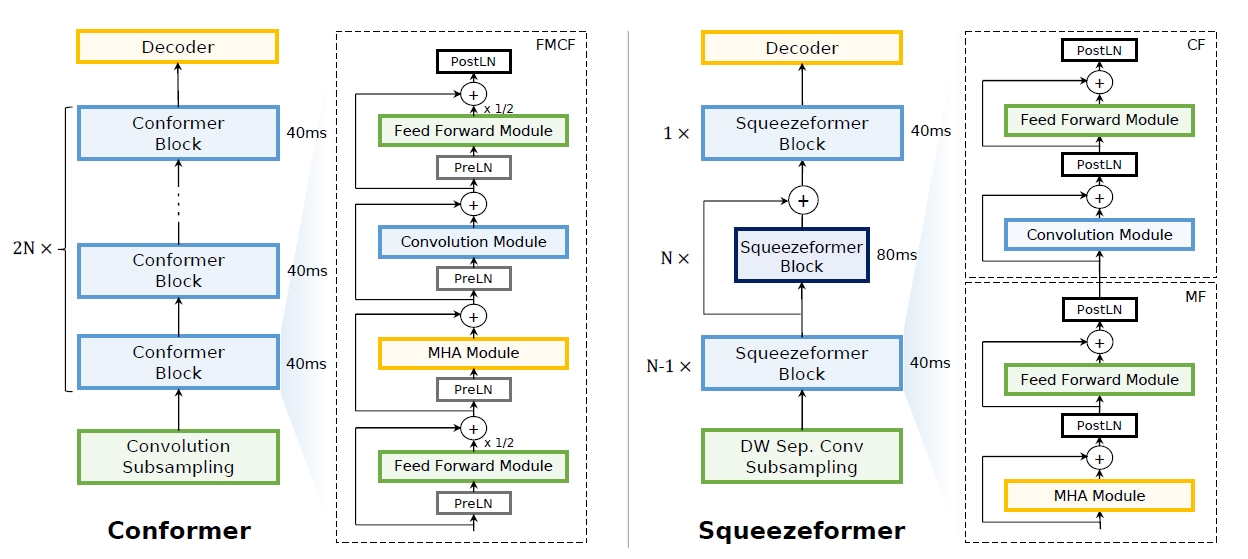
Squeezeformer 是在重新研究了Conformer的宏观和微观结构后,通过调整多头注意力、前馈模块等,实现了更低的WER,模型结构如图所示,左边是Conformer结构,右边则是改进后的Squeezeformer结构。
## 算法原理
在宏观层面,Squeezeformer采用了:
- Temporal U-Net结构,减少了多头注意力模块在长序列上的成本。
- 更简单的多头注意力模块块结构或卷积模块块结构,然后是前反馈模块,而不是Conformer中提出的Macaron结构。
在微观层面,Squeezeformer进行了一下调整:
- 简化了卷积块中的激活。
- 消除了冗余的层规范化操作。
- 结合了一个有效的深度下采样层,用以有效地对输入信号进行下采样。
最终模型相比相同Flops的COnformer,取得了更低的词错误率(WER)。
## 环境配置
### Dcoker(方法一)
此处提供[光源](https://sourcefind.cn/#main-page)拉取镜像的地址与使用步骤:
```sh
docker pull image.sourcefind.cn:5000/dcu/admin/base/tensorflow:2.13.1-ubuntu20.04-dtk24.04.2-py3.8
docker run -it -v /path/your_code_data/:/path/your_code_data/ -v /opt/hyhal:/opt/hyhal:ro --shm-size=32G --privileged=true --device=/dev/kfd --device=/dev/dri/ --group-add video --name docker_name imageID bash
pip install datasets==1.3.0
pip install librosa==0.8.0
pip install PyYAML
pip install tqdm
pip install tensorflow.io
pip install sentencepiece==0.1.94
pip install tensorflow_datasets==4.2.0
pip install jiwer
```
### Dockerfile(方法二)
此处提供Dockerfile的使用方法:
```shell
cd ./docker
docker build --no-cache -t Squeezeformer:latest
docker run -it -v /path/your_code_data/:/path/your_code_data/ -v /opt/hyhal:/opt/hyhal:ro --shm-size=32G --privileged=true --device=/dev/kfd --device=/dev/dri/ --group-add video --name docker_name imageID bash
```
### Anaconda(方法三)
关于本项目DCU显卡所需的特殊深度学习库可从光合开发者社区下载安装: https://developer.hpccube.com/tool/
```
DTK软件栈:dtk24,04,2
Python:3.8
tensorflow:2.13.1
```
Tips:以上dtk软件栈、python、tensorflow等DCU相关工具版本需要严格一一对应
## 安装 CTC decoder
```
cd scripts
bash install_ctc_decoders.sh
```
## 数据准备
### 数据集下载
官方代码在模型的训练和测试中使用的是LibriSpeech数据集。
- SCNet快速下载链接:
- [LibriSpeech_asr数据集下载](http://113.200.138.88:18080/aidatasets/librispeech_asr_dummy)
- 官方下载链接:
- [LibriSpeech_asr数据集官方下载](https://www.openslr.org/12)
librispeech是大约1000小时的16kHz英语阅读演讲语料库,数据来源于LibriVox项目的有声读物,并经过仔细分割和整理,其中的音频文件以flac格式存储,语音对应的文本转炉内容以txt格式存储。
数据集的目录结构如下:
```
LibriSpeech
├── train-clean-100
│ ├── 19
│ │ ├── 19-198
│ │ │ ├── 19-198-0000.flac
│ │ │ ├── 19-198-0001.flac
│ │ │ ├── 19-198-0002.flac
│ │ │ ├── 19-198-0003.flac
│ │ │ ├── ...
│ │ │ ├── 19-198.trans.txt
│ │ └── ...
│ └── ...
├── train-clean-360
├── train-other-500
├── dev-clean
├── dev-other
├── test-clean
└── test-othe
```
*在'data'文件夹下放了一个来自于librispeech的小数据集用于快速测试。
### 创建Manifest文件
在训练之前,需要通过一下命令创建和数据集对应的Manifest文件,该文件包括数据集的文件路径和语音的转录文本
```sh
cd scripts
python create_librispeech_trans_all.py --data {dataset_path}/LibriSpeech --output {tsv_dir}
```
- dataset_path是LibriSpeech数据集进行清理的目录。
- 此脚本在tsv_dir下创建tsv文件,其中列出音频文件路径、持续时间和转录文本。
- 如果要跳过处理训练数据集,请使用另一个参数 --mode test-only。
如果正确遵循了说明,应该会产生以下文件:
- dev_clean.tsv, dev_other.tsv, test_clean.tsv, test_other.tsv
- train_clean_100.tsv, train_clean_360.tsv, train_other_500.tsv (if not --mode test-only)
- train_other.tsv that merges all training tsv files into one (if not --mode test-only)
## 测试
### 使用预训练模型
所有Squeezeformer变种均提供了预先训练的checkpoint,可以从SCNet下载
| **Model** | **Checkpoint** | **test-clean** | **test-other** |
| :-----------------: | :---------------------------------------------------------------------------------------: | :------------: | :------------: |
| Squeezeformer-XS | [link](http://113.200.138.88:18080/aimodels/squeezeformer_checkpoint/-/blob/main/squeezeformer-XS.h5) | 3.74 | 9.09 |
| Squeezeformer-S | [link](http://113.200.138.88:18080/aimodels/squeezeformer_checkpoint/-/blob/main/squeezeformer-S.h5) | 3.08 | 7.47 |
| Squeezeformer-SM | [link](http://113.200.138.88:18080/aimodels/squeezeformer_checkpoint/-/blob/main/squeezeformer-SM.h5) | 2.79 | 6.89 |
| Squeezeformer-M | [link](http://113.200.138.88:18080/aimodels/squeezeformer_checkpoint/-/blob/main/squeezeformer-M.h5) | 2.56 | 6.50 |
| Squeezeformer-ML | [link](http://113.200.138.88:18080/aimodels/squeezeformer_checkpoint/-/blob/main/squeezeformer-ML.h5) | 2.61 | 6.05 |
### 运行测试脚本
运行以下命令:
```
cd examples/squeezeformer
python test.py --bs {batch_size} --config configs/squeezeformer-S.yml --saved squeezeformer-S.h5 --dataset_path {tsv_dir} --dataset {dev_clean|dev_other|test_clean|test_other} --mode test-only
```
- tsv_dir是在上一步中创建的TSV清单文件的目录路径。
- 通过更改--config和--saved在其他Squeezeformer模型上进行测试,例如,Squeezeformer-L或Squeezeformer-M。
### 可能遇到的问题及解决办法:
问题:AttributeError: module 'numpy' has no attribute 'complex'.
解决:numpy版本问题,报错的地方改为:np.complex_
### result
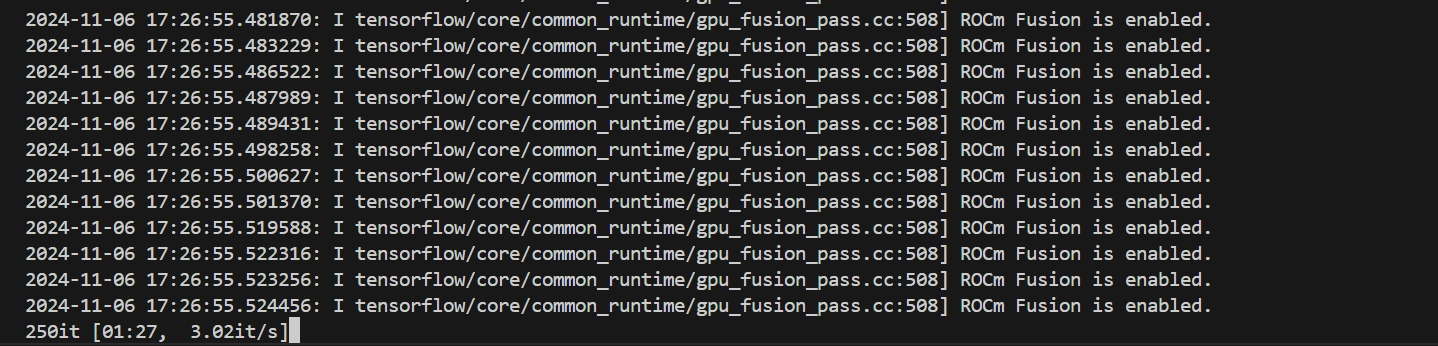
运行成功终端应该输出信息:
## 应用场景
### 算法分类
语音识别
### 热点应用行业
语音识别、教育、医疗
## 源码仓库及问题反馈
https://developer.hpccube.com/codes/modelzoo/squeezeformer_tensorflow
## 参考资料
https://github.com/kssteven418/Squeezeformer