# SmolLM2
端侧小模型新星SmolLM2 1.7B击败Qwen 2.5 1.5B和Llama 3.2 1B,可以在不到2GB的VRAM上运行。
## 论文
`未发表`
## 模型结构
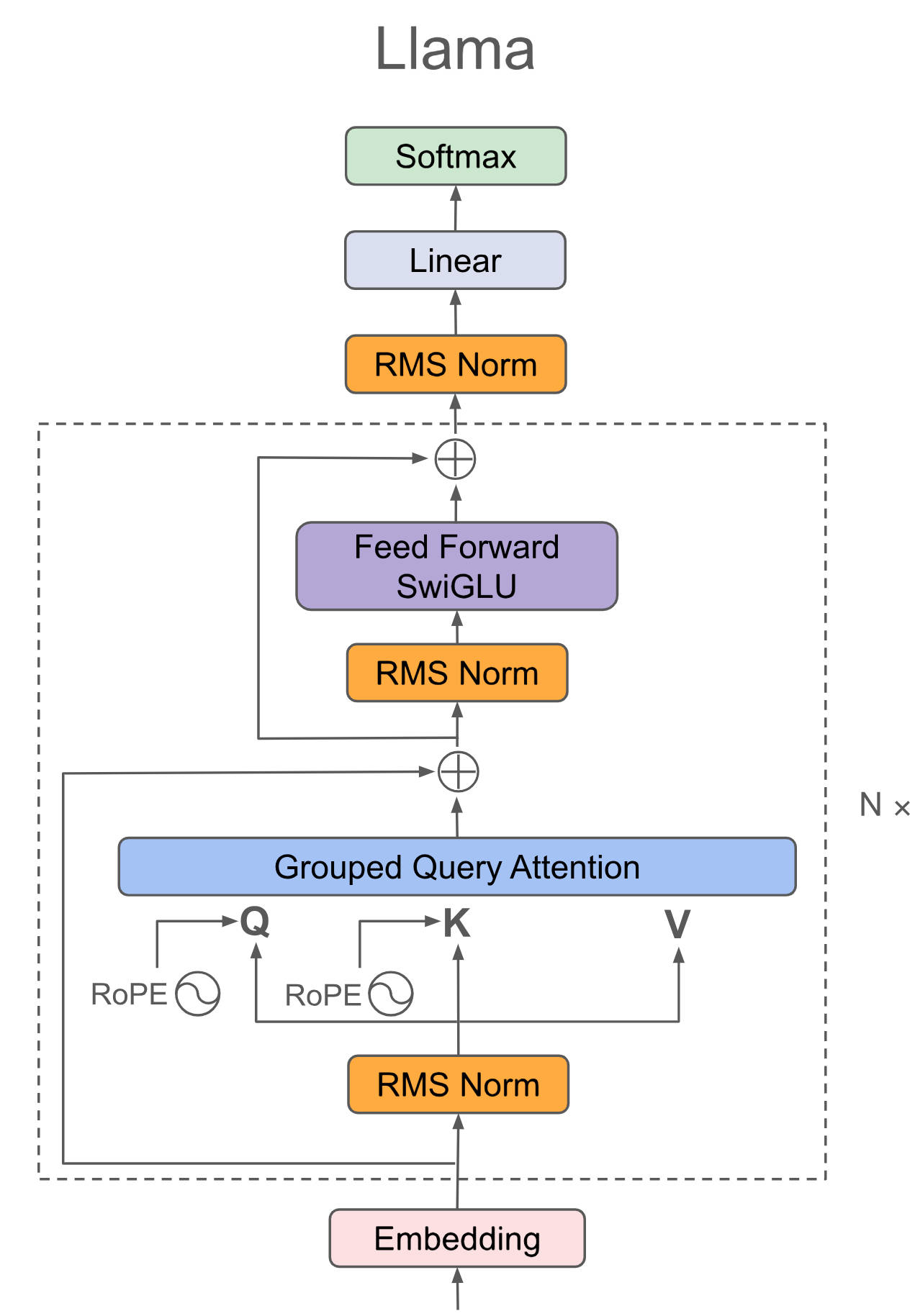
SmolLM2对Llama结构进行了瘦身,认为深-窄结构具有更好的梯度流和参数效率,仍为Decoder-only结构。
## 算法原理
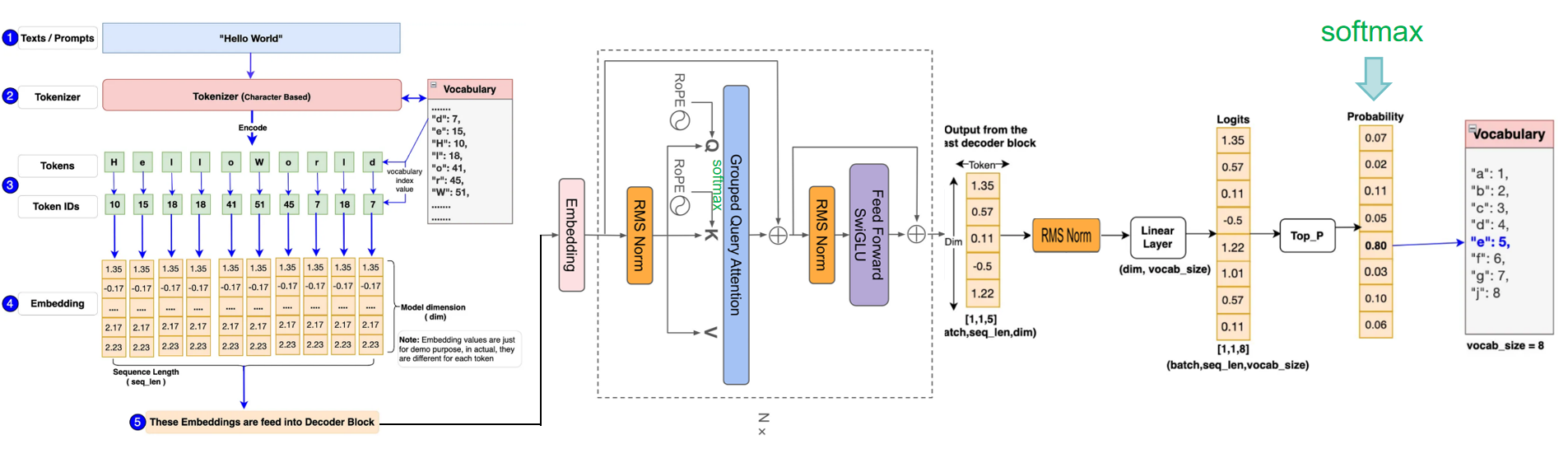
Llama将输入embedding(将语句根据词汇量和词的位置、属性转换成数字化矩阵)后放入attention+ffn等提取特征,最后利用Softmax将解码器最后一层产生的未经归一化的分数向量(logits)转换为概率分布,其中每个元素表示生成对应词汇的概率,这使得模型可以生成一个分布,并从中选择最可能的词作为预测结果,然后一个字一个预测出来就是咱们看到的对话生成效果。
## 环境配置
```
mv smollm_pytorch smollm # 去框架名后缀
```
### Docker(方法一)
```
docker pull image.sourcefind.cn:5000/dcu/admin/base/pytorch:2.3.0-ubuntu22.04-dtk24.04.2-py3.10
# 为以上拉取的docker的镜像ID替换,本镜像为:83714c19d308
docker run -it --shm-size=64G -v $PWD/smollm:/home/smollm -v /opt/hyhal:/opt/hyhal:ro --privileged=true --device=/dev/kfd --device=/dev/dri/ --group-add video --name smollm2 bash
# 安装bnb库
pip install whl/bitsandbytes-0.42.0+das.opt1.dtk24042-py3-none-any.whl
```
### Dockerfile(方法二)
```
cd cd /home/smollm/docker
docker build --no-cache -t smollm2:latest .
docker run --shm-size=64G --name smollm2 -v /opt/hyhal:/opt/hyhal:ro --privileged=true --device=/dev/kfd --device=/dev/dri/ --group-add video -v $PWD/../../smollm:/home/smollm -it smollm2 bash
# 若遇到Dockerfile启动的方式安装环境需要长时间等待,可注释掉里面的pip安装,启动容器后再安装python库:pip install -r requirements.txt。
cd /home/smollm
pip install -r finetuning/requirements.txt
# 安装bnb库
pip install whl/bitsandbytes-0.42.0+das.opt1.dtk24042-py3-none-any.whl
```
### Anaconda(方法三)
1、关于本项目DCU显卡所需的特殊深度学习库可从光合开发者社区下载安装:
- https://developer.hpccube.com/tool/
```
DTK驱动:dtk24.04.2
python:python3.10
torch:2.3.0
torchvision:0.18.1
torchaudio:2.1.2
triton:2.1.0
flash-attn:2.0.4
deepspeed:0.14.2
apex:1.3.0
xformers:0.0.25
```
`Tips:以上dtk驱动、python、torch等DCU相关工具版本需要严格一一对应。`
2、其它非特殊库参照requirements.txt安装
```
cd /home/smollm
pip install -r finetuning/requirements.txt
# 安装bnb库
pip install whl/bitsandbytes-0.42.0+das.opt1.dtk24042-py3-none-any.whl
```
## 数据集
[bigcode/the-stack-smol](http://113.200.138.88:18080/aimodels/bigcode/the-stack-smol.git)
本项目已提供迷你数据集[`the-stack-smol/data/python`](./finetuning/bigcode/the-stack-smol/data/python/data.json),可直接试用。
数据完整目录结构如下:
```
/home/smollm/finetuning/bigcode/the-stack-smol
├── README.md
├── data_generation.py
└── data
├── assembly
├── python
...
└── visual-basic
```
更多资料可参考源项目的[`README_origin`](./README_origin.md)
## 训练
```
关闭 wandb
wandb disabled
wandb offline
cd /home/smollm/finetuning
sh train.sh
```
更多资料可参考源项目的[`README`](./finetuning/README.md)
## 推理
```
cd /home/smollm
# 方法一
python infer.py
# 方法二
trl chat --model_name_or_path HuggingFaceTB/SmolLM2-1.7B-Instruct --device cpu
```
更多资料可参考源项目的[`README`](./finetuning/README.md)
## result
推理方法一效果示例:
`输入: `
```
user:"Write a 100-word article on 'Benefits of Open-Source in AI research"
```
`输出:`
```
<|im_start|>system
You are a helpful AI assistant named SmolLM, trained by Hugging Face<|im_end|>
<|im_start|>user
Write a 100-word article on 'Benefits of Open-Source in AI research<|im_end|>
<|im_start|>assistant
Open-source in AI research offers numerous benefits. Firstly, it fosters collaboration and community engagement, accelerating the development of AI technologies. Secondly, it promotes transparency and accountability, as open-source projects are subject to peer review and scrutiny
```
### 精度
DCU与GPU精度一致,推理框架:pytorch。
## 应用场景
### 算法类别
`对话问答`
### 热点应用行业
`制造,广媒,金融,能源,医疗,家居,教育`
## 预训练权重
预训练权重快速下载中心:[SCNet AIModels](http://113.200.138.88:18080/aimodels) ,项目中的预训练权重可从快速下载通道下载:[SmolLM2-1.7B-Instruct](http://113.200.138.88:18080/aimodels/huggingfacetb/SmolLM2-1.7B-Instruct.git) 。
Hugging Face下载地址为:[HuggingFaceTB/SmolLM2-1.7B-Instruct](https://huggingface.co/HuggingFaceTB/SmolLM2-1.7B-Instruct)
## 源码仓库及问题反馈
- http://developer.sourcefind.cn/codes/modelzoo/smollm_pytorch.git
## 参考资料
- https://github.com/huggingface/smollm.git