```bash
git clone git@github.com:OpenSenseNova/SenseNova-SI.git
cd SenseNova-SI/
uv sync --extra cu124 # 或以下值之一: [cu118|cu121|cu124|cu126|cu128|cu129], 取决于您的 CUDA 版本
source .venv/bin/activate
```
#### Hello World
无需图像的简单测试,以验证环境是否正确配置,并下载模型。
```bash
python example.py \
--question "Hello" \
--model_path sensenova/SenseNova-SI-1.4-InternVL3-8B
```
#### 切换已支持的模型
我们已**完整支持多种模型架构**。如需使用不同模型,仅需修改 `--model_path` 参数,其余代码无需任何改动。
使用 **BAGEL-MoT** 模型:
```bash
--model_path sensenova/SenseNova-SI-1.1-BAGEL-7B-MoT
```
使用 **Qwen3-VL** 模型:
```bash
--model_path sensenova/SenseNova-SI-1.3-Qwen3-VL-8B
```
### 示例
更多示例请参见 [示例](docs/zh/example.md)。
#### BAGEL 图像生成示例
若要运行针对 BAGEL-7B-MoT 架构的图像生成示例,请使用以下命令:
```bash
python example_bagel.py \
--model_path sensenova/SenseNova-SI-1.1-BAGEL-7B-MoT \
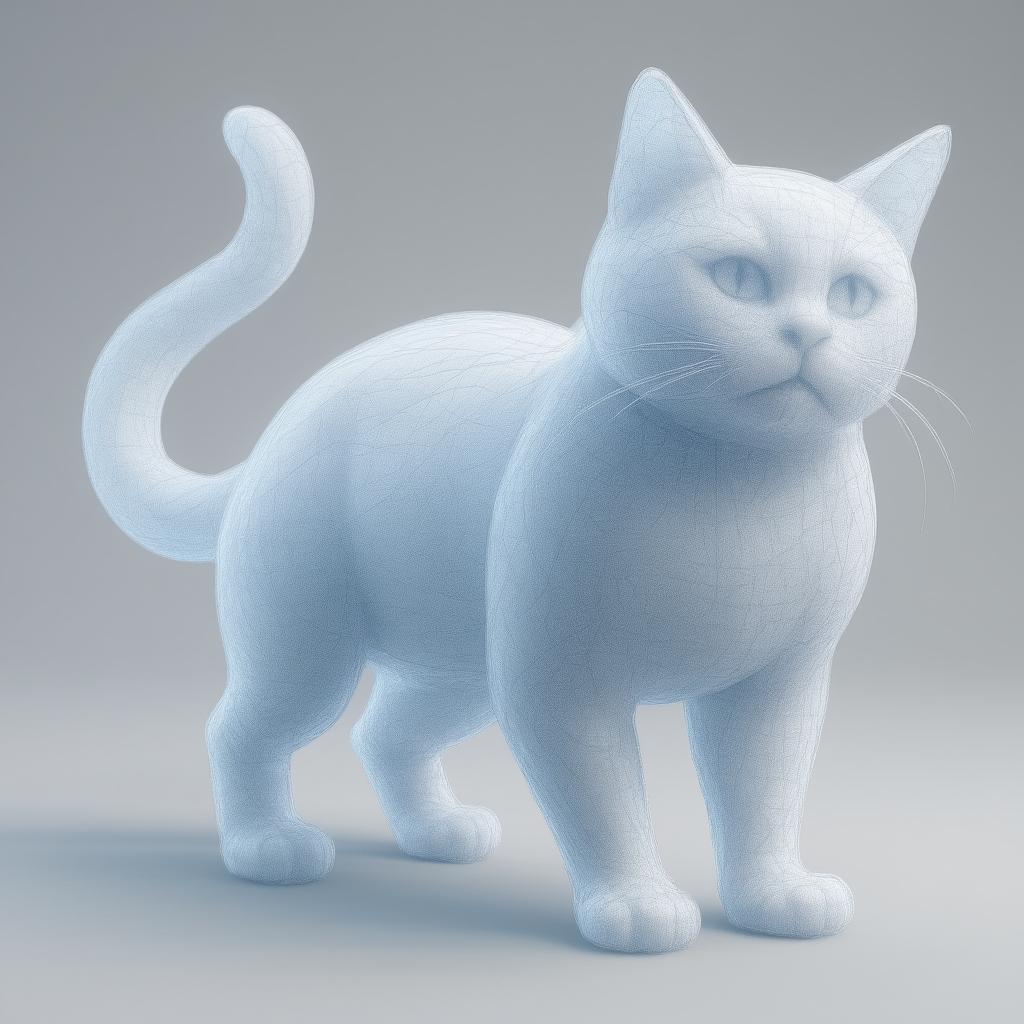
--prompt "A chubby cat made of 3D point clouds, stretching its body, translucent with a soft glow." \
--mode generate
```
如果想要开启thinking模型进行生成,可以使用`--mode think_generate`。相同的Prompt生成的效果对比:
| mode=generate |
mode=think_generate |
|

|
#### 示例1
该例题源自[SITE-Bench](https://github.com/wenqi-wang20/SITE-Bench):
```bash
python example.py \
--image_paths examples/Q1_1.png \
--question "Question: Consider the real-world 3D locations of the objects. Which is closer to the sink, the toilet paper or the towel?\nOptions: \nA. toilet paper\nB. towel\nGive me the answer letter directly. The best answer is:" \
--model_path sensenova/SenseNova-SI-1.5-InternVL3-8B
# --model_path sensenova/SenseNova-SI-1.3-Qwen3-VL-8B
```
示例1详情
Q: Question: Consider the real-world 3D locations of the objects. Which is closer to the sink, the toilet paper or the towel?\nOptions: \nA. toilet paper\nB. towel\nGive me the answer letter directly. The best answer is:
正确答案: A
#### 示例2
该例题源自[MMSI-Bench](https://github.com/InternRobotics/MMSI-Bench):
```bash
python example.py \
--image_paths examples/Q2_1.png examples/Q2_2.png \
--question "If the landscape painting is on the east side of the bedroom, where is the window located in the bedroom?\nOptions: A. North side, B. South side, C. West side, D. East side\nAnswer with the option's letter from the given choices directly. Enclose the option's letter within ``." \
--model_path sensenova/SenseNova-SI-1.5-InternVL3-8B
# --model_path sensenova/SenseNova-SI-1.3-Qwen3-VL-8B
```
示例2详情
Q: If the landscape painting is on the east side of the bedroom, where is the window located in the bedroom?\nOptions: A. North side, B. South side, C. West side, D. East side\nAnswer with the option's letter from the given choices directly. Enclose the option's letter within ``.
正确答案: C
#### 示例3
该例题源自 [MMSI-Bench](https://github.com/InternRobotics/MMSI-Bench),测试模型在开放式简答题上的能力:
```bash
python example.py \
--image_paths examples/Q3_1.png examples/Q3_2.png examples/Q3_3.png \
--question "The robot is making tea. What is the order in which the pictures were taken?" \
--model_path sensenova/SenseNova-SI-1.3-InternVL3-8B
```
示例3详情
Q: The robot is making tea. What is the order in which the pictures were taken?
正确答案: Second, first, third
#### 示例4
该例题展示模型的 **grounding** 能力,数据来自 [RefCOCO](https://github.com/lichengunc/refer):
```bash
python example.py \
--image_paths examples/Q4.png \
--question "Please provide the bounding box coordinate of the region this sentence describes: [blue shirt lady]" \
--model_path sensenova/SenseNova-SI-1.4-InternVL3-8B
```
示例4详情
Q: Please provide the bounding box coordinate of the region this sentence describes: <ref>blue shirt lady</ref>
正确答案: [0.096234, 0.161229, 0.436516, 1.000000]
#### 示例5
该例题展示模型的 **深度估计** 能力:
```bash
python example.py \
--image_paths examples/Q5.png \
--question "Identify the minimal distance between the point and the camera, in meters." \
--model_path sensenova/SenseNova-SI-1.4-InternVL3-8B
```
示例5详情
Q: Identify the minimal distance between the point and the camera, in meters.
正确答案: 4.4
#### 示例6
此示例展示模型的 **立体几何(三视图)** 能力:
```bash
python example.py \
--image_paths examples/Q6.png \
--question "Enclose your thinking process in tags and your final answer in " \
--model_path sensenova/SenseNova-SI-1.5-InternVL3-8B
```
示例6详情
Q: Enclose your thinking process in <think> </think> tags and your final answer in <answer> </answer>
正确答案: D
#### 示例7
此示例展示模型的 **立体几何(展开图)** 能力:
```bash
python example.py \
--image_paths examples/Q7.png \
--question "请将你的思考过程放在标签内,并将你的最终答案放在标签内。" \
--model_path sensenova/SenseNova-SI-1.5-InternVL3-8B
```
示例7详情
问题:请将你的思考过程放在<think> </think>标签内,并将你的最终答案放在<answer> </answer>标签内。
GT: D
#### 一次测试多个问题
构建类似于[examples/examples.jsonl](examples/examples.jsonl)的文件,每一行代表一个问题。
模型只加载一次,按逐行的顺序逐个回答问题,问题之间互不干扰。
> `jsonl`更详细的格式可以参考[单图数据](https://internvl.readthedocs.io/en/latest/get_started/chat_data_format.html#single-image-data)和[多图数据](https://internvl.readthedocs.io/en/latest/get_started/chat_data_format.html#multi-image-data)
```bash
python example.py \
--jsonl_path examples/examples.jsonl \
--model_path sensenova/SenseNova-SI-1.3-InternVL3-8B
```
### 训练
#### 1. 下载数据集
用户可选择下载 [SenseNova-SI-800K](https://huggingface.co/datasets/sensenova/SenseNova-SI-800K) (一个下采样子集,专门用于研究尺度效应)或 [SenseNova-SI-8M](https://huggingface.co/datasets/sensenova/SenseNova-SI-8M) (官方全量训练数据集).
将 [SenseNova-SI-800K](https://huggingface.co/datasets/sensenova/SenseNova-SI-800K) 下载到 `training/data/` 目录:
```bash
pip install huggingface_hub
huggingface-cli download sensenova/SenseNova-SI-800K --repo-type dataset --local-dir training/data/SenseNova-SI-800K
```
将 [SenseNova-SI-8M](https://huggingface.co/datasets/sensenova/SenseNova-SI-8M) 下载到 `training/data/` 目录:
```bash
pip install huggingface_hub
huggingface-cli download sensenova/SenseNova-SI-8M --repo-type dataset --local-dir training/data/SenseNova-SI-8M
```
#### 2(a). 训练InternVL架构模型
**载预训练模型**
将 [InternVL3-8B](https://huggingface.co/OpenGVLab/InternVL3-8B) 下载到 training/pretrained_models/:
```bash
huggingface-cli download OpenGVLab/InternVL3-8B --local-dir training/pretrained_models/OpenGVLab/InternVL3-8B
```
**安装依赖**
```bash
conda create -n internvl python=3.10 -y
conda activate internvl
pip install uv
uv pip install -r training/InternVL/requirements.txt
uv pip install flash-attn==2.3.6
```
**开始训练**
```bash
bash training/InternVL/internvl_chat/shell/sensenova_si_800K_internvl3_8b.sh #用SenseNova-SI-800K数据训练
bash training/intern_vl/internvl_chat/shell/sensenova_si_8M_internvl3_8b.sh #或者用SenseNova-SI-8M数据训练
```
#### 2(b). 训练Qwen3-VL架构模型
训练框架为 [lmms-engine](https://github.com/EvolvingLMMs-Lab/lmms-engine),作为一个 Git 子模块包含在 `training/pretrained_models/` 目录下。
**下载预训练模型**
将 [Qwen3VL-8B](https://github.com/QwenLM/Qwen3-VL) 下载到 `training/pretrained_models/`:
```bash
huggingface-cli download Qwen/Qwen3-VL-8B-Instruct --local-dir training/pretrained_models/Qwen/Qwen3-VL-8B-Instruct
```
**安装依赖**
```bash
# Initialize the lmms-engine submodule (first time only)
git submodule update --init --recursive
conda create -n qwen3vl python=3.10 -y
uv pip install -e training/lmms-engine
# Optional: Performance optimizations
uv pip install flash-attn --no-build-isolation
uv pip install liger-kernel
```
**数据预处理**
先将 `SenseNova-SI-800K.jsonl` 和 `SenseNova-SI-8M.jsonl` 转换为 Qwen3-VL 训练数据格式:
```bash
python training/qwen3_vl/preprocess_sensenova_si_dataset.py \
--src data/SenseNova-SI-800K.jsonl \
--dst data/SenseNova-SI-800K_qwen3vl_format.jsonl #预处理 SenseNova-SI-800K数据
python training/qwen3_vl/preprocess_sensenova_si_dataset.py \
--src data/SenseNova-SI-8M.jsonl \
--dst data/SenseNova-SI-8M_qwen3vl_format.jsonl #预处理 SenseNova-SI-8M数据
```
**准备数据 YAML**
参考 [training/qwen3_vl/data_800K.yaml](training/qwen3_vl/data_800K.yaml) 和 [training/qwen3_vl/data_8M.yaml](training/qwen3_vl/data_8M.yaml)
**配置训练参数**
参考 [training/qwen3_vl/train_config_800K.yaml](training/qwen3_vl/train_config_800K.yaml) 和 [training/qwen3_vl/train_config_8M.yaml](training/qwen3_vl/train_config_8M.yaml)
**开始训练**
```bash
# Single node, 8 GPUs (default)
bash training/qwen3_vl/run.sh 800K #用SenseNova-SI-800K数据训练
bash training/qwen3_vl/run.sh 8M #或者用SenseNova-SI-8M数据训练
```
#### 2(c). 训练BAGEL架构模型
**下载预训练模型**
将 [BAGEL-7B-MoT](https://huggingface.co/ByteDance-Seed/BAGEL-7B-MoT) 下载到 training/pretrained_models/:
```bash
huggingface-cli download ByteDance-Seed/BAGEL-7B-MoT --local-dir training/pretrained_models/BAGEL-7B-MoT
```
**安装依赖**
```bash
conda create -n bagel python=3.10 -y
conda activate bagel
pip install uv
uv pip install -r training/Bagel/requirements.txt
uv pip install flash_attn==2.5.8 --no-build-isolation
```
**开始训练**
```bash
bash training/Bagel/scripts/train_sensenova_si_800K.sh #用SenseNova-SI-800K数据训练
bash training/bagel/scripts/train_sensenova_si_8M.sh #或者用SenseNova-SI-8M数据训练
```
有关训练超参数(如学习率、batch size、FSDP 配置等)的详细信息,请参考 [training/Bagel/TRAIN.md](training/Bagel/TRAIN.md)。
### 评测
如需复现上述基准测试结果,请参考 [EASI](https://github.com/EvolvingLMMs-Lab/EASI) 在主流空间智能基准上评估 SenseNova-SI 的表现。
EASI 支持超过 20 种空间智能模型和 20 多种空间基准,并提供 Docker 实现一键式空间智能评估。
### 致谢
本项目包含基于 BAGEL、InternVL、lmms-engine 团队原始代码修改的代码。
* 源代码仓库:[BAGEL](https://github.com/bytedance-seed/BAGEL)、[InternVL](https://github.com/opengvlab/internvl)、[lmms-engine](https://github.com/EvolvingLMMs-Lab/lmms-engine)
我们衷心感谢原作者及贡献者的工作。
请参阅原始仓库以获取完整细节、更新及许可信息。
## 🖊️ 引用
```bib
@InProceedings{sensenova-si,
title = {Scaling Spatial Intelligence with Multimodal Foundation Models},
author = {Cai, Zhongang and Wang, Ruisi and Gu, Chenyang and Pu, Fanyi and Xu, Junxiang and Wang, Yubo and Yin, Wanqi and Yang, Zhitao and Wei, Chen and Sun, Qingping and Zhou, Tongxi and Li, Jiaqi and Pang, Hui En and Qian, Oscar and Wei, Yukun and Lin, Zhiqian and Shi, Xuanke and Deng, Kewang and Han, Xiaoyang and Chen, Zukai and Fan, Xiangyu and Deng, Hanming and Lu, Lewei and Pan, Liang and Li, Bo and Liu, Ziwei and Wang, Quan and Lin, Dahua and Yang, Lei},
booktitle = {Proceedings of the IEEE/CVF Conference on Computer Vision and Pattern Recognition (CVPR)},
year = {2026}
}
```









