# SED
## 论文
`SED: A Simple Encoder-Decoder for Open-Vocabulary Semantic Segmentation`
- https://arxiv.org/abs/2311.15537
## 模型结构
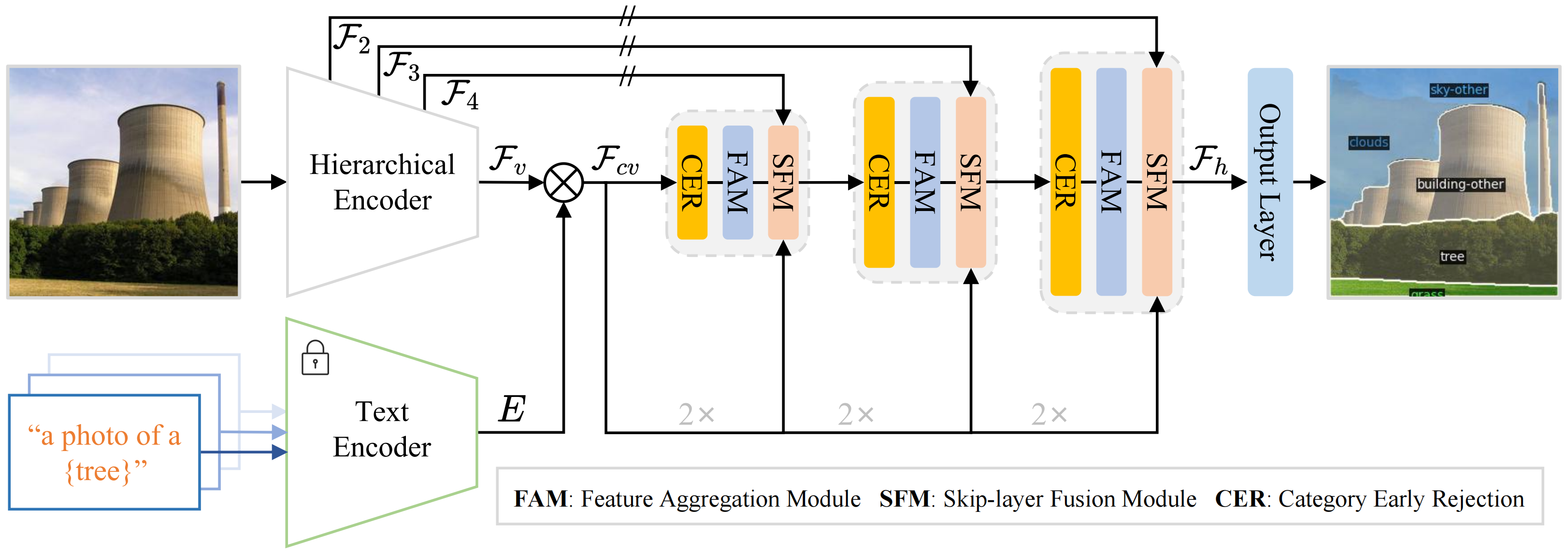
SED的总体架构,首先使用分层编码器(可学习的)和文本编码器(冻结的)来生成像素级的图像-文本成本图。然后,我们引入了一种渐进融合解码器,将不同的层次编码器特征映射和成本图相结合。渐进融合解码器堆栈具有聚合模块(FAM)和跳跃层融合模块(SFM)。此外,我们在解码器中设计了一个类别早期屏蔽(CER),以在不牺牲性能的情况下加速推理速度。
## 算法原理
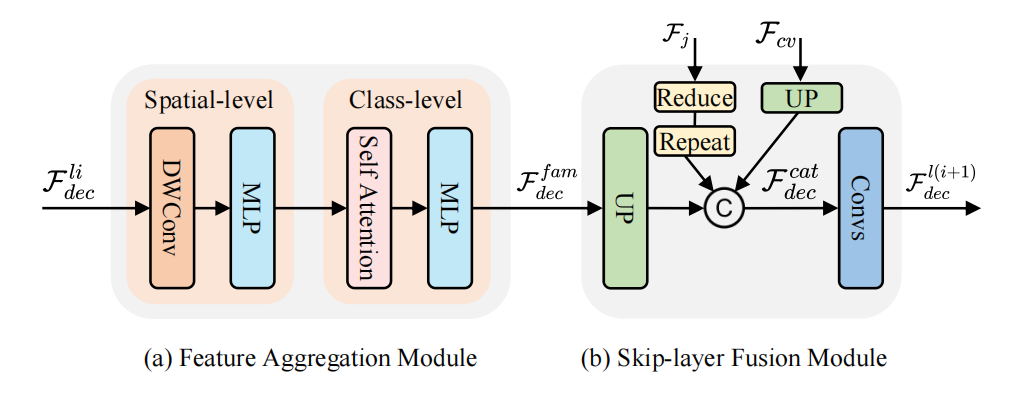
渐进融合解码器的结构如下图所示。渐进融合解码器(GFD)首先在空间和类层次上进行特征聚合(a),然后采用跳层融合(b)将之前解码层和层次编码器的特征映射结合起来。
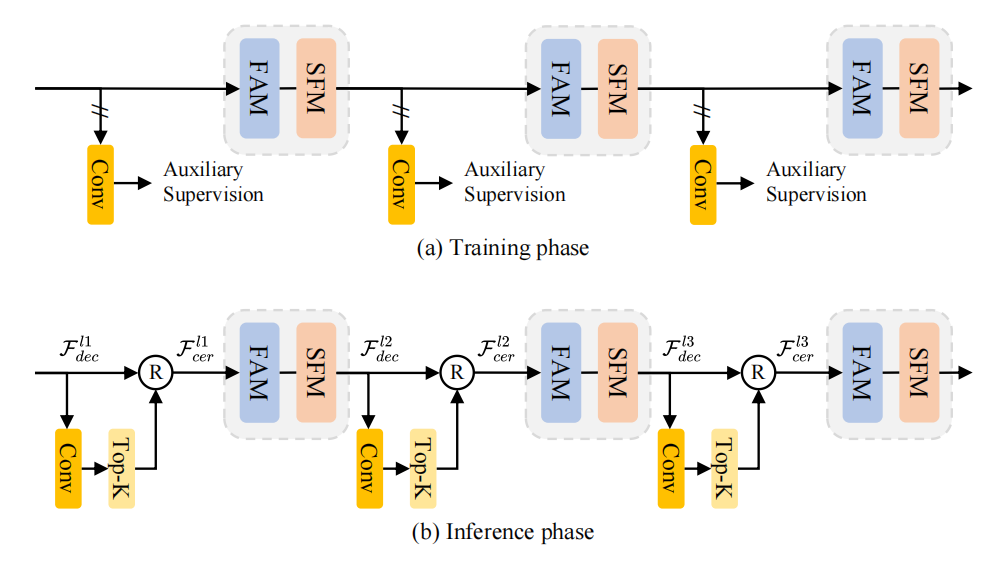
类别早期屏蔽(CER)结构如下图。在训练(a)期间,在每个解码器层之后附加一个辅助卷积来预测由标签监督的分割图。在推理(b)过程中,采用top-k策略来预测现有的类别,并拒绝下一个解码器层中不存在的类别。
## 环境配置
### Docker(方法一)
此处提供[光源](https://www.sourcefind.cn/)拉取docker镜像的地址与使用步骤,以及[光合](https://developer.sourcefind.cn/tool/)开发者社区深度学习库下载地址
```
docker pull image.sourcefind.cn:5000/dcu/admin/base/pytorch:2.1.0-ubuntu20.04-dtk24.04.2-py3.8
docker run -it --shm-size=128G -v /path/your_code_data/:/path/your_code_data/ -v /opt/hyhal:/opt/hyhal:ro --privileged=true --device=/dev/kfd --device=/dev/dri/ --group-add video --name sed bash # 为以上拉取的docker的镜像ID替换,本镜像为:ffa1f63239fc
cd /path/your_code_data/sed_pytorch
pip install -r requirements.txt -i https://mirrors.aliyun.com/pypi/simple/ --trusted-host mirrors.aliyun.com
#安装detectron2-0.6
cd whl
pip install detectron2-0.6-cp38-cp38-linux_x86_64.whl
cd ..
cd open_clip/
make install
```
### Dockerfile(方法二)
此处提供dockerfile的使用方法
```
docker build --no-cache -t sed:latest .
docker run -it --shm-size=128G -v /path/your_code_data/:/path/your_code_data/ -v /opt/hyhal:/opt/hyhal:ro --privileged=true --device=/dev/kfd --device=/dev/dri/ --group-add video --name sed_pytorch sed bash
cd /path/your_code_data/sed_pytorch
pip install -r requirements.txt -i https://mirrors.aliyun.com/pypi/simple/ --trusted-host mirrors.aliyun.com
#安装detectron2-0.6
cd whl
pip install detectron2-0.6-cp38-cp38-linux_x86_64.whl
cd ..
cd open_clip/
make install
```
### Anaconda(方法三)
此处提供本地配置、编译的详细步骤,例如:
关于本项目DCU显卡所需的特殊深度学习库可从[光合](https://developer.sourcefind.cn/tool/)开发者社区下载安装。
```
DTK驱动:dtk24.04.2
python:python3.8
torch: 2.1.0
torchvision: 0.16.0
```
`Tips:以上dtk驱动、python、torch等DCU相关工具版本需要严格一一对应`
其它依赖环境安装如下:
```
cd /path/your_code_data/sed_pytorch
cd whl
pip install detectron2-0.6-cp38-cp38-linux_x86_64.whl
pip install -r requirements.txt -i https://mirrors.aliyun.com/pypi/simple/ --trusted-host mirrors.aliyun.com
cd open_clip/
make install
```
## 数据集
SED 内置了对一些数据集的支持。假定数据集存在于环境变量 DETECTRON2_DATASETS 指定的目录中。在此目录下,Detectron2 将查找具有下述结构的数据集。
可以通过导出 DETECTRON2_DATASETS=/path/to/datasets 设置内置数据集的位置。如果未设置,默认值是相对于当前工作目录的 ./datasets,默认数据结构如下:
```
── datasets
│ ├── coco-stuff
│ ├── ADEChallengeData2016
│ ├── ADE20K_2021_17_01
│ ├── VOCdevkit
│ │ ├── VOC2010
│ │ └── VOC2012
```
数据准备详情查看[dataset/readme.md](https://developer.sourcefind.cn/codes/modelzoo/sed_pytorch/-/blob/master/datasets/README.md)。
数据集SCnet快速下载链接:[coco-stuff](https://www.modelscope.cn/datasets/OmniData/COCO-Stuff)、[coco2017](https://cocodataset.org/#home)、[ADEChallengeData2016](http://data.csail.mit.edu/places/ADEchallenge/ADEChallengeData2016.zip)、[ADE20K_2021_17_01](https://ade20k.csail.mit.edu/index.html)、[VOCdevkit](https://link.zhihu.com/?target=http%3A//host.robots.ox.ac.uk/pascal/VOC/voc2012/)
## 训练
首先下载模型文件CLIP-convnext_base_w_320-laion_aesthetic-s13B-b82K和laionCLIP-convnext_large_d_320.laion2B-s29B-b131K-ft-soup,放于weights目录下:
[CLIP-convnext_base_w_320-laion_aesthetic-s13B-b82K](https://huggingface.co/laion/CLIP-convnext_base_w_320-laion_aesthetic-s13B-b82K)
[laionCLIP-convnext_large_d_320.laion2B-s29B-b131K-ft-soup](https://huggingface.co/laion/CLIP-convnext_large_d_320.laion2B-s29B-b131K-ft-soup)
注:使用本地模型文件时修改/open_clip/src/open_clip/pretrained.py文件中download_pretrained_from_hf函数下的cached_file地址为对应的权重本地文件夹地址,例如:
```
#ConvNeXt-B
cached_file = './weights/CLIP-convnext_base_w_320-laion_aesthetic-s13B-b82K/open_clip_pytorch_model.bin'
```
### 单机多卡
```
sh run.sh [CONFIG] [NUM_GPUS] [OUTPUT_DIR] [OPTS]
# For ConvNeXt-B variant
sh run.sh configs/convnextB_768.yaml 4 output/
# For ConvNeXt-L variant
sh run.sh configs/convnextL_768.yaml 4 output/
```
## 推理
模型权重文件下载表格如下,放到weights文件夹下:
| Name | CLIP | Download |
|:------------:|:----------:|--------------------------------------------------------------------------------|
| SED (B) | ConvNeXt-B | [ckpt](https://drive.google.com/file/d/1qx6zGZgSPkF6TObregRz4uzQqSRHrgUw/view) |
| SED-fast (B) | ConvNeXt-B | [ckpt](https://drive.google.com/file/d/1qx6zGZgSPkF6TObregRz4uzQqSRHrgUw/view) |
| SED (L) | ConvNeXt-L | [ckpt](https://drive.google.com/file/d/1zAXE0QXy47n0cVn7j_2cSR85eqxdDGg8/view) |
| SED-fast (L) | ConvNeXt-L | [ckpt](https://drive.google.com/file/d/1zAXE0QXy47n0cVn7j_2cSR85eqxdDGg8/view) |
注意:模型配置文件、clip文件与权重文件应一一对应
### 单卡推理
```
#sh eval.sh [CONFIG] [NUM_GPUS] [OUTPUT_DIR] [OPTS]
#sh eval.sh configs/convnextB_768.yaml 1 output/ MODEL.WEIGHTS path/to/weights.pth
sh eval.sh configs/convnextB_768.yaml 1 output/ MODEL.WEIGHTS ./weights/sed_model_base.pth
# Fast version.
#sh eval.sh configs/convnextB_768.yaml 1 output/ MODEL.WEIGHTS path/to/weights.pth TEST.FAST_INFERENCE True TEST.TOPK 8
sh eval.sh configs/convnextB_768.yaml 1 output/ MODEL.WEIGHTS ./weights/sed_model_base.pth TEST.FAST_INFERENCE True TEST.TOPK 8
```
Demo_for_vis:
```
# python demo/demo_for_vis.py --input image_path --output result_path --opts MODEL.WEIGHTS path/to/your/pretrained_model.pth
# image_path: A list of space separated input images; or a single glob pattern such as 'directory/*.jpg'
python demo/demo_for_vis.py --input ./docs/ADE_val_00000001_Original.jpg --output demo_results --opts MODEL.WEIGHTS ./weights/sed_model_base.pth
```
### 多卡推理
```
#sh run.sh [CONFIG] [NUM_GPUS] [OUTPUT_DIR] [OPTS]
$sh eval.sh configs/convnextB_768.yaml 4 output/ MODEL.WEIGHTS path/to/weights.pth
sh eval.sh configs/convnextB_768.yaml 4 output/ MODEL.WEIGHTS ./weights/sed_model_base.pth
# Fast version.
#sh eval.sh configs/convnextB_768.yaml 4 output/ MODEL.WEIGHTS path/to/weights.pth TEST.FAST_INFERENCE True TEST.TOPK 8
sh eval.sh configs/convnextB_768.yaml 4 output/ MODEL.WEIGHTS ./weights/sed_model_base.pth TEST.FAST_INFERENCE True TEST.TOPK 8
```
## result
原图:
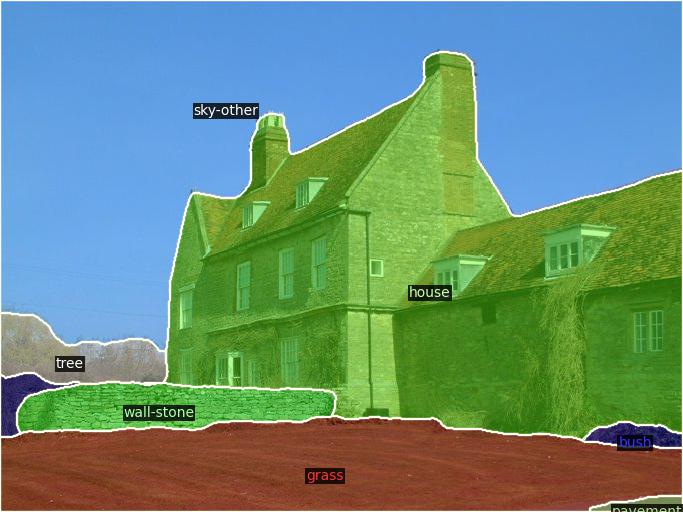
Demo_for_vis可视化结果如下:
### 精度
使用四张DCU-K100卡推理
| Name | CLIP | A-847 | PC-459 | A-150 | PC-59 | PAS-20 |
|:------------:|:-------------------------:|------|------|-------|-------|--------|
| SED (B) | ConvNeXt-B | 11.2 | 18.6 | 31.7 | 57.7 | 94.4 |
| SED-fast (B) | ConvNeXt-B | 11.3 | 18.6 | 31.6 | 57.3 | 94.4 |
| SED (L) | ConvNeXt-L | 13.7 | 22.1 | 35.3 | 60.9 | 96.1 |
| SED-fast (L) | ConvNeXt-L | 13.9 | 22.6 | 35.2 | 60.6 | 96.1 |
## 应用场景
### 算法类别
`图像分割`
### 热点应用行业
`科研,制造,医疗,家居,教育`
## 源码仓库及问题反馈
- https://developer.sourcefind.cn/codes/modelzoo/sed_pytorch
## 参考资料
- https://github.com/xb534/SED