# RVC
一个基于VITS简单易用的变声框架,使用少量数据进行训练也能得到较好结果,方便直播娱乐。
## 论文
`Conditional Variational Autoencoder with Adversarial Learning for End-to-End Text-to-Speech`
- https://proceedings.mlr.press/v139/kim21f/kim21f.pdf
## 模型结构
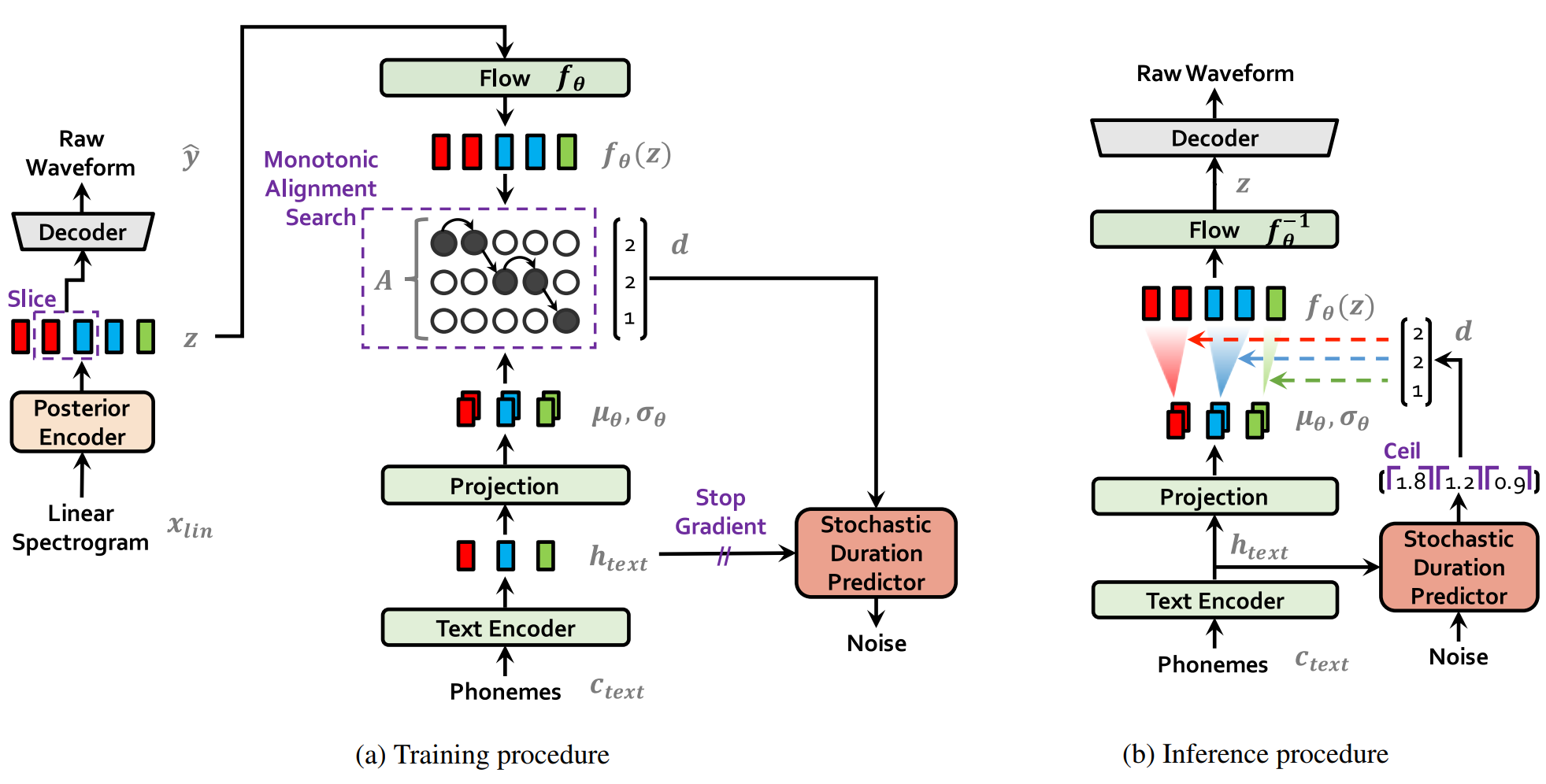
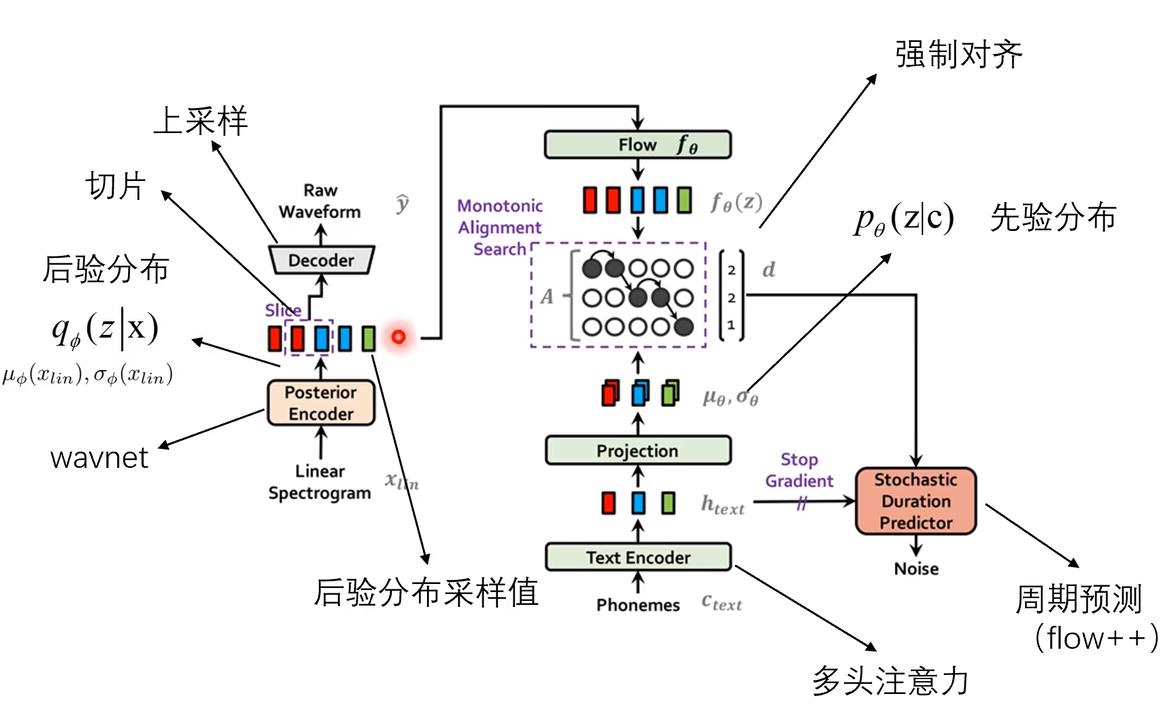
VITS是一个基于Flow算法的端到端TTS模型,结合VAE、FLOW和GAN三种算法,提出随机持续时间预测器处理不同节奏,通过MonotonicAlignmentSearch实现文本和音频的对齐。
## 算法原理
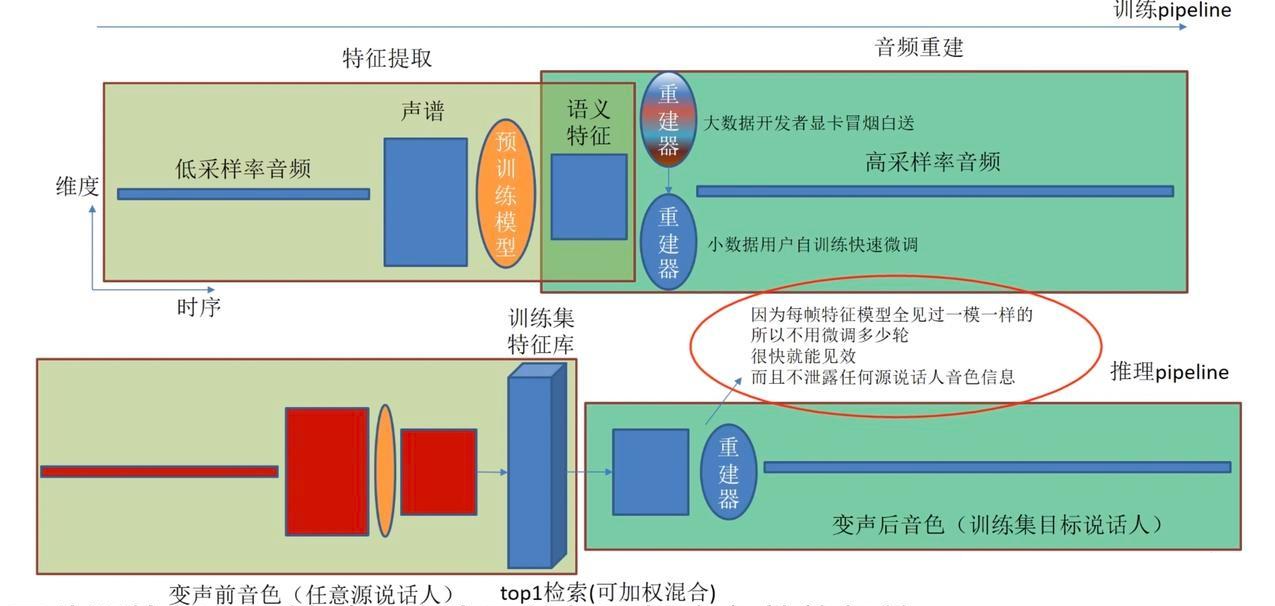
RVC训练一个Encoder-Decoder对,通过更换Decoder(或微调Decoder的权重)来实现变声。
## 环境配置
```
mv Retrieval-based-Voice-Conversion-WebUI_pytorch Retrieval-based-Voice-Conversion-WebUI # 去框架名后缀
```
### Docker(方法一)
```
docker pull image.sourcefind.cn:5000/dcu/admin/base/pytorch:2.1.0-ubuntu20.04-dtk24.04.1-py3.10
# 为以上拉取的docker的镜像ID替换,本镜像为:a4dd5be0ca23
docker run -p 7865:7865 -it --shm-size=64G -v $PWD/Retrieval-based-Voice-Conversion-WebUI:/home/Retrieval-based-Voice-Conversion-WebUI -v /opt/hyhal:/opt/hyhal:ro --privileged=true --device=/dev/kfd --device=//dev/dri/ --group-add video --name rvc bash
cd /home/Retrieval-based-Voice-Conversion-WebUI
pip install -r requirements.txt # requirements.txt
apt install ffmpeg # 其它系统借鉴Ubuntu安装方法
pip install ffmpeg-python # 需先安装ffmpeg再安装ffmpeg-python才能正常生效
```
`若遇到无法安装ffmpeg则可以更新apt下载源为清华源:`
```
cp /etc/apt/sources.list /etc/apt/sources.list.backup
vim /etc/apt/sources.list
# 清华大学镜像源:
deb https://mirrors.tuna.tsinghua.edu.cn/ubuntu/ focal main restricted
deb https://mirrors.tuna.tsinghua.edu.cn/ubuntu/ focal-updates main restricted
deb https://mirrors.tuna.tsinghua.edu.cn/ubuntu/ focal universe
deb https://mirrors.tuna.tsinghua.edu.cn/ubuntu/ focal-updates universe
deb https://mirrors.tuna.tsinghua.edu.cn/ubuntu/ focal multiverse
deb https://mirrors.tuna.tsinghua.edu.cn/ubuntu/ focal-updates multiverse
deb https://mirrors.tuna.tsinghua.edu.cn/ubuntu/ focal-backports main restricted universe multiverse
deb https://mirrors.tuna.tsinghua.edu.cn/ubuntu/ focal-security main restricted
deb https://mirrors.tuna.tsinghua.edu.cn/ubuntu/ focal-security universe
deb https://mirrors.tuna.tsinghua.edu.cn/ubuntu/ focal-security multiverse
# 以上清华镜像源添加到sources.list末尾
apt update
```
### Dockerfile(方法二)
```
cd Retrieval-based-Voice-Conversion-WebUI/docker
docker build --no-cache -t rvc:latest .
docker run -p 7865:7865 --shm-size=64G -v /opt/hyhal:/opt/hyhal:ro --privileged=true --device=/dev/kfd --device=/dev/dri/ --group-add video -v $PWD/../../Retrieval-based-Voice-Conversion-WebUI:/home/Retrieval-based-Voice-Conversion-WebUI -it rvc bash
# 若遇到Dockerfile启动的方式安装环境需要长时间等待,可注释掉里面的pip安装,启动容器后再安装python库:pip install -r requirements.txt。
apt install ffmpeg # 其它系统借鉴Ubuntu安装方法
pip install ffmpeg-python # 需先安装ffmpeg再安装ffmpeg-python才能正常生效
# 若遇到无法安装ffmpeg可借鉴方法一添加清华源
```
### Anaconda(方法三)
1、关于本项目DCU显卡所需的特殊深度学习库可从光合开发者社区下载安装:
- https://developer.sourcefind.cn/tool/
```
DTK驱动:dtk24.04.1
python:python3.10
torch:2.1.0
torchvision:0.16.0
```
`Tips:以上dtk驱动、python、torch等DCU相关工具版本需要严格一一对应。`
2、其它非特殊库参照requirements.txt安装
```
pip install -r requirements.txt # requirements.txt
apt install ffmpeg # 其它系统借鉴Ubuntu安装方法
pip install ffmpeg-python # 需先安装ffmpeg再安装ffmpeg-python才能正常生效
# 若遇到无法安装ffmpeg可借鉴方法一添加清华源
```
`Tips:建议芯片版本>=K100AI、dtk版本>=24.04.1`
## 数据集
本项目的训练数据需要干净纯粹的源声音和目标声音,可借助以下工具进行初步制作,专业玩家请忽视,直接采用专业软件进行制作:
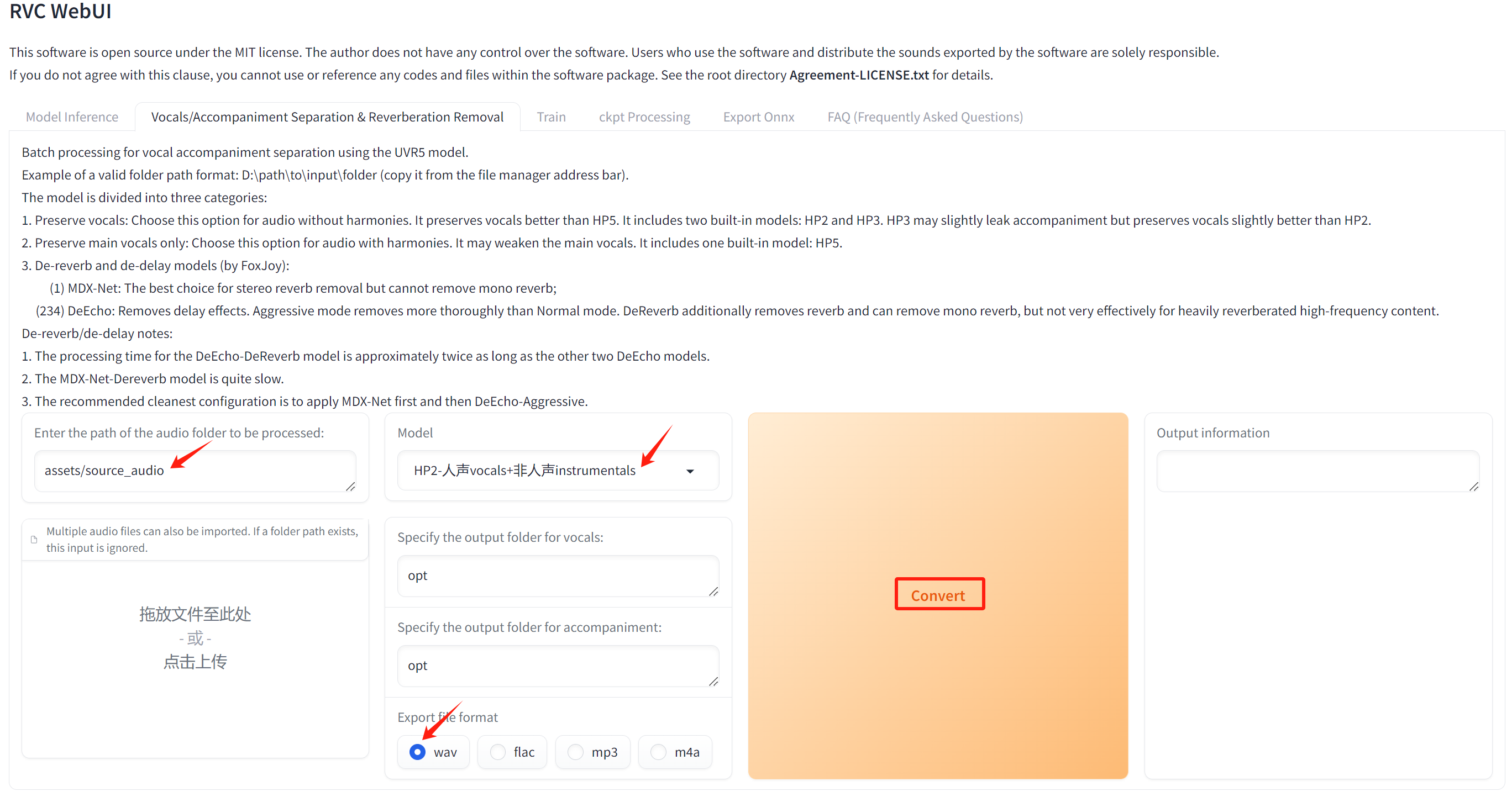
在线声音剪辑/录音工具: [`喜马拉雅音剪`](https://yunjianji.ximalaya.com/) ,YouTube在线声音提取工具:[`YtMp3`](https://ytmp3s.nu/Ok4t/) ,人声背景音乐分离工具(本项目web版自带)`uvr5`,使用方式如下图:
本项目试验董宇辉模仿刘德华的声音,所有干声皆采用上述工具即可获得,本试验仅供娱乐和算法开源研究,无任何商业行为,训练数据目录结构如下:
```
assets/
├── vocal_liudehua.mp3_10.wav
├── source_audio/
│ ├── dongyuhui.mp3
```
## 训练
### 单机单卡
预训练权重准备如下:
```
# 基础预训练权重
cp -r VoiceConversionWebUI/pretrained_v2/f0G40k.pth assets/pretrained_v2/
cp -r VoiceConversionWebUI/pretrained_v2/f0D40k.pth assets/pretrained_v2/
# 语音识别预训练权重
cp -r VoiceConversionWebUI/hubert_base.pt assets/hubert/
# 人声背景分离预训练权重
cp -r VoiceConversionWebUI/uvr5_weights/* assets/uvr5_weights/
# RMVPE人声音高提取预训练权重
cp -r VoiceConversionWebUI/rmvpe.pt assets/rmvpe/
```
```
export HIP_VISIBLE_DEVICES=0
python infer-web.py
# 然后尝试在本地浏览器输入此类网址进行后续线上web操作:http://服务器ip:7865/、http://localhost:7865/
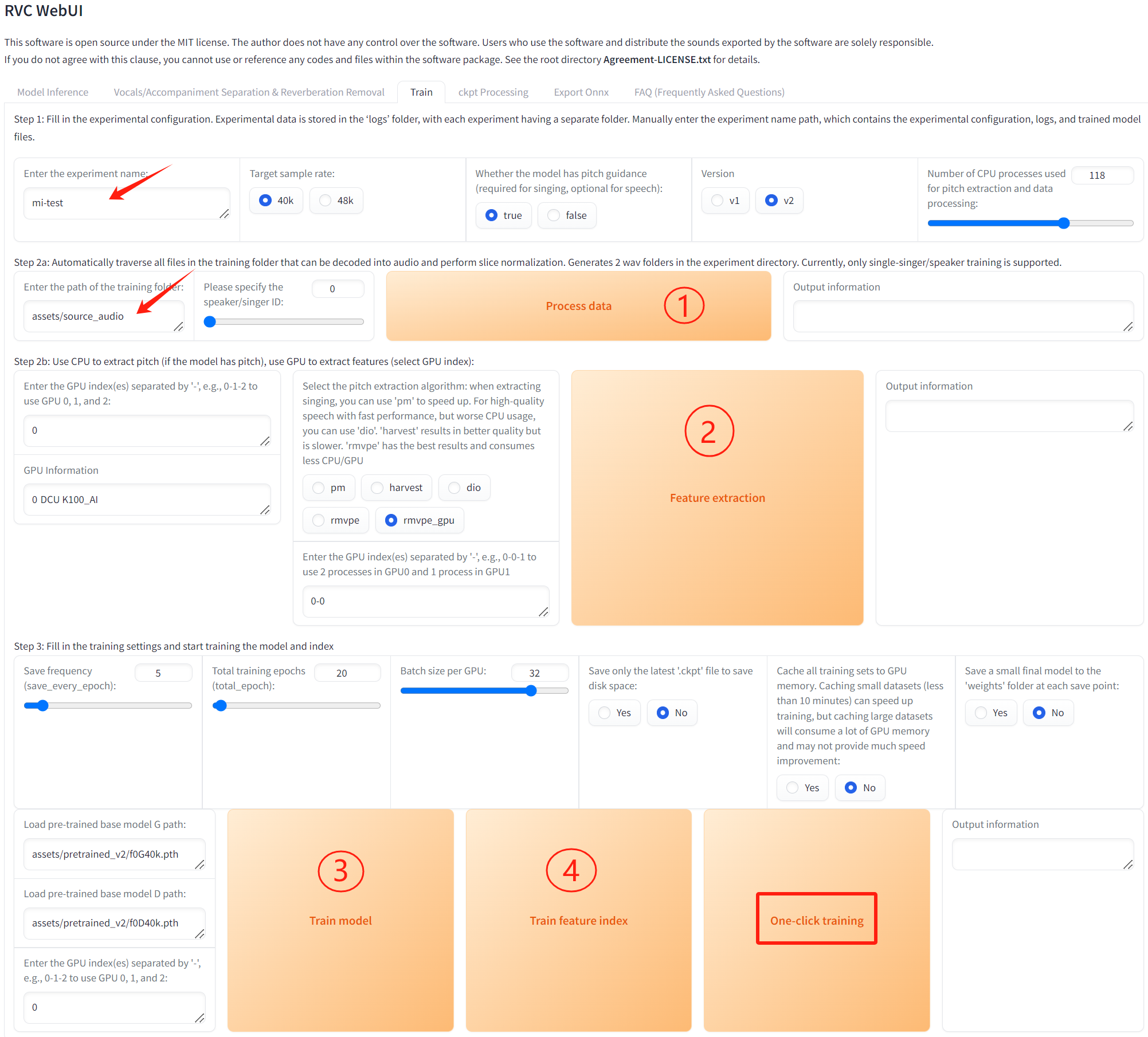
# 如下图填入所需路径,按数字步骤依次点击运行来完成训练,也可直接点击一键训练,如点击无反应可以通过刷新网页来解决(源项目不太稳定,可能出现些许报错,但仍可以完成训练。)。
```
更多资料可参考源项目的[`README_origin`](./README_origin.md)
## 推理
### 单机单卡
```
export HIP_VISIBLE_DEVICES=0
python infer-web.py
# 然后尝试在本地浏览器输入此类网址进行后续线上web操作:http://服务器ip:7865/、http://localhost:7865/
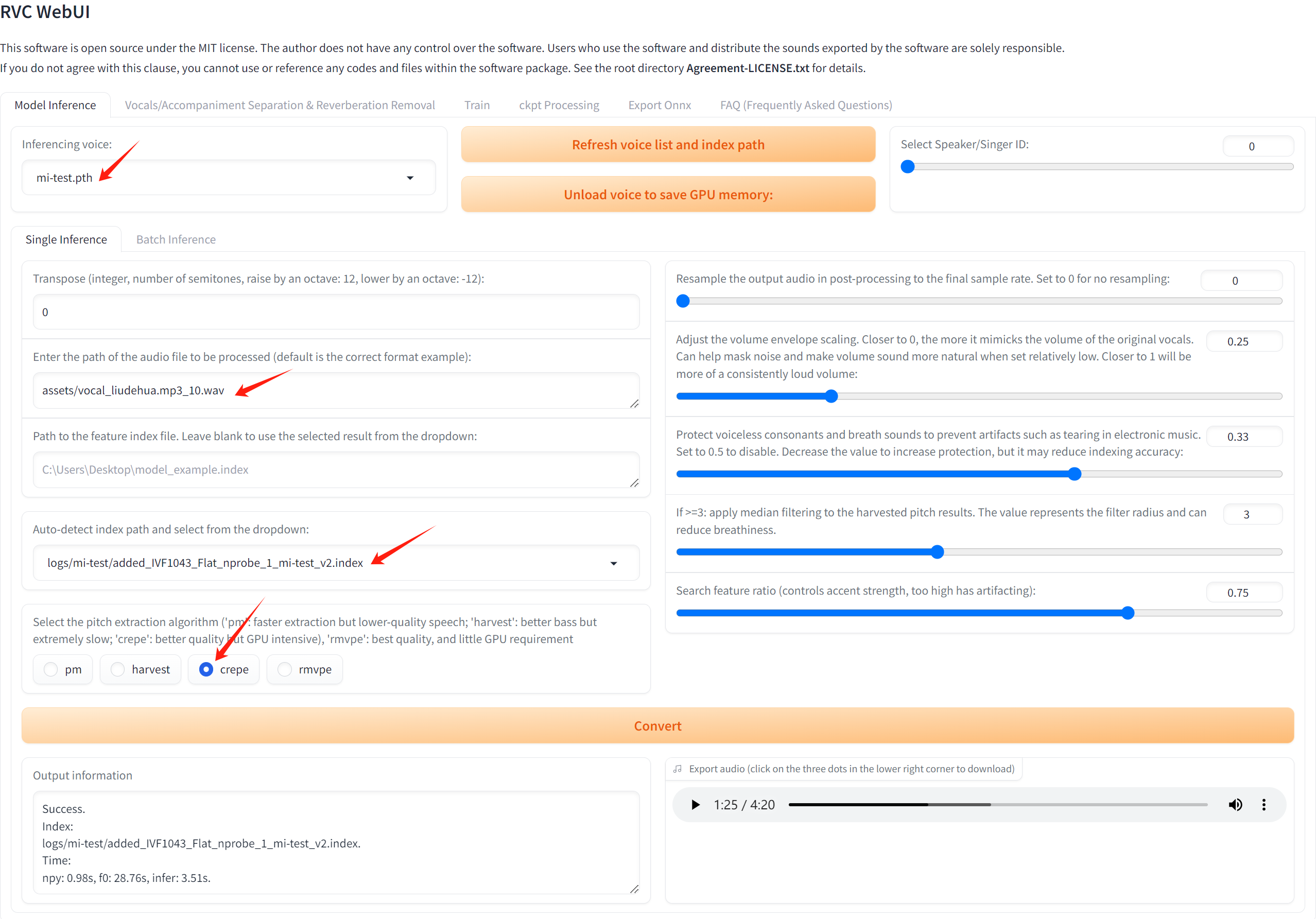
# 如下图填入所需路径,最先填"Auto-detect index path and select from the dropdown:",否则容易报错,最后点击convert即可,如点击无反应或报错可以通过刷新整个网页来解决(源项目不太稳定)。
# 本试验中RVC的DCU K100AI推理速度约为GPU A800的3.4倍。
```
## result
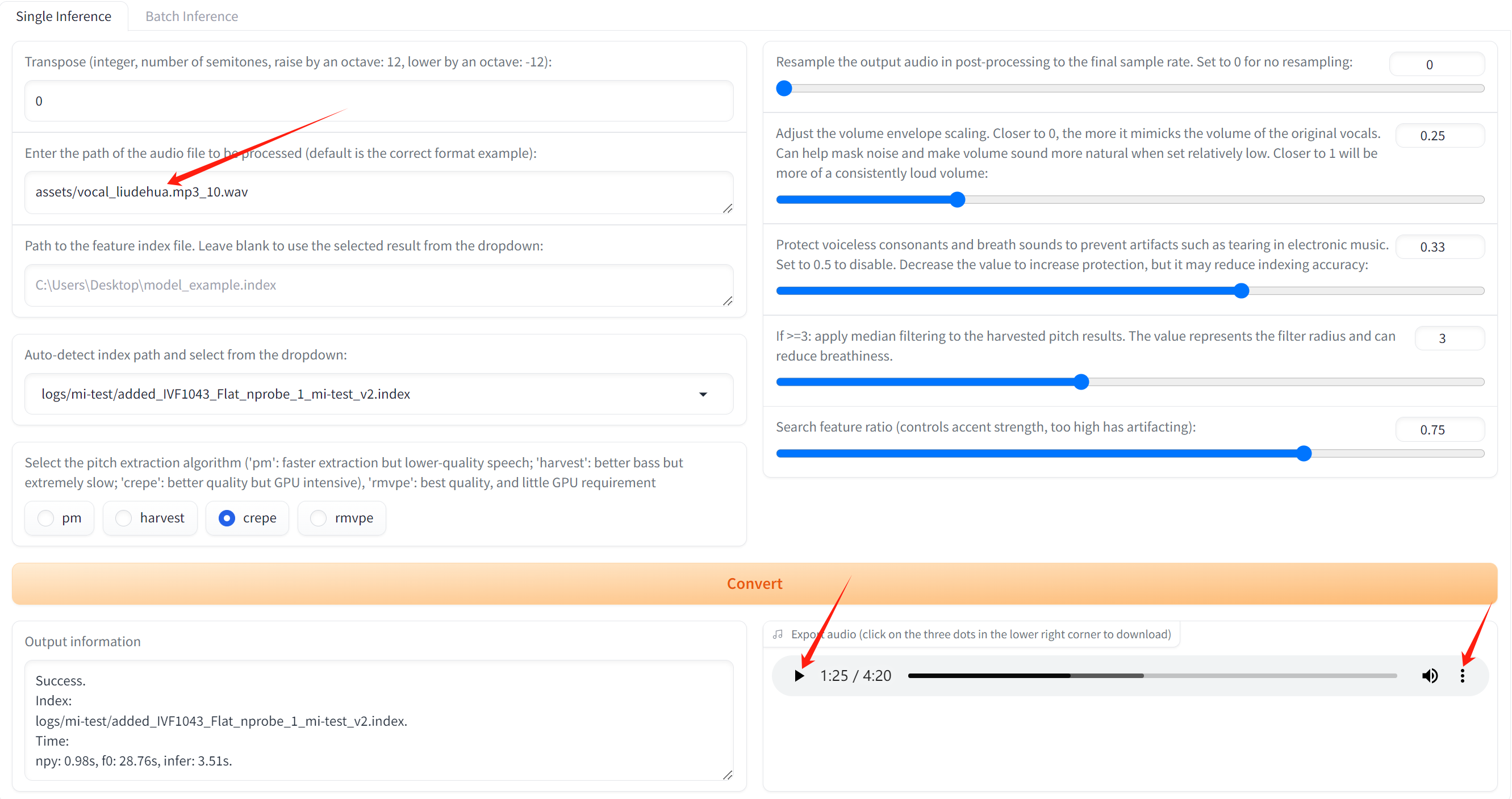
输入输出效果同上述推理页面效果,点击播放、下载即可试听:
### 精度
DCU K100AI与GPU A800精度一致,训练框架:pytorch。
## 应用场景
### 算法类别
`语音合成`
### 热点应用行业
`直播,影视,电商`
## 预训练权重
Hugging Face 预训练权重地址: [lj1995/VoiceConversionWebUI](https://huggingface.co/lj1995/VoiceConversionWebUI/tree/main) 。
## 源码仓库及问题反馈
- http://developer.sourcefind.cn/codes/modelzoo/retrieval-based-voice-conversion-webui_pytorch.git
## 参考资料
- https://github.com/RVC-Project/Retrieval-based-Voice-Conversion-WebUI.git