# Qwen2-VL
## 论文
Qwen2-VL: Enhancing Vision-Language Model's Perception of the World at Any Resolution
-https://arxiv.org/abs/2409.12191
## 模型结构
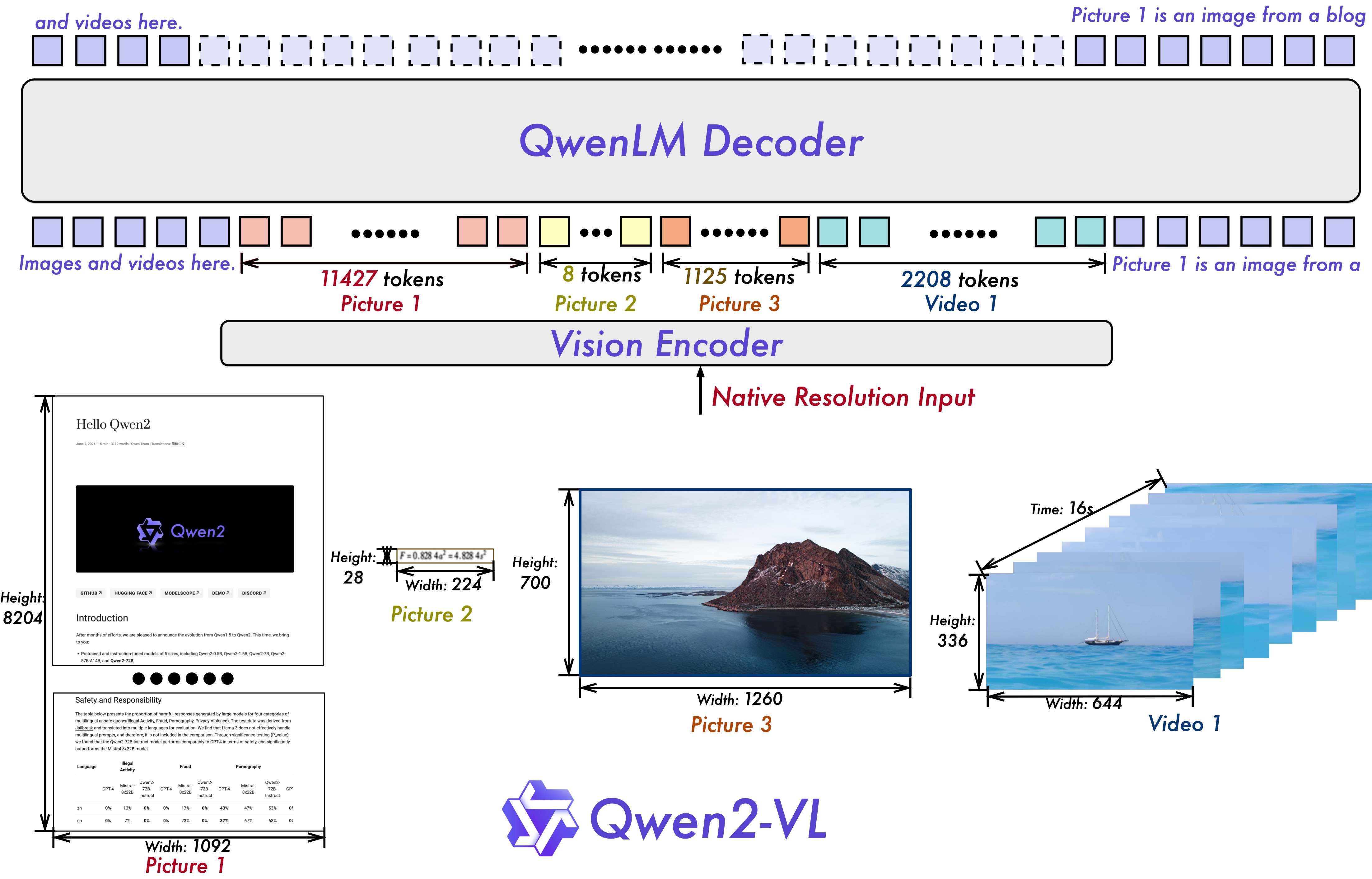
整体上Qwen2-VL仍然延续了 Qwen-VL 中 ViT 加 Qwen2 的串联结构,在三个不同尺度的模型上,都采用 600M 规模大小的 ViT,并且支持图像和视频统一输入。
## 算法原理
为了让模型更清楚地感知视觉信息和理解视频,还进行了以下升级:
- Qwen2-VL 在架构上的一大改进是实现了对原生动态分辨率的全面支持。与上一代模型相比,Qwen2-VL 能够处理任意分辨率的图像输入,不同大小图片被转换为动态数量的 tokens,
最小只占 4 个 tokens。这种设计不仅确保了模型输入与图像原始信息之间的高度一致性,更是模拟了人类视觉感知的自然方式,赋予模型处理任意尺寸图像的强大能力,
使其在图像处理领域展现出更加灵活和高效的表现。
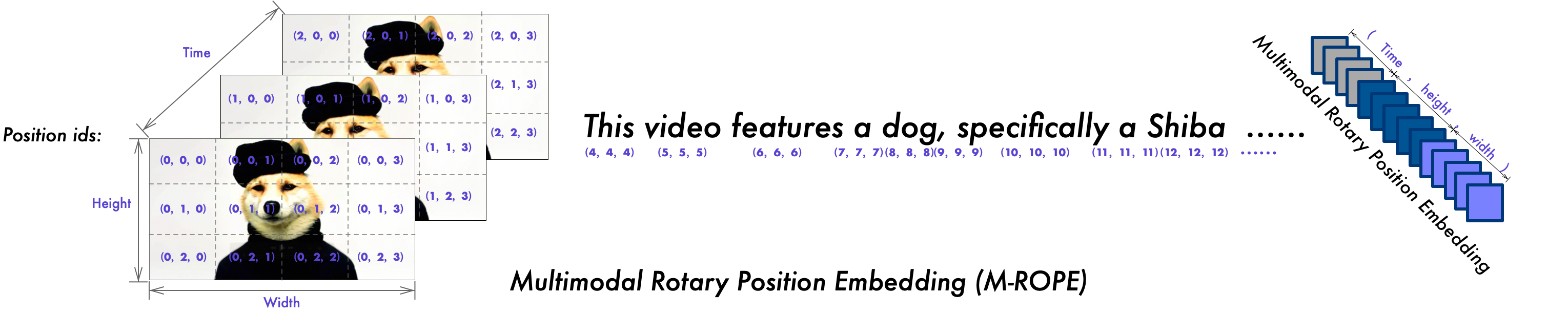
- Qwen2-VL 在架构上的另一重要创新则是多模态旋转位置嵌入(M-ROPE)。传统的旋转位置嵌入只能捕捉一维序列的位置信息,而 M-ROPE 通过将原始旋转嵌入分解为代表时间、高度和宽度的三个部分,
使得大规模语言模型能够同时捕捉和整合一维文本序列、二维视觉图像以及三维视频的位置信息。这一创新赋予了语言模型强大的多模态处理和推理能力,能够更好地理解和建模复杂的多模态数据。
## 环境配置
### Docker(方法一)
推荐使用docker方式运行, 此处提供[光源](https://www.sourcefind.cn/#/service-details)拉取docker镜像的地址与使用步骤
```
docker pull image.sourcefind.cn:5000/dcu/admin/base/pytorch:2.3.0-py3.10-dtk24.04.3-ubuntu20.04-vllm0.6
docker run -it --shm-size=1024G -v /path/your_code_data/:/path/your_code_data/ -v /opt/hyhal:/opt/hyhal --privileged=true --device=/dev/kfd --device=/dev/dri/ --group-add video --name qwen2_vl_pytorch bash # 为以上拉取的docker的镜像ID替换,本镜像为:b030eb4a853a
cd /path/your_code_data/
pip install qwen-vl-utils[decord]
git clone http://developer.sourcefind.cn/codes/OpenDAS/llama-factory.git
cd llama-factory
pip install -e ".[torch,metrics]"
pip install timm
```
Tips:以上dtk驱动、python、torch、vllm等DCU相关工具版本需要严格一一对应。
### Dockerfile(方法二)
此处提供dockerfile的使用方法
```
docker build -t qwen2_vl:latest .
docker run -it --shm-size=1024G -v /path/your_code_data/:/path/your_code_data/ -v /opt/hyhal:/opt/hyhal --privileged=true --device=/dev/kfd --device=/dev/dri/ --group-add video --name qwen2_vl_pytorch qwen2_vl bash
cd /path/your_code_data/
pip install qwen-vl-utils[decord]
git clone http://developer.sourcefind.cn/codes/OpenDAS/llama-factory.git
cd llama-factory
pip install -e ".[torch,metrics]"
pip install timm
```
### Anaconda(方法三)
此处提供本地配置、编译的详细步骤,例如:
关于本项目DCU显卡所需的特殊深度学习库可从[光合](https://developer.hpccube.com/tool/)开发者社区下载安装。
```
DTK驱动:dtk24.04.3
python:3.10
torch:2.3.0
flash-attn:2.6.1
vllm:0.6.2
lmslim:0.1.2
xformers:0.0.25
triton:2.1.0
deepspeed:0.14.2
apx:1.3.0
```
`Tips:以上dtk驱动、python、torch等DCU相关工具版本需要严格一一对应`
其它非深度学习库参照requirement.txt安装:
```
cd /path/your_code_data/
pip install qwen-vl-utils[decord]
git clone http://developer.sourcefind.cn/codes/OpenDAS/llama-factory.git
cd llama-factory
pip install -e ".[torch,metrics]"
pip install timm
```
## 数据集
使用mllm_demo,identity,mllm_video_demo数据集,已经包含在data目录中
训练数据目录结构如下,用于正常训练的完整数据集请按此目录结构进行制备:
```
── data
├── mllm_demo.json
├── identity.json
├── mllm_video_demo.json
└── ...
```
如果您正在使用自定义数据集,请按以下方式准备您的数据集。
将数据组织成一个 JSON 文件,并将数据放入 data 文件夹中。LLaMA-Factory 支持以 sharegpt 格式的多模态数据集。 sharegpt 格式的数据集应遵循以下格式:
```
[
{
"messages": [
{
"content": "Who are they?",
"role": "user"
},
{
"content": "They're Kane and Gretzka from Bayern Munich.",
"role": "assistant"
},
{
"content": "What are they doing?",
"role": "user"
},
{
"content": "They are celebrating on the soccer field.",
"role": "assistant"
}
],
"images": [
"mllm_demo_data/1.jpg",
"mllm_demo_data/1.jpg"
]
},
]
```
请按照以下格式在 data/dataset_info.json 中提供您的数据集定义。
对于 sharegpt 格式的数据集,dataset_info.json 中的列应包括:
```
"dataset_name": {
"file_name": "dataset_name.json",
"formatting": "sharegpt",
"columns": {
"messages": "messages",
"images": "images"
},
"tags": {
"role_tag": "role",
"content_tag": "content",
"user_tag": "user",
"assistant_tag": "assistant"
}
}
```
## 训练
使用LLaMA-Factory框架微调
### 单机单卡(LoRA-finetune)
```
# 注意:根据自己的模型切换.yaml文件中的模型位置并调整其他参数
cd /path/your_code_data/
cd llama-factory
HIP_VISIBLE_DEVICES=0 llamafactory-cli train examples/train_lora/qwen2vl_lora_sft.yaml
```
### 单机多卡(LoRA-finetune)
4卡微调
```
HIP_VISIBLE_DEVICES=0,1,2,3 llamafactory-cli train examples/train_lora/qwen2vl_lora_sft.yaml
```
## 推理
使用vllm框架推理
### 单机单卡
- inference:
```
#注意:根据自己的模型切换文件中的模型位置并调整其他参数
cd /path/your_code_data/
python ./inference_vllm/single_dcu_inference.py
```
- OpenAI api服务推理:
运行以下命令来启动与 OpenAI 兼容的 API 服务:
```
python -m vllm.entrypoints.openai.api_server --served-model-name Qwen2-VL-7B-Instruct --model Qwen/Qwen2-VL-7B-Instruct
```
然后您可以按如下方式使用聊天 API(通过 curl 或 Python API):
```
curl http://localhost:8000/v1/chat/completions \
-H "Content-Type: application/json" \
-d '{
"model": "Qwen2-VL-7B-Instruct",
"messages": [
{"role": "system", "content": "You are a helpful assistant."},
{"role": "user", "content": [
{"type": "image_url", "image_url": {"url": "https://modelscope.oss-cn-beijing.aliyuncs.com/resource/qwen.png"}},
{"type": "text", "text": "What is the text in the illustrate?"}
]}
]
}'
```
```
from openai import OpenAI
# Set OpenAI's API key and API base to use vLLM's API server.
openai_api_key = "EMPTY"
openai_api_base = "http://localhost:8000/v1"
client = OpenAI(
api_key=openai_api_key,
base_url=openai_api_base,
)
chat_response = client.chat.completions.create(
model="Qwen2-VL-7B-Instruct",
messages=[
{"role": "system", "content": "You are a helpful assistant."},
{
"role": "user",
"content": [
{
"type": "image_url",
"image_url": {
"url": "https://modelscope.oss-cn-beijing.aliyuncs.com/resource/qwen.png"
},
},
{"type": "text", "text": "What is the text in the illustrate?"},
],
},
],
)
print("Chat response:", chat_response)
```
### 单机多卡
```
HIP_VISIBLE_DEVICES=0,1,2,3 python ./inference_vllm/multi_dcu_inference.py
```
其中,MODEL_PATH为模型路径,tensor_parallel_size=4为使用卡数,messages为需要输入的内容。
## result
messages:
- "image":https://modelscope.oss-cn-beijing.aliyuncs.com/resource/qwen.png
- text:"What is the text in the illustrate?"
result:
### 精度
精度测试使用视觉-语言模型评估工具VLMEvalkit:
- 模型:Qwen2-VL-7B-Instruct
```
#可根据自己的要求切换模型和其他设置,调整卡的数量等
#4卡测试样例:
cd VLMEvalKit
torchrun --nproc-per-node=4 --master-port=29501 run.py --data MMMU_DEV_VAL DocVQA_VAL MMBench_DEV_EN --model Qwen2-VL-7B-Instruct --verbose
```
| Model Size | MMMU | DocVQA | MMBench |
| --- |-------| --- |---------|
| Qwen2-VL-7B-Instruct | 50.66 | 93.82 | 81.61 |
## 应用场景
### 算法类别
`对话问答`
### 热点应用行业
`科研,教育,政府,金融`
## 预训练权重
[Qwen2-VL-2B-Instruct](https://huggingface.co/Qwen/Qwen2-VL-2B-Instruct)
[Qwen2-VL-7B-Instruct](https://huggingface.co/Qwen/Qwen2-VL-7B-Instruct)
[Qwen2-VL-72B-Instruct](https://huggingface.co/Qwen/Qwen2-VL-72B-Instruct)
## 源码仓库及问题反馈
- http://developer.hpccube.com/codes/modelzoo/qwen2_vl_pytorch.git
## 参考资料
- https://github.com/hiyouga/LLaMA-Factory
- https://github.com/QwenLM/Qwen2-VL
- https://github.com/open-compass/VLMEvalKit