# Qwen2
## 论文
Qwen2 Technical Report
https://arxiv.org/abs/2407.10671
## 模型结构
Qwen2使用字节级字节对编码,值得注意的是,这种分词器具有很高的编码效率,其压缩率优于其他选项,这有助于增强Qwen2的多语言能力。 Qwen2 超越了大多数之前的开放权重模型,包括其前身 Qwen1.5,并且在语言理解、生成、多语言能力、编码、数学和推理等各种基准测试中,与专有模型相比表现出了极具竞争力的性能。
## 算法原理
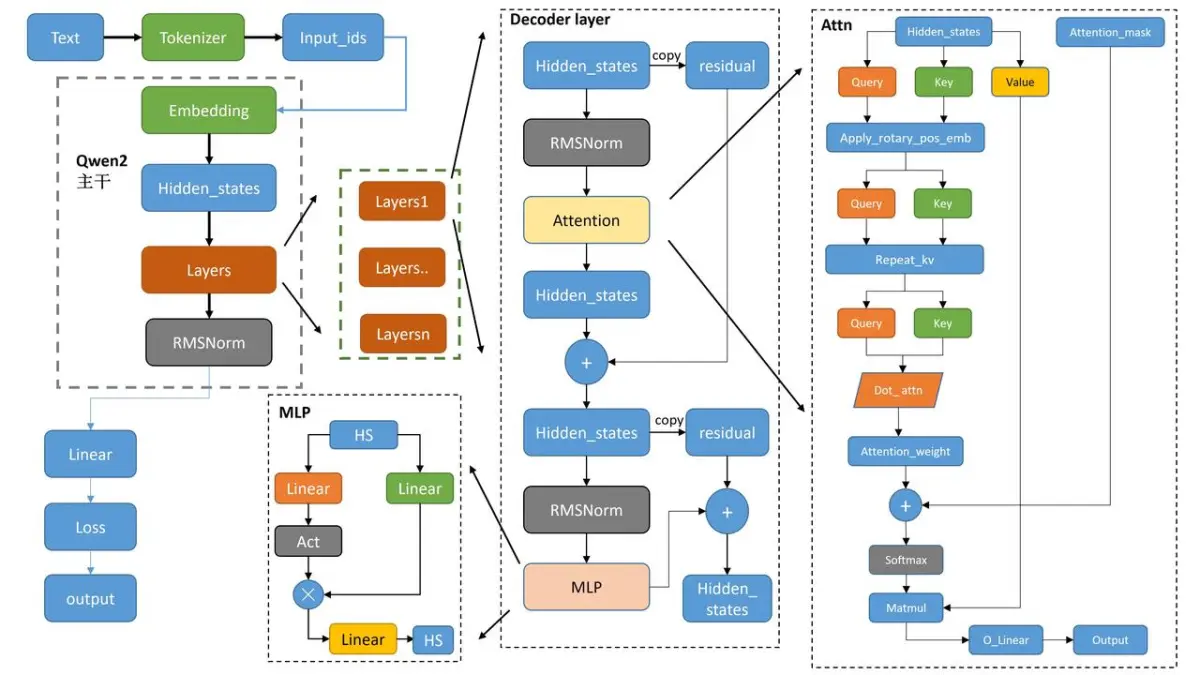
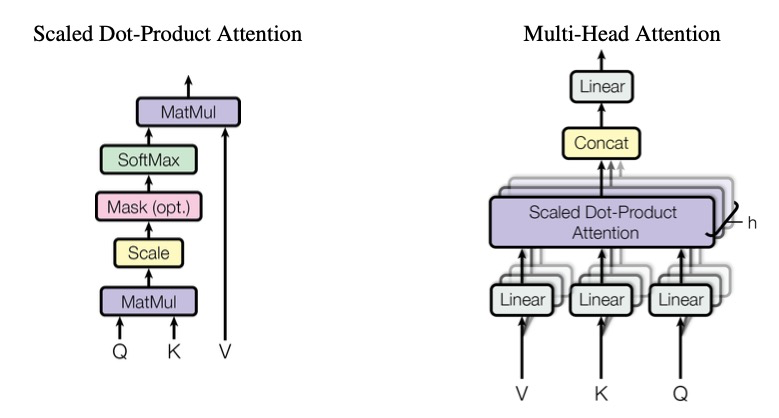
Qwen2仍然是一个典型decoder-only的transformers大模型结构,主要包括文本输入层、embedding层、decoder层、输出层及损失函数
## 环境配置
### Docker(方法一)
推荐使用docker方式运行, 此处提供[光源](https://www.sourcefind.cn/#/service-details)拉取docker镜像的地址与使用步骤
```
docker pull image.sourcefind.cn:5000/dcu/admin/base/pytorch:2.1.0-ubuntu20.04-dtk24.04.1-py3.10
docker run -it --shm-size=1024G -v /path/your_code_data/:/path/your_code_data/ -v /opt/hyhal:/opt/hyhal --privileged=true --device=/dev/kfd --device=/dev/dri/ --group-add video --name qwen2_72B_pytorch bash # 为以上拉取的docker的镜像ID替换,本镜像为:a4dd5be0ca23
pip install https://cancon.hpccube.com:65024/directlink/4/vllm/DAS1.1.1/vllm-0.5.0+das.opt1.3e2c63a.dtk2404.torch2.1.0-cp310-cp310-linux_x86_64.whl
cd /path/your_code_data/
cd LLaMA-Factory
pip install -r requirements.txt -i https://mirrors.aliyun.com/pypi/simple/ --trusted-host mirrors.aliyun.com
pip install e . -i https://mirrors.aliyun.com/pypi/simple/ --trusted-host mirrors.aliyun.com
```
Tips:以上dtk驱动、python、torch、vllm等DCU相关工具版本需要严格一一对应。
### Dockerfile(方法二)
此处提供dockerfile的使用方法
```
docker build -t qwen2:latest .
docker run -it --shm-size=1024G -v /path/your_code_data/:/path/your_code_data/ -v /opt/hyhal:/opt/hyhal --privileged=true --device=/dev/kfd --device=/dev/dri/ --group-add video --name qwen2_pytorch qwen2 bash
pip install https://cancon.hpccube.com:65024/directlink/4/vllm/DAS1.1.1/vllm-0.5.0+das.opt1.3e2c63a.dtk2404.torch2.1.0-cp310-cp310-linux_x86_64.whl
cd /path/your_code_data/
cd LLaMA-Factory
pip install -r requirements.txt -i https://mirrors.aliyun.com/pypi/simple/ --trusted-host mirrors.aliyun.com
pip install e . -i https://mirrors.aliyun.com/pypi/simple/ --trusted-host mirrors.aliyun.com
```
### Anaconda(方法三)
此处提供本地配置、编译的详细步骤,例如:
关于本项目DCU显卡所需的特殊深度学习库可从[光合](https://developer.sourcefind.cn/tool/)开发者社区下载安装。
```
DTK驱动:dtk24.04
python:3.10
torch:2.1.0
flash-attn:2.0.4
vllm:0.5.0
xformers:0.0.25
triton:2.1.0
deepspeed:0.12.3
apx:1.1.0
```
`Tips:以上dtk驱动、python、torch等DCU相关工具版本需要严格一一对应`
其它非深度学习库参照requirement.txt安装:
```
cd /path/your_code_data/
cd LLaMA-Factory
pip install -r requirements.txt -i https://mirrors.aliyun.com/pypi/simple/ --trusted-host mirrors.aliyun.com
pip install e . -i https://mirrors.aliyun.com/pypi/simple/ --trusted-host mirrors.aliyun.com
```
## 数据集
使用alpaca_gpt4_zh数据集,已经包含在data目录中,具体文件为alpaca_gpt4_data_zh.json
训练数据目录结构如下,用于正常训练的完整数据集请按此目录结构进行制备:
```
── data
├── alpaca_zh_demo.json
├── alpaca_en_demo.json
├── identity.json
└── ...
```
## 训练
使用LLaMA-Factory框架微调
### 单机单卡(LoRA-finetune)
```
#注意:根据自己的模型切换.yaml文件中的模型位置并调整其他参数
cd /path/your_code_data/
cd LLaMA-Factory
export FORCE_TORCHRUN=1
HIP_VISIBLE_DEVICES=0 llamafactory-cli train examples/train_lora/qwen2_lora_sft_ds3.yaml
```
### 单机多卡(LoRA-finetune)
```
HIP_VISIBLE_DEVICES=0,1,2,3 llamafactory-cli train examples/train_lora/qwen2_lora_sft_ds3.yaml
```
## 推理
使用vllm框架推理
### 单机单卡
```
#注意:根据自己的模型切换文件中的模型位置并调整其他参数
cd /path/your_code_data/
python ./inference_vllm/Qwen2_7B_inference.py
```
### 单机多卡
```
python ./inference_vllm/Qwen2_72B_inference.py
```
其中,prompts为提示词,model为模型路径,tensor_parallel_size=4为使用卡数。
## result
使用的加速卡:4张 K100_AI 模型:qwen2-72B-Instruct
### 精度
模型:qwen2-72B-Instruct
数据: identity,alpaca_zh_demo,alpaca_en_demo
训练模式:LoRA finetune;zero3训练
硬件:4卡,k100 AI
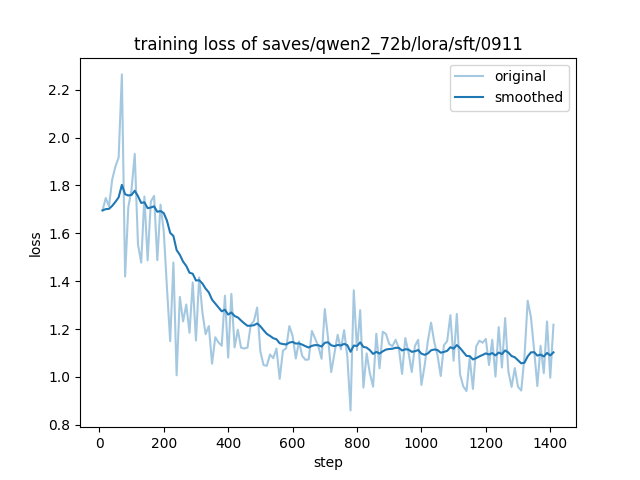
在DCU上训练的收敛情况:
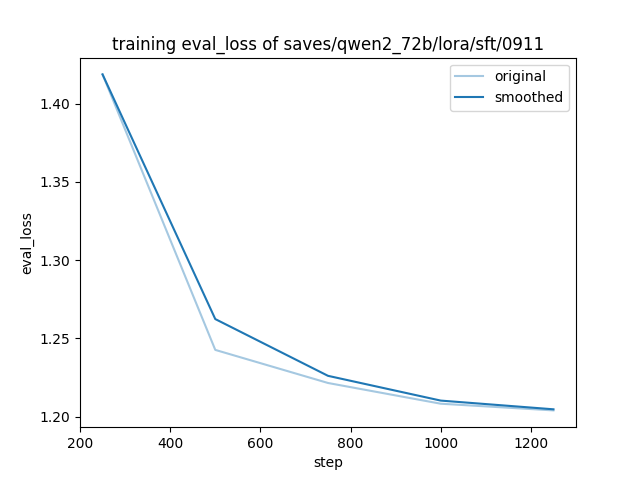
在DCU上训练时的验证收敛情况(250个steps间隔验证一次):
## 应用场景
### 算法类别
`对话问答`
### 热点应用行业
`科研,教育,政府,金融`
## 预训练权重
[qwen2-7B](https://huggingface.co/Qwen/Qwen2-7B)
[qwen2-7B-Instruct](https://huggingface.co/Qwen/Qwen2-7B-Instruct)
[qwen2-72B](https://huggingface.co/Qwen/Qwen2-72B)
[qwen2-72B-Instruct](https://huggingface.co/Qwen/Qwen2-72B-Instruct)
## 源码仓库及问题反馈
- https://developer.sourcefind.cn/codes/modelzoo/qwen2_pytorch
## 参考资料
- https://github.com/hiyouga/LLaMA-Factory
- https://github.com/QwenLM/Qwen2