# Qwen1.5
## 论文
无
## 模型结构
Qwen1.5是阿里云开源大型语言模型系列,是Qwen2.0的beta版本。相较于以往版本,本次更新着重提升了Chat模型与人类偏好的对齐程度,并且显著增强了模型的多语言处理能力。在序列长度方面,所有规模模型均已实现 32768 个tokens的上下文长度范围支持。同时,预训练 Base 模型的质量也有关键优化,有望在微调过程中带来更佳体验。
## 算法原理
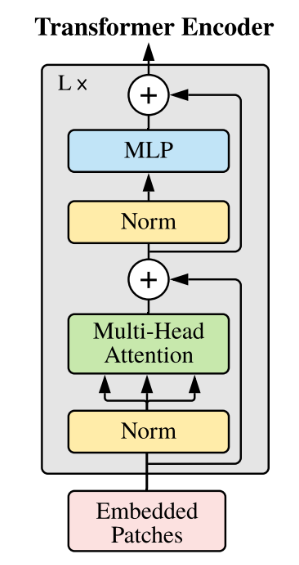
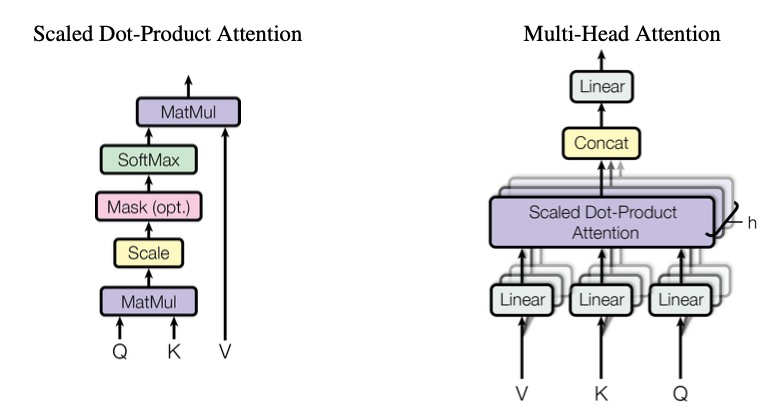
和Qwen一样,Qwen1.5仍然是一个decoder-only的transformer模型,使用SwiGLU激活函数、RoPE、多头注意力机制等。
## 环境配置
### Docker(方法一)
提供[光源](https://www.sourcefind.cn/#/image/dcu/custom)拉取推理的docker镜像:
```
docker pull image.sourcefind.cn:5000/dcu/admin/base/pytorch:2.1.0-ubuntu20.04-dtk24.04.2-py3.10
# 用上面拉取docker镜像的ID替换
# 主机端路径
# 容器映射路径
docker run -it --name qwen1.5_vllm --privileged --shm-size=64G --device=/dev/kfd --device=/dev/dri/ --cap-add=SYS_PTRACE --security-opt seccomp=unconfined --ulimit memlock=-1:-1 --ipc=host --network host --group-add video -v /opt/hyhal:/opt/hyhal -v : /bin/bash
```
`Tips:若在K100/Z100L上使用,使用定制镜像docker pull image.sourcefind.cn:5000/dcu/admin/base/custom:vllm0.5.0-dtk24.04.1-ubuntu20.04-py310-zk-v1,K100/Z100L不支持awq量化`
### Dockerfile(方法二)
```
# 主机端路径
# 容器映射路径
docker build -t qwen1.5:latest .
docker run -it --name qwen1.5_vllm --privileged --shm-size=64G --device=/dev/kfd --device=/dev/dri/ --cap-add=SYS_PTRACE --security-opt seccomp=unconfined --ulimit memlock=-1:-1 --ipc=host --network host --group-add video -v /opt/hyhal:/opt/hyhal:ro -v : qwen1.5:latest /bin/bash
```
### Anaconda(方法三)
```
conda create -n qwen1.5_vllm python=3.10
```
关于本项目DCU显卡所需的特殊深度学习库可从[光合](https://developer.hpccube.com/tool/)开发者社区下载安装。
* DTK驱动:dtk24.04.2
* Pytorch: 2.1.0
* triton:2.1.0
* lmslim: 0.1.0
* xformers: 0.0.25
* flash_attn: 2.0.4
* vllm: 0.5.0
* python: python3.10
`Tips:需先安装相关依赖,最后安装vllm包`
## 数据集
无
## 推理
### 模型下载
| 基座模型 | chat模型 | GPTQ模型 | AWQ模型 |
| --------------------------------------------------------------------- | ----------------------------------------------------------------------------- | ------------------------------------------------------------------------------------------------------- | -------------------------------------------------------------------------------------------- |
| [Qwen-7B](http://113.200.138.88:18080/aimodels/qwen/Qwen-7B.git) | [Qwen-7B-Chat](http://113.200.138.88:18080/aimodels/Qwen-7B-Chat) | [Qwen-7B-Chat-GPTQ-Int4](https://huggingface.co/Qwen/Qwen-7B-Chat-Int4) | |
| [Qwen-14B](http://113.200.138.88:18080/aimodels/qwen/Qwen-14B) | [Qwen-14B-Chat](http://113.200.138.88:18080/aimodels/Qwen-14B-Chat) | [Qwen-14B-Chat-GPTQ-Int4](http://113.200.138.88:18080/aimodels/qwen/Qwen-14B-Chat-Int4.git) | |
| [Qwen-72B](http://113.200.138.88:18080/aimodels/qwen/Qwen-72B) | [Qwen-72B-Chat](http://113.200.138.88:18080/aimodels/Qwen-72B-Chat) | [Qwen-72B-Chat-GPTQ-Int4](http://113.200.138.88:18080/aimodels/qwen/Qwen-72B-Chat-Int4.git) | |
| [Qwen1.5-7B](http://113.200.138.88:18080/aimodels/qwen/Qwen1.5-7B.git) | [Qwen1.5-7B-Chat](http://113.200.138.88:18080/aimodels/qwen/Qwen1.5-7B-Chat.git) | [Qwen1.5-7B-Chat-GPTQ-Int4](http://113.200.138.88:18080/aimodels/qwen/Qwen1.5-7B-Chat-GPTQ-Int4.git) | [Qwen1.5-7B-Chat-AWQ-Int4](http://113.200.138.88:18080/aimodels/qwen/Qwen1.5-7B-Chat-AWQ) |
| [Qwen1.5-14B](http://113.200.138.88:18080/aimodels/qwen/Qwen1.5-14B.git) | [Qwen1.5-14B-Chat](http://113.200.138.88:18080/aimodels/qwen/Qwen1.5-14B-Chat) | [Qwen1.5-14B-Chat-GPTQ-Int4](http://113.200.138.88:18080/aimodels/qwen/Qwen1.5-14B-Chat-GPTQ-Int4.git) | [Qwen1.5-14B-Chat-AWQ-Int4](http://113.200.138.88:18080/aimodels/qwen/Qwen1.5-14B-Chat-AWQ) |
| [Qwen1.5-32B](http://113.200.138.88:18080/aimodels/Qwen1.5-32B) | [Qwen1.5-32B-Chat](http://113.200.138.88:18080/aimodels/Qwen1.5-32B-Chat) | [Qwen1.5-32B-Chat-GPTQ-Int4](http://113.200.138.88:18080/aimodels/Qwen1.5-32B-Chat-GPTQ-Int4) | [Qwen1.5-32B-Chat-AWQ-Int4](http://113.200.138.88:18080/aimodels/qwen/Qwen1.5-32B-Chat-AWQ.git) |
| [Qwen1.5-72B](http://113.200.138.88:18080/aimodels/Qwen1.5-72B) | [Qwen1.5-72B-Chat](http://113.200.138.88:18080/aimodels/Qwen1.5-72B-Chat) | [Qwen1.5-72B-Chat-GPTQ-Int4](http://113.200.138.88:18080/aimodels/qwen/Qwen1.5-72B-Chat-GPTQ-Int4.git) | [Qwen1.5-72B-Chat-AWQ-Int4](http://113.200.138.88:18080/aimodels/qwen/Qwen1.5-72B-Chat-AWQ) |
| [Qwen1.5-110B](http://113.200.138.88:18080/aimodels/Qwen1.5-110B) | [Qwen1.5-110B-Chat](http://113.200.138.88:18080/aimodels/Qwen1.5-110B-Chat) | [Qwen1.5-110B-Chat-GPTQ-Int4](http://113.200.138.88:18080/aimodels/qwen/Qwen1.5-110B-Chat-GPTQ-Int4.git) | [Qwen1.5-110B-Chat-AWQ-Int4](http://113.200.138.88:18080/aimodels/qwen/Qwen1.5-110B-Chat-AWQ) |
| [Qwen2-7B](http://113.200.138.88:18080/aimodels/Qwen2-7B) | [Qwen2-7B-Instruct](http://113.200.138.88:18080/aimodels/Qwen2-7B-Instruct) | [Qwen2-7B-Instruct-GPTQ-Int4](http://113.200.138.88:18080/aimodels/qwen/Qwen2-7B-Instruct-GPTQ-Int4.git) | [Qwen2-7B-Instruct-AWQ-Int4](http://113.200.138.88:18080/aimodels/qwen/Qwen2-7B-Instruct-AWQ) |
| [Qwen2-72B](http://113.200.138.88:18080/aimodels/Qwen2-72B) | [Qwen2-72B-Instruct](http://113.200.138.88:18080/aimodels/Qwen2-72B-Instruct) | [Qwen2-72B-Instruct-GPTQ-Int4](http://113.200.138.88:18080/aimodels/qwen/Qwen2-72B-Instruct-GPTQ-Int4.git) | [Qwen2-72B-Instruct-AWQ-Int4](http://113.200.138.88:18080/aimodels/qwen/Qwen2-72B-Instruct-AWQ) |
### 离线批量推理
```bash
python examples/offline_inference.py
```
其中,`prompts`为提示词;`temperature`为控制采样随机性的值,值越小模型生成越确定,值变高模型生成更随机,0表示贪婪采样,默认为1;`max_tokens=16`为生成长度,默认为1;
`model`为模型路径;`tensor_parallel_size=1`为使用卡数,默认为1;`dtype="float16"`为推理数据类型,如果模型权重是bfloat16,需要修改为float16推理,`quantization="gptq"`为使用gptq量化进行推理,需下载以上GPTQ模型。`quantization="awq"`为使用awq量化进行推理,需下载以上AWQ模型。
### 离线批量推理性能测试
1、指定输入输出
```bash
python benchmarks/benchmark_throughput.py --num-prompts 1 --input-len 32 --output-len 128 --model Qwen/Qwen1.5-7B-Chat -tp 1 --trust-remote-code --enforce-eager --dtype float16
```
其中 `--num-prompts`是batch数,`--input-len`是输入seqlen,`--output-len`是输出token长度,`--model`为模型路径,`-tp`为使用卡数,`dtype="float16"`为推理数据类型,如果模型权重是bfloat16,需要修改为float16推理。若指定 `--output-len 1`即为首字延迟。`-q gptq`为使用gptq量化模型进行推理。
2、使用数据集
下载数据集:
```bash
wget http://113.200.138.88:18080/aidatasets/vllm_data/-/raw/main/ShareGPT_V3_unfiltered_cleaned_split.json
```
```bash
python benchmarks/benchmark_throughput.py --num-prompts 1 --model Qwen/Qwen1.5-7B-Chat --dataset ShareGPT_V3_unfiltered_cleaned_split.json -tp 1 --trust-remote-code --enforce-eager --dtype float16
```
其中 `--num-prompts`是batch数,`--model`为模型路径,`--dataset`为使用的数据集,`-tp`为使用卡数,`dtype="float16"`为推理数据类型,如果模型权重是bfloat16,需要修改为float16推理。`-q gptq`为使用gptq量化模型进行推理。
### api服务推理性能测试
1、启动服务端:
```bash
python -m vllm.entrypoints.openai.api_server --model Qwen/Qwen1.5-7B-Chat --dtype float16 --enforce-eager -tp 1
```
2、启动客户端:
```bash
python benchmarks/benchmark_serving.py --model Qwen/Qwen1.5-7B-Chat --dataset ShareGPT_V3_unfiltered_cleaned_split.json --num-prompts 1 --trust-remote-code
```
参数同使用数据集,离线批量推理性能测试,具体参考[benchmarks/benchmark_serving.py](benchmarks/benchmark_serving.py)
### OpenAI兼容服务
启动服务:
```bash
python -m vllm.entrypoints.openai.api_server --model Qwen/Qwen1.5-7B-Chat --enforce-eager --dtype float16 --trust-remote-code
```
这里 `--model`为加载模型路径,`--dtype`为数据类型:float16,默认情况使用tokenizer中的预定义聊天模板,`--chat-template`可以添加新模板覆盖默认模板,`-q gptq`为使用gptq量化模型进行推理,`-q awqq`为使用awq量化模型进行推理。
列出模型型号:
```bash
curl http://localhost:8000/v1/models
```
### OpenAI Completions API和vllm结合使用
```bash
curl http://localhost:8000/v1/completions \
-H "Content-Type: application/json" \
-d '{
"model": "Qwen/Qwen1.5-7B",
"prompt": "What is deep learning?",
"max_tokens": 7,
"temperature": 0
}'
```
或者使用[examples/openai_completion_client.py](examples/openai_completion_client.py)
### OpenAI Chat API和vllm结合使用
```bash
curl http://localhost:8000/v1/chat/completions \
-H "Content-Type: application/json" \
-d '{
"model": "Qwen/Qwen1.5-7B-Chat",
"messages": [
{"role": "system", "content": "What is deep learning?"},
{"role": "user", "content": "What is deep learning?"}
]
}'
```
或者使用[examples/openai_chatcompletion_client.py](examples/openai_chatcompletion_client.py)
### **gradio和vllm结合使用**
1.安装gradio
```
pip install gradio
```
2.安装必要文件
2.1 启动gradio服务,根据提示操作
```
python gradio_openai_chatbot_webserver.py --model "Qwen/Qwen1.5-7B-Chat" --model-url http://localhost:8000/v1 --temp 0.8 --stop-token-ids ""
```
2.2 更改文件权限
打开提示下载文件目录,输入以下命令给予权限
```
chmod +x frpc_linux_amd64_v0.*
```
3.启动OpenAI兼容服务
```
python -m vllm.entrypoints.openai.api_server --model Qwen/Qwen1.5-7B-Chat --enforce-eager --dtype float16 --trust-remote-code --port 8000
```
4.启动gradio服务
```
python gradio_openai_chatbot_webserver.py --model "Qwen/Qwen1.5-7B-Chat" --model-url http://localhost:8000/v1 --temp 0.8 --stop-token-ids ""
```
5.使用对话服务
在浏览器中输入本地 URL,可以使用 Gradio 提供的对话服务。
## result
使用的加速卡:1张 DCU-K100_AI-64G
```
Prompt: 'What is deep learning?', Generated text: ' Deep learning is a subset of machine learning that involves the use of neural networks to model and solve complex problems. Neural networks are a network of interconnected nodes or " neurons" that are designed to recognize patterns in data, learn from examples, and make predictions or decisions.\nThe term "deep" in deep learning refers to the use of multiple layers or hidden layers in these neural networks. Each layer processes the input data in a different way, extracting increasingly abstract features as the data passes through.'
```
### 精度
无
## 应用场景
### 算法类别
对话问答
### 热点应用行业
金融,科研,教育
## 源码仓库及问题反馈
* [https://developer.hpccube.com/codes/modelzoo/qwen1.5_vllm](https://developer.hpccube.com/codes/modelzoo/qwen1.5_vllm)
## 参考资料
* [https://github.com/vllm-project/vllm](https://github.com/vllm-project/vllm)