# Qwen-VL
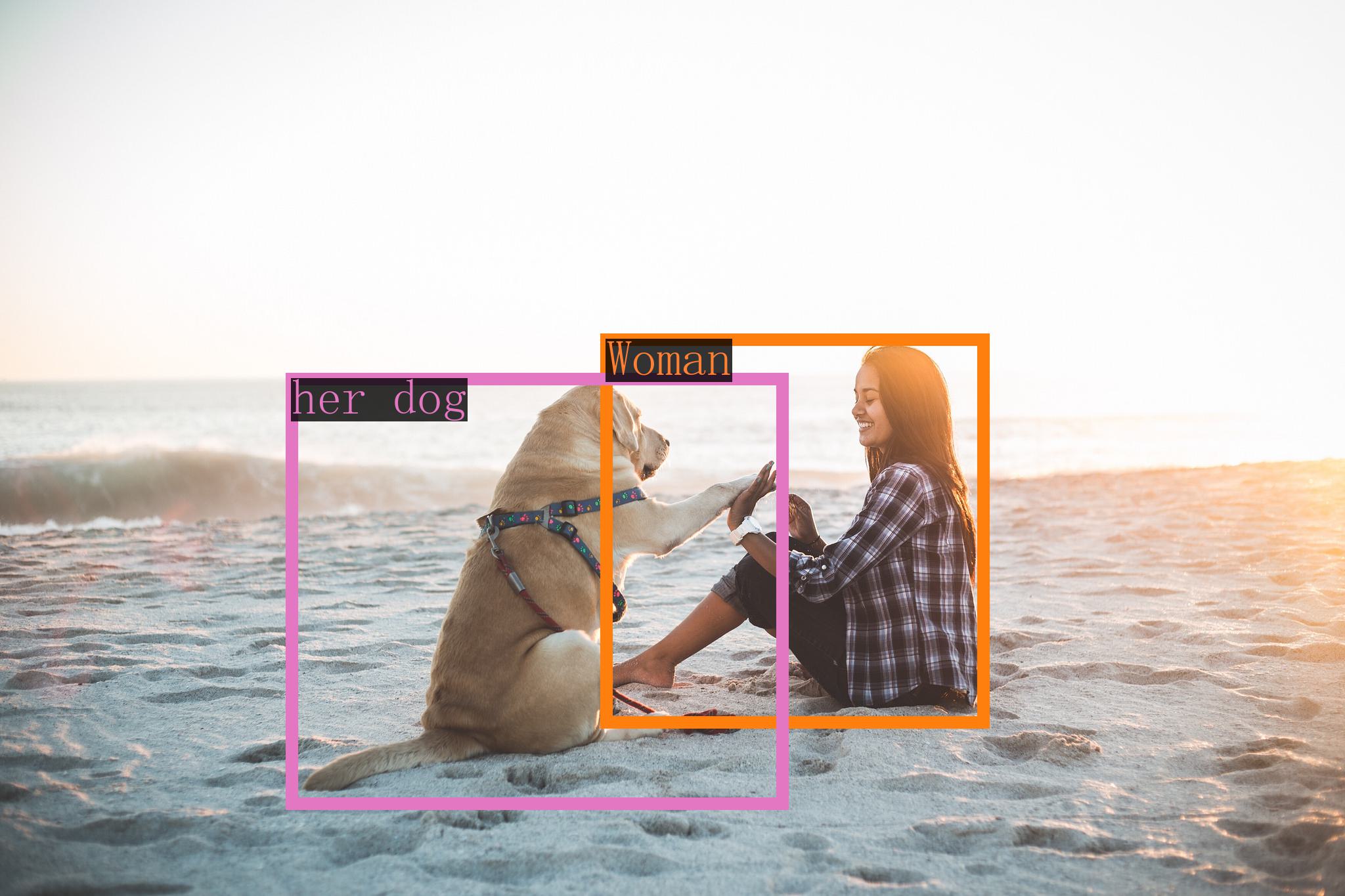
Qwen-VL 是阿里云研发的大规模视觉语言模型(Large Vision Language Model, LVLM)。Qwen-VL 可以以图像、文本、检测框作为输入,并以文本和检测框作为输出。
## 论文
- [Qwen-VL: A Versatile Vision-Language Model for
Understanding, Localization, Text Reading, and Beyond](https://arxiv.org/pdf/2308.12966)
## 模型结构
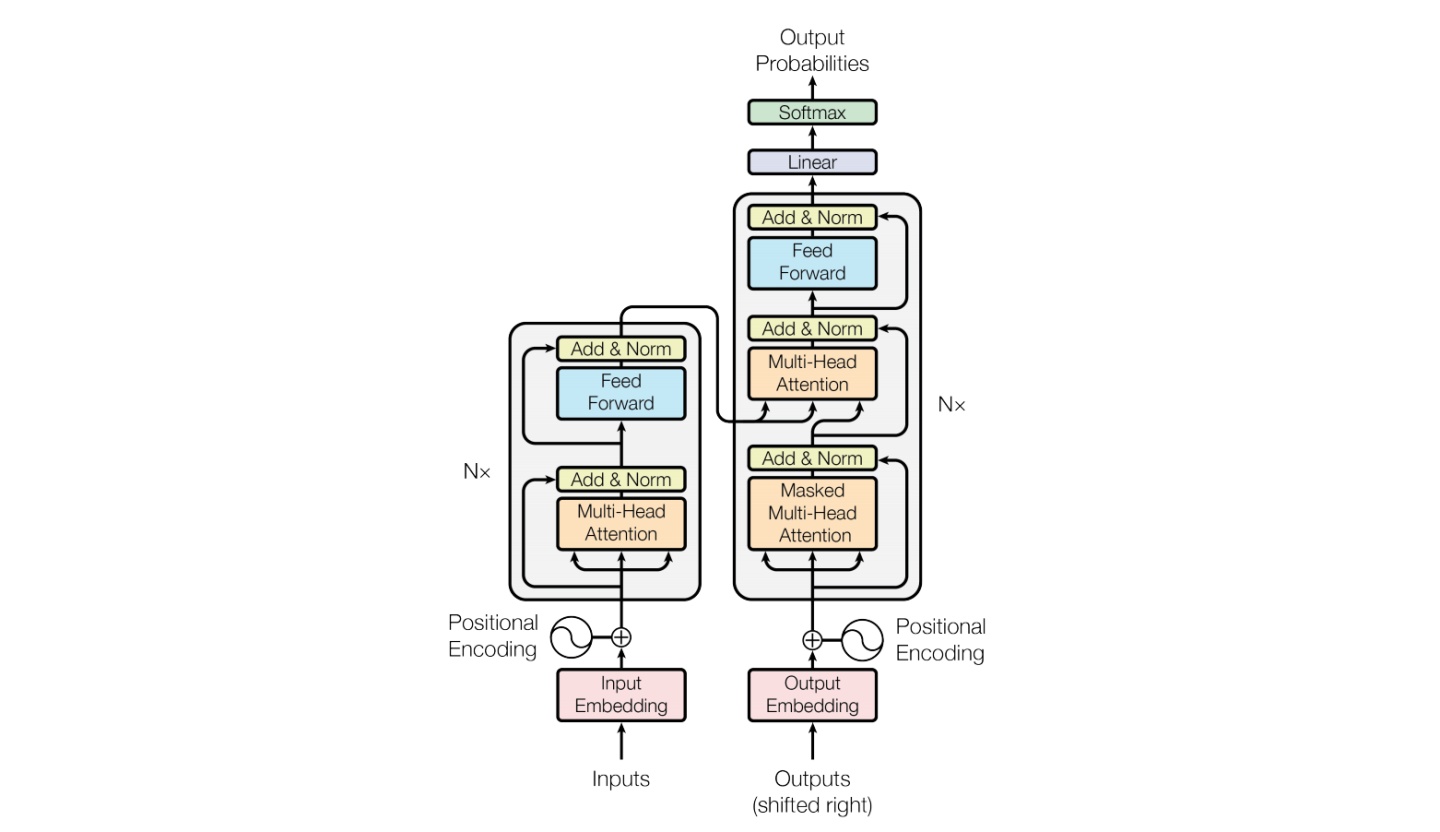
Qwen-VL的多语言视觉语言模型系列,基于Qwen-7B语言模型。该模型通过视觉编码器和位置感知的视觉语言适配器,赋予语言模型视觉理解能力。
## 算法原理
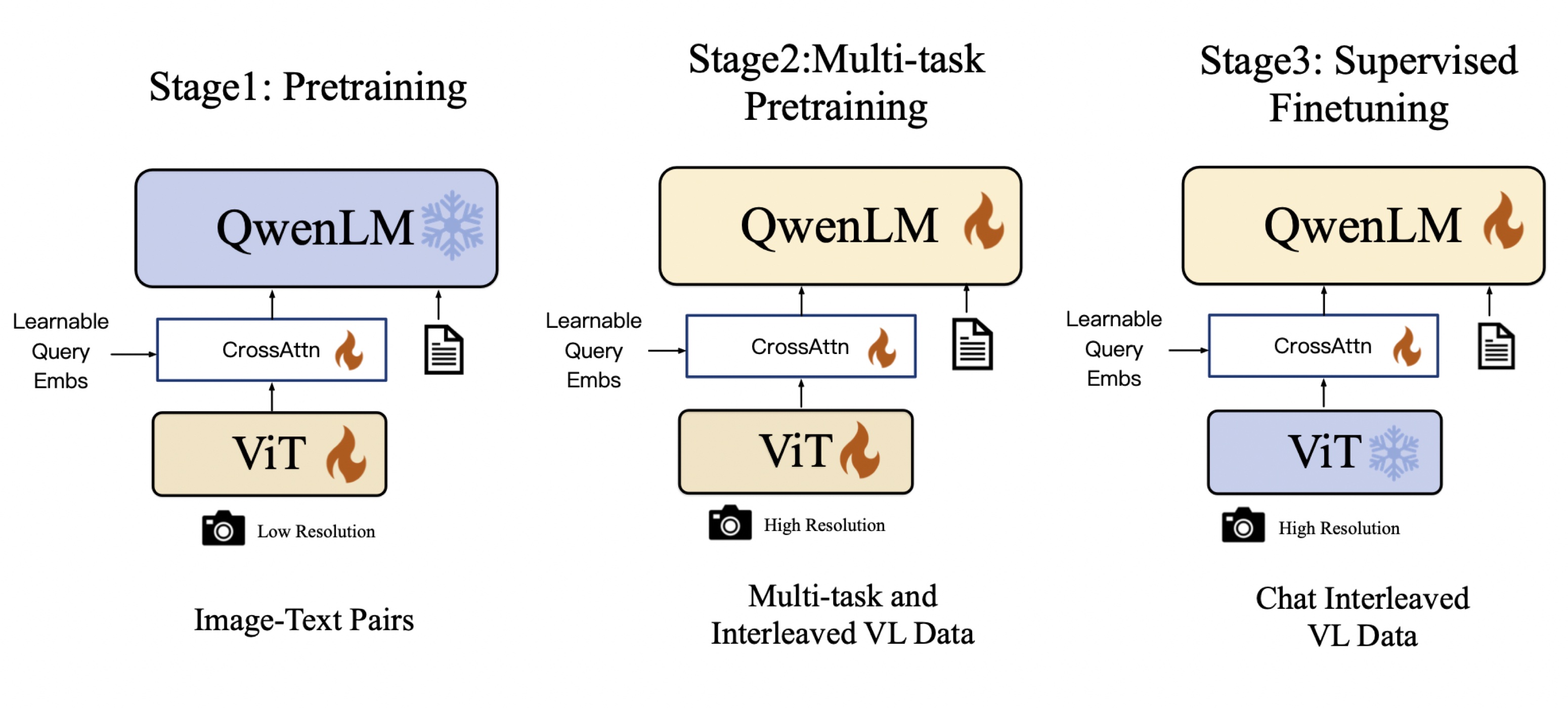
Qwen-VL: Qwen-VL 以 Qwen-7B 的预训练模型作为语言模型的初始化,并以 Openclip ViT-bigG 作为视觉编码器的初始化,中间加入单层随机初始化的 cross-attention,经过约1.5B的图文数据训练得到。最终图像输入分辨率为448。
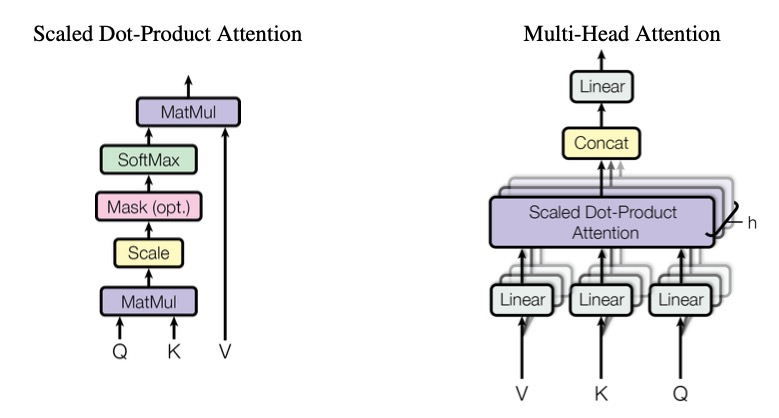
Qwen-VL采用了三阶段的训练流程,并在多个视觉语言理解基准测试中取得了领先的成绩。该模型支持多语言、多图像输入,具备细粒度的视觉理解能力。
另外,通过指令调优,生成了交互式的Qwen-VL-Chat模型,在现实世界用户行为的评估中展现出了优异的表现。总体而言,Qwen-VL系列模型在视觉语言理解任务上取得了显著的成果,并在开源社区中具有领先的地位。
## 环境配置
### Docker(方法一)
[光源](https://www.sourcefind.cn/#/service-details)拉取docker镜像的地址与使用步骤
```
docker pull image.sourcefind.cn:5000/dcu/admin/base/pytorch:2.1.0-ubuntu20.04-dtk24.04.1-py3.10
docker run -it -v /path/your_code_data/:/path/your_code_data/ -v /opt/hyhal/:/opt/hyhal/:ro --shm-size=64G --privileged=true --device=/dev/kfd --device=/dev/dri/ --group-add video --name qwen-vl bash
cd /path/your_code_data/
pip install -r requirements.txt -i http://mirrors.aliyun.com/pypi/simple/ --trusted-host mirrors.aliyun.com
pip install -r requirements_web_demo.txt -i http://mirrors.aliyun.com/pypi/simple/ --trusted-host mirrors.aliyun.com
```
### Dockerfile(方法二)
```
cd /path/your_code_data/docker
docker build --no-cache -t qwen-vl:latest .
docker run --shm-size=64G --name qwen-vl -v /opt/hyhal:/opt/hyhal:ro --privileged=true --device=/dev/kfd --device=/dev/dri/ --group-add video -v /path/your_code_data/:/path/your_code_data/ -it qwen-vl:latest bash
```
### Anaconda(方法三)
关于本项目DCU显卡所需的特殊深度学习库可从[光合](https://developer.hpccube.com/tool/)开发者社区下载安装。
```
DTK驱动:dtk24.04.1
python:python3.10
torch:2.1
torchvision: 0.16.0
deepspped: 0.12.3
```
`Tips:以上dtk驱动、python、paddle等DCU相关工具版本需要严格一一对应`
```
conda create -n qwen-vl python=3.10
conda activate qwen-vl
cd /path/your_code_data/
pip install -r requirements.txt -i http://mirrors.aliyun.com/pypi/simple
pip install -r requirements_web_demo.txt -i http://mirrors.aliyun.com/pypi/simple
```
## 数据集
迷你数据集 [assets/mm_tutorial](./assets/mm_tutorial)
预训练需要准备你的训练数据,需要将所有样本放到一个列表中并存入[data.json](./data.json)文件中。每个样本对应一个字典,包含id和conversation,其中后者为一个列表。示例如下所示:用于正常训练的完整数据集请按此目录结构进行制备:
```
[
{
"id": "identity_0",
"conversations": [
{
"from": "user",
"value": "你好"
},
{
"from": "assistant",
"value": "我是Qwen-VL,一个支持视觉输入的大模型。"
}
]
},
{
"id": "identity_1",
"conversations": [
{
"from": "user",
"value": "Picture 1: ![]() https://qianwen-res.oss-cn-beijing.aliyuncs.com/Qwen-VL/assets/demo.jpeg\n图中的狗是什么品种?"
},
{
"from": "assistant",
"value": "图中是一只拉布拉多犬。"
},
{
"from": "user",
"value": "框出图中的格子衬衫"
},
{
"from": "assistant",
"value": "
https://qianwen-res.oss-cn-beijing.aliyuncs.com/Qwen-VL/assets/demo.jpeg\n图中的狗是什么品种?"
},
{
"from": "assistant",
"value": "图中是一只拉布拉多犬。"
},
{
"from": "user",
"value": "框出图中的格子衬衫"
},
{
"from": "assistant",
"value": "[格子衬衫](588,499),(725,789)"
}
]
},
{
"id": "identity_2",
"conversations": [
{
"from": "user",
"value": "Picture 1: ![]() assets/mm_tutorial/Chongqing.jpeg\nPicture 2:
assets/mm_tutorial/Chongqing.jpeg\nPicture 2: ![]() assets/mm_tutorial/Beijing.jpeg\n图中都是哪"
},
{
"from": "assistant",
"value": "第一张图片是重庆的城市天际线,第二张图片是北京的天际线。"
}
]
}
]
```
## 训练
### 单机单卡
```
sh finetune/finetune_lora_single.sh
```
## 推理
执行多种任务时需要对以下参数进行修改,可使用中文指令,如下:
`'image'= 图片路径`
`'text'= 任务需求`
```
query = tokenizer.from_list_format([
{'image': 'https://qianwen-res.oss-cn-beijing.aliyuncs.com/Qwen-VL/assets/demo.jpeg'}, # Either a local path or an url
{'text': 'Generate the caption in English with grounding:'},
])
```
### 单机单卡
```
python qwen_vl_inference.py
```
## result
### 检测任务
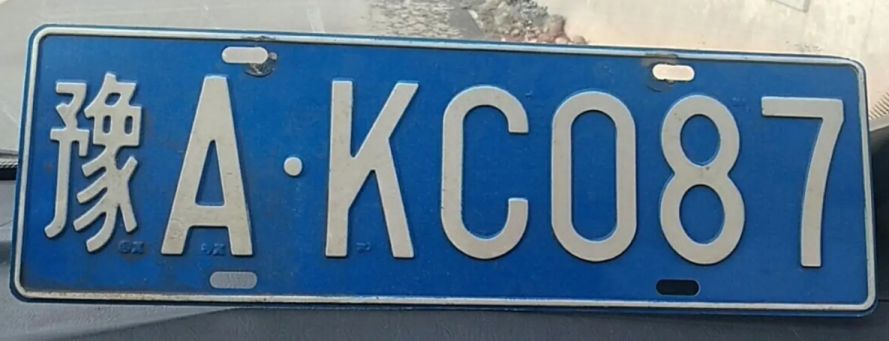
### 车牌识别
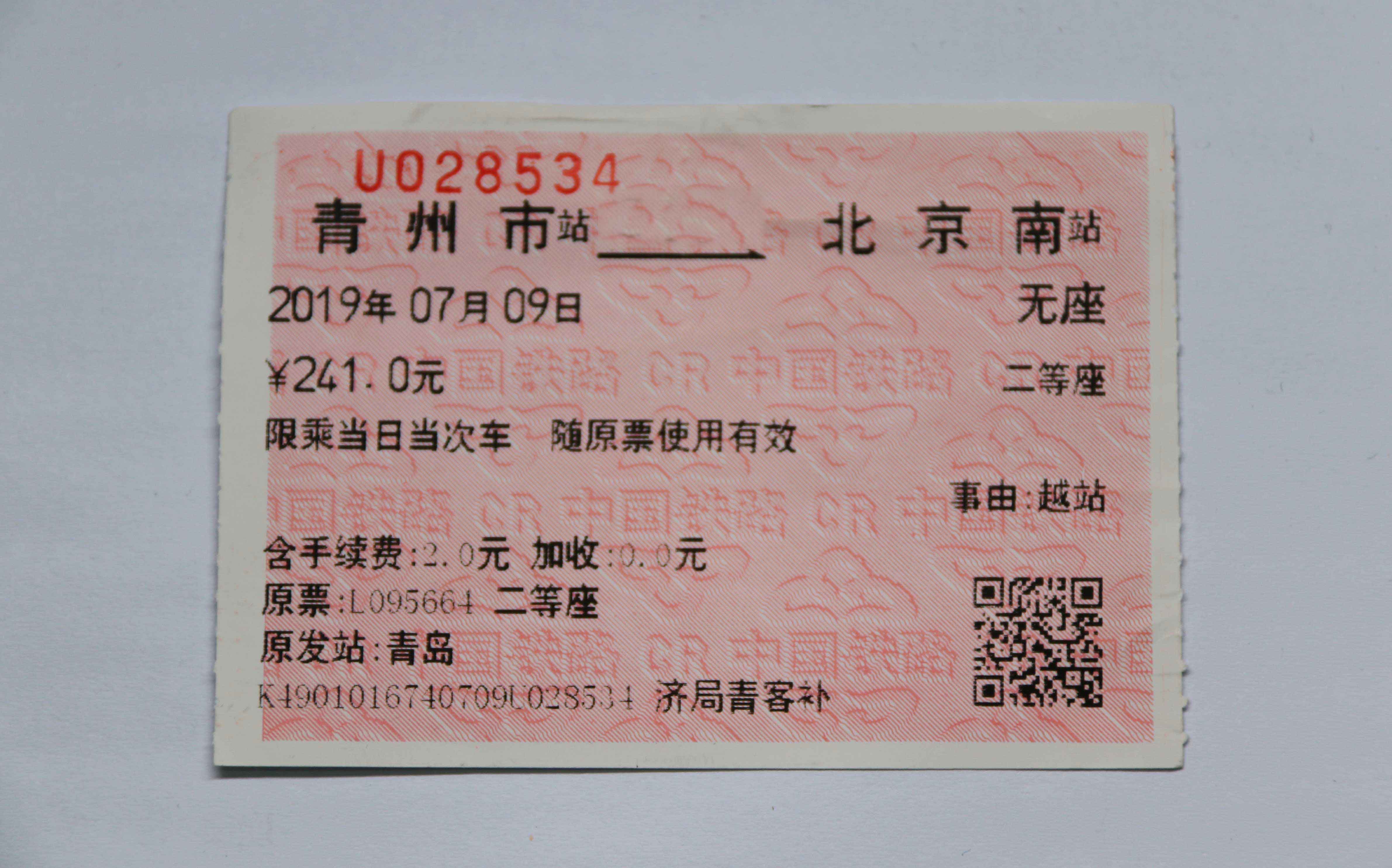
### 火车票识别
## 应用场景
### 算法类别
`ocr`
### 热点应用行业
`金融,教育,政府,科研,制造,能源,交通`
## 预训练权重
- [Qwen/Qwen-VL-Chat](https://hf-mirror.com/Qwen/Qwen-VL-Chat/tree/main)
- [Qwen/Qwen-VL](https://hf-mirror.com/Qwen/Qwen-VL/tree/main)
预训练权重快速下载中心:[SCNet AIModels](https://www.scnet.cn/ui/aihub/models)
项目中的预训练权重可从快速下载通道下载: [qwen-vl-chat](https://www.scnet.cn/ui/aihub/models/icszy_zs_ai/Qwen-VL-Chat)
## 源码仓库及问题反馈
- https://developer.sourcefind.cn/codes/modelzoo/qwen-vl_pytorch
## 参考资料
- [Qwen-VL: A Versatile Vision-Language Model for
Understanding, Localization, Text Reading, and Beyond](https://arxiv.org/pdf/2308.12966)
- [Qwen-VL github](https://github.com/QwenLM/Qwen-VL)
assets/mm_tutorial/Beijing.jpeg\n图中都是哪"
},
{
"from": "assistant",
"value": "第一张图片是重庆的城市天际线,第二张图片是北京的天际线。"
}
]
}
]
```
## 训练
### 单机单卡
```
sh finetune/finetune_lora_single.sh
```
## 推理
执行多种任务时需要对以下参数进行修改,可使用中文指令,如下:
`'image'= 图片路径`
`'text'= 任务需求`
```
query = tokenizer.from_list_format([
{'image': 'https://qianwen-res.oss-cn-beijing.aliyuncs.com/Qwen-VL/assets/demo.jpeg'}, # Either a local path or an url
{'text': 'Generate the caption in English with grounding:'},
])
```
### 单机单卡
```
python qwen_vl_inference.py
```
## result
### 检测任务
### 车牌识别
### 火车票识别
## 应用场景
### 算法类别
`ocr`
### 热点应用行业
`金融,教育,政府,科研,制造,能源,交通`
## 预训练权重
- [Qwen/Qwen-VL-Chat](https://hf-mirror.com/Qwen/Qwen-VL-Chat/tree/main)
- [Qwen/Qwen-VL](https://hf-mirror.com/Qwen/Qwen-VL/tree/main)
预训练权重快速下载中心:[SCNet AIModels](https://www.scnet.cn/ui/aihub/models)
项目中的预训练权重可从快速下载通道下载: [qwen-vl-chat](https://www.scnet.cn/ui/aihub/models/icszy_zs_ai/Qwen-VL-Chat)
## 源码仓库及问题反馈
- https://developer.sourcefind.cn/codes/modelzoo/qwen-vl_pytorch
## 参考资料
- [Qwen-VL: A Versatile Vision-Language Model for
Understanding, Localization, Text Reading, and Beyond](https://arxiv.org/pdf/2308.12966)
- [Qwen-VL github](https://github.com/QwenLM/Qwen-VL)