# MobileVLM
MobileVLM V2为移动端部署而设计,在资源受限的设备上展现出出色的性能,计算量1.7B达到普通VLM3B大小的水平,与LLaMA2共享相同分词器,便于知识蒸馏,在精度和性能上达到了一个新的平衡点,以下步骤适于推理。
## 论文
`MobileVLM V2: Faster and Stronger Baseline for Vision Language Model`
- https://arxiv.org/pdf/2402.03766.pdf
## 模型结构
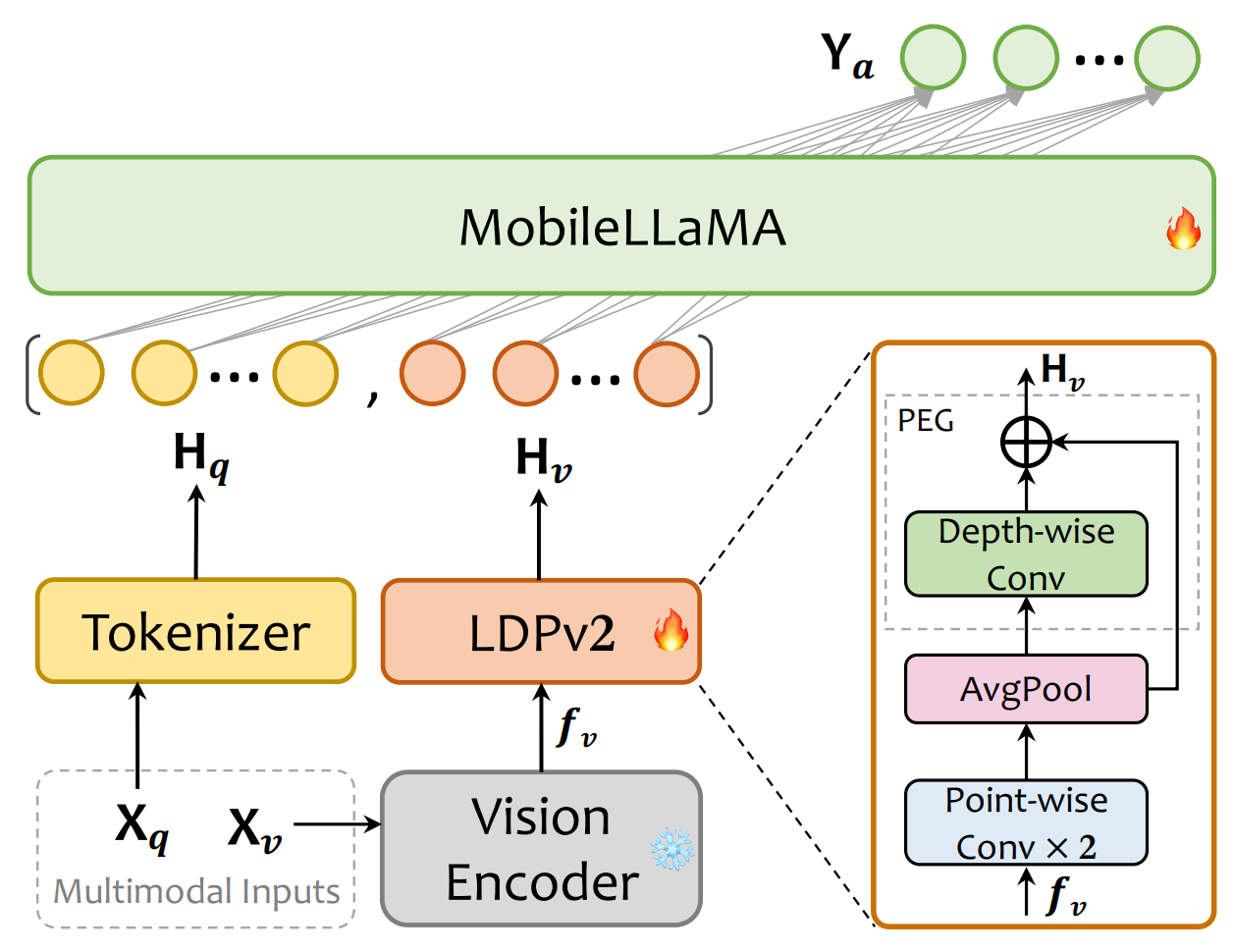
MobileVLM V2的结构采用CLIP ViT-L/14作为视觉编码器,这种编码器经过大规模的图像-文本对比预训练,对VLM非常有效。该模型包括预训练的视觉编码器、MobileLLaMA作为语言模型,以及轻量级的下采样投影器,其中投影器通过特征变换、标记压缩和位置信息增强三个模块实现视觉和语言的对齐。
## 算法原理
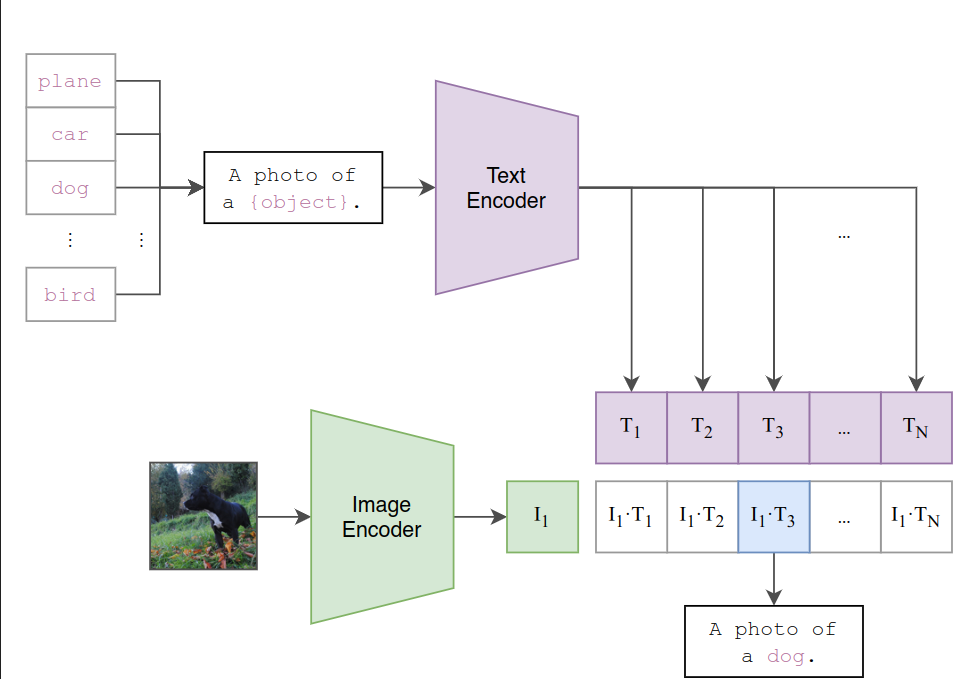
MobileVLM V2的训练过程分为预训练和多任务训练两个阶段:在预训练阶段,只允许投影器和LLM进行训练,MobileVLM V2使用ShareGPT4V-PT数据集,包含120万图像-文本对,该数据集有助于提高模型的图像-文本对齐能力,这是多模态表示学习的一个关键方面;图像-文本对齐学习阶段后,精心选择各种任务数据集训练,赋予模型多任务分析和图像-文本对话的能力。
## 环境配置
```
mv mobilevlm_pytorch MobileVLM # 去框架名后缀
```
### Docker(方法一)
```
docker pull image.sourcefind.cn:5000/dcu/admin/base/pytorch:2.1.0-ubuntu20.04-dtk24.04.1-py3.10
# 为以上拉取的docker的镜像ID替换
docker run -it --shm-size=32G -v $PWD/MobileVLM:/home/MobileVLM -v /opt/hyhal:/opt/hyhal:ro --privileged=true --device=/dev/kfd --device=/dev/dri/ --group-add video --name mobilevlm bash
cd /home/MobileVLM
pip install -r requirements.txt
```
### Dockerfile(方法二)
```
cd MobileVLM/docker
docker build --no-cache -t mobilevlm:latest .
docker run --shm-size=32G --name mobilevlm -v /opt/hyhal:/opt/hyhal:ro --privileged=true --device=/dev/kfd --device=/dev/dri/ --group-add video -v $PWD/../../MobileVLM:/home/MobileVLM -it mobilevlm bash
# 若遇到Dockerfile启动的方式安装环境需要长时间等待,可注释掉里面的pip安装,启动容器后再安装python库:pip install -r requirements.txt。
```
### Anaconda(方法三)
1、关于本项目DCU显卡所需的特殊深度学习库可从光合开发者社区下载安装:
- https://developer.sourcefind.cn/tool/
```
DTK驱动:dtk24.04.1
python:python3.10
torch:2.1.0
torchvision:0.16.0
triton:2.1.0
apex:1.1.0
deepspeed:0.12.3
flash-attn:2.0.4
bitsandbytes:0.42.0
```
`Tips:以上dtk驱动、python、torch等DCU相关工具版本需要严格一一对应。`
2、其它非特殊库参照requirements.txt安装
```
pip install -r requirements.txt # requirements.txt
```
## 推理
[模型权重快速下载地址]:
- [mtgv/MobileVLM_V2-1.7B]:(https://huggingface.co/mtgv/MobileVLM_V2-1.7B)
- [openai/clip-vit-large-patch14-336]:(https://huggingface.co/openai/clip-vit-large-patch14-336)
```
export HIP_VISIBLE_DEVICES=0
python infer.py # 单机单卡
# 采用官方默认权重推理:代码里设置model_path = "mtgv/MobileVLM_V2-1.7B"
```
## result
```
# 输入
图片:assets/samples/demo.jpg
问题\prompt:"Who is the author of this book?\nAnswer the question using a single word or phrase."
# 输出
答案:Susan Wise Bauer
```
### 精度
DCU Z100L与GPU V100S精度一致。
## 应用场景
### 算法类别
`图像理解`
### 热点应用行业
`制造,广媒,金融,能源,医疗,家居,教育`
## 源码仓库及问题反馈
- http://developer.sourcefind.cn/codes/modelzoo/mobilevlm_pytorch.git
## 参考资料
- https://github.com/Meituan-AutoML/MobileVLM.git
- https://hf-mirror.com/ #Huggingface镜像官网下载教程
- https://hf-mirror.com/datasets #Huggingface镜像数据地址
- https://modelscope.cn/models # ModelZoo上部分算法的权重可尝试从魔搭社区下载