# MobileVLM
MobileVLM V2为移动端部署而设计,在资源受限的设备上展现出出色的性能,计算量1.7B达到普通VLM3B大小的水平,与LLaMA2共享相同分词器,便于知识蒸馏,在精度和性能上达到了一个新的平衡点,以下步骤适于推理。
## 论文
`MobileVLM V2: Faster and Stronger Baseline for Vision Language Model`
- https://arxiv.org/pdf/2402.03766.pdf
## 模型结构
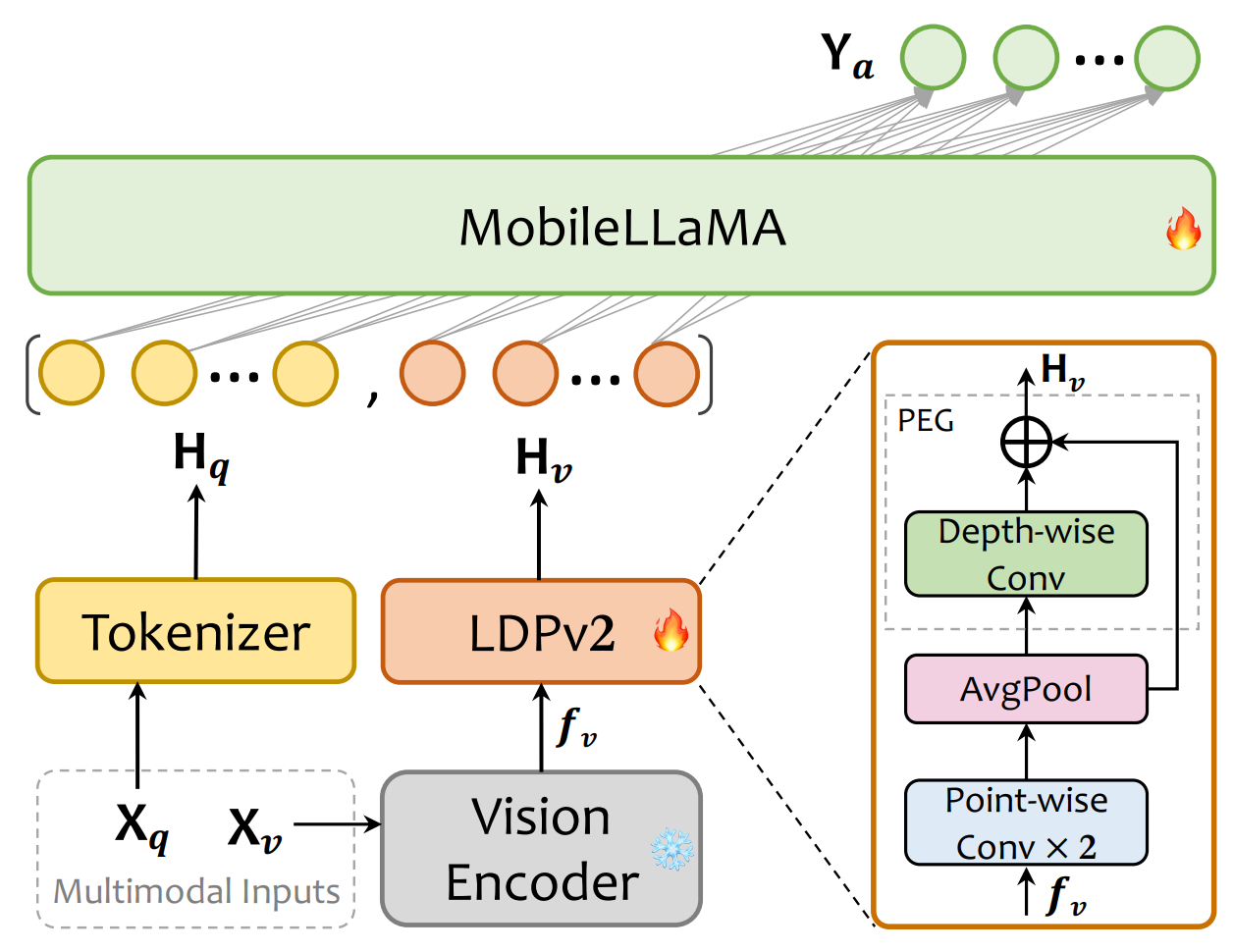
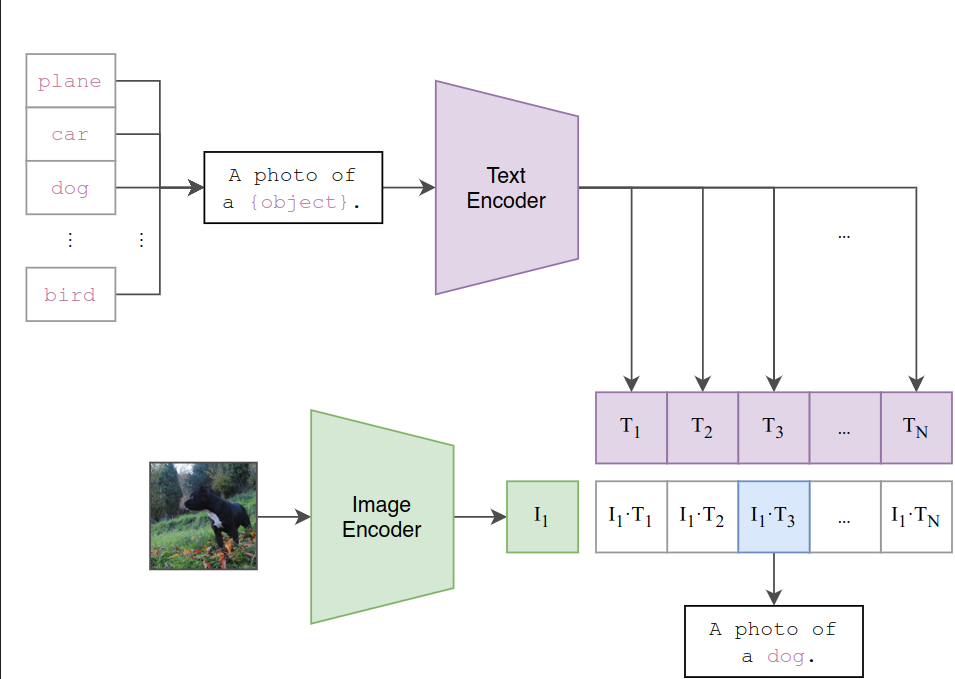
MobileVLM V2的结构采用CLIP ViT-L/14作为视觉编码器,这种编码器经过大规模的图像-文本对比预训练,对VLM非常有效。该模型包括预训练的视觉编码器、MobileLLaMA作为语言模型,以及轻量级的下采样投影器,其中投影器通过特征变换、标记压缩和位置信息增强三个模块实现视觉和语言的对齐。
## 算法原理
MobileVLM V2的训练过程分为预训练和多任务训练两个阶段:在预训练阶段,只允许投影器和LLM进行训练,MobileVLM V2使用ShareGPT4V-PT数据集,包含120万图像-文本对,该数据集有助于提高模型的图像-文本对齐能力,这是多模态表示学习的一个关键方面;图像-文本对齐学习阶段后,精心选择各种任务数据集训练,赋予模型多任务分析和图像-文本对话的能力。
## 环境配置
```
mv mobilevlm_pytorch MobileVLM # 去框架名后缀
```
### Docker(方法一)
```
docker pull image.sourcefind.cn:5000/dcu/admin/base/pytorch:2.1.0-centos7.6-dtk23.10-py38
# 为以上拉取的docker的镜像ID替换,本镜像为:ffa1f63239fc
docker run -it --shm-size=32G -v $PWD/MobileVLM:/home/MobileVLM -v /opt/hyhal:/opt/hyhal:ro --privileged=true --device=/dev/kfd --device=/dev/dri/ --group-add video --name mobilevlm bash
cd /home/MobileVLM
pip install -r requirements.txt
# deepspeed、flash_attn2、bitsandbytes可从whl.zip文件里获取安装:
pip install deepspeed-0.12.3+git299681e.abi0.dtk2310.torch2.1.0a0-cp38-cp38-linux_x86_64.whl
pip install flash_attn-2.0.4_torch2.1_dtk2310-cp38-cp38-linux_x86_64.whl
pip install bitsandbytes-0.43.0-py3-none-any.whl
```
### Dockerfile(方法二)
```
cd MobileVLM/docker
docker build --no-cache -t mobilevlm:latest .
docker run --shm-size=32G --name mobilevlm -v /opt/hyhal:/opt/hyhal:ro --privileged=true --device=/dev/kfd --device=/dev/dri/ --group-add video -v $PWD/../../MobileVLM:/home/MobileVLM -it mobilevlm bash
# 若遇到Dockerfile启动的方式安装环境需要长时间等待,可注释掉里面的pip安装,启动容器后再安装python库:pip install -r requirements.txt。
# deepspeed、flash_attn2、bitsandbytes可从whl.zip文件里获取安装:
pip install deepspeed-0.12.3+git299681e.abi0.dtk2310.torch2.1.0a0-cp38-cp38-linux_x86_64.whl
pip install flash_attn-2.0.4_torch2.1_dtk2310-cp38-cp38-linux_x86_64.whl
pip install bitsandbytes-0.43.0-py3-none-any.whl
```
### Anaconda(方法三)
1、关于本项目DCU显卡所需的特殊深度学习库可从光合开发者社区下载安装:
- https://developer.hpccube.com/tool/
```
DTK驱动:dtk23.10
python:python3.8
torch:2.1.0
torchvision:0.16.0
triton:2.1.0
apex:0.1
deepspeed:0.12.3
flash_attn:2.0.4
bitsandbytes:0.43.0
```
```
# flash_attn2、bitsandbytes可从whl.zip文件里获取安装:
pip install deepspeed-0.12.3+git299681e.abi0.dtk2310.torch2.1.0a0-cp38-cp38-linux_x86_64.whl
pip install flash_attn-2.0.4_torch2.1_dtk2310-cp38-cp38-linux_x86_64.whl
pip install bitsandbytes-0.43.0-py3-none-any.whl
```
`Tips:以上dtk驱动、python、torch等DCU相关工具版本需要严格一一对应。`
2、其它非特殊库参照requirements.txt安装
```
pip install -r requirements.txt # requirements.txt
```
## 数据集
- 建立data文件夹放置数据:
- `cd MobileVLM && mkdir -p data/pretrain_data data/finetune_data data/benchmark_data` # work_dir为MobileVLM
- 预训练数据
- `cd ${work_dir}/data/pretrain_data`
- download the ShareGPT4V-PT from [here](https://huggingface.co/datasets/Lin-Chen/ShareGPT4V/blob/main/share-captioner_coco_lcs_sam_1246k_1107.json), which is provided by ShareGPT4V team.
- 多任务训练数据
- `cd ${work_dir}/data/finetune_data`
- download the annotation of our MobileVLM_V2_FT_Mix2M data from huggingface [here](https://huggingface.co/datasets/mtgv/MobileVLM_V2_FT_Mix2M), and download the images from constituting datasets:
[Text-VQA](https://dl.fbaipublicfiles.com/textvqa/images/train_val_images.zip),
[IConQA](https://drive.google.com/file/d/1Xqdt1zMcMZU5N_u1SAIjk-UAclriynGx/edit), [SQA](https://drive.google.com/drive/folders/1w8imCXWYn2LxajmGeGH_g5DaL2rabHev), [SBU](https://huggingface.co/datasets/sbu_captions), follow [ShareGPT4V](https://github.com/InternLM/InternLM-XComposer/blob/main/projects/ShareGPT4V/docs/Data.md) to download images from:
[LAION-CC-SBU-558K](https://huggingface.co/datasets/liuhaotian/LLaVA-Pretrain/blob/main/images.zip), [COCO](http://images.cocodataset.org/zips/train2017.zip), [WebData](https://drive.google.com/drive/folders/1tCUQ-sq6vdshZVkF0ZeF3K4eztkXJgax?usp=sharing), [SAM](https://drive.google.com/file/d/1dKumdOKSXtV7lIXdrG7jsIK_z2vZv2gs/view?usp=drive_link), [GQA](https://downloads.cs.stanford.edu/nlp/data/gqa/images.zip), [OCR-VQA](https://drive.google.com/drive/folders/1_GYPY5UkUy7HIcR0zq3ZCFgeZN7BAfm_?usp=sharing), [TextVQA](https://dl.fbaipublicfiles.com/textvqa/images/train_val_images.zip), [VisualGnome](https://cs.stanford.edu/people/rak248/VG_100K_2) ([Part1](https://cs.stanford.edu/people/rak248/VG_100K_2/images.zip), [Part2](https://cs.stanford.edu/people/rak248/VG_100K_2/images2.zip))
- benchmark测试数据
- We evaluate models on a diverse set of 6 benchmarks, *i.e.* GQA, MMBench, MME, POPE, SQA, TextVQA. We do not evaluate using beam search to make the inference process consistent with the chat demo of real-time outputs. You should follow these instructions to manage the datasets.
-
Data Download Instructions
- download some useful [data/scripts](https://github.com/Meituan-AutoML/MobileVLM/releases/download/v0.1/benchmark_data.zip) pre-collected by us.
- `unzip benchmark_data.zip && cd benchmark_data`
- `bmk_dir=${work_dir}/data/benchmark_data`
- gqa
- download its image data following the official instructions [here](https://cs.stanford.edu/people/dorarad/gqa/download.html)
- `cd ${bmk_dir}/gqa && ln -s /path/to/gqa/images images`
- mme
- download the data following the official instructions [here](https://github.com/BradyFU/Awesome-Multimodal-Large-Language-Models/tree/Evaluation).
- `cd ${bmk_dir}/mme && ln -s /path/to/MME/MME_Benchmark_release_version images`
- pope
- download coco from POPE following the official instructions [here](https://github.com/AoiDragon/POPE/tree/e3e39262c85a6a83f26cf5094022a782cb0df58d/output/coco).
- `cd ${bmk_dir}/pope && ln -s /path/to/pope/coco coco && ln -s /path/to/coco/val2014 val2014`
- sqa
- download images from the `data/scienceqa` folder of the ScienceQA [repo](https://github.com/lupantech/ScienceQA).
- `cd ${bmk_dir}/sqa && ln -s /path/to/sqa/images images`
- textvqa
- download images following the instructions [here](https://dl.fbaipublicfiles.com/textvqa/images/train_val_images.zip).
- `cd ${bmk_dir}/textvqa && ln -s /path/to/textvqa/train_images train_images`
- mmbench
- no action is needed.
更多资料可参考源项目的[`README_origin`](./README_origin.md),由于本项目使用数据集过多,此处不方便提供迷你数据集,读者请根据是否需要自主微调决定是否进行全量下载。
完整数据目录结构如下:
```
data
├── benchmark_data
│ ├── gqa
│ │ ├── convert_gqa_for_eval.py
│ │ ├── eval.py
│ │ ├── images -> /path/to/your/gqa/images
│ │ ├── llava_gqa_testdev_balanced.jsonl
│ │ └── testdev_balanced_questions.json
│ ├── mmbench
│ │ ├── convert_mmbench_for_submission.py
│ │ ├── eval.py
│ │ └── mmbench_dev_en_20231003.tsv
│ ├── mme
│ │ ├── calculation.py
│ │ ├── convert_answer_to_mme.py
│ │ ├── images -> /path/to/your/MME/MME_Benchmark_release_version
│ │ └── llava_mme.jsonl
│ ├── pope
│ │ ├── coco -> /path/to/your/pope/coco
│ │ ├── eval.py
│ │ ├── llava_pope_test.jsonl
│ │ └── val2014 -> /path/to/your/coco/val2014
│ ├── sqa
│ │ ├── eval.py
│ │ ├── images -> /path/to/your/scienceqa/images
│ │ ├── llava_test_CQM-A.json
│ │ ├── pid_splits.json
│ │ └── problems.json
│ └── textvqa
│ ├── eval.py
│ ├── llava_textvqa_val_v051_ocr.jsonl
│ ├── TextVQA_0.5.1_val.json
│ └── train_images -> /path/to/your/textvqa/train_images
├── finetune_data
│ ├── llava_v1_5_mix665k.json
│ ├── MobileVLM_V2_FT_Mix2M.json
│ ├── coco
│ │ ├── train2017
│ │ └── val2017
│ ├── gqa
│ │ └── images
│ ├── iconqa_data
│ │ └── iconqa
│ │ └── train
│ │ ├── choose_img
│ │ ├── choose_txt
│ │ └── fill_in_blank
│ ├── ocr_vqa
│ │ └── images
│ ├── sam
│ │ └── images
│ ├── SBU
│ │ └── images
│ ├── ScienceQA
│ │ └── train
│ ├── share_textvqa
│ │ └── images
│ ├── textvqa
│ │ └── train_images
│ ├── vg
│ │ ├── VG_100K
│ │ └── VG_100K_2
│ ├── web-celebrity
│ │ └── images
│ ├── web-landmark
│ │ └── images
│ └── wikiart
│ └── images
└── pretrain_data
├── share-captioner_coco_lcs_sam_1246k_1107.json
├── blip_laion_cc_sbu_558k.json
├── images
├── coco
│ └── train2017
├── llava
│ └── llava_pretrain
└── sam
└── images
```
更多资料可参考源项目的[`README_origin`](./README_origin.md)。
## 训练
finetune需要下载预训练权重`mtgv/MobileVLM_V2-1.7B`:https://huggingface.co/mtgv/MobileVLM_V2-1.7B
同时还需要下载图像-文本clip权重`openai/clip-vit-large-patch14-336`:https://huggingface.co/openai/clip-vit-large-patch14-336
### 单机多卡
```
bash run.sh mobilevlm_v2_1.7b pretrain mtgv/MobileVLM_V2-1.7B openai/clip-vit-large-patch14-336 # 或sh pretrain.sh
# 当前bnb库仅支持fp16微调,后期逐渐开放其它微调精度。
# 微调所需深度学习库参见前文环境配置,读者自行下载完整数据集后方可使用。
```
## 推理
```
export HIP_VISIBLE_DEVICES=0
python infer.py # 单机单卡
# 采用官方默认权重推理:代码里设置model_path = "mtgv/MobileVLM_V2-1.7B"
```
## result
```
# 输入
图片:assets/samples/demo.jpg
问题\prompt:"Who is the author of this book?\nAnswer the question using a single word or phrase."
# 输出
答案:Susan Wise Bauer
```
### 精度
DCU Z100L与GPU V100S精度一致。
## 应用场景
### 算法类别
`图像理解`
### 热点应用行业
`制造,广媒,金融,能源,医疗,家居,教育`
## 源码仓库及问题反馈
- http://developer.hpccube.com/codes/modelzoo/mobilevlm_pytorch.git
## 参考资料
- https://github.com/Meituan-AutoML/MobileVLM.git
- https://hf-mirror.com/ #Huggingface镜像官网下载教程
- https://hf-mirror.com/datasets #Huggingface镜像数据地址
- https://modelscope.cn/models # ModelZoo上部分算法的权重可尝试从魔搭社区下载