## Mixtral
## 论文
[Mixture of Experts](https://arxiv.org/pdf/2401.04088)
## 模型结构
Mixtral 8x7B 是 Mistral AI 公司开源的大型语言模型,采用稀疏混合专家架构(Sparse Mixture of Experts),包含 8 个专家网络,每个专家具有 70 亿参数。Mixtral 8x7B 在推理时仅使用 2 个最相关的专家网络进行计算,使其在保持 470 亿参数规模训练效果的同时,实际推理时仅需要约 140 亿参数的计算量。该模型支持多语言处理能力,能够在英语、法语、德语、西班牙语、意大利语等多种语言中表现出色。通过在高质量数据集上的训练,结合多专家架构和新颖的路由算法,Mixtral 8x7B 在数学推理、代码生成、知识问答等多个基准测试中均超越了同规模的其他开源模型。作为一个完全开源的模型,Mixtral 8x7B 提供了 Apache 2.0 许可证下的模型权重和推理代码,支持商用,并可在消费级显卡上直接部署运行,为开源AI社区带来了具有里程碑意义的贡献
以下是Mixtral系列模型的主要网络参数配置:
| 模型名称 | 总参数量 | 每次激活参数量 | 专家数 | 每个专家参数量 | 最大序列长度 |
| ------------------ | -------- | -------------- | ------ | -------------- | ------------ |
| Mixtral-8×7B-MoE | 467亿 | 129亿 | 8 | 70亿 | 32,768 |
| Mixtral-8×22B-MoE | 1,760亿 | 440亿 | 8 | 220亿 | 65,536 |
## 算法原理
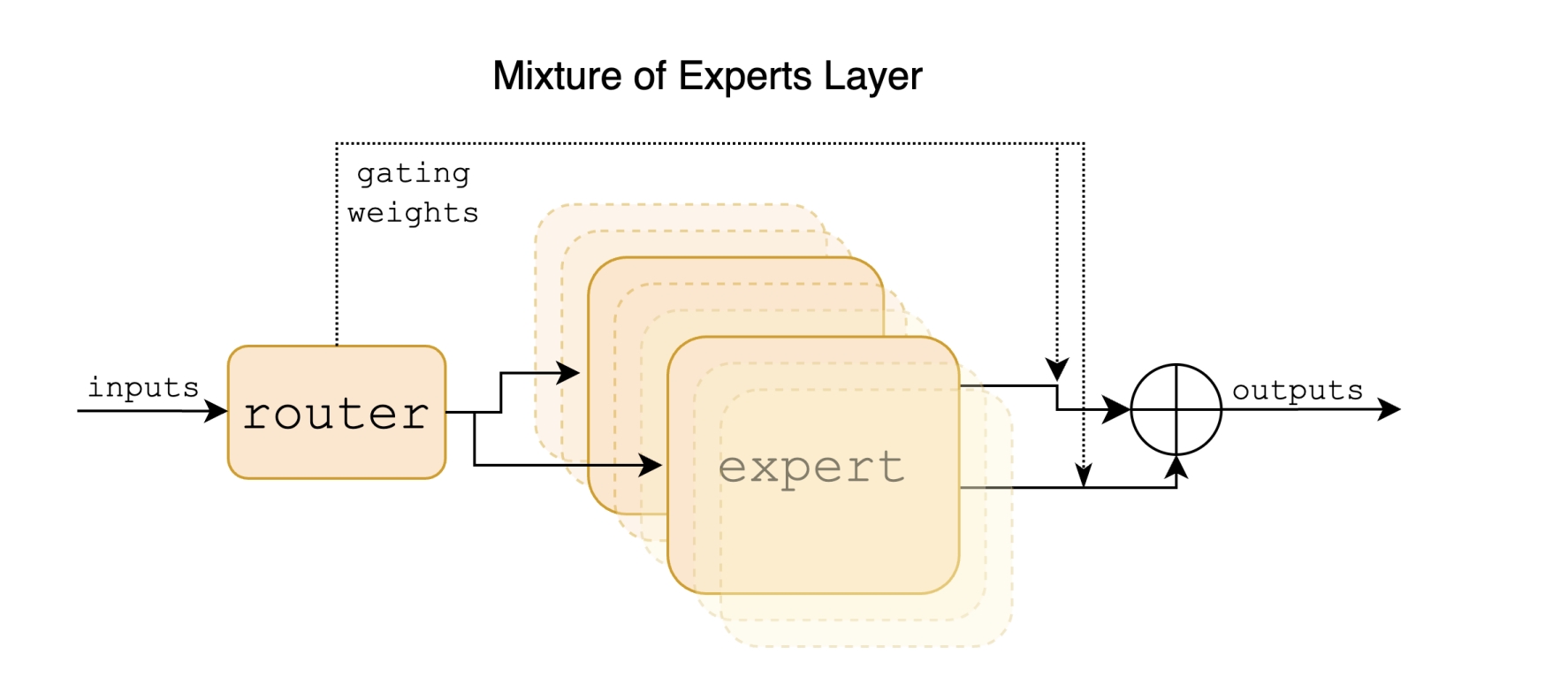
Mixtral模型是一种稀疏专家混合(SMoE)语言模型,在每层包含多个前馈网络(专家),通过路由网络为每个输入token选择最相关的专家进行处理,从而在保持高效计算的同时提升模型性能。
## 环境配置
### Docker(方法一)
提供[光源](https://www.sourcefind.cn/#/image/dcu/custom)拉取推理的docker镜像:
```
docker pull image.sourcefind.cn:5000/dcu/admin/base/vllm:0.9.2-ubuntu22.04-dtk25.04.1-rc5-rocblas104381-0915-das1.6-py3.10-20250916-rc2
# 用上面拉取docker镜像的ID替换
# 主机端路径
# 容器映射路径
# 若要在主机端和容器端映射端口需要删除--network host参数
docker run -it --name mixtral_vllm --privileged --shm-size=64G --device=/dev/kfd --device=/dev/dri/ --cap-add=SYS_PTRACE --security-opt seccomp=unconfined --ulimit memlock=-1:-1 --ipc=host --network host --group-add video -v /opt/hyhal:/opt/hyhal -v : /bin/bash
```
`Tips:若在K100/Z100L上使用,使用定制镜像docker pull image.sourcefind.cn:5000/dcu/admin/base/custom:vllm0.5.0-dtk24.04.1-ubuntu20.04-py310-zk-v1,K100/Z100L不支持awq量化`
### Dockerfile(方法二)
```
# 主机端路径
# 容器映射路径
docker build -t mixtral:latest .
docker run -it --name mixtral_vllm --privileged --shm-size=64G --device=/dev/kfd --device=/dev/dri/ --cap-add=SYS_PTRACE --security-opt seccomp=unconfined --ulimit memlock=-1:-1 --ipc=host --network host --group-add video -v /opt/hyhal:/opt/hyhal:ro -v : mixtral:latest /bin/bash
```
### Anaconda(方法三)
```
conda create -n mixtral_vllm python=3.10
```
关于本项目DCU显卡所需的特殊深度学习库可从[光合](https://developer.hpccube.com/tool/)开发者社区下载安装。
* DTK驱动:dtk25.04.01
* Pytorch: 2.4.0
* triton: 3.0.0
* lmslim: 0.2.1
* flash_attn: 2.6.1
* flash_mla: 1.0.0
* vllm: 0.9.2
* python: python3.10
`Tips:需先安装相关依赖,最后安装vllm包`
环境变量:
export ALLREDUCE_STREAM_WITH_COMPUTE=1
export VLLM_NUMA_BIND=1
export VLLM_RANK0_NUMA=0
export VLLM_RANK1_NUMA=1
export VLLM_RANK2_NUMA=2
export VLLM_RANK3_NUMA=3
export VLLM_RANK4_NUMA=4
export VLLM_RANK5_NUMA=5
export VLLM_RANK6_NUMA=6
export VLLM_RANK7_NUMA=7
## 数据集
无
## 推理
### 模型下载
| 基座模型 | |
| -------------------------------------------------------------------------------------- | ---------------------------------------------------------------------------------------- |
| [Mixtral-8x7B-Instruct-v0.1](https://huggingface.co/mistralai/Mixtral-8x7B-Instruct-v0.1) | [Mixtral-8x22B-Instruct-v0.1](https://huggingface.co/mistralai/Mixtral-8x22B-Instruct-v0.1) |
### 离线批量推理
```bash
python examples/offline_inference/basic/basic.py
```
其中,本示例脚本在代码中直接定义了 `prompts`,并设置 `temperature=0.8`、`top_p=0.95`、`max_tokens=16`;如需调整请修改脚本中的参数。`model` 在脚本中指定为本地模型路径;`tensor_parallel_size=1` 表示使用 1 卡;`dtype="float16"` 为推理数据类型(若权重为 bfloat16,请相应调整)。本示例未使用 `quantization` 参数,量化推理请参考下文性能测试示例。
### 离线批量推理性能测试
1、指定输入输出
```bash
python benchmarks/benchmark_throughput.py --num-prompts 1 --input-len 32 --output-len 128 --model mixtral/Mixtral-8x7B-Instruct-v0.1 -tp 4 --trust-remote-code --enforce-eager --dtype float16
```
其中 `--num-prompts`是batch数,`--input-len`是输入seqlen,`--output-len`是输出token长度,`--model`为模型路径,`-tp`为使用卡数,`dtype="float16"`为推理数据类型,如果模型权重是bfloat16,需要修改为float16推理。若指定 `--output-len 1`即为首字延迟。`-q gptq`为使用gptq量化模型进行推理。
2、使用数据集
下载数据集:
[sharegpt_v3_unfiltered_cleaned_split](https://huggingface.co/datasets/learnanything/sharegpt_v3_unfiltered_cleaned_split)
```bash
python benchmarks/benchmark_throughput.py --num-prompts 1 --model mixtral/Mixtral-8x7B-Instruct-v0.1 --dataset-name sharegpt --dataset-path /path/to/ShareGPT_V3_unfiltered_cleaned_split.json -tp 4 --trust-remote-code --enforce-eager --dtype float16
```
其中 `--num-prompts`是batch数,`--model`为模型路径,`--dataset`为使用的数据集,`-tp`为使用卡数,`dtype="float16"`为推理数据类型,如果模型权重是bfloat16,需要修改为float16推理。`-q gptq`为使用gptq量化模型进行推理。
### OpenAI api服务推理性能测试
1、启动服务端:
```bash
vllm serve --model mixtral/Mixtral-8x7B-Instruct-v0.1 --enforce-eager --dtype float16 --trust-remote-code --tensor-parallel-size 4
```
2、启动客户端:
```
python benchmarks/benchmark_serving.py --model mixtral/Mixtral-8x7B-Instruct-v0.1 --dataset-name sharegpt --dataset-path /path/to/ShareGPT_V3_unfiltered_cleaned_split.json --num-prompts 1 --trust-remote-code
```
参数同使用数据集,离线批量推理性能测试,具体参考[benchmarks/benchmark_serving.py](benchmarks/benchmark_serving.py)
### OpenAI兼容服务
启动服务:
```bash
vllm serve mixtral/Mixtral-8x7B-Instruct-v0.1 --enforce-eager --dtype float16 --trust-remote-code
```
这里serve之后 为加载模型路径,`--dtype`为数据类型:float16,默认情况使用tokenizer中的预定义聊天模板,`--chat-template`可以添加新模板覆盖默认模板,`-q gptq`为使用gptq量化模型进行推理。
列出模型型号:
```bash
curl http://localhost:8000/v1/models
```
### OpenAI Completions API和vllm结合使用
```bash
curl http://localhost:8000/v1/completions \
-H "Content-Type: application/json" \
-d '{
"model": "mixtral/Mixtral-8x7B-Instruct-v0.1",
"prompt": "晚上睡不着怎么办",
"max_tokens": 7,
"temperature": 0
}'
```
或者使用[examples/openai_completion_client.py](examples/openai_completion_client.py)
### OpenAI Chat API和vllm结合使用
```bash
curl http://localhost:8000/v1/chat/completions \
-X POST \
-H "Content-Type: application/json" \
-d '{
"model": "mixtral/Mixtral-8x7B-Instruct-v0.1",
"max_tokens": 128,
"messages": [
{
"role": "user",
"content": "晚上睡不着怎么办"
}
]
}'
```
或者使用[examples/online_serving/openai_chat_completion_client.py](examples/online_serving/openai_chat_completion_client.py)
### **gradio和vllm结合使用**
1.安装gradio
```
pip install gradio
```
2.安装必要文件
2.1 启动gradio服务,根据提示操作
```
python examples/online_serving/gradio_openai_chatbot_webserver.py --model "mixtral/Mixtral-8x7B-Instruct-v0.1" --model-url http://localhost:8000/v1 --temp 0.8 --stop-token-ids ""
```
2.2 更改文件权限
打开提示下载文件目录,输入以下命令给予权限
```
chmod +x frpc_linux_amd64_v0.*
```
2.3端口映射
```
ssh -L 8000:计算节点IP:8000 -L 8001:计算节点IP:8001 用户名@登录节点 -p 登录节点端口
```
3.启动OpenAI兼容服务
```
vllm serve mixtral/Mixtral-8x7B-Instruct-v0.1 --enforce-eager --dtype float16 --trust-remote-code --host "0.0.0.0"
```
4.启动gradio服务
```
python examples/online_serving/gradio_openai_chatbot_webserver.py --model "mixtral/Mixtral-8x7B-Instruct-v0.1" --model-url http://localhost:8000/v1 --temp 0.8 --stop-token-ids "" --host "0.0.0.0" --port 8001
```
5.使用对话服务
在浏览器中输入本地 URL,可以使用 Gradio 提供的对话服务。
## result
使用的加速卡:1张 DCU-K100_AI-64G
```
Prompt: '晚上睡不着怎么办', Generated text: '?\n晚上睡不着可以尝试以下方法来改善睡眠质量:\n\n1. **调整作息时间**:尽量每天同一时间上床睡觉和起床,建立规律的生物钟。\n\n2. **放松身心**:睡前进行深呼吸、冥想或瑜伽等放松活动,有助于减轻压力和焦虑。\n\n3. **避免咖啡因和酒精**:晚上避免摄入咖啡因和酒精,因为它们可能会干扰睡眠。\n\n'
```
### 精度
无
## 应用场景
### 算法类别
对话问答
### 热点应用行业
医疗,金融,科研,教育
## 源码仓库及问题反馈
* [https://developer.sourcefind.cn/codes/modelzoo/mixtral_vllm](https://developer.sourcefind.cn/codes/modelzoo/mixtral_vllm)
## 参考资料
* [https://github.com/vllm-project/vllm](https://github.com/vllm-project/vllm)