# Mini-Omni2
Mini-Omni2是功能上最接近GPT4o的多模态模型之一,Mini-Omni2是个视觉-音频助理,实时语音对话,能同时处理视觉、听觉和文本三种模态,针对用户视频和语音查询,实时提供端到端的语音响应。
## 论文
`Mini-Omni2: Towards Open-source GPT-4o Model with Vision, Speech and Duplex`
- https://arxiv.org/pdf/2410.11190
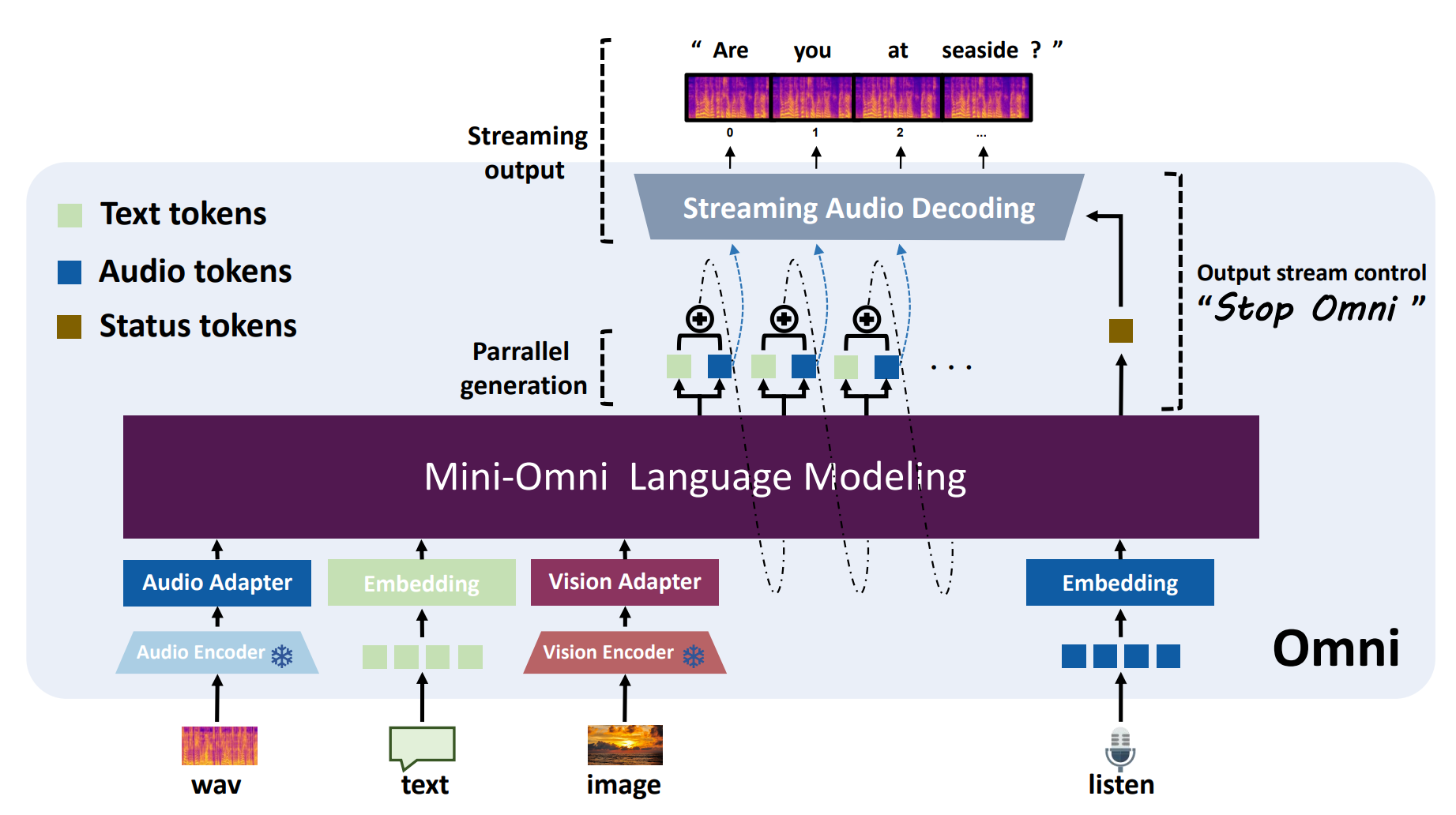
## 模型结构
Omni2的语言模型采用Qwen2-0.5B,adapter采用llama中常用的MLP,Encoder采用各种预训练效果较好模态的编码器,以便用很简单的方法就能训练出多模态模型。
## 算法原理
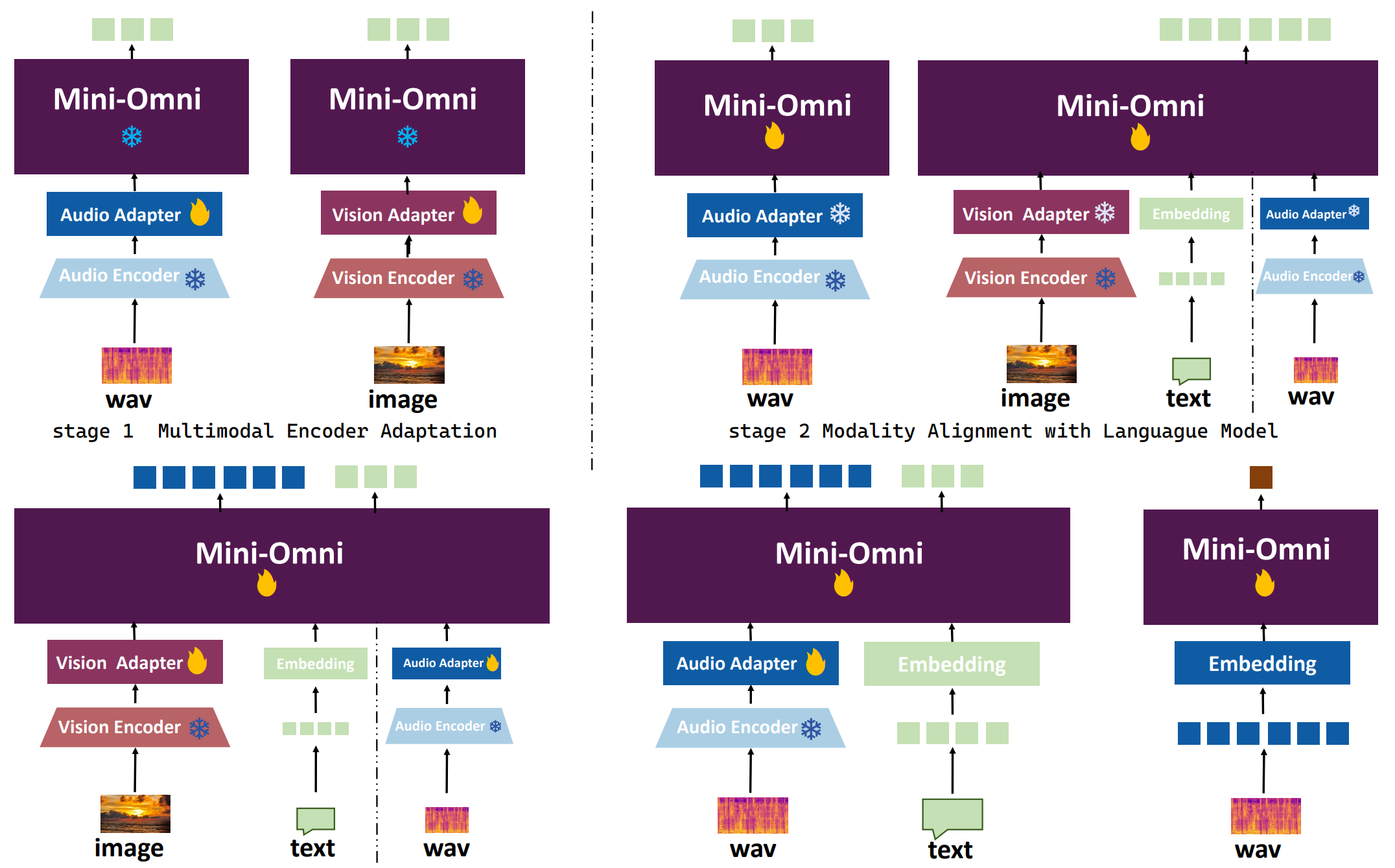
Omni2的原理是以文本到文本的大语言模型能力为基础,吸收各种已经预训练好的不同模态的编码器的编码能力,添加一层MLP来适应多模态任务,通过一定的微调策略,在缺乏多模态配对训练数据的情况下也能取得一定的多模态效果,下图为其三阶段微调策略。
## 环境配置
```
mv mini-omni2_pytorch mini-omni2 # 去框架名后缀
```
### Docker(方法一)
```
docker pull image.sourcefind.cn:5000/dcu/admin/base/pytorch:2.3.0-ubuntu22.04-dtk24.04.2-py3.10
# 为以上拉取的docker的镜像ID替换,本镜像为:83714c19d308
docker run -it --shm-size=64G -v $PWD/mini-omni2:/home/mini-omni2 -v /opt/hyhal:/opt/hyhal:ro --privileged=true --device=/dev/kfd --device=/dev/dri/ --group-add video --name omni2 bash
cd /home/mini-omni2
pip install -r requirements.txt # requirements.txt
# 安装ffmpeg
apt update
apt-get install ffmpeg
# 安装CLIP
cd CLIP
pip install . #clip==1.0
```
### Dockerfile(方法二)
```
cd mini-omni2/docker
docker build --no-cache -t omni2:latest .
docker run --shm-size=64G --name omni2 -v /opt/hyhal:/opt/hyhal:ro --privileged=true --device=/dev/kfd --device=/dev/dri/ --group-add video -v $PWD/../../mini-omni2:/home/mini-omni2 -it omni2 bash
# 若遇到Dockerfile启动的方式安装环境需要长时间等待,可注释掉里面的pip安装,启动容器后再安装python库:pip install -r requirements.txt。
cd /home/mini-omni2
# 安装ffmpeg
apt update
apt-get install ffmpeg
# 安装CLIPclip-1.0
cd CLIP
pip install . #clip==1.0
```
### Anaconda(方法三)
1、关于本项目DCU显卡所需的特殊深度学习库可从光合开发者社区下载安装:
- https://developer.sourcefind.cn/tool/
```
DTK驱动:dtk24.04.2
python:python3.10
torch:2.3.0
torchvision:0.18.1
torchaudio:2.1.2
triton:2.1.0
flash-attn:2.0.4
deepspeed:0.14.2
apex:1.3.0
xformers:0.0.25
```
`Tips:以上dtk驱动、python、torch等DCU相关工具版本需要严格一一对应。`
2、其它非特殊库参照requirements.txt安装
```
cd mini-omni2
pip install -r requirements.txt # requirements.txt
# 安装ffmpeg
apt update
apt-get install ffmpeg
# 安装CLIP
cd CLIP
pip install . #clip==1.0
```
## 数据集
无
## 训练
无
## 推理
1、下载预训练权重`gpt-omni/mini-omni2`,将mini-omni2下所有文件放入checkpoint(新建)文件夹下;
```
#移动下载的权重到checkpoint下
mv gpt-omni/mini-omni2/* checkpoint/
```
2、下载预训练权重`hubertsiuzdak/snac_24khz`,将文件夹hubertsiuzdak放在根目录mini-omni2下;
```
cd mini-omni2
python inference_vision.py
```
更多资料可参考源项目的[`README_origin`](./README_origin.md)
## result
`输入: `
```
# 音色
input_audio_path = './data/samples/vision_qa_audio.wav'
# 图片
input_image_path = './data/samples/vision_qa_image.jpg'
```
`输出:`
```
# 文本
text output: The person in the image appears to be a middle-aged man with a fair complexion. He has short, neatly combed gray hair and a receding hairline. His facial features include a prominent nose, thin lips, and a gentle smile. He is wearing a dark suit with a notched lapel, a white shirt, and a dark tie with diagonal stripes. The background is a neutral, dark color that provides a contrast to his light-colored suit. The overall impression is one of professionalism and formality.
# 音频
'vision_qa_output.wav'
```
### 精度
DCU与GPU精度一致,推理框架:pytorch。
## 应用场景
### 算法类别
`对话问答`
### 热点应用行业
`制造,广媒,金融,能源,医疗,家居,教育`
## 预训练权重
Hugging Face下载地址为:[gpt-omni/mini-omni2](https://huggingface.co/gpt-omni/mini-omni2) 、[hubertsiuzdak/snac_24khz](https://huggingface.co/hubertsiuzdak/snac_24khz)
## 源码仓库及问题反馈
- http://developer.sourcefind.cn/codes/modelzoo/mini-omni2_pytorch.git
## 参考资料
- https://github.com/gpt-omni/mini-omni2.git
- https://github.com/QwenLM/Qwen2.5.git