# MambaVision
## 论文
`MambaVision: A Hybrid Mamba-Transformer Vision Backbone`
- https://arxiv.org/abs/2407.08083
## 模型结构
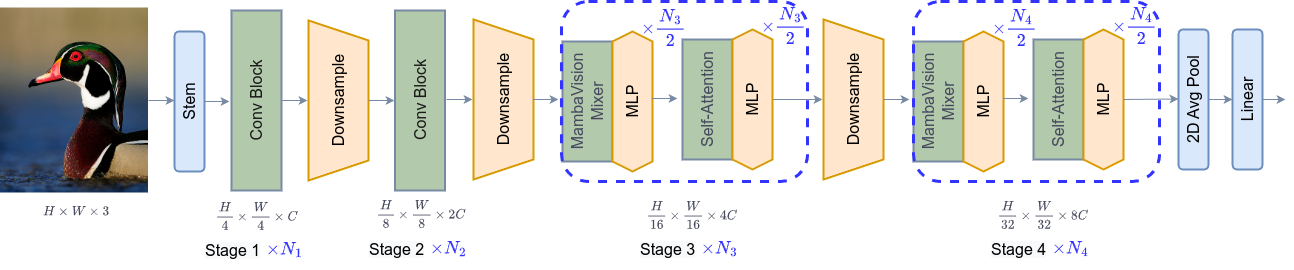
MambaVision模型提出了一种新型混合 Mamba-Transformer 主干,专门针对视觉应用而量身定制。
核心贡献包括重新设计 Mamba 公式以增强其高效建模视觉特征的能力。
此外,将 Vision Transformers (ViT) 与 Mamba 集成的可行性进行了全面的消融研究。
在 Mamba 架构的最后几层配备多个自注意力块可大大提高捕捉长距离空间依赖关系的建模能力。根据研究结果,引入了一系列具有分层架构的 MambaVision 模型,以满足各种设计标准。
## 算法原理
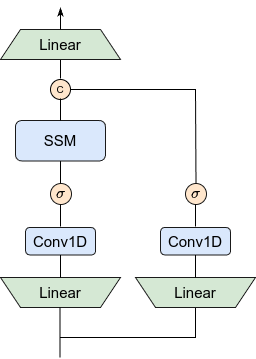
MambaVision通过创建没有 SSM 的对称路径来引入一种新颖的混合器模块,以增强全局上下文的建模
## 环境配置
### Docker(方法一)
此处提供[光源](https://www.sourcefind.cn/#/service-details)拉取docker镜像的地址与使用步骤,以及[光合](https://developer.hpccube.com/tool/)开发者社区深度学习库下载地址
```
docker pull image.sourcefind.cn:5000/dcu/admin/base/pytorch:2.1.0-ubuntu20.04-dtk24.04.1-py3.10
docker run -it --shm-size=1024G -v /path/your_code_data/:/path/your_code_data/ -v /opt/hyhal:/opt/hyhal --privileged=true --device=/dev/kfd --device=/dev/dri/ --group-add video --name MambaVision_pytorch bash # 为以上拉取的docker的镜像ID替换,本镜像为:a4dd5be0ca23
cd /path/your_code_data/MambaVision_pytorch/mamba
pip install wheel -i https://mirrors.aliyun.com/pypi/simple/
pip install . --no-build-isolation --no-deps
git clone https://github.com/Dao-AILab/causal-conv1d.git
cd causal-conv1d
pip install e .
cd /path/your_code_data/MambaVision_pytorch/
pip install . --no-build-isolation --no-deps
pip install timm==0.9.0 tensorboardX
```
### Dockerfile(方法二)
此处提供dockerfile的使用方法
```
docker build --no-cache -t MambaVision:latest .
docker run -it --shm-size=128G -v /path/your_code_data/:/path/your_code_data/ -v /opt/hyhal:/opt/hyhal:ro --privileged=true --device=/dev/kfd --device=/dev/dri/ --group-add video --name MambaVision_pytorch MambaVision bash
cd /path/your_code_data/MambaVision_pytorch/mamba
pip install wheel -i https://mirrors.aliyun.com/pypi/simple/
pip install . --no-build-isolation --no-deps
git clone https://github.com/Dao-AILab/causal-conv1d.git
cd causal-conv1d
pip install e .
cd /path/your_code_data/MambaVision_pytorch/
pip install . --no-build-isolation --no-deps
pip install timm==0.9.0 tensorboardX
```
### Anaconda(方法三)
此处提供本地配置、编译的详细步骤,例如:
关于本项目DCU显卡所需的特殊深度学习库可从[光合](https://developer.hpccube.com/tool/)开发者社区下载安装。
```
#DTK驱动:dtk24.04.1
# python:python3.10
# torch: 2.1.0
# torchvision: 0.16.0
```
`Tips:以上dtk驱动、python、torch等DCU相关工具版本需要严格一一对应`
其它依赖环境安装如下:
```
cd /path/your_code_data/MambaVision_pytorch/mamba
pip install wheel -i https://mirrors.aliyun.com/pypi/simple/
pip install . --no-build-isolation --no-deps
git clone https://github.com/Dao-AILab/causal-conv1d.git
cd causal-conv1d
pip install e .
cd /path/your_code_data/MambaVision_pytorch/
pip install . --no-build-isolation --no-deps
pip install timm==0.9.0 tensorboardX
```
## 数据集
dataset数据结构如下:
数据集SCNet快速下载链接
[ImageNet-1K](https://image-net.org/challenges/LSVRC/index.php)
```
── imagenet-1k
│ ├── train
│ │ ├── n13133613
│ │ ├── n15075141
│ │ └── ...
│ ├── val
│ │ ├── n13133613
│ │ ├── n15075141
│ │ └── ...
```
## 训练
### 单机单卡
```
sh train.sh
```
### 单机多卡
```
sh multidcu_train.sh
```
注意:修改DATA_PATH的地址为自己的数据地址
## 推理
模型权重SCNet快速下载链接见下方预训练权重
### 单卡推理
Inference :
To save outputs to a directory , use --output
```
python inference.py
```
Evaluate :
```
sh validate.sh
```
### 多卡推理
```
sh multidcu_validate.sh
```
注意:修改DATA_PATH的地址为自己的数据地址;修改checkpoint为自己的权重地址并修改--model名称与其对应。
## result
Inference :
### 精度
使用1张K100 AI卡推理
| Method | Acc@1(%) | Acc@5(%) |
|:------------------------------------------------------------------------------------:|:---------------:|------|
| MambaVision-T | 82.242 | 96.146 |
| MambaVision-S | 83.256 | 96.464 |
| MambaVision-B | 84.148 | 96.878 |
| MambaVision-L | 84.968 | 97.114 |
## 应用场景
### 算法类别
`图像分类`
### 热点应用行业
`科研,制造,医疗,家居,教育`
## 预训练权重
[MambaVision-T-1K](https://huggingface.co/nvidia/MambaVision-T-1K)
## 源码仓库及问题反馈
- https://developer.hpccube.com/codes/modelzoo/mambavision_pytorch
## 参考资料
- https://github.com/NVlabs/MambaVision
