[简体中文](README.md) | English
# Zero-shot Text Classification
**Table of contents**
- [1. Zero-shot Text Classification Application](#1)
- [2. Quick Start](#2)
- [2.1 Code Structure](#21)
- [2.2 Data Annotation](#22)
- [2.3 Finetuning](#23)
- [2.4 Evaluation](#24)
- [2.5 Inference](#25)
- [2.6 Deployment](#26)
- [2.7 Experiments](#27)
## 1. Zero-shot Text Classification
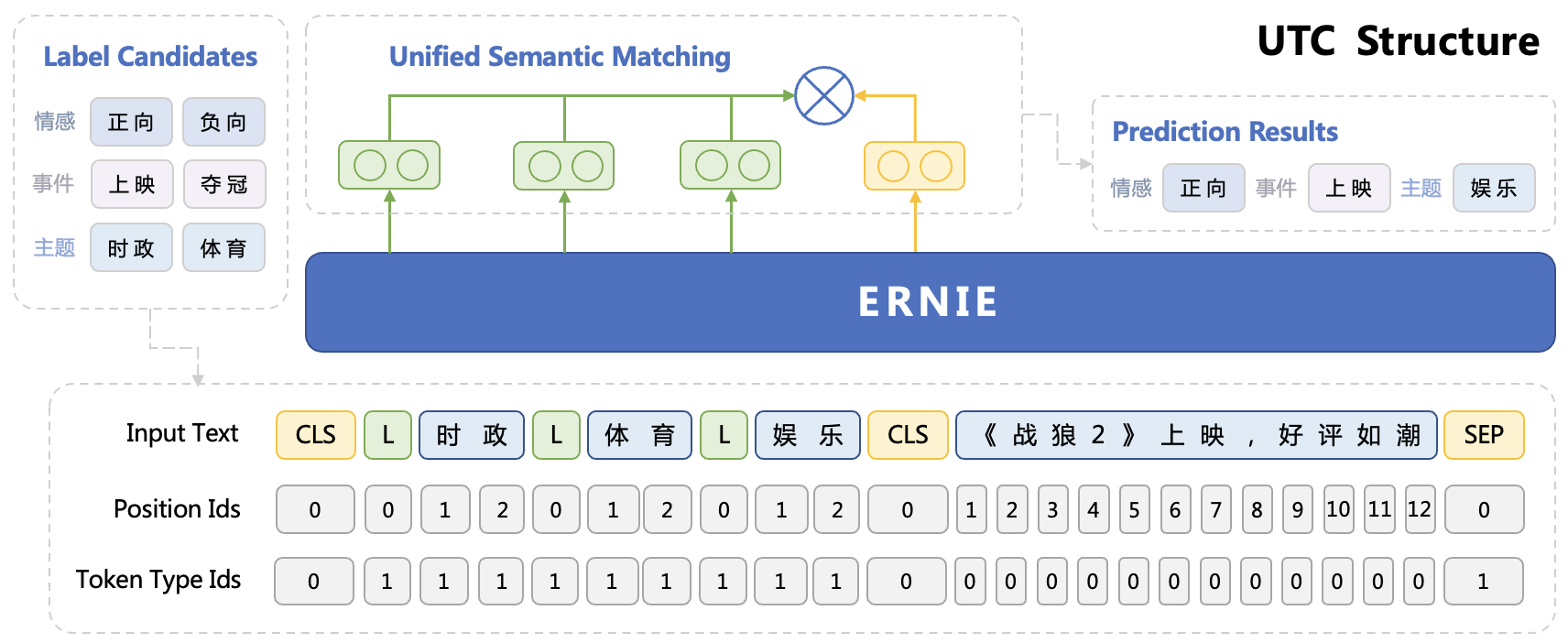
This project provides an end-to-end application solution for universal text classification based on Universal Task Classification (UTC) finetuning and goes through the full lifecycle of **data labeling, model training and model deployment**. We hope this guide can help you apply Text Classification techniques with zero-shot ability in your own products or models.
Text Classification refers to assigning a set of categories to given input text. Despite the advantages of tuning, applying text classification techniques in practice remains a challenge due to domain adaption and lack of labeled data, etc. This PaddleNLP Zero-shot Text Classification Guide builds on our UTC from the Unified Semantic Matching (USM) model series and provides an industrial-level solution that supports universal text classification tasks, including but not limited to **semantic analysis, semantic matching, intention recognition and event detection**, allowing you accomplish multiple tasks with a single model. Besides, our method brings good generation performance through multi-task pretraining.
**Highlights:**
- **Comprehensive Coverage**🎓: Covers various mainstream tasks of text classification, including but not limited to semantic analysis, semantic matching, intention recognition and event detection.
- **State-of-the-Art Performance**🏃: Strong performance from the UTC model, which ranks first on [ZeroCLUE](https://www.cluebenchmarks.com/zeroclue.html)/[FewCLUE](https://www.cluebenchmarks.com/fewclue.html) as of 01/11/2023.
- **Easy to use**⚡: Three lines of code to use our Taskflow for out-of-box Zero-shot Text Classification capability. One line of command to model training and model deployment.
- **Efficient Tuning**✊: Developers can easily get started with the data labeling and model training process without a background in Machine Learning.
## 2. Quick start
For quick start, you can directly use ```paddlenlp.Taskflow``` out-of-the-box, leveraging the zero-shot performance. For production use cases, we recommend labeling a small amount of data for model fine-tuning to further improve the performance.
### 2.1 Code structure
```shell
.
├── deploy/simple_serving/ # model deployment script
├── utils.py # data processing tools
├── run_train.py # model fine-tuning script
├── run_eval.py # model evaluation script
├── label_studio.py # data format conversion script
├── label_studio_text.md # data annotation instruction
└── README.md
```
### 2.2 Data labeling
We recommend using [Label Studio](https://labelstud.io/) for data labeling. You can export labeled data in Label Studio and convert them into the required input format. Please refer to [Label Studio Data Labeling Guide](./label_studio_text_en.md) for more details.
Here we provide a pre-labeled example dataset `Medical Question Intent Classification Dataset`, which you can download with the following command. We will show how to use the data conversion script to generate training/validation/test set files for fine-tuning.
Download the medical question intent classification dataset:
```shell
wget https://bj.bcebos.com/paddlenlp/datasets/utc-medical.tar.gz
tar -xvf utc-medical.tar.gz
mv utc-medical data
rm utc-medical.tar.gz
```
Generate training/validation set files:
```shell
python label_studio.py \
--label_studio_file ./data/label_studio.json \
--save_dir ./data \
--splits 0.8 0.1 0.1 \
--options ./data/label.txt
```
For multi-task training, you can convert data with script separately and move them to the same directory.
### 2.3 Finetuning
Use the following command to fine-tune the model using `utc-base` as the pre-trained model, and save the fine-tuned model to `./checkpoint/model_best/`:
Single GPU:
```shell
python run_train.py \
--device gpu \
--logging_steps 10 \
--save_steps 100 \
--eval_steps 100 \
--seed 1000 \
--model_name_or_path utc-base \
--output_dir ./checkpoint/model_best \
--dataset_path ./data/ \
--max_seq_length 512 \
--per_device_train_batch_size 2 \
--per_device_eval_batch_size 2 \
--gradient_accumulation_steps 8 \
--num_train_epochs 20 \
--learning_rate 1e-5 \
--do_train \
--do_eval \
--do_export \
--export_model_dir ./checkpoint/model_best \
--overwrite_output_dir \
--disable_tqdm True \
--metric_for_best_model macro_f1 \
--load_best_model_at_end True \
--save_total_limit 1
```
Multiple GPUs:
```shell
python -u -m paddle.distributed.launch --gpus "0,1" run_train.py \
--device gpu \
--logging_steps 10 \
--save_steps 100 \
--eval_steps 100 \
--seed 1000 \
--model_name_or_path utc-base \
--output_dir ./checkpoint/model_best \
--dataset_path ./data/ \
--max_seq_length 512 \
--per_device_train_batch_size 2 \
--per_device_eval_batch_size 2 \
--gradient_accumulation_steps 8 \
--num_train_epochs 20 \
--learning_rate 1e-5 \
--do_train \
--do_eval \
--do_export \
--export_model_dir ./checkpoint/model_best \
--overwrite_output_dir \
--disable_tqdm True \
--metric_for_best_model macro_f1 \
--load_best_model_at_end True \
--save_total_limit 1
```
Parameters:
* `device`: Training device, one of 'cpu' and 'gpu' can be selected; the default is GPU training.
* `logging_steps`: The interval steps of log printing during training, the default is 10.
* `save_steps`: The number of interval steps to save the model checkpoint during training, the default is 100.
* `eval_steps`: The number of interval steps to save the model checkpoint during training, the default is 100.
* `seed`: global random seed, default is 42.
* `model_name_or_path`: The pre-trained model used for few shot training. Defaults to "utc-base". Options: "utc-xbase", "utc-base", "utc-medium", "utc-mini", "utc-micro", "utc-nano", "utc-pico".
* `output_dir`: Required, the model directory saved after model training or compression; the default is `None`.
* `dataset_path`: The directory to dataset; defaults to `./data`.
* `train_file`: Training file name; defaults to `train.txt`.
* `dev_file`: Development file name; defaults to `dev.txt`.
* `max_seq_len`: The maximum segmentation length of the text and label candidates. When the input exceeds the maximum length, the input text will be automatically segmented. The default is 512.
* `per_device_train_batch_size`: The batch size of each GPU core/CPU used for training, the default is 8.
* `per_device_eval_batch_size`: Batch size per GPU core/CPU for evaluation, default is 8.
* `num_train_epochs`: Training rounds, 100 can be selected when using early stopping method; the default is 10.
* `learning_rate`: The maximum learning rate for training, UTC recommends setting it to 1e-5; the default value is 3e-5.
* `do_train`: Whether to perform fine-tuning training, setting this parameter means to perform fine-tuning training, and it is not set by default.
* `do_eval`: Whether to evaluate, setting this parameter means to evaluate, the default is not set.
* `do_export`: Whether to export, setting this parameter means to export static graph, and it is not set by default.
* `export_model_dir`: Static map export address, the default is `./checkpoint/model_best`.
* `overwrite_output_dir`: If `True`, overwrite the contents of the output directory. If `output_dir` points to a checkpoint directory, use it to continue training.
* `disable_tqdm`: Whether to use tqdm progress bar.
* `metric_for_best_model`: Optimal model metric, UTC recommends setting it to `macro_f1`, the default is None.
* `load_best_model_at_end`: Whether to load the best model after training, usually used in conjunction with `metric_for_best_model`, the default is False.
* `save_total_limit`: If this parameter is set, the total number of checkpoints will be limited. Remove old checkpoints `output directory`, defaults to None.
### 2.4 Evaluation
Model evaluation:
```shell
python evaluate.py \
--model_path ./checkpoint/model_best \
--test_path ./data/test.txt \
--per_device_eval_batch_size 2 \
--max_seq_len 512 \
--output_dir ./checkpoint_test
```
Parameters:
- `model_path`: The path of the model folder for evaluation, which must contain the model weight file `model_state.pdparams` and the configuration file `model_config.json`.
- `test_path`: The test set file for evaluation.
- `per_device_eval_batch_size`: Batch size, please adjust it according to the machine situation, the default is 8.
- `max_seq_len`: The maximum segmentation length of the text and label candidates. When the input exceeds the maximum length, the input text will be automatically segmented. The default is 512.
### 2.5 Inference
You can use `paddlenlp.Taskflow` to load your custom model by specifying the path of the model weight file through `task_path`.
```python
>>> from pprint import pprint
>>> from paddlenlp import Taskflow
>>> schema = ["病情诊断", "治疗方案", "病因分析", "指标解读", "就医建议", "疾病表述", "后果表述", "注意事项", "功效作用", "医疗费用", "其他"]
>>> my_cls = Taskflow("zero_shot_text_classification", model="utc-base", schema=schema, task_path="./checkpoint/model_best", precision="fp16")
>>> pprint(my_cls("中性粒细胞比率偏低"))
```
### 2.6 Deployment
We provide the deployment solution on the foundation of PaddleNLP SimpleServing, where you can easily build your own deployment service with three-line code.
```
# Save at server.py
from paddlenlp import SimpleServer, Taskflow
schema = ["病情诊断", "治疗方案", "病因分析", "指标解读", "就医建议"]
utc = Taskflow("zero_shot_text_classification",
model="utc-base",
schema=schema,
task_path="../../checkpoint/model_best/",
precision="fp32")
app = SimpleServer()
app.register_taskflow("taskflow/utc", utc)
```
```
# Start the server
paddlenlp server server:app --host 0.0.0.0 --port 8990
```
It supports FP16 (half-precision) and multiple process for inference acceleration.
### 2.7 Experiments
The zero-shot results reported here are based on the development set of KUAKE-QIC.
| | Macro F1 | Micro F1 |
| :--------: | :--------: | :--------: |
| utc-xbase | 66.30 | 89.67 |
| utc-base | 64.13 | 89.06 |
| utc-medium | 69.62 | 89.15 |
| utc-micro | 60.31 | 79.14 |
| utc-mini | 65.82 | 89.82 |
| utc-nano | 62.03 | 80.92 |
| utc-pico | 53.63 | 83.57 |