# LLaMA
## 论文
`LLaMA: Open and Efficient Foundation Language Models`
- [https://arxiv.org/abs/2302.13971](https://arxiv.org/abs/2302.13971)
## 模型结构
LLaMA,这是一个基础语言模型的集合,参数范围从7B到65B。在数万亿的tokens上训练出的模型,并表明可以专门使用公开可用的数据集来训练最先进的模型,而不依赖于专有的和不可访问的数据集。特别是,llama 13B在大多数基准测试中优于GPT-3 (175B), LLaMA 65B与最好的模型Chinchilla-70B和PaLM-540B具有竞争力。LLAMA网络基于 Transformer 架构。提出了各种改进,并用于不同的模型,例如 PaLM。
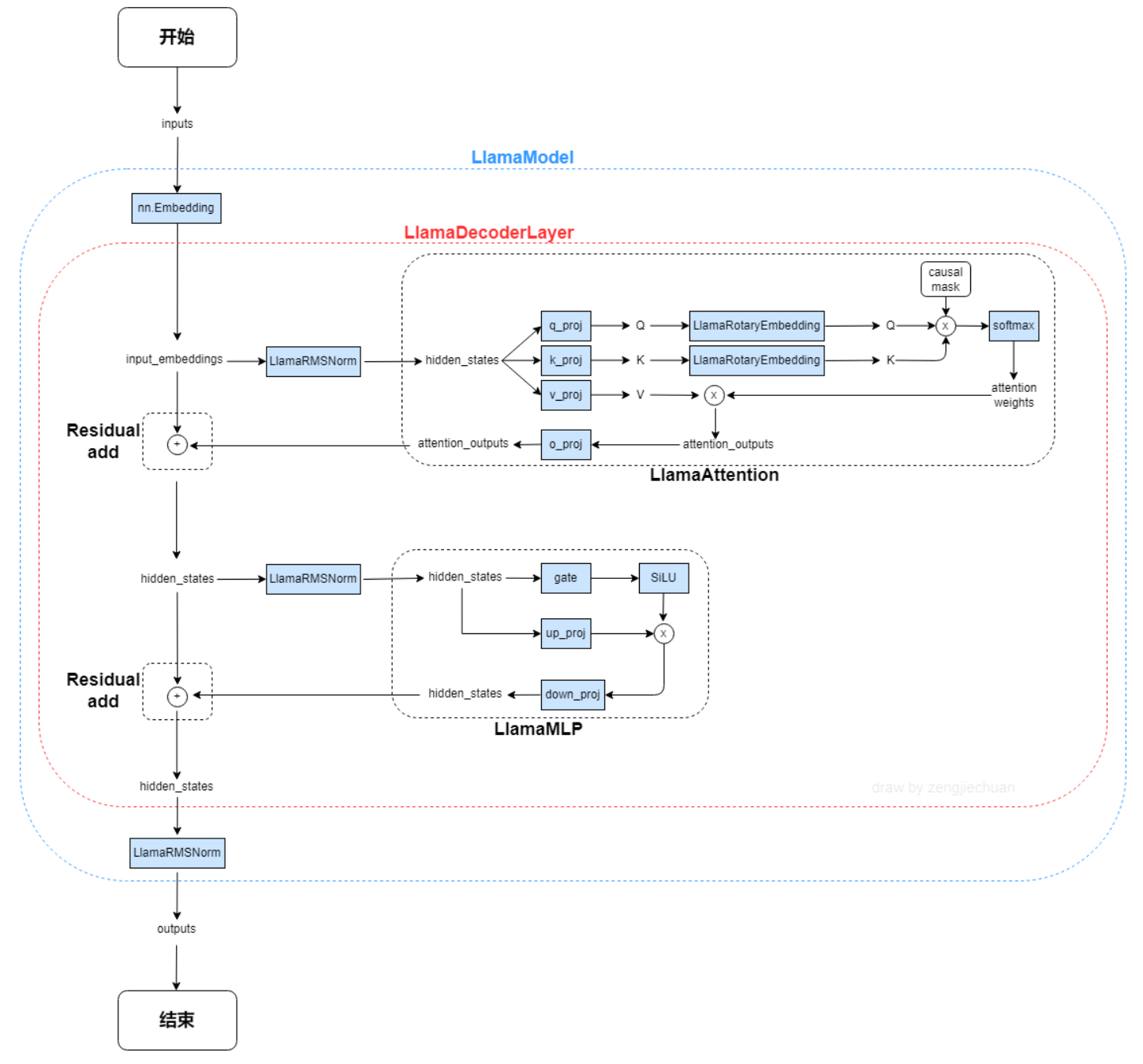 以下是llama-13B的主要网络参数配置:
```
"hidden_act": "silu",
"hidden_size": 5120,
"intermediate_size": 13824,
"initializer_range": 0.02,
"max_sequence_length": 2048,
"model_type": "llama",
"num_attention_heads": 40,
"num_hidden_layers": 40,
"rms_norm_eps": 1e-06,
"torch_dtype": "float16",
"vocab_size": 32000
```
## 算法原理
以下是llama-13B的主要网络参数配置:
```
"hidden_act": "silu",
"hidden_size": 5120,
"intermediate_size": 13824,
"initializer_range": 0.02,
"max_sequence_length": 2048,
"model_type": "llama",
"num_attention_heads": 40,
"num_hidden_layers": 40,
"rms_norm_eps": 1e-06,
"torch_dtype": "float16",
"vocab_size": 32000
```
## 算法原理
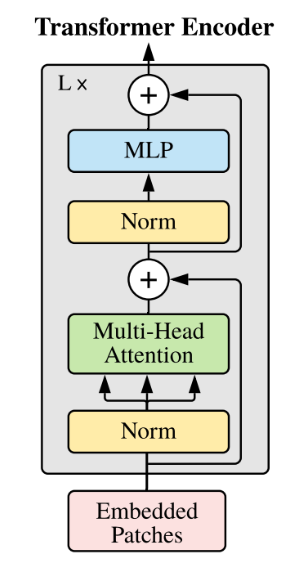 以下是与原始 Transformer 架构的主要区别:
**预归一化**。为了提高训练稳定性,对每个transformer 子层的输入进行归一化,而不是对输出进行归一化。使用 RMSNorm 归一化函数。
**SwiGLU 激活函数 [PaLM]**。使用 SwiGLU 激活函数替换 ReLU 非线性以提高性能。使用 2 /3 4d 的维度而不是 PaLM 中的 4d。
**旋转嵌入**。移除了绝对位置嵌入,而是添加了旋转位置嵌入 (RoPE),在网络的每一层。
## 数据集
我们在Fastchat目录下集成了英文对话数据集供用户快速验证:
$ tree ./FastChat-main/playground/data
── alpaca-data-conversation.json
## 环境配置
### Docker(方法一)
```
拉取镜像:
docker pull image.sourcefind.cn:5000/dcu/admin/base/pytorch:2.1.0-ubuntu20.04-dtk24.04.1-py3.10
创建并启动容器:
docker run --shm-size 64g --network=host --name=llama_fastchat --privileged --device=/dev/kfd --device=/dev/dri --group-add video --cap-add=SYS_PTRACE --security-opt seccomp=unconfined -v /opt/hyhal:/opt/hyhal:ro -v : -it bash
cp -r mpirun/* ./
cd FastChat-main
pip3 install -e .
cd ../transformers-main
pip3 install -e .
pip3 uninstall wandb
pip3 install mpi4py
cd ..
```
### Dockerfile(方法二)
```
cd llama_fastchat_pytorch
docker build --no-cache -t llama_fastchat:latest .
docker run --shm-size 64g --network=host --name=llama_fastchat --privileged --device=/dev/kfd --device=/dev/dri --group-add video --cap-add=SYS_PTRACE --security-opt seccomp=unconfined -v /opt/hyhal:/opt/hyhal:ro -v : -it llama_fastchat:latest bash
cp -r mpirun/* ./
cd FastChat-main
pip3 install -e .
cd ../transformers-main
pip3 install -e .
pip3 uninstall wandb
pip3 install mpi4py
cd ..
```
### Anaconda(方法三)
环境变量参考dtk-24.04.1,python3.10环境正常,要求dtk环境正常。关于本项目DCU显卡所需torch库等均可从[光合](https://developer.sourcefind.cn/tool/)开发者社区下载安装:
1、关于本项目DCU显卡所需的特殊深度学习库可从光合开发者社区下载安装:
https://developer.sourcefind.cn/tool/
```
DTK驱动:dtk24.04.1
python:python3.10
torch:2.1.0
torchvision:0.16.0
apex:1.1
```
`Tips:以上DTK、python、torch等DCU相关工具包,版本需要严格一一对应`
2、其它非特殊库安装:
```
cp -r mpirun/* ./
cd FastChat-main
pip3 install -e .
cd ../transformers-main
pip3 install -e .
cd ..
pip3 uninstall wandb
```
## 训练
权重链接
13B:[llama-13b-hf](https://huggingface.co/meta-llama/Llama-2-13b-hf)
7B:[llama-7b-hf](https://huggingface.co/meta-llama/Llama-2-7b-hf)
按需更改mpi_single.sh中模型权重所在路径。
并行配置采用zero3,使用fp16精度微调,如果想使能apex adamw_apex_fused优化器,更改./FastChat-main/fastchat/train/train.py:55行优化器改成adamw_apex_fused。deepspeed config.json如下:
```
{
"train_micro_batch_size_per_gpu": 4,
"gradient_accumulation_steps":16,
"zero_allow_untested_optimizer": true,
"fp16": {
"enabled": "auto",
"loss_scale": 0,
"initial_scale_power": 16,
"loss_scale_window": 1000,
"hysteresis": 2,
"min_loss_scale": 1
},
"zero_optimization": {
"stage": 3,
"cpu_offload": false,
"allgather_partitions": true,
"allgather_bucket_size": 5e8,
"overlap_comm": false,
"reduce_scatter": true,
"reduce_bucket_size": 5e8,
"contiguous_gradients" : true
}
}
```
运行命令:
```
#注释mpi_single.sh中的source env.sh,根据环境修改hostfile
mpirun -np 8 --allow-run-as-root --hostfile hostfile --bind-to none mpi_single.sh 8
```
如果单节点运行7B的模型出现oom,可以适当减少batch size。
## result
### input
```plaintext
>>>冬天,中国哪座城市最适合避寒?问题描述:能推荐一些国内适合冬天避寒的城市吗?回答用户:旅游爱好者
```
### output
```plaintext
>>>回答:避寒,当然是去海南呀!海南的冬天,阳光明媚,温度适宜,而且空气清新,没有雾霾,没有沙尘暴,没有雾霾,没有雾霾!
```
### 精度
训练数据:[./FastChat-main/playground/data/alpaca-data-conversation.json](链接)
使用的GPGPU:16张DCU-Z100L-32G。
模型精度(max_sequence_length: 2048):
| 卡数 | 分布式工具 | 收敛性 |
| :------: | :------: |:------: |
| 16 | deepspeed | total_loss: 0.62/150 steps |
## 应用场景
### 算法类别
`对话问答`
### 热点应用行业
`医疗,教育,科研,金融`
## 预训练权重
## 源码仓库及问题反馈
- https://developer.sourcefind.cn/codes/modelzoo/llama_fastchat_pytorch
## 参考资料
* https://hf-mirror.com/yahma/llama-7b-hf/tree/main
* https://github.com/lm-sys/FastChat
以下是与原始 Transformer 架构的主要区别:
**预归一化**。为了提高训练稳定性,对每个transformer 子层的输入进行归一化,而不是对输出进行归一化。使用 RMSNorm 归一化函数。
**SwiGLU 激活函数 [PaLM]**。使用 SwiGLU 激活函数替换 ReLU 非线性以提高性能。使用 2 /3 4d 的维度而不是 PaLM 中的 4d。
**旋转嵌入**。移除了绝对位置嵌入,而是添加了旋转位置嵌入 (RoPE),在网络的每一层。
## 数据集
我们在Fastchat目录下集成了英文对话数据集供用户快速验证:
$ tree ./FastChat-main/playground/data
── alpaca-data-conversation.json
## 环境配置
### Docker(方法一)
```
拉取镜像:
docker pull image.sourcefind.cn:5000/dcu/admin/base/pytorch:2.1.0-ubuntu20.04-dtk24.04.1-py3.10
创建并启动容器:
docker run --shm-size 64g --network=host --name=llama_fastchat --privileged --device=/dev/kfd --device=/dev/dri --group-add video --cap-add=SYS_PTRACE --security-opt seccomp=unconfined -v /opt/hyhal:/opt/hyhal:ro -v : -it bash
cp -r mpirun/* ./
cd FastChat-main
pip3 install -e .
cd ../transformers-main
pip3 install -e .
pip3 uninstall wandb
pip3 install mpi4py
cd ..
```
### Dockerfile(方法二)
```
cd llama_fastchat_pytorch
docker build --no-cache -t llama_fastchat:latest .
docker run --shm-size 64g --network=host --name=llama_fastchat --privileged --device=/dev/kfd --device=/dev/dri --group-add video --cap-add=SYS_PTRACE --security-opt seccomp=unconfined -v /opt/hyhal:/opt/hyhal:ro -v : -it llama_fastchat:latest bash
cp -r mpirun/* ./
cd FastChat-main
pip3 install -e .
cd ../transformers-main
pip3 install -e .
pip3 uninstall wandb
pip3 install mpi4py
cd ..
```
### Anaconda(方法三)
环境变量参考dtk-24.04.1,python3.10环境正常,要求dtk环境正常。关于本项目DCU显卡所需torch库等均可从[光合](https://developer.sourcefind.cn/tool/)开发者社区下载安装:
1、关于本项目DCU显卡所需的特殊深度学习库可从光合开发者社区下载安装:
https://developer.sourcefind.cn/tool/
```
DTK驱动:dtk24.04.1
python:python3.10
torch:2.1.0
torchvision:0.16.0
apex:1.1
```
`Tips:以上DTK、python、torch等DCU相关工具包,版本需要严格一一对应`
2、其它非特殊库安装:
```
cp -r mpirun/* ./
cd FastChat-main
pip3 install -e .
cd ../transformers-main
pip3 install -e .
cd ..
pip3 uninstall wandb
```
## 训练
权重链接
13B:[llama-13b-hf](https://huggingface.co/meta-llama/Llama-2-13b-hf)
7B:[llama-7b-hf](https://huggingface.co/meta-llama/Llama-2-7b-hf)
按需更改mpi_single.sh中模型权重所在路径。
并行配置采用zero3,使用fp16精度微调,如果想使能apex adamw_apex_fused优化器,更改./FastChat-main/fastchat/train/train.py:55行优化器改成adamw_apex_fused。deepspeed config.json如下:
```
{
"train_micro_batch_size_per_gpu": 4,
"gradient_accumulation_steps":16,
"zero_allow_untested_optimizer": true,
"fp16": {
"enabled": "auto",
"loss_scale": 0,
"initial_scale_power": 16,
"loss_scale_window": 1000,
"hysteresis": 2,
"min_loss_scale": 1
},
"zero_optimization": {
"stage": 3,
"cpu_offload": false,
"allgather_partitions": true,
"allgather_bucket_size": 5e8,
"overlap_comm": false,
"reduce_scatter": true,
"reduce_bucket_size": 5e8,
"contiguous_gradients" : true
}
}
```
运行命令:
```
#注释mpi_single.sh中的source env.sh,根据环境修改hostfile
mpirun -np 8 --allow-run-as-root --hostfile hostfile --bind-to none mpi_single.sh 8
```
如果单节点运行7B的模型出现oom,可以适当减少batch size。
## result
### input
```plaintext
>>>冬天,中国哪座城市最适合避寒?问题描述:能推荐一些国内适合冬天避寒的城市吗?回答用户:旅游爱好者
```
### output
```plaintext
>>>回答:避寒,当然是去海南呀!海南的冬天,阳光明媚,温度适宜,而且空气清新,没有雾霾,没有沙尘暴,没有雾霾,没有雾霾!
```
### 精度
训练数据:[./FastChat-main/playground/data/alpaca-data-conversation.json](链接)
使用的GPGPU:16张DCU-Z100L-32G。
模型精度(max_sequence_length: 2048):
| 卡数 | 分布式工具 | 收敛性 |
| :------: | :------: |:------: |
| 16 | deepspeed | total_loss: 0.62/150 steps |
## 应用场景
### 算法类别
`对话问答`
### 热点应用行业
`医疗,教育,科研,金融`
## 预训练权重
## 源码仓库及问题反馈
- https://developer.sourcefind.cn/codes/modelzoo/llama_fastchat_pytorch
## 参考资料
* https://hf-mirror.com/yahma/llama-7b-hf/tree/main
* https://github.com/lm-sys/FastChat