# LinFusion
## 论文
LinFusion: 1 GPU, 1 Minute, 16K Image
- https://arxiv.org/abs/2409.02097
## 模型结构
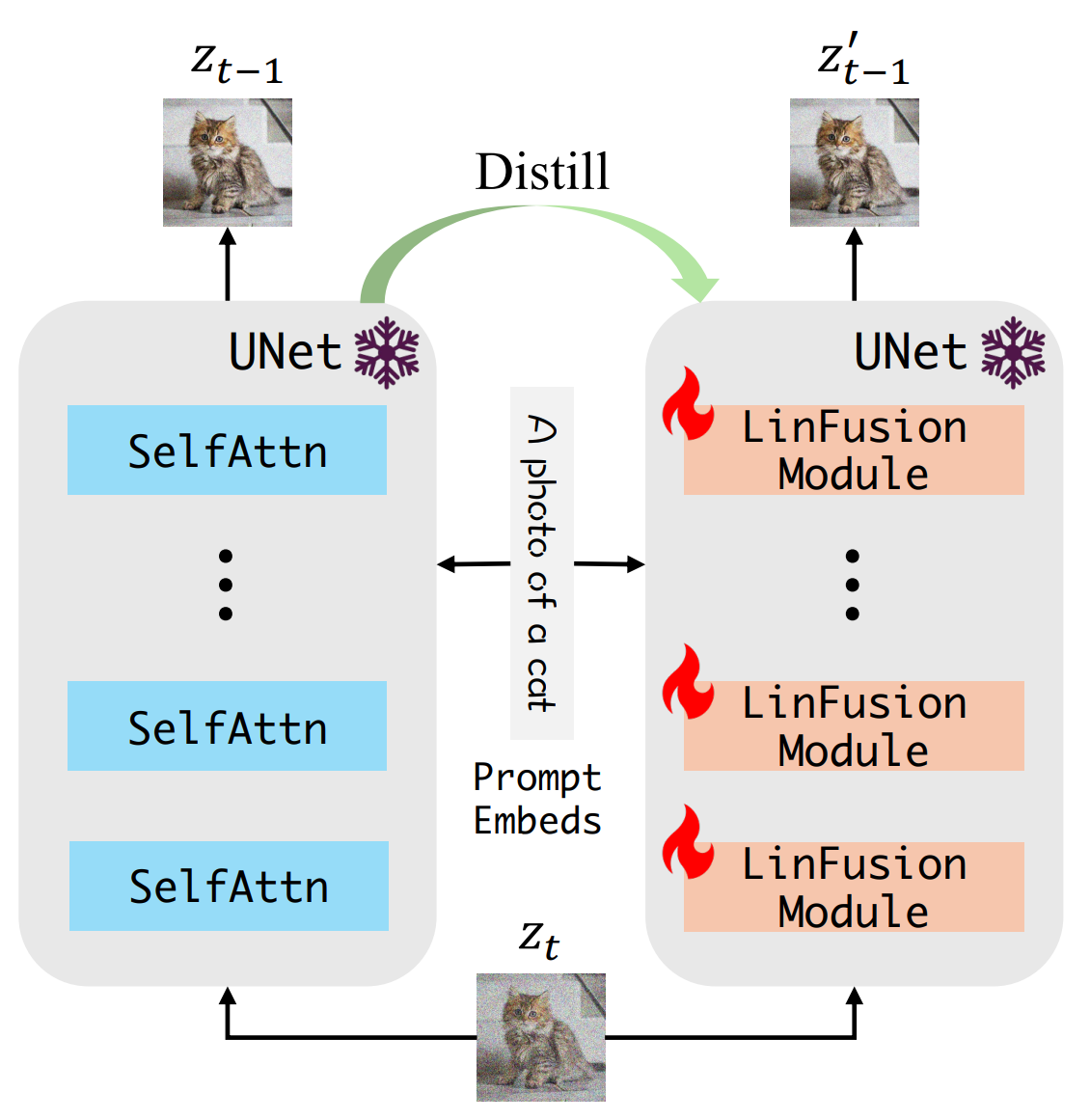
作者将所提出的 Generalized Linear Attention 模块集成到 SD 的架构中,替换原始的 Self-Attention 模块,生成的模型称为 LinFusion。使用知识蒸馏策略,只训练线性注意模块 50K 步,LinFusion 的性能即可与原始 SD 相当甚至更好,同时显著降低了时间和显存占用的复杂度。
## 算法原理
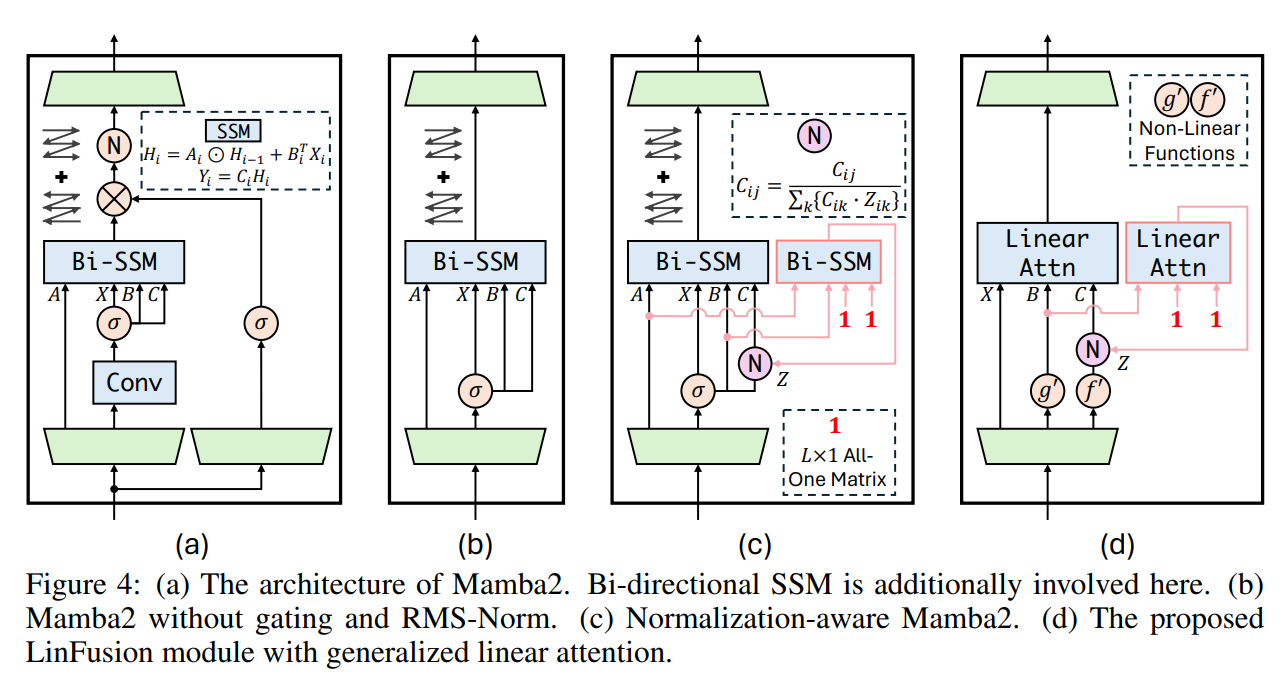
为了得到具有线性计算复杂度的 Diffusion Backbone,一个简单的方案是使用 Mamba2 替换所有的 Self-Attention,如图 4 (a) 所示。作者使用双向的 SSM 来确保当前位置可以从后续位置访问信息。SD 中的 Self-Attention 模块不包含 Mamba2 中的门控操作或者 RMS-Norm。作者为了保持一致性,就删除了这些结构,导致性能略有提高。
## 环境配置
### Docker(方法一)
推荐使用docker方式运行, 此处提供[光源](https://www.sourcefind.cn/#/service-details)拉取docker镜像的地址与使用步骤
```
docker pull image.sourcefind.cn:5000/dcu/admin/base/pytorch:2.1.0-ubuntu20.04-dtk24.04.2-py3.10
docker run -it --shm-size=1024G --network host -v /path/your_code_data/:/path/your_code_data/ -v /opt/hyhal:/opt/hyhal --privileged=true --device=/dev/kfd --device=/dev/dri/ --group-add video --name linfusion_pytorch bash # 为以上拉取的docker的镜像ID替换,本镜像为:4555f389bc2a
cd /path/your_code_data/
pip install git+https://github.com/openai/CLIP.git
pip install click clean-fid open_clip_torch
```
Tips:以上dtk驱动、python、torch、vllm等DCU相关工具版本需要严格一一对应。
### Dockerfile(方法二)
此处提供dockerfile的使用方法
```
docker build -t linfusion:latest .
docker run -it --shm-size=1024G -v /path/your_code_data/:/path/your_code_data/ -v /opt/hyhal:/opt/hyhal --privileged=true --device=/dev/kfd --device=/dev/dri/ --group-add video --name linfusion_pytorch linfusion bash
cd /path/your_code_data/
pip install git+https://github.com/openai/CLIP.git
pip install click clean-fid open_clip_torch
```
### Anaconda(方法三)
此处提供本地配置、编译的详细步骤,例如:
关于本项目DCU显卡所需的特殊深度学习库可从[光合](https://developer.hpccube.com/tool/)开发者社区下载安装。
```
DTK驱动:dtk24.04.2
python:3.10
torch:2.1.0
```
`Tips:以上dtk驱动、python、torch等DCU相关工具版本需要严格一一对应`
其它非深度学习库参照requirement.txt安装:
```
cd /path/your_code_data/
pip install -r requirements.txt -i https://mirrors.aliyun.com/pypi/simple/ --trusted-host mirrors.aliyun.com
pip install git+https://github.com/openai/CLIP.git
pip install click clean-fid open_clip_torch
```
## 数据集
如果没有,执行训练指令时代码将默认自动将bhargavsdesai/laion_improved_aesthetics_6.5plus_with_images 数据集下载到目录中,其中包含 169k 张图像,需要约 75 GB 的磁盘空间。~/.cache
训练数据集SCNet快速下载链接[bhargavsdesai/laion_improved_aesthetics_6.5plus_with_images](http://113.200.138.88:18080/aidatasets/bhargavsdesai/laion_improved_aesthetics_6.5plus_with_images.git)
用于快速验证的小数据集SCNet快速下载链接[min_data](http://113.200.138.88:18080/aidatasets/bhargavsdesai/laion_improved_aesthetics_6.5plus_with_images/-/tree/main/min_data),下载后放于对应文件夹
训练数据目录结构如下:
```
── bhargavsdesai/laion_improved_aesthetics_6.5plus_with_images/data
├── train-00000-of-00080-b8c547951c435f2e.parquet
├── train-00001-of-00080-6502db8bd493f966.parquet
├── train-00002-of-00080-73d42259ed4d3c6c.parquet
└── ...
```
验证数据集下载整理如下,也可通过scnet快速下载链接[coco/val2014](http://113.200.138.88:18080/aidatasets/project-dependency/coco2014)下载:
```
wget http://images.cocodataset.org/zips/val2014.zip
unzip val2014.zip -d /path/to/coco
```
## 训练
### 单机单卡
```
#根据自己的需求修改train.sh中的参数
cd /path/your_code_data/
bash ./examples/train/train.sh
```
### 单机多卡
```
#根据自己的卡数和需求修改distill.sh中的参数
bash ./examples/train/distill.sh
```
## 推理
### 单机单卡
inference:
```
cd /path/your_code_data/
#注意:可修改pretrained_model_name_or_path="stabilityai/stable-diffusion-xl-base-1.0"为自己的模型路径
python examples/inference/sdxl_distrifusion_example.py
```
运行examples/eval/eval.sh以生成用于评估的图像。
```
#注意:您可能需要指定outdir、repo_id、resolution等
bash examples/eval/singleDCU_eval.sh
```
### 单机多卡
```
#其中,--nproc_per_node为使用卡数。
bash examples/eval/eval.sh
```
#运行examples/eval/calculate_metrics.sh以计算指标。您可能需要指定/path/to/coco、fake_dir等。
```
#运行时会自动下载clip模型,可离线下载openclip模型laion/CLIP-ViT-g-14-laion2B-s12B-b42K
#同时修改src/eval/calculate_metrics.py中compute_clip_score函数的下述代码行:
#clip, _, clip_preprocessor = open_clip.create_model_and_transforms("ViT-g-14", pretrained="laion2b_s12b_b42k")中pretrained为你的模型地址
#例如:pretrained="/data/luopl/LinFusion/laion/CLIP-ViT-g-14-laion2B-s12B-b42K/open_clip_pytorch_model.bin
bash examples/eval/calculate_metrics.sh
```
## result
使用的加速卡:4张 K100_AI
模型:
- stabilityai/stable-diffusion-xl-base-1.0
- Yuanshi/LinFusion-XL
文生图结果:
inference:
### 精度
使用的加速卡:4张 K100_AI
## 应用场景
### 算法类别
`以文生图`
### 热点应用行业
`科研,教育,政府,金融`
## 预训练权重
[stabilityai/stable-diffusion-v1-5模型下载SCNet链接](http://113.200.138.88:18080/aimodels/stable-diffusion-v1-5)
[stabilityai/stable-diffusion-2-1模型下载SCNet链接](http://113.200.138.88:18080/aimodels/stable-diffusion-2-1)
[stabilityai/stable-diffusion-xl-base-1.0模型下载SCNet链接](http://113.200.138.88:18080/aimodels/stable-diffusion-xl-base-1.0)
[Yuanshi/LinFusion-1-5模型下载SCNet链接](http://113.200.138.88:18080/aimodels/yuanshi/LinFusion-1-5.git)
[Yuanshi/LinFusion-2-1模型下载SCNet链接](http://113.200.138.88:18080/aimodels/yuanshi/LinFusion-2-1.git)
[Yuanshi/LinFusion-XL模型下载SCNet链接](http://113.200.138.88:18080/aimodels/yuanshi/LinFusion-XL.git)
[laion/CLIP-ViT-g-14-laion2B-s12B-b42K模型下载SCNet链接](http://113.200.138.88:18080/aimodels/clip-vit-g-14-laion2b-s12b-b42k)
## 源码仓库及问题反馈
- http://developer.hpccube.com/codes/modelzoo/linfusion_pytorch.git
## 参考资料
- https://github.com/Huage001/LinFusion/