# Hunyuan-DiT : A Powerful Multi-Resolution Diffusion Transformer with Fine-Grained Chinese Understanding
-----
This repo contains PyTorch model definitions, pre-trained weights and inference/sampling code for our paper exploring Hunyuan-DiT. You can find more visualizations on our [project page](https://dit.hunyuan.tencent.com/).
> [**Hunyuan-DiT : A Powerful Multi-Resolution Diffusion Transformer with Fine-Grained Chinese Understanding**](https://arxiv.org/abs/2405.08748)
> [**DialogGen:Multi-modal Interactive Dialogue System for Multi-turn Text-to-Image Generation**](https://arxiv.org/abs/2403.08857)
## 🔥🔥🔥 News!!
* May 22, 2024: 🚀 We introduce TensorRT version for Hunyuan-DiT acceleration, which achieves **47%** acceleration on NVIDIA GPUs. Please check [TensorRT-libs](https://huggingface.co/Tencent-Hunyuan/TensorRT-libs) for instructions.
* May 22, 2024: 💬 We support demo running multi-turn text2image generation now. Please check the [script](#using-gradio) below.
## 🤖 Try it on the web
Welcome to our web-based [**Tencent Hunyuan Bot**](https://hunyuan.tencent.com/bot/chat), where you can explore our innovative products! Just input the suggested prompts below or any other **imaginative prompts containing drawing-related keywords** to activate the Hunyuan text-to-image generation feature. Unleash your creativity and create any picture you desire, **all for free!**
You can use simple prompts similar to natural language text
> 画一只穿着西装的猪
>
> draw a pig in a suit
>
> 生成一幅画,赛博朋克风,跑车
>
> generate a painting, cyberpunk style, sports car
or multi-turn language interactions to create the picture.
> 画一个木制的鸟
>
> draw a wooden bird
>
> 变成玻璃的
>
> turn into glass
## 📑 Open-source Plan
- Hunyuan-DiT (Text-to-Image Model)
- [x] Inference
- [x] Checkpoints
- [ ] Distillation Version (Coming soon ⏩️)
- [x] TensorRT Version (Coming soon ⏩️)
- [ ] Training (Coming later ⏩️)
- [DialogGen](https://github.com/Centaurusalpha/DialogGen) (Prompt Enhancement Model)
- [x] Inference
- [X] Web Demo (Gradio)
- [x] Multi-turn T2I Demo (Gradio)
- [X] Cli Demo
## Contents
- [Hunyuan-DiT](#hunyuan-dit--a-powerful-multi-resolution-diffusion-transformer-with-fine-grained-chinese-understanding)
- [Abstract](#abstract)
- [🎉 Hunyuan-DiT Key Features](#-hunyuan-dit-key-features)
- [Chinese-English Bilingual DiT Architecture](#chinese-english-bilingual-dit-architecture)
- [Multi-turn Text2Image Generation](#multi-turn-text2image-generation)
- [📈 Comparisons](#-comparisons)
- [🎥 Visualization](#-visualization)
- [📜 Requirements](#-requirements)
- [🛠 Dependencies and Installation](#%EF%B8%8F-dependencies-and-installation)
- [🧱 Download Pretrained Models](#-download-pretrained-models)
- [🔑 Inference](#-inference)
- [Using Gradio](#using-gradio)
- [Using Command Line](#using-command-line)
- [More Configurations](#more-configurations)
- [🚀 Acceleration (for Linux)](#-acceleration-for-linux)
- [🔗 BibTeX](#-bibtex)
## **Abstract**
We present Hunyuan-DiT, a text-to-image diffusion transformer with fine-grained understanding of both English and Chinese. To construct Hunyuan-DiT, we carefully designed the transformer structure, text encoder, and positional encoding. We also build from scratch a whole data pipeline to update and evaluate data for iterative model optimization. For fine-grained language understanding, we train a Multimodal Large Language Model to refine the captions of the images. Finally, Hunyuan-DiT can perform multi-round multi-modal dialogue with users, generating and refining images according to the context.
Through our carefully designed holistic human evaluation protocol with more than 50 professional human evaluators, Hunyuan-DiT sets a new state-of-the-art in Chinese-to-image generation compared with other open-source models.
## 🎉 **Hunyuan-DiT Key Features**
### **Chinese-English Bilingual DiT Architecture**
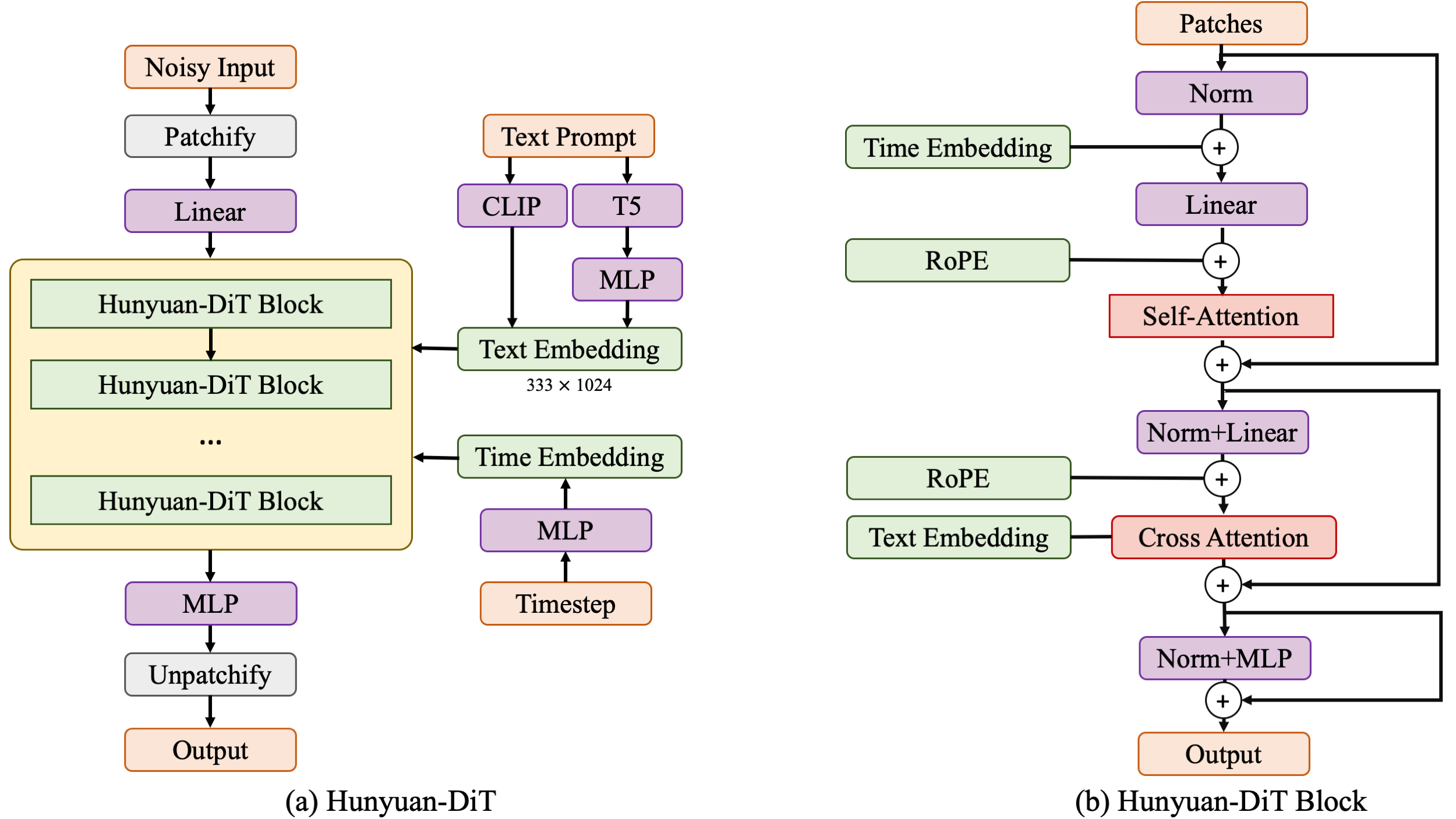
Hunyuan-DiT is a diffusion model in the latent space, as depicted in figure below. Following the Latent Diffusion Model, we use a pre-trained Variational Autoencoder (VAE) to compress the images into low-dimensional latent spaces and train a diffusion model to learn the data distribution with diffusion models. Our diffusion model is parameterized with a transformer. To encode the text prompts, we leverage a combination of pre-trained bilingual (English and Chinese) CLIP and multilingual T5 encoder.
### Multi-turn Text2Image Generation
Understanding natural language instructions and performing multi-turn interaction with users are important for a
text-to-image system. It can help build a dynamic and iterative creation process that bring the user’s idea into reality
step by step. In this section, we will detail how we empower Hunyuan-DiT with the ability to perform multi-round
conversations and image generation. We train MLLM to understand the multi-round user dialogue
and output the new text prompt for image generation.
## 📈 Comparisons
In order to comprehensively compare the generation capabilities of HunyuanDiT and other models, we constructed a 4-dimensional test set, including Text-Image Consistency, Excluding AI Artifacts, Subject Clarity, Aesthetic. More than 50 professional evaluators performs the evaluation.
Model
Open Source
Text-Image Consistency (%)
Excluding AI Artifacts (%)
Subject Clarity (%)
Aesthetics (%)
Overall (%)
SDXL
✔
64.3
60.6
91.1
76.3
42.7
PixArt-α
✔
68.3
60.9
93.2
77.5
45.5
Playground 2.5
✔
71.9
70.8
94.9
83.3
54.3
SD 3
✘
77.1
69.3
94.6
82.5
56.7
MidJourney v6
✘
73.5
80.2
93.5
87.2
63.3
DALL-E 3
✘
83.9
80.3
96.5
89.4
71.0
Hunyuan-DiT
✔
74.2
74.3
95.4
86.6
59.0
## 🎥 Visualization
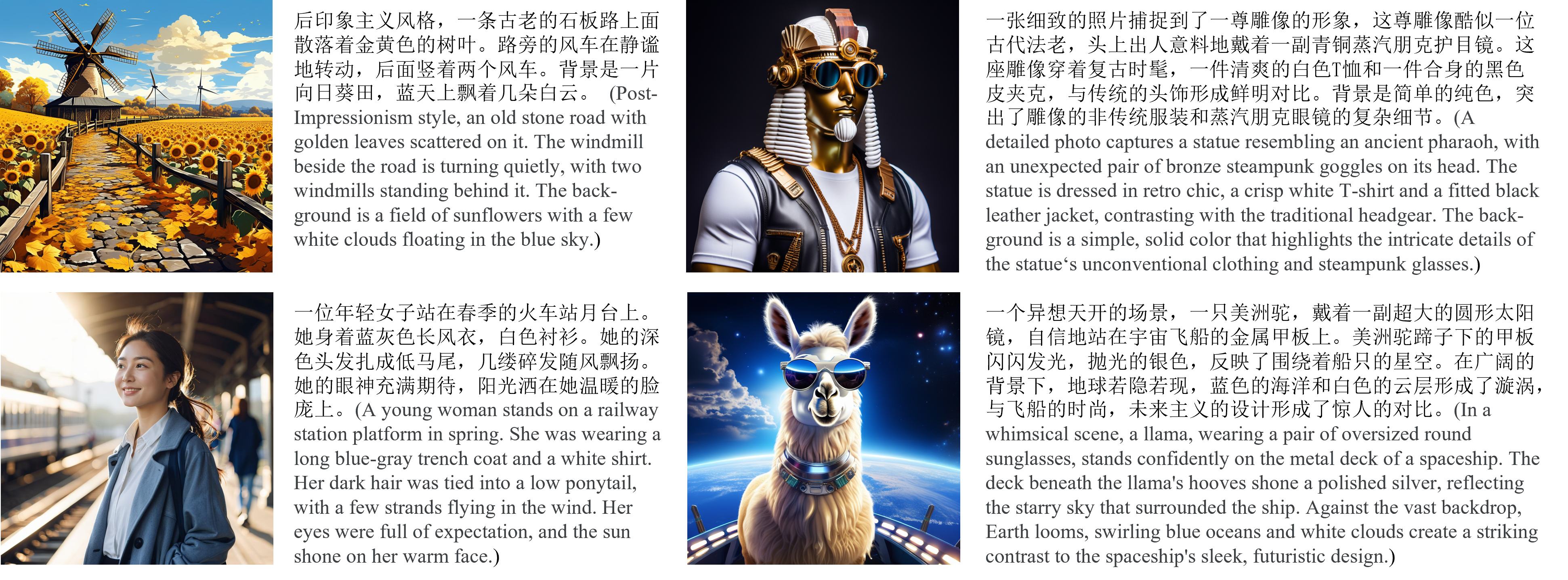
* **Chinese Elements**
* **Long Text Input**
* **Multi-turn Text2Image Generation**
https://github.com/Tencent/tencent.github.io/assets/27557933/94b4dcc3-104d-44e1-8bb2-dc55108763d1
---
## 📜 Requirements
This repo consists of DialogGen (a prompt enhancement model) and Hunyuan-DiT (a text-to-image model).
The following table shows the requirements for running the models (batch size = 1):
| Model | --load-4bit (DialogGen) | GPU Peak Memory | GPU |
|:-----------------------:|:-----------------------:|:---------------:|:---------------:|
| DialogGen + Hunyuan-DiT | ✘ | 32G | A100 |
| DialogGen + Hunyuan-DiT | ✔ | 22G | A100 |
| Hunyuan-DiT | - | 11G | A100 |
| Hunyuan-DiT | - | 14G | RTX3090/RTX4090 |
* An NVIDIA GPU with CUDA support is required.
* We have tested V100 and A100 GPUs.
* **Minimum**: The minimum GPU memory required is 11GB.
* **Recommended**: We recommend using a GPU with 32GB of memory for better generation quality.
* Tested operating system: Linux
## 🛠️ Dependencies and Installation
Begin by cloning the repository:
```shell
git clone https://github.com/tencent/HunyuanDiT
cd HunyuanDiT
```
### Installation Guide for Linux
We provide an `environment.yml` file for setting up a Conda environment.
Conda's installation instructions are available [here](https://docs.anaconda.com/free/miniconda/index.html).
```shell
# 1. Prepare conda environment
conda env create -f environment.yml
# 2. Activate the environment
conda activate HunyuanDiT
# 3. Install pip dependencies
python -m pip install -r requirements.txt
# 4. (Optional) Install flash attention v2 for acceleration (requires CUDA 11.6 or above)
python -m pip install git+https://github.com/Dao-AILab/flash-attention.git@v2.1.2.post3
```
## 🧱 Download Pretrained Models
To download the model, first install the huggingface-cli. (Detailed instructions are available [here](https://huggingface.co/docs/huggingface_hub/guides/cli).)
```shell
python -m pip install "huggingface_hub[cli]"
```
Then download the model using the following commands:
```shell
# Create a directory named 'ckpts' where the model will be saved, fulfilling the prerequisites for running the demo.
mkdir ckpts
# Use the huggingface-cli tool to download the model.
# The download time may vary from 10 minutes to 1 hour depending on network conditions.
huggingface-cli download Tencent-Hunyuan/HunyuanDiT --local-dir ./ckpts
```
💡Tips for using huggingface-cli (network problem)
##### 1. Using HF-Mirror
If you encounter slow download speeds in China, you can try a mirror to speed up the download process. For example,
```shell
HF_ENDPOINT=https://hf-mirror.com huggingface-cli download Tencent-Hunyuan/HunyuanDiT --local-dir ./ckpts
```
##### 2. Resume Download
`huggingface-cli` supports resuming downloads. If the download is interrupted, you can just rerun the download
command to resume the download process.
Note: If an `No such file or directory: 'ckpts/.huggingface/.gitignore.lock'` like error occurs during the download
process, you can ignore the error and rerun the download command.
---
All models will be automatically downloaded. For more information about the model, visit the Hugging Face repository [here](https://huggingface.co/Tencent-Hunyuan/HunyuanDiT).
| Model | #Params | Download URL |
|:------------------:|:-------:|:-------------------------------------------------------------------------------------------------------:|
| mT5 | 1.6B | [mT5](https://huggingface.co/Tencent-Hunyuan/HunyuanDiT/tree/main/t2i/mt5) |
| CLIP | 350M | [CLIP](https://huggingface.co/Tencent-Hunyuan/HunyuanDiT/tree/main/t2i/clip_text_encoder) |
| DialogGen | 7.0B | [DialogGen](https://huggingface.co/Tencent-Hunyuan/HunyuanDiT/tree/main/dialoggen) |
| sdxl-vae-fp16-fix | 83M | [sdxl-vae-fp16-fix](https://huggingface.co/Tencent-Hunyuan/HunyuanDiT/tree/main/t2i/sdxl-vae-fp16-fix) |
| Hunyuan-DiT | 1.5B | [Hunyuan-DiT](https://huggingface.co/Tencent-Hunyuan/HunyuanDiT/tree/main/t2i/model) |
## 🔑 Inference
### Using Gradio
Make sure you have activated the conda environment before running the following command.
```shell
# By default, we start a Chinese UI.
python app/hydit_app.py
# Using Flash Attention for acceleration.
python app/hydit_app.py --infer-mode fa
# You can disable the enhancement model if the GPU memory is insufficient.
# The enhancement will be unavailable until you restart the app without the `--no-enhance` flag.
python app/hydit_app.py --no-enhance
# Start with English UI
python app/hydit_app.py --lang en
# Start a multi-turn T2I generation UI.
# If your GPU memory is less than 32GB, use '--load-4bit' to enable 4-bit quantization, which requires at least 22GB of memory.
python app/multiTurnT2I_app.py
```
Then the demo can be accessed through http://0.0.0.0:443
### Using Command Line
We provide several commands to quick start:
```shell
# Prompt Enhancement + Text-to-Image. Torch mode
python sample_t2i.py --prompt "渔舟唱晚"
# Only Text-to-Image. Torch mode
python sample_t2i.py --prompt "渔舟唱晚" --no-enhance
# Only Text-to-Image. Flash Attention mode
python sample_t2i.py --infer-mode fa --prompt "渔舟唱晚"
# Generate an image with other image sizes.
python sample_t2i.py --prompt "渔舟唱晚" --image-size 1280 768
# Prompt Enhancement + Text-to-Image. DialogGen loads with 4-bit quantization, but it may loss performance.
python sample_t2i.py --prompt "渔舟唱晚" --load-4bit
```
More example prompts can be found in [example_prompts.txt](example_prompts.txt)
### More Configurations
We list some more useful configurations for easy usage:
| Argument | Default | Description |
|:---------------:|:---------:|:---------------------------------------------------:|
| `--prompt` | None | The text prompt for image generation |
| `--image-size` | 1024 1024 | The size of the generated image |
| `--seed` | 42 | The random seed for generating images |
| `--infer-steps` | 100 | The number of steps for sampling |
| `--negative` | - | The negative prompt for image generation |
| `--infer-mode` | torch | The inference mode (torch, fa, or trt) |
| `--sampler` | ddpm | The diffusion sampler (ddpm, ddim, or dpmms) |
| `--no-enhance` | False | Disable the prompt enhancement model |
| `--model-root` | ckpts | The root directory of the model checkpoints |
| `--load-key` | ema | Load the student model or EMA model (ema or module) |
| `--load-4bit` | Fasle | Load DialogGen model with 4bit quantization |
## 🚀 Acceleration (for Linux)
We provide TensorRT version of HunyuanDiT for inference acceleration (faster than flash attention).
See [Tencent-Hunyuan/TensorRT-libs](https://huggingface.co/Tencent-Hunyuan/TensorRT-libs) for more details.
## 🔗 BibTeX
If you find [Hunyuan-DiT](https://arxiv.org/abs/2405.08748) or [DialogGen](https://arxiv.org/abs/2403.08857) useful for your research and applications, please cite using this BibTeX:
```BibTeX
@misc{li2024hunyuandit,
title={Hunyuan-DiT: A Powerful Multi-Resolution Diffusion Transformer with Fine-Grained Chinese Understanding},
author={Zhimin Li and Jianwei Zhang and Qin Lin and Jiangfeng Xiong and Yanxin Long and Xinchi Deng and Yingfang Zhang and Xingchao Liu and Minbin Huang and Zedong Xiao and Dayou Chen and Jiajun He and Jiahao Li and Wenyue Li and Chen Zhang and Rongwei Quan and Jianxiang Lu and Jiabin Huang and Xiaoyan Yuan and Xiaoxiao Zheng and Yixuan Li and Jihong Zhang and Chao Zhang and Meng Chen and Jie Liu and Zheng Fang and Weiyan Wang and Jinbao Xue and Yangyu Tao and Jianchen Zhu and Kai Liu and Sihuan Lin and Yifu Sun and Yun Li and Dongdong Wang and Mingtao Chen and Zhichao Hu and Xiao Xiao and Yan Chen and Yuhong Liu and Wei Liu and Di Wang and Yong Yang and Jie Jiang and Qinglin Lu},
year={2024},
eprint={2405.08748},
archivePrefix={arXiv},
primaryClass={cs.CV}
}
@article{huang2024dialoggen,
title={DialogGen: Multi-modal Interactive Dialogue System for Multi-turn Text-to-Image Generation},
author={Huang, Minbin and Long, Yanxin and Deng, Xinchi and Chu, Ruihang and Xiong, Jiangfeng and Liang, Xiaodan and Cheng, Hong and Lu, Qinglin and Liu, Wei},
journal={arXiv preprint arXiv:2403.08857},
year={2024}
}
```
## Start History