## 2D Human Pose Demo
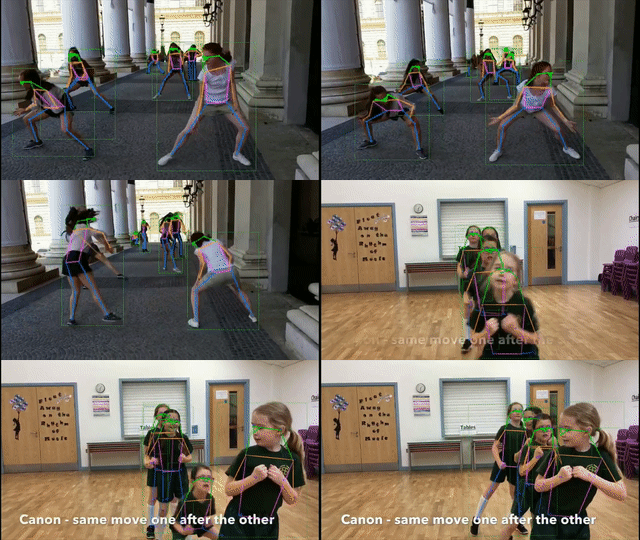
### 2D Human Pose Top-Down Image Demo
#### Using gt human bounding boxes as input
We provide a demo script to test a single image, given gt json file.
```shell
python demo/top_down_img_demo.py \
${MMPOSE_CONFIG_FILE} ${MMPOSE_CHECKPOINT_FILE} \
--img-root ${IMG_ROOT} --json-file ${JSON_FILE} \
--out-img-root ${OUTPUT_DIR} \
[--show --device ${GPU_ID or CPU}] \
[--kpt-thr ${KPT_SCORE_THR}]
```
Examples:
```shell
python demo/top_down_img_demo.py \
configs/body/2d_kpt_sview_rgb_img/topdown_heatmap/coco/hrnet_w48_coco_256x192.py \
https://download.openmmlab.com/mmpose/top_down/hrnet/hrnet_w48_coco_256x192-b9e0b3ab_20200708.pth \
--img-root tests/data/coco/ --json-file tests/data/coco/test_coco.json \
--out-img-root vis_results
```
To run demos on CPU:
```shell
python demo/top_down_img_demo.py \
configs/body/2d_kpt_sview_rgb_img/topdown_heatmap/coco/hrnet_w48_coco_256x192.py \
https://download.openmmlab.com/mmpose/top_down/hrnet/hrnet_w48_coco_256x192-b9e0b3ab_20200708.pth \
--img-root tests/data/coco/ --json-file tests/data/coco/test_coco.json \
--out-img-root vis_results \
--device=cpu
```
#### Using mmdet for human bounding box detection
We provide a demo script to run mmdet for human detection, and mmpose for pose estimation.
Assume that you have already installed [mmdet](https://github.com/open-mmlab/mmdetection).
```shell
python demo/top_down_img_demo_with_mmdet.py \
${MMDET_CONFIG_FILE} ${MMDET_CHECKPOINT_FILE} \
${MMPOSE_CONFIG_FILE} ${MMPOSE_CHECKPOINT_FILE} \
--img-root ${IMG_ROOT} --img ${IMG_FILE} \
--out-img-root ${OUTPUT_DIR} \
[--show --device ${GPU_ID or CPU}] \
[--bbox-thr ${BBOX_SCORE_THR} --kpt-thr ${KPT_SCORE_THR}]
```
Examples:
```shell
python demo/top_down_img_demo_with_mmdet.py \
demo/mmdetection_cfg/faster_rcnn_r50_fpn_coco.py \
https://download.openmmlab.com/mmdetection/v2.0/faster_rcnn/faster_rcnn_r50_fpn_1x_coco/faster_rcnn_r50_fpn_1x_coco_20200130-047c8118.pth \
configs/body/2d_kpt_sview_rgb_img/topdown_heatmap/coco/hrnet_w48_coco_256x192.py \
https://download.openmmlab.com/mmpose/top_down/hrnet/hrnet_w48_coco_256x192-b9e0b3ab_20200708.pth \
--img-root tests/data/coco/ \
--img 000000196141.jpg \
--out-img-root vis_results
```
### 2D Human Pose Top-Down Video Demo
We also provide a video demo to illustrate the results.
Assume that you have already installed [mmdet](https://github.com/open-mmlab/mmdetection).
```shell
python demo/top_down_video_demo_with_mmdet.py \
${MMDET_CONFIG_FILE} ${MMDET_CHECKPOINT_FILE} \
${MMPOSE_CONFIG_FILE} ${MMPOSE_CHECKPOINT_FILE} \
--video-path ${VIDEO_PATH} \
--out-video-root ${OUTPUT_VIDEO_ROOT} \
[--show --device ${GPU_ID or CPU}] \
[--bbox-thr ${BBOX_SCORE_THR} --kpt-thr ${KPT_SCORE_THR}] \
[--use-multi-frames] [--online]
```
Note that
1. `${VIDEO_PATH}` can be the local path or **URL** link to video file.
2. You can turn on the `[--use-multi-frames]` option to use multi frames for inference in the pose estimation stage.
3. If the `[--online]` option is set to **True**, future frame information can **not** be used when using multi frames for inference in the pose estimation stage.
Examples:
For single-frame inference that do not rely on extra frames to get the final results of the current frame, try this:
```shell
python demo/top_down_video_demo_with_mmdet.py \
demo/mmdetection_cfg/faster_rcnn_r50_fpn_coco.py \
https://download.openmmlab.com/mmdetection/v2.0/faster_rcnn/faster_rcnn_r50_fpn_1x_coco/faster_rcnn_r50_fpn_1x_coco_20200130-047c8118.pth \
configs/body/2d_kpt_sview_rgb_img/topdown_heatmap/coco/hrnet_w48_coco_256x192.py \
https://download.openmmlab.com/mmpose/top_down/hrnet/hrnet_w48_coco_256x192-b9e0b3ab_20200708.pth \
--video-path demo/resources/demo.mp4 \
--out-video-root vis_results
```
For multi-frame inference that rely on extra frames to get the final results of the current frame, try this:
```shell
python demo/top_down_video_demo_with_mmdet.py \
demo/mmdetection_cfg/faster_rcnn_r50_fpn_coco.py \
https://download.openmmlab.com/mmdetection/v2.0/faster_rcnn/faster_rcnn_r50_fpn_1x_coco/faster_rcnn_r50_fpn_1x_coco_20200130-047c8118.pth \
configs/body/2d_kpt_sview_rgb_vid/posewarper/posetrack18/hrnet_w48_posetrack18_384x288_posewarper_stage2.py \
https://download.openmmlab.com/mmpose/top_down/posewarper/hrnet_w48_posetrack18_384x288_posewarper_stage2-4abf88db_20211130.pth \
--video-path https://user-images.githubusercontent.com/87690686/137440639-fb08603d-9a35-474e-b65f-46b5c06b68d6.mp4 \
--out-video-root vis_results \
--use-multi-frames --online
```
#### Using the full image as input
We also provide a video demo which does not require human bounding box detection. If the video is cropped with the human centered in the screen, we can simply use the full image as the model input.
```shell
python demo/top_down_video_demo_full_frame_without_det.py \
${MMPOSE_CONFIG_FILE} ${MMPOSE_CHECKPOINT_FILE} \
--video-path ${VIDEO_PATH} \
--out-video-root ${OUTPUT_VIDEO_ROOT} \
[--show --device ${GPU_ID or CPU}] \
[--kpt-thr ${KPT_SCORE_THR}]
```
Note that `${VIDEO_PATH}` can be the local path or **URL** link to video file.
Examples:
```shell
python demo/top_down_video_demo_full_frame_without_det.py \
configs/body/2d_kpt_sview_rgb_img/topdown_heatmap/coco/vipnas_res50_coco_256x192.py \
https://download.openmmlab.com/mmpose/top_down/vipnas/vipnas_res50_coco_256x192-cc43b466_20210624.pth \
--video-path https://user-images.githubusercontent.com/87690686/169808764-29e5678c-6762-4f43-8666-c3e60f94338f.mp4 \
--show
```
We also provide a GPU version which can accelerate inference and save CPU workload. Assume that you have already installed [ffmpegcv](https://github.com/chenxinfeng4/ffmpegcv). If the `--nvdecode` option is turned on, the video reader can support NVIDIA-VIDEO-DECODING for some qualified Nvidia GPUs, which can further accelerate the inference.
```shell
python demo/top_down_video_demo_full_frame_without_det_gpuaccel.py \
${MMPOSE_CONFIG_FILE} ${MMPOSE_CHECKPOINT_FILE} \
--video-path ${VIDEO_PATH} \
--out-video-root ${OUTPUT_VIDEO_ROOT} \
[--show --device ${GPU_ID or CPU}] \
[--kpt-thr ${KPT_SCORE_THR}] \
[--nvdecode]
```
Examples:
```shell
python demo/top_down_video_demo_full_frame_without_det_gpuaccel.py \
configs/body/2d_kpt_sview_rgb_img/topdown_heatmap/coco/vipnas_res50_coco_256x192.py \
https://download.openmmlab.com/mmpose/top_down/vipnas/vipnas_res50_coco_256x192-cc43b466_20210624.pth \
--video-path https://user-images.githubusercontent.com/87690686/169808764-29e5678c-6762-4f43-8666-c3e60f94338f.mp4 \
--out-video-root vis_results
```
### 2D Human Pose Bottom-Up Image Demo
We provide a demo script to test a single image.
```shell
python demo/bottom_up_img_demo.py \
${MMPOSE_CONFIG_FILE} ${MMPOSE_CHECKPOINT_FILE} \
--img-path ${IMG_PATH}\
--out-img-root ${OUTPUT_DIR} \
[--show --device ${GPU_ID or CPU}] \
[--kpt-thr ${KPT_SCORE_THR} --pose-nms-thr ${POSE_NMS_THR}]
```
Examples:
```shell
python demo/bottom_up_img_demo.py \
configs/body/2d_kpt_sview_rgb_img/associative_embedding/coco/hrnet_w32_coco_512x512.py \
https://download.openmmlab.com/mmpose/bottom_up/hrnet_w32_coco_512x512-bcb8c247_20200816.pth \
--img-path tests/data/coco/ \
--out-img-root vis_results
```
### 2D Human Pose Bottom-Up Video Demo
We also provide a video demo to illustrate the results.
```shell
python demo/bottom_up_video_demo.py \
${MMPOSE_CONFIG_FILE} ${MMPOSE_CHECKPOINT_FILE} \
--video-path ${VIDEO_PATH} \
--out-video-root ${OUTPUT_VIDEO_ROOT} \
[--show --device ${GPU_ID or CPU}] \
[--kpt-thr ${KPT_SCORE_THR} --pose-nms-thr ${POSE_NMS_THR}]
```
Note that `${VIDEO_PATH}` can be the local path or **URL** link to video file.
Examples:
```shell
python demo/bottom_up_video_demo.py \
configs/body/2d_kpt_sview_rgb_img/associative_embedding/coco/hrnet_w32_coco_512x512.py \
https://download.openmmlab.com/mmpose/bottom_up/hrnet_w32_coco_512x512-bcb8c247_20200816.pth \
--video-path demo/resources/demo.mp4 \
--out-video-root vis_results
```
### Speed Up Inference
Some tips to speed up MMPose inference:
For top-down models, try to edit the config file. For example,
1. set `flip_test=False` in [topdown-res50](https://github.com/open-mmlab/mmpose/tree/e1ec589884235bee875c89102170439a991f8450/configs/top_down/resnet/coco/res50_coco_256x192.py#L51).
2. set `post_process='default'` in [topdown-res50](https://github.com/open-mmlab/mmpose/tree/e1ec589884235bee875c89102170439a991f8450/configs/top_down/resnet/coco/res50_coco_256x192.py#L52).
3. use faster human bounding box detector, see [MMDetection](https://mmdetection.readthedocs.io/en/latest/model_zoo.html).
For bottom-up models, try to edit the config file. For example,
1. set `flip_test=False` in [AE-res50](https://github.com/open-mmlab/mmpose/tree/e1ec589884235bee875c89102170439a991f8450/configs/bottom_up/resnet/coco/res50_coco_512x512.py#L80).
2. set `adjust=False` in [AE-res50](https://github.com/open-mmlab/mmpose/tree/e1ec589884235bee875c89102170439a991f8450/configs/bottom_up/resnet/coco/res50_coco_512x512.py#L78).
3. set `refine=False` in [AE-res50](https://github.com/open-mmlab/mmpose/tree/e1ec589884235bee875c89102170439a991f8450/configs/bottom_up/resnet/coco/res50_coco_512x512.py#L79).
4. use smaller input image size in [AE-res50](https://github.com/open-mmlab/mmpose/tree/e1ec589884235bee875c89102170439a991f8450/configs/bottom_up/resnet/coco/res50_coco_512x512.py#L39).