# InternVL Best Practice
## Table of Contents
- [Environment Setup](#environment-setup)
- [Inference](#inference)
- [Fine-tuning](#fine-tuning)
- [Inference after Fine-tuning](#inference-after-fine-tuning)
## Environment Setup
```shell
git clone https://github.com/modelscope/swift.git
cd swift
pip install -e '.[llm]'
pip install Pillow
```
## Inference
Inference for [internvl-chat-v1.5](https://www.modelscope.cn/models/AI-ModelScope/InternVL-Chat-V1-5/summary)
(To use a local model file, add the argument `--model_id_or_path /path/to/model`)
Inference with [internvl-chat-v1.5](https://www.modelscope.cn/models/AI-ModelScope/InternVL-Chat-V1-5/summary) and [internvl-chat-v1.5-int8](https://www.modelscope.cn/models/AI-ModelScope/InternVL-Chat-V1-5-int8/summary).
The tutorial below takes `internvl-chat-v1.5` as an example, and you can change to `--model_type internvl-chat-v1_5-int8` to select the INT8 version of the model. Alternatively, select the Mini-Internvl model by choosing either `mini-internvl-chat-2b-v1_5` or `mini-internvl-chat-4b-v1_5`.
**Note**
- If you want to use a local model file, add the argument --model_id_or_path /path/to/model.
- If your GPU does not support flash attention, use the argument --use_flash_attn false. And for int8 models, it is necessary to specify `dtype --bf16` during inference, otherwise the output may be garbled.
- The model's configuration specifies a relatively small max_length of 2048, which can be modified by setting `--max_length`.
- Memory consumption can be reduced by using the parameter `--gradient_checkpointing true`.
- The InternVL series of models only support training on datasets that include images.
```shell
# Experimental environment: A100
# 55GB GPU memory
CUDA_VISIBLE_DEVICES=0 swift infer --model_type internvl-chat-v1_5 --dtype bf16 --max_length 4096
# 2*30GB GPU memory
CUDA_VISIBLE_DEVICES=0,1 swift infer --model_type internvl-chat-v1_5 --dtype bf16 --max_length 4096
```
Output: (supports passing in local path or URL)
```python
"""
<<< Describe this image.
Input a media path or URL <<< http://modelscope-open.oss-cn-hangzhou.aliyuncs.com/images/cat.png
This is a high-resolution image of a kitten. The kitten has striking blue eyes and a fluffy white and grey coat. The fur pattern suggests that it may be a Maine Coon or a similar breed. The kitten's ears are perked up, and it has a curious and innocent expression. The background is blurred, which brings the focus to the kitten's face.
--------------------------------------------------
<<< How many sheep are in the picture?
Input a media path or URL <<< http://modelscope-open.oss-cn-hangzhou.aliyuncs.com/images/animal.png
There are four sheep in the picture.
--------------------------------------------------
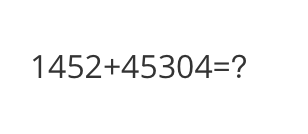
<<< What is the calculation result?
Input a media path or URL <<< http://modelscope-open.oss-cn-hangzhou.aliyuncs.com/images/math.png
The calculation result is 59,856.
--------------------------------------------------
<<< Write a poem based on the content of the picture.
Input a media path or URL <<< http://modelscope-open.oss-cn-hangzhou.aliyuncs.com/images/poem.png
Token indices sequence length is longer than the specified maximum sequence length for this model (5142 > 4096). Running this sequence through the model will result in indexing errors
In the still of the night,
A lone boat sails on the light.
The stars above, a twinkling sight,
Reflecting in the water's might.
The trees stand tall, a silent guard,
Their leaves rustling in the yard.
The boatman's lantern, a beacon bright,
Guiding him through the night.
The river flows, a gentle stream,
Carrying the boatman's dream.
His journey long, his heart serene,
In the beauty of the scene.
The stars above, a guiding light,
Leading him through the night.
The boatman's journey, a tale to tell,
Of courage, hope, and love as well.
"""
```
Example images are as follows:
cat:
 animal:
 math:
math:
 poem:
poem:
 **Single Sample Inference**
```python
import os
os.environ['CUDA_VISIBLE_DEVICES'] = '0'
from swift.llm import (
get_model_tokenizer, get_template, inference, ModelType,
get_default_template_type, inference_stream
)
from swift.utils import seed_everything
import torch
model_type = ModelType.internvl_chat_v1_5
template_type = get_default_template_type(model_type)
print(f'template_type: {template_type}')
model, tokenizer = get_model_tokenizer(model_type, torch.bfloat16,
model_kwargs={'device_map': 'auto'})
# for GPUs that do not support flash attention
# model, tokenizer = get_model_tokenizer(model_type, torch.float16,
# model_kwargs={'device_map': 'auto'},
# use_flash_attn = False)
model.generation_config.max_new_tokens = 256
template = get_template(template_type, tokenizer)
seed_everything(42)
images = ['http://modelscope-open.oss-cn-hangzhou.aliyuncs.com/images/road.png']
query = 'How far is it from each city?'
response, history = inference(model, template, query, images=images) # chat with image
print(f'query: {query}')
print(f'response: {response}')
# 流式
query = 'Which city is the farthest?'
gen = inference_stream(model, template, query, history) # chat withoud image
print_idx = 0
print(f'query: {query}\nresponse: ', end='')
for response, history in gen:
delta = response[print_idx:]
print(delta, end='', flush=True)
print_idx = len(response)
print()
print(f'history: {history}')
"""
query: How far is it from each city?
response: The distances from the location of the sign to each city are as follows:
- Mata: 14 kilometers
- Yangjiang: 62 kilometers
- Guangzhou: 293 kilometers
These distances are indicated on the road sign in the image.
query: Which city is the farthest?
response: The city that is farthest from the location of the sign is Guangzhou, which is 293 kilometers away.
history: [['How far is it from each city?', 'The distances from the location of the sign to each city are as follows:\n\n- Mata: 14 kilometers\n- Yangjiang: 62 kilometers\n- Guangzhou: 293 kilometers\n\nThese distances are indicated on the road sign in the image. '], ['Which city is the farthest?', 'The city that is farthest from the location of the sign is Guangzhou, which is 293 kilometers away. ']]
"""
```
Example image is as follows:
road:
**Single Sample Inference**
```python
import os
os.environ['CUDA_VISIBLE_DEVICES'] = '0'
from swift.llm import (
get_model_tokenizer, get_template, inference, ModelType,
get_default_template_type, inference_stream
)
from swift.utils import seed_everything
import torch
model_type = ModelType.internvl_chat_v1_5
template_type = get_default_template_type(model_type)
print(f'template_type: {template_type}')
model, tokenizer = get_model_tokenizer(model_type, torch.bfloat16,
model_kwargs={'device_map': 'auto'})
# for GPUs that do not support flash attention
# model, tokenizer = get_model_tokenizer(model_type, torch.float16,
# model_kwargs={'device_map': 'auto'},
# use_flash_attn = False)
model.generation_config.max_new_tokens = 256
template = get_template(template_type, tokenizer)
seed_everything(42)
images = ['http://modelscope-open.oss-cn-hangzhou.aliyuncs.com/images/road.png']
query = 'How far is it from each city?'
response, history = inference(model, template, query, images=images) # chat with image
print(f'query: {query}')
print(f'response: {response}')
# 流式
query = 'Which city is the farthest?'
gen = inference_stream(model, template, query, history) # chat withoud image
print_idx = 0
print(f'query: {query}\nresponse: ', end='')
for response, history in gen:
delta = response[print_idx:]
print(delta, end='', flush=True)
print_idx = len(response)
print()
print(f'history: {history}')
"""
query: How far is it from each city?
response: The distances from the location of the sign to each city are as follows:
- Mata: 14 kilometers
- Yangjiang: 62 kilometers
- Guangzhou: 293 kilometers
These distances are indicated on the road sign in the image.
query: Which city is the farthest?
response: The city that is farthest from the location of the sign is Guangzhou, which is 293 kilometers away.
history: [['How far is it from each city?', 'The distances from the location of the sign to each city are as follows:\n\n- Mata: 14 kilometers\n- Yangjiang: 62 kilometers\n- Guangzhou: 293 kilometers\n\nThese distances are indicated on the road sign in the image. '], ['Which city is the farthest?', 'The city that is farthest from the location of the sign is Guangzhou, which is 293 kilometers away. ']]
"""
```
Example image is as follows:
road:
 ## Fine-tuning
Multimodal large model fine-tuning usually uses **custom datasets** for fine-tuning. Here is a demo that can be run directly:
LoRA fine-tuning:
**note**
- If your GPU does not support flash attention, use the argument --use_flash_attn false.
- By default, only the qkv of the LLM part is fine-tuned using LoRA. If you want to fine-tune all linear layers including the vision model part, you can specify `--lora_target_modules ALL`.
```shell
# Experimental environment: A100
# 80GB GPU memory
CUDA_VISIBLE_DEVICES=0 swift sft \
--model_type internvl-chat-v1_5 \
--dataset coco-en-2-mini \
--max_length 4096
# device_map
# Experimental environment: 2*A100...
# 2*43GB GPU memory
CUDA_VISIBLE_DEVICES=0,1 swift sft \
--model_type internvl-chat-v1_5 \
--dataset coco-en-2-mini \
--max_length 4096
# ddp + deepspeed-zero2
# Experimental environment: 2*A100...
# 2*80GB GPU memory
NPROC_PER_NODE=2 \
CUDA_VISIBLE_DEVICES=0,1 swift sft \
--model_type internvl-chat-v1_5 \
--dataset coco-en-2-mini \
--max_length 4096 \
--deepspeed default-zero2
```
Full parameter fine-tuning:
```shell
# Experimental environment: 4 * A100
# device map
# 4 * 72 GPU memory
CUDA_VISIBLE_DEVICES=0,1,2,3 swift sft \
--model_type internvl-chat-v1_5 \
--dataset coco-en-2-mini \
--sft_type full \
--max_length 4096
```
[Custom datasets](../LLM/Customization.md#-Recommended-Command-line-arguments) support json, jsonl formats. Here is an example of a custom dataset:
(Only single-turn dialogue is supported. Each turn of dialogue must contain one image. Local paths or URLs can be passed in.)
```jsonl
{"query": "55555", "response": "66666", "images": ["image_path"]}
{"query": "eeeee", "response": "fffff", "images": ["image_path"]}
{"query": "EEEEE", "response": "FFFFF", "images": ["image_path"]}
```
## Inference after Fine-tuning
Direct inference:
```shell
CUDA_VISIBLE_DEVICES=0 swift infer \
--ckpt_dir output/internvl-chat-v1_5/vx-xxx/checkpoint-xxx \
--load_dataset_config true \
--max_length 4096
```
**merge-lora** and inference:
```shell
CUDA_VISIBLE_DEVICES=0 swift export \
--ckpt_dir "output/internvl-chat-v1_5/vx-xxx/checkpoint-xxx" \
--merge_lora true
CUDA_VISIBLE_DEVICES=0 swift infer \
--ckpt_dir "output/internvl-chat-v1_5/vx-xxx/checkpoint-xxx-merged" \
--load_dataset_config true \
--max_length 4096
# device map
CUDA_VISIBLE_DEVICES=0,1 swift infer \
--ckpt_dir "output/internvl-chat-v1_5/vx-xxx/checkpoint-xxx-merged" \
--load_dataset_config true \
--max_length 4096
```
## Fine-tuning
Multimodal large model fine-tuning usually uses **custom datasets** for fine-tuning. Here is a demo that can be run directly:
LoRA fine-tuning:
**note**
- If your GPU does not support flash attention, use the argument --use_flash_attn false.
- By default, only the qkv of the LLM part is fine-tuned using LoRA. If you want to fine-tune all linear layers including the vision model part, you can specify `--lora_target_modules ALL`.
```shell
# Experimental environment: A100
# 80GB GPU memory
CUDA_VISIBLE_DEVICES=0 swift sft \
--model_type internvl-chat-v1_5 \
--dataset coco-en-2-mini \
--max_length 4096
# device_map
# Experimental environment: 2*A100...
# 2*43GB GPU memory
CUDA_VISIBLE_DEVICES=0,1 swift sft \
--model_type internvl-chat-v1_5 \
--dataset coco-en-2-mini \
--max_length 4096
# ddp + deepspeed-zero2
# Experimental environment: 2*A100...
# 2*80GB GPU memory
NPROC_PER_NODE=2 \
CUDA_VISIBLE_DEVICES=0,1 swift sft \
--model_type internvl-chat-v1_5 \
--dataset coco-en-2-mini \
--max_length 4096 \
--deepspeed default-zero2
```
Full parameter fine-tuning:
```shell
# Experimental environment: 4 * A100
# device map
# 4 * 72 GPU memory
CUDA_VISIBLE_DEVICES=0,1,2,3 swift sft \
--model_type internvl-chat-v1_5 \
--dataset coco-en-2-mini \
--sft_type full \
--max_length 4096
```
[Custom datasets](../LLM/Customization.md#-Recommended-Command-line-arguments) support json, jsonl formats. Here is an example of a custom dataset:
(Only single-turn dialogue is supported. Each turn of dialogue must contain one image. Local paths or URLs can be passed in.)
```jsonl
{"query": "55555", "response": "66666", "images": ["image_path"]}
{"query": "eeeee", "response": "fffff", "images": ["image_path"]}
{"query": "EEEEE", "response": "FFFFF", "images": ["image_path"]}
```
## Inference after Fine-tuning
Direct inference:
```shell
CUDA_VISIBLE_DEVICES=0 swift infer \
--ckpt_dir output/internvl-chat-v1_5/vx-xxx/checkpoint-xxx \
--load_dataset_config true \
--max_length 4096
```
**merge-lora** and inference:
```shell
CUDA_VISIBLE_DEVICES=0 swift export \
--ckpt_dir "output/internvl-chat-v1_5/vx-xxx/checkpoint-xxx" \
--merge_lora true
CUDA_VISIBLE_DEVICES=0 swift infer \
--ckpt_dir "output/internvl-chat-v1_5/vx-xxx/checkpoint-xxx-merged" \
--load_dataset_config true \
--max_length 4096
# device map
CUDA_VISIBLE_DEVICES=0,1 swift infer \
--ckpt_dir "output/internvl-chat-v1_5/vx-xxx/checkpoint-xxx-merged" \
--load_dataset_config true \
--max_length 4096
```