# Yi-VL 最佳实践
## 目录
- [环境准备](#环境准备)
- [推理](#推理)
- [微调](#微调)
- [微调后推理](#微调后推理)
## 环境准备
```shell
git clone https://github.com/modelscope/swift.git
cd swift
pip install -e '.[llm]'
```
## 推理
推理[yi-vl-6b-chat](https://modelscope.cn/models/01ai/Yi-VL-6B/summary):
```shell
# Experimental environment: A10, 3090, V100...
# 18GB GPU memory
CUDA_VISIBLE_DEVICES=0 swift infer --model_type yi-vl-6b-chat
```
输出: (支持传入本地路径或URL)
```python
"""
<<< 描述这张图片
Input a media path or URL <<< http://modelscope-open.oss-cn-hangzhou.aliyuncs.com/images/cat.png
图片显示一只小猫坐在地板上,眼睛睁开,凝视着摄像机。小猫看起来很可爱,有灰色和白色的毛皮,以及蓝色的眼睛。它似乎正在看摄像机,可能对周围环境很好奇。
--------------------------------------------------
<<< 图中有几只羊
Input a media path or URL <<< http://modelscope-open.oss-cn-hangzhou.aliyuncs.com/images/animal.png
图中有四只羊.
--------------------------------------------------
<<< clear
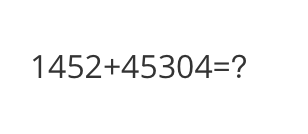
<<< 计算结果是多少
Input a media path or URL <<< http://modelscope-open.oss-cn-hangzhou.aliyuncs.com/images/math.png
1452 + 45304 = 46756
--------------------------------------------------
<<< clear
<<< 根据图片中的内容写首诗
Input a media path or URL <<< http://modelscope-open.oss-cn-hangzhou.aliyuncs.com/images/poem.png
夜幕降临,星光闪烁,
一艘小船在河上飘荡,
船头挂着一盏明亮的灯,
照亮了周围的黑暗。
船上有两个人,
一个在船头,另一个在船尾,
他们似乎在谈话,
在星光下享受着宁静的时刻。
河岸边,树木在黑暗中站着,
在星光下投下长长的影子。
这景象是那么的宁静,
让人想起一个古老的传说。
小船,人,和星光,
构成了一个美丽的画面,
它唤起一种宁静的感觉,
在喧嚣的城市生活之外。
"""
```
示例图片如下:
cat:
 animal:
 math:
math:
 poem:
poem:
 **单样本推理**
```python
import os
os.environ['CUDA_VISIBLE_DEVICES'] = '0'
from swift.llm import (
get_model_tokenizer, get_template, inference, ModelType,
get_default_template_type, inference_stream
)
from swift.utils import seed_everything
import torch
model_type = ModelType.yi_vl_6b_chat
template_type = get_default_template_type(model_type)
print(f'template_type: {template_type}')
model, tokenizer = get_model_tokenizer(model_type, torch.float16,
model_kwargs={'device_map': 'auto'})
model.generation_config.max_new_tokens = 256
template = get_template(template_type, tokenizer)
seed_everything(2) # ...
images = ['http://modelscope-open.oss-cn-hangzhou.aliyuncs.com/images/road.png']
query = '距离各城市多远?'
response, history = inference(model, template, query, images=images)
print(f'query: {query}')
print(f'response: {response}')
# 流式
query = '距离最远的城市是哪?'
images = images * 2
gen = inference_stream(model, template, query, history, images=images)
print_idx = 0
print(f'query: {query}\nresponse: ', end='')
for response, history in gen:
delta = response[print_idx:]
print(delta, end='', flush=True)
print_idx = len(response)
print()
print(f'history: {history}')
"""
query: 距离各城市多远?
response: 距离甲塔14公里,距离阳江62公里,距离广州293公里,距离广州293公里。
query: 距离最远的城市是哪?
response: 最远的距离是293公里。
history: [['距离各城市多远?', '距离甲塔14公里,距离阳江62公里,距离广州293公里,距离广州293公里。'], ['距离最远的城市是哪?', '最远的距离是293公里。']]
"""
```
示例图片如下:
road:
**单样本推理**
```python
import os
os.environ['CUDA_VISIBLE_DEVICES'] = '0'
from swift.llm import (
get_model_tokenizer, get_template, inference, ModelType,
get_default_template_type, inference_stream
)
from swift.utils import seed_everything
import torch
model_type = ModelType.yi_vl_6b_chat
template_type = get_default_template_type(model_type)
print(f'template_type: {template_type}')
model, tokenizer = get_model_tokenizer(model_type, torch.float16,
model_kwargs={'device_map': 'auto'})
model.generation_config.max_new_tokens = 256
template = get_template(template_type, tokenizer)
seed_everything(2) # ...
images = ['http://modelscope-open.oss-cn-hangzhou.aliyuncs.com/images/road.png']
query = '距离各城市多远?'
response, history = inference(model, template, query, images=images)
print(f'query: {query}')
print(f'response: {response}')
# 流式
query = '距离最远的城市是哪?'
images = images * 2
gen = inference_stream(model, template, query, history, images=images)
print_idx = 0
print(f'query: {query}\nresponse: ', end='')
for response, history in gen:
delta = response[print_idx:]
print(delta, end='', flush=True)
print_idx = len(response)
print()
print(f'history: {history}')
"""
query: 距离各城市多远?
response: 距离甲塔14公里,距离阳江62公里,距离广州293公里,距离广州293公里。
query: 距离最远的城市是哪?
response: 最远的距离是293公里。
history: [['距离各城市多远?', '距离甲塔14公里,距离阳江62公里,距离广州293公里,距离广州293公里。'], ['距离最远的城市是哪?', '最远的距离是293公里。']]
"""
```
示例图片如下:
road:
 ## 微调
多模态大模型微调通常使用**自定义数据集**进行微调. 这里展示可直接运行的demo:
(默认只对LLM部分的qkv进行lora微调. 如果你想对所有linear含vision模型部分都进行微调, 可以指定`--lora_target_modules ALL`. 支持全参数微调.)
```shell
# Experimental environment: A10, 3090, V100...
# 19GB GPU memory
CUDA_VISIBLE_DEVICES=0 swift sft \
--model_type yi-vl-6b-chat \
--dataset coco-en-2-mini \
```
[自定义数据集](../LLM/自定义与拓展.md#-推荐命令行参数的形式)支持json, jsonl样式, 以下是自定义数据集的例子:
(支持多轮对话, 每轮对话必须包含一张图片, 支持传入本地路径或URL)
```jsonl
{"query": "55555", "response": "66666", "images": ["image_path"]}
{"query": "eeeee", "response": "fffff", "history": [], "images": ["image_path"]}
{"query": "EEEEE", "response": "FFFFF", "history": [["AAAAA", "BBBBB"], ["CCCCC", "DDDDD"]], "images": ["image_path", "image_path2", "image_path3"]}
```
## 微调后推理
直接推理:
```shell
CUDA_VISIBLE_DEVICES=0 swift infer \
--ckpt_dir output/yi-vl-6b-chat/vx-xxx/checkpoint-xxx \
--load_dataset_config true \
```
**merge-lora**并推理:
```shell
CUDA_VISIBLE_DEVICES=0 swift export \
--ckpt_dir output/yi-vl-6b-chat/vx-xxx/checkpoint-xxx \
--merge_lora true
CUDA_VISIBLE_DEVICES=0 swift infer \
--ckpt_dir output/yi-vl-6b-chat/vx-xxx/checkpoint-xxx-merged \
--load_dataset_config true
```
## 微调
多模态大模型微调通常使用**自定义数据集**进行微调. 这里展示可直接运行的demo:
(默认只对LLM部分的qkv进行lora微调. 如果你想对所有linear含vision模型部分都进行微调, 可以指定`--lora_target_modules ALL`. 支持全参数微调.)
```shell
# Experimental environment: A10, 3090, V100...
# 19GB GPU memory
CUDA_VISIBLE_DEVICES=0 swift sft \
--model_type yi-vl-6b-chat \
--dataset coco-en-2-mini \
```
[自定义数据集](../LLM/自定义与拓展.md#-推荐命令行参数的形式)支持json, jsonl样式, 以下是自定义数据集的例子:
(支持多轮对话, 每轮对话必须包含一张图片, 支持传入本地路径或URL)
```jsonl
{"query": "55555", "response": "66666", "images": ["image_path"]}
{"query": "eeeee", "response": "fffff", "history": [], "images": ["image_path"]}
{"query": "EEEEE", "response": "FFFFF", "history": [["AAAAA", "BBBBB"], ["CCCCC", "DDDDD"]], "images": ["image_path", "image_path2", "image_path3"]}
```
## 微调后推理
直接推理:
```shell
CUDA_VISIBLE_DEVICES=0 swift infer \
--ckpt_dir output/yi-vl-6b-chat/vx-xxx/checkpoint-xxx \
--load_dataset_config true \
```
**merge-lora**并推理:
```shell
CUDA_VISIBLE_DEVICES=0 swift export \
--ckpt_dir output/yi-vl-6b-chat/vx-xxx/checkpoint-xxx \
--merge_lora true
CUDA_VISIBLE_DEVICES=0 swift infer \
--ckpt_dir output/yi-vl-6b-chat/vx-xxx/checkpoint-xxx-merged \
--load_dataset_config true
```