# Qwen-VL 最佳实践
## 目录
- [环境准备](#环境准备)
- [推理](#推理)
- [微调](#微调)
- [微调后推理](#微调后推理)
## 环境准备
```shell
pip install 'ms-swift[llm]' -U
```
## 推理
推理[qwen-vl-chat](https://modelscope.cn/models/qwen/Qwen-VL-Chat/summary):
```shell
# Experimental environment: 3090
# 24GB GPU memory
CUDA_VISIBLE_DEVICES=0 swift infer --model_type qwen-vl-chat
```
输出: (支持传入本地路径或URL)
```python
"""
<<< multi-line
[INFO:swift] End multi-line input with `#`.
[INFO:swift] Input `single-line` to switch to single-line input mode.
<<<[M] 你是谁?#
我是通义千问,由阿里云开发的AI助手。我被设计用来回答各种问题、提供信息和与用户进行对话。有什么我可以帮助你的吗?
--------------------------------------------------
<<<[M] Picture 1:![]() http://modelscope-open.oss-cn-hangzhou.aliyuncs.com/images/animal.png
Picture 2:
http://modelscope-open.oss-cn-hangzhou.aliyuncs.com/images/animal.png
Picture 2:![]() http://modelscope-open.oss-cn-hangzhou.aliyuncs.com/images/cat.png
这两张图片有什么区别#
两张图片的相同点是它们都是关于动物的插画,但是它们的动物不同。
第一张图片中的动物是绵羊,而第二张图片中的动物是小猫。
--------------------------------------------------
<<<[M] Picture 1:
http://modelscope-open.oss-cn-hangzhou.aliyuncs.com/images/cat.png
这两张图片有什么区别#
两张图片的相同点是它们都是关于动物的插画,但是它们的动物不同。
第一张图片中的动物是绵羊,而第二张图片中的动物是小猫。
--------------------------------------------------
<<<[M] Picture 1:![]() http://modelscope-open.oss-cn-hangzhou.aliyuncs.com/images/animal.png
图中有几只羊#
图中有四只羊。
--------------------------------------------------
<<<[M] Picture 1:
http://modelscope-open.oss-cn-hangzhou.aliyuncs.com/images/animal.png
图中有几只羊#
图中有四只羊。
--------------------------------------------------
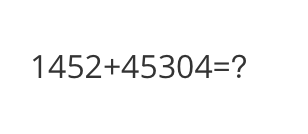
<<<[M] Picture 1:![]() http://modelscope-open.oss-cn-hangzhou.aliyuncs.com/images/math.png
计算结果是多少#
1452 + 45304 = 46756
--------------------------------------------------
<<< clear
<<<[M] Picture 1:
http://modelscope-open.oss-cn-hangzhou.aliyuncs.com/images/math.png
计算结果是多少#
1452 + 45304 = 46756
--------------------------------------------------
<<< clear
<<<[M] Picture 1:![]() http://modelscope-open.oss-cn-hangzhou.aliyuncs.com/images/poem.png
根据图片中的内容写首诗#
月光如水船如星,独坐船头吹夜风。深林倒影照水面,萤火点点照船行。
"""
```
示例图片如下:
cat:
http://modelscope-open.oss-cn-hangzhou.aliyuncs.com/images/poem.png
根据图片中的内容写首诗#
月光如水船如星,独坐船头吹夜风。深林倒影照水面,萤火点点照船行。
"""
```
示例图片如下:
cat:
 animal:
 math:
math:
 poem:
poem:
 **单样本推理**
```python
import os
os.environ['CUDA_VISIBLE_DEVICES'] = '0'
from swift.llm import (
get_model_tokenizer, get_template, inference, ModelType,
get_default_template_type, inference_stream
)
from swift.utils import seed_everything
import torch
model_type = ModelType.qwen_vl_chat
template_type = get_default_template_type(model_type)
print(f'template_type: {template_type}')
model, tokenizer = get_model_tokenizer(model_type, torch.float16,
model_kwargs={'device_map': 'auto'})
model.generation_config.max_new_tokens = 256
template = get_template(template_type, tokenizer)
seed_everything(42)
query = """Picture 1:
**单样本推理**
```python
import os
os.environ['CUDA_VISIBLE_DEVICES'] = '0'
from swift.llm import (
get_model_tokenizer, get_template, inference, ModelType,
get_default_template_type, inference_stream
)
from swift.utils import seed_everything
import torch
model_type = ModelType.qwen_vl_chat
template_type = get_default_template_type(model_type)
print(f'template_type: {template_type}')
model, tokenizer = get_model_tokenizer(model_type, torch.float16,
model_kwargs={'device_map': 'auto'})
model.generation_config.max_new_tokens = 256
template = get_template(template_type, tokenizer)
seed_everything(42)
query = """Picture 1:![]() http://modelscope-open.oss-cn-hangzhou.aliyuncs.com/images/road.png
距离各城市多远?"""
response, history = inference(model, template, query)
print(f'query: {query}')
print(f'response: {response}')
# 流式
query = '距离最远的城市是哪?'
gen = inference_stream(model, template, query, history)
print_idx = 0
print(f'query: {query}\nresponse: ', end='')
for response, history in gen:
delta = response[print_idx:]
print(delta, end='', flush=True)
print_idx = len(response)
print()
print(f'history: {history}')
"""
query: Picture 1:
http://modelscope-open.oss-cn-hangzhou.aliyuncs.com/images/road.png
距离各城市多远?"""
response, history = inference(model, template, query)
print(f'query: {query}')
print(f'response: {response}')
# 流式
query = '距离最远的城市是哪?'
gen = inference_stream(model, template, query, history)
print_idx = 0
print(f'query: {query}\nresponse: ', end='')
for response, history in gen:
delta = response[print_idx:]
print(delta, end='', flush=True)
print_idx = len(response)
print()
print(f'history: {history}')
"""
query: Picture 1:![]() http://modelscope-open.oss-cn-hangzhou.aliyuncs.com/images/road.png
距离各城市多远?
response: 马路边距离马路边14公里;阳江边距离马路边62公里;广州边距离马路边293公里。
query: 距离最远的城市是哪?
response: 距离最远的城市是广州,距离马路边293公里。
history: [['Picture 1:
http://modelscope-open.oss-cn-hangzhou.aliyuncs.com/images/road.png
距离各城市多远?
response: 马路边距离马路边14公里;阳江边距离马路边62公里;广州边距离马路边293公里。
query: 距离最远的城市是哪?
response: 距离最远的城市是广州,距离马路边293公里。
history: [['Picture 1:![]() http://modelscope-open.oss-cn-hangzhou.aliyuncs.com/images/road.png\n距离各城市多远?', '马路边距离马路边14公里;阳江边距离马路边62公里;广州边距离马路边293公里。'], ['距离最远的城市是哪?', '距离最远的城市是广州,距离马路边293公里。']]
"""
```
示例图片如下:
road:
http://modelscope-open.oss-cn-hangzhou.aliyuncs.com/images/road.png\n距离各城市多远?', '马路边距离马路边14公里;阳江边距离马路边62公里;广州边距离马路边293公里。'], ['距离最远的城市是哪?', '距离最远的城市是广州,距离马路边293公里。']]
"""
```
示例图片如下:
road:
 ## 微调
多模态大模型微调通常使用**自定义数据集**进行微调. 这里展示可直接运行的demo:
LoRA微调:
(默认只对LLM部分的qkv进行lora微调. 如果你想对所有linear含vision模型部分都进行微调, 可以指定`--lora_target_modules ALL`)
```shell
# Experimental environment: 3090
# 23GB GPU memory
CUDA_VISIBLE_DEVICES=0 swift sft \
--model_type qwen-vl-chat \
--dataset coco-en-mini \
```
全参数微调:
```shell
# Experimental environment: 4 * A100
# 4 * 70 GPU memory
NPROC_PER_NODE=2 CUDA_VISIBLE_DEVICES=0,1,2,3 swift sft \
--model_type qwen-vl-chat \
--dataset coco-en-mini \
--sft_type full \
```
[自定义数据集](../LLM/自定义与拓展.md#-推荐命令行参数的形式)支持json, jsonl样式, 以下是自定义数据集的例子:
(支持多轮对话, 支持每轮对话含多张图片或不含图片, 支持传入本地路径或URL)
```json
[
{"conversations": [
{"from": "user", "value": "Picture 1:
## 微调
多模态大模型微调通常使用**自定义数据集**进行微调. 这里展示可直接运行的demo:
LoRA微调:
(默认只对LLM部分的qkv进行lora微调. 如果你想对所有linear含vision模型部分都进行微调, 可以指定`--lora_target_modules ALL`)
```shell
# Experimental environment: 3090
# 23GB GPU memory
CUDA_VISIBLE_DEVICES=0 swift sft \
--model_type qwen-vl-chat \
--dataset coco-en-mini \
```
全参数微调:
```shell
# Experimental environment: 4 * A100
# 4 * 70 GPU memory
NPROC_PER_NODE=2 CUDA_VISIBLE_DEVICES=0,1,2,3 swift sft \
--model_type qwen-vl-chat \
--dataset coco-en-mini \
--sft_type full \
```
[自定义数据集](../LLM/自定义与拓展.md#-推荐命令行参数的形式)支持json, jsonl样式, 以下是自定义数据集的例子:
(支持多轮对话, 支持每轮对话含多张图片或不含图片, 支持传入本地路径或URL)
```json
[
{"conversations": [
{"from": "user", "value": "Picture 1:![]() img_path\n11111"},
{"from": "assistant", "value": "22222"}
]},
{"conversations": [
{"from": "user", "value": "Picture 1:
img_path\n11111"},
{"from": "assistant", "value": "22222"}
]},
{"conversations": [
{"from": "user", "value": "Picture 1:![]() img_path\nPicture 2:
img_path\nPicture 2:![]() img_path2\nPicture 3:
img_path2\nPicture 3:![]() img_path3\naaaaa"},
{"from": "assistant", "value": "bbbbb"},
{"from": "user", "value": "Picture 1:
img_path3\naaaaa"},
{"from": "assistant", "value": "bbbbb"},
{"from": "user", "value": "Picture 1:![]() img_path\nccccc"},
{"from": "assistant", "value": "ddddd"}
]},
{"conversations": [
{"from": "user", "value": "AAAAA"},
{"from": "assistant", "value": "BBBBB"},
{"from": "user", "value": "CCCCC"},
{"from": "assistant", "value": "DDDDD"}
]}
]
```
## 微调后推理
直接推理:
```shell
CUDA_VISIBLE_DEVICES=0 swift infer \
--ckpt_dir output/qwen-vl-chat/vx-xxx/checkpoint-xxx \
--load_dataset_config true \
```
**merge-lora**并推理:
```shell
CUDA_VISIBLE_DEVICES=0 swift export \
--ckpt_dir output/qwen-vl-chat/vx-xxx/checkpoint-xxx \
--merge_lora true
CUDA_VISIBLE_DEVICES=0 swift infer \
--ckpt_dir output/qwen-vl-chat/vx-xxx/checkpoint-xxx-merged \
--load_dataset_config true
```
img_path\nccccc"},
{"from": "assistant", "value": "ddddd"}
]},
{"conversations": [
{"from": "user", "value": "AAAAA"},
{"from": "assistant", "value": "BBBBB"},
{"from": "user", "value": "CCCCC"},
{"from": "assistant", "value": "DDDDD"}
]}
]
```
## 微调后推理
直接推理:
```shell
CUDA_VISIBLE_DEVICES=0 swift infer \
--ckpt_dir output/qwen-vl-chat/vx-xxx/checkpoint-xxx \
--load_dataset_config true \
```
**merge-lora**并推理:
```shell
CUDA_VISIBLE_DEVICES=0 swift export \
--ckpt_dir output/qwen-vl-chat/vx-xxx/checkpoint-xxx \
--merge_lora true
CUDA_VISIBLE_DEVICES=0 swift infer \
--ckpt_dir output/qwen-vl-chat/vx-xxx/checkpoint-xxx-merged \
--load_dataset_config true
```