# mPLUG-Owl2 最佳实践
以下内容以`mplug-owl2_1-chat`为例, 你也可以选择`mplug-owl2-chat`.
## 目录
- [环境准备](#环境准备)
- [推理](#推理)
- [微调](#微调)
- [微调后推理](#微调后推理)
## 环境准备
```shell
git clone https://github.com/modelscope/swift.git
cd swift
pip install -e '.[llm]'
```
模型链接:
- mplug-owl2_1-chat: [https://modelscope.cn/models/iic/mPLUG-Owl2.1/summary](https://modelscope.cn/models/iic/mPLUG-Owl2.1/summary)
- mplug-owl2-chat: [https://modelscope.cn/models/iic/mPLUG-Owl2/summary](https://modelscope.cn/models/iic/mPLUG-Owl2/summary)
## 推理
推理`mplug-owl2_1-chat`:
```shell
# Experimental environment: A10, 3090, V100...
# 24GB GPU memory
CUDA_VISIBLE_DEVICES=0 swift infer --model_type mplug-owl2_1-chat
```
输出: (支持传入本地路径或URL)
```python
"""
<<< Describe this image.
Input a media path or URL <<< http://modelscope-open.oss-cn-hangzhou.aliyuncs.com/images/cat.png
The image features a close-up of a cute, gray and white kitten with big blue eyes. The kitten is sitting on a table, looking directly at the viewer. The scene captures the kitten's adorable features, including its whiskers and the fur on its face. The kitten appears to be staring into the camera, creating a captivating and endearing atmosphere.
--------------------------------------------------
<<< How many sheep are in the picture?
Input a media path or URL <<< http://modelscope-open.oss-cn-hangzhou.aliyuncs.com/images/animal.png
There are four sheep in the picture.
--------------------------------------------------
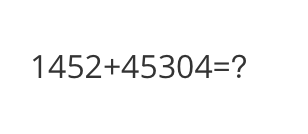
<<< What is the calculation result?
Input a media path or URL <<< http://modelscope-open.oss-cn-hangzhou.aliyuncs.com/images/math.png
The calculation result is 1452 + 45304 = 46756.
--------------------------------------------------
<<< Write a poem based on the content of the picture.
Input a media path or URL <<< http://modelscope-open.oss-cn-hangzhou.aliyuncs.com/images/poem.png
In the stillness of the night, a boat glides across the water, its light shining bright. The stars twinkle above, casting a magical glow. A man and a dog are on board, enjoying the serene journey. The boat floats gently, as if it's floating on air. The calm waters reflect the stars, creating a breathtaking scene. The man and his dog are lost in their thoughts, taking in the beauty of nature. The boat seems to be floating in a dream, as if they are on a journey to find their way back home.
"""
```
示例图片如下:
cat:
 animal:
 math:
math:
 poem:
poem:
 **单样本推理**
```python
import os
os.environ['CUDA_VISIBLE_DEVICES'] = '0'
from swift.llm import (
get_model_tokenizer, get_template, inference, ModelType,
get_default_template_type, inference_stream
)
from swift.utils import seed_everything
import torch
model_type = ModelType.mplug_owl2_1_chat
template_type = get_default_template_type(model_type)
print(f'template_type: {template_type}')
model, tokenizer = get_model_tokenizer(model_type, torch.float16,
model_kwargs={'device_map': 'auto'})
model.generation_config.max_new_tokens = 256
template = get_template(template_type, tokenizer)
seed_everything(42)
images = ['http://modelscope-open.oss-cn-hangzhou.aliyuncs.com/images/road.png']
query = 'How far is it from each city?'
response, history = inference(model, template, query, images=images)
print(f'query: {query}')
print(f'response: {response}')
# 流式
query = 'Which city is the farthest?'
images = images * 2
gen = inference_stream(model, template, query, history, images=images)
print_idx = 0
print(f'query: {query}\nresponse: ', end='')
for response, history in gen:
delta = response[print_idx:]
print(delta, end='', flush=True)
print_idx = len(response)
print()
print(f'history: {history}')
"""
query: How far is it from each city?
response: From the given information, it is 14 km from the city of Mata, 62 km from Yangjiang, and 293 km from Guangzhou.
query: Which city is the farthest?
response: The farthest city is Guangzhou, which is 293 km away.
history: [['How far is it from each city?', 'From the given information, it is 14 km from the city of Mata, 62 km from Yangjiang, and 293 km from Guangzhou.'], ['Which city is the farthest?', 'The farthest city is Guangzhou, which is 293 km away.']]
"""
```
示例图片如下:
road:
**单样本推理**
```python
import os
os.environ['CUDA_VISIBLE_DEVICES'] = '0'
from swift.llm import (
get_model_tokenizer, get_template, inference, ModelType,
get_default_template_type, inference_stream
)
from swift.utils import seed_everything
import torch
model_type = ModelType.mplug_owl2_1_chat
template_type = get_default_template_type(model_type)
print(f'template_type: {template_type}')
model, tokenizer = get_model_tokenizer(model_type, torch.float16,
model_kwargs={'device_map': 'auto'})
model.generation_config.max_new_tokens = 256
template = get_template(template_type, tokenizer)
seed_everything(42)
images = ['http://modelscope-open.oss-cn-hangzhou.aliyuncs.com/images/road.png']
query = 'How far is it from each city?'
response, history = inference(model, template, query, images=images)
print(f'query: {query}')
print(f'response: {response}')
# 流式
query = 'Which city is the farthest?'
images = images * 2
gen = inference_stream(model, template, query, history, images=images)
print_idx = 0
print(f'query: {query}\nresponse: ', end='')
for response, history in gen:
delta = response[print_idx:]
print(delta, end='', flush=True)
print_idx = len(response)
print()
print(f'history: {history}')
"""
query: How far is it from each city?
response: From the given information, it is 14 km from the city of Mata, 62 km from Yangjiang, and 293 km from Guangzhou.
query: Which city is the farthest?
response: The farthest city is Guangzhou, which is 293 km away.
history: [['How far is it from each city?', 'From the given information, it is 14 km from the city of Mata, 62 km from Yangjiang, and 293 km from Guangzhou.'], ['Which city is the farthest?', 'The farthest city is Guangzhou, which is 293 km away.']]
"""
```
示例图片如下:
road:
 ## 微调
多模态大模型微调通常使用**自定义数据集**进行微调. 这里展示可直接运行的demo:
(默认只对LLM部分的qkv进行lora微调. 如果你想对所有linear含vision模型部分都进行微调, 可以指定`--lora_target_modules ALL`. 支持全参数微调.)
```shell
# Experimental environment: A10, 3090, V100...
# 24GB GPU memory
CUDA_VISIBLE_DEVICES=0 swift sft \
--model_type mplug-owl2_1-chat \
--dataset coco-en-2-mini \
```
[自定义数据集](../LLM/自定义与拓展.md#-推荐命令行参数的形式)支持json, jsonl样式, 以下是自定义数据集的例子:
(支持多轮对话, 每轮对话必须包含一张图片, 支持传入本地路径或URL)
```jsonl
{"query": "55555", "response": "66666", "images": ["image_path"]}
{"query": "eeeee", "response": "fffff", "history": [], "images": ["image_path"]}
{"query": "EEEEE", "response": "FFFFF", "history": [["AAAAA", "BBBBB"], ["CCCCC", "DDDDD"]], "images": ["image_path", "image_path2", "image_path3"]}
```
## 微调后推理
直接推理:
```shell
CUDA_VISIBLE_DEVICES=0 swift infer \
--ckpt_dir output/mplug-owl2_1-chat/vx-xxx/checkpoint-xxx \
--load_dataset_config true \
```
**merge-lora**并推理:
```shell
CUDA_VISIBLE_DEVICES=0 swift export \
--ckpt_dir output/mplug-owl2_1-chat/vx-xxx/checkpoint-xxx \
--merge_lora true
CUDA_VISIBLE_DEVICES=0 swift infer \
--ckpt_dir output/mplug-owl2_1-chat/vx-xxx/checkpoint-xxx-merged \
--load_dataset_config true
```
## 微调
多模态大模型微调通常使用**自定义数据集**进行微调. 这里展示可直接运行的demo:
(默认只对LLM部分的qkv进行lora微调. 如果你想对所有linear含vision模型部分都进行微调, 可以指定`--lora_target_modules ALL`. 支持全参数微调.)
```shell
# Experimental environment: A10, 3090, V100...
# 24GB GPU memory
CUDA_VISIBLE_DEVICES=0 swift sft \
--model_type mplug-owl2_1-chat \
--dataset coco-en-2-mini \
```
[自定义数据集](../LLM/自定义与拓展.md#-推荐命令行参数的形式)支持json, jsonl样式, 以下是自定义数据集的例子:
(支持多轮对话, 每轮对话必须包含一张图片, 支持传入本地路径或URL)
```jsonl
{"query": "55555", "response": "66666", "images": ["image_path"]}
{"query": "eeeee", "response": "fffff", "history": [], "images": ["image_path"]}
{"query": "EEEEE", "response": "FFFFF", "history": [["AAAAA", "BBBBB"], ["CCCCC", "DDDDD"]], "images": ["image_path", "image_path2", "image_path3"]}
```
## 微调后推理
直接推理:
```shell
CUDA_VISIBLE_DEVICES=0 swift infer \
--ckpt_dir output/mplug-owl2_1-chat/vx-xxx/checkpoint-xxx \
--load_dataset_config true \
```
**merge-lora**并推理:
```shell
CUDA_VISIBLE_DEVICES=0 swift export \
--ckpt_dir output/mplug-owl2_1-chat/vx-xxx/checkpoint-xxx \
--merge_lora true
CUDA_VISIBLE_DEVICES=0 swift infer \
--ckpt_dir output/mplug-owl2_1-chat/vx-xxx/checkpoint-xxx-merged \
--load_dataset_config true
```