# InternVL 最佳实践
## 目录
- [环境准备](#环境准备)
- [推理](#推理)
- [微调](#微调)
- [微调后推理](#微调后推理)
## 环境准备
```shell
git clone https://github.com/modelscope/swift.git
cd swift
pip install -e '.[llm]'
pip install Pillow
```
## 推理
推理[internvl-chat-v1.5](https://www.modelscope.cn/models/AI-ModelScope/InternVL-Chat-V1-5/summary)和[internvl-chat-v1.5-int8](https://www.modelscope.cn/models/AI-ModelScope/InternVL-Chat-V1-5-int8/summary)
下面教程以`internvl-chat-v1.5`为例,你可以修改`--model_type internvl-chat-v1_5-int8`来选择int8版本的模型,使用`mini-internvl-chat-2b-v1_5`或
`mini-internvl-chat-4b-v1_5`来使用Mini-Internvl
**注意**
- 如果要使用本地模型文件,加上参数 `--model_id_or_path /path/to/model`
- 如果你的GPU不支持flash attention, 使用参数`--use_flash_attn false`。且对于int8模型,推理时需要指定`dtype --bf16`, 否则可能会出现乱码
- 模型本身config中的max_length较小,为2048,可以设置`--max_length`来修改
- 可以使用参数`--gradient_checkpoting true`减少显存占用
- InternVL系列模型的**训练**只支持带有图片的数据集
```shell
# Experimental environment: A100
# 55GB GPU memory
CUDA_VISIBLE_DEVICES=0 swift infer --model_type internvl-chat-v1_5 --dtype bf16 --max_length 4096
# 2*30GB GPU memory
CUDA_VISIBLE_DEVICES=0,1 swift infer --model_type internvl-chat-v1_5 --dtype bf16 --max_length 4096
```
输出: (支持传入本地路径或URL)
```python
"""
<<< Describe this image.
Input a media path or URL <<< http://modelscope-open.oss-cn-hangzhou.aliyuncs.com/images/cat.png
This is a high-resolution image of a kitten. The kitten has striking blue eyes and a fluffy white and grey coat. The fur pattern suggests that it may be a Maine Coon or a similar breed. The kitten's ears are perked up, and it has a curious and innocent expression. The background is blurred, which brings the focus to the kitten's face.
--------------------------------------------------
<<< How many sheep are in the picture?
Input a media path or URL <<< http://modelscope-open.oss-cn-hangzhou.aliyuncs.com/images/animal.png
There are four sheep in the picture.
--------------------------------------------------
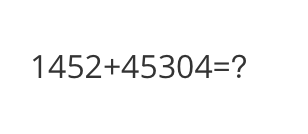
<<< What is the calculation result?
Input a media path or URL <<< http://modelscope-open.oss-cn-hangzhou.aliyuncs.com/images/math.png
The calculation result is 59,856.
--------------------------------------------------
<<< Write a poem based on the content of the picture.
Input a media path or URL <<< http://modelscope-open.oss-cn-hangzhou.aliyuncs.com/images/poem.png
Token indices sequence length is longer than the specified maximum sequence length for this model (5142 > 4096). Running this sequence through the model will result in indexing errors
In the still of the night,
A lone boat sails on the light.
The stars above, a twinkling sight,
Reflecting in the water's might.
The trees stand tall, a silent guard,
Their leaves rustling in the yard.
The boatman's lantern, a beacon bright,
Guiding him through the night.
The river flows, a gentle stream,
Carrying the boatman's dream.
His journey long, his heart serene,
In the beauty of the scene.
The stars above, a guiding light,
Leading him through the night.
The boatman's journey, a tale to tell,
Of courage, hope, and love as well.
"""
```
示例图片如下:
cat:
 animal:
 math:
math:
 poem:
poem:
 **单样本推理**
```python
import os
os.environ['CUDA_VISIBLE_DEVICES'] = '0'
from swift.llm import (
get_model_tokenizer, get_template, inference, ModelType,
get_default_template_type, inference_stream
)
from swift.utils import seed_everything
import torch
model_type = ModelType.internvl_chat_v1_5
template_type = get_default_template_type(model_type)
print(f'template_type: {template_type}')
model, tokenizer = get_model_tokenizer(model_type, torch.bfloat16,
model_kwargs={'device_map': 'auto'})
# for GPUs that do not support flash attention
# model, tokenizer = get_model_tokenizer(model_type, torch.float16,
# model_kwargs={'device_map': 'auto'},
# use_flash_attn = False)
model.generation_config.max_new_tokens = 256
template = get_template(template_type, tokenizer)
seed_everything(42)
images = ['http://modelscope-open.oss-cn-hangzhou.aliyuncs.com/images/road.png']
query = '距离各城市多远?'
response, history = inference(model, template, query, images=images) # chat with image
print(f'query: {query}')
print(f'response: {response}')
# 流式
query = '距离最远的城市是哪?'
gen = inference_stream(model, template, query, history) # chat without image
print_idx = 0
print(f'query: {query}\nresponse: ', end='')
for response, history in gen:
delta = response[print_idx:]
print(delta, end='', flush=True)
print_idx = len(response)
print()
print(f'history: {history}')
"""
query: 距离各城市多远?
response: 这张图片显示的是一个路标,上面标示了三个目的地及其距离:
- 马踏(Mata):14公里
- 阳江(Yangjiang):62公里
- 广州(Guangzhou):293公里
这些距离是按照路标上的指示来计算的。
query: 距离最远的城市是哪?
response: 根据这张图片,距离最远的城市是广州(Guangzhou),距离为293公里。
history: [['距离各城市多远?', '这张图片显示的是一个路标,上面标示了三个目的地及其距离:\n\n- 马踏(Mata):14公里\n- 阳江(Yangjiang):62公里\n- 广州(Guangzhou):293公里\n\n这些距离是按照路标上的指示来计算的。 '], ['距离最远的城市是哪?', '根据这张图片,距离最远的城市是广州(Guangzhou),距离为293公里。 ']]
"""
```
示例图片如下:
road:
**单样本推理**
```python
import os
os.environ['CUDA_VISIBLE_DEVICES'] = '0'
from swift.llm import (
get_model_tokenizer, get_template, inference, ModelType,
get_default_template_type, inference_stream
)
from swift.utils import seed_everything
import torch
model_type = ModelType.internvl_chat_v1_5
template_type = get_default_template_type(model_type)
print(f'template_type: {template_type}')
model, tokenizer = get_model_tokenizer(model_type, torch.bfloat16,
model_kwargs={'device_map': 'auto'})
# for GPUs that do not support flash attention
# model, tokenizer = get_model_tokenizer(model_type, torch.float16,
# model_kwargs={'device_map': 'auto'},
# use_flash_attn = False)
model.generation_config.max_new_tokens = 256
template = get_template(template_type, tokenizer)
seed_everything(42)
images = ['http://modelscope-open.oss-cn-hangzhou.aliyuncs.com/images/road.png']
query = '距离各城市多远?'
response, history = inference(model, template, query, images=images) # chat with image
print(f'query: {query}')
print(f'response: {response}')
# 流式
query = '距离最远的城市是哪?'
gen = inference_stream(model, template, query, history) # chat without image
print_idx = 0
print(f'query: {query}\nresponse: ', end='')
for response, history in gen:
delta = response[print_idx:]
print(delta, end='', flush=True)
print_idx = len(response)
print()
print(f'history: {history}')
"""
query: 距离各城市多远?
response: 这张图片显示的是一个路标,上面标示了三个目的地及其距离:
- 马踏(Mata):14公里
- 阳江(Yangjiang):62公里
- 广州(Guangzhou):293公里
这些距离是按照路标上的指示来计算的。
query: 距离最远的城市是哪?
response: 根据这张图片,距离最远的城市是广州(Guangzhou),距离为293公里。
history: [['距离各城市多远?', '这张图片显示的是一个路标,上面标示了三个目的地及其距离:\n\n- 马踏(Mata):14公里\n- 阳江(Yangjiang):62公里\n- 广州(Guangzhou):293公里\n\n这些距离是按照路标上的指示来计算的。 '], ['距离最远的城市是哪?', '根据这张图片,距离最远的城市是广州(Guangzhou),距离为293公里。 ']]
"""
```
示例图片如下:
road:
 ## 微调
多模态大模型微调通常使用**自定义数据集**进行微调. 这里展示可直接运行的demo:
LoRA微调:
**注意**
- 默认只对LLM部分的qkv进行lora微调. 如果你想对所有linear含vision模型部分都进行微调, 可以指定`--lora_target_modules ALL`.
- 如果你的GPU不支持flash attention, 使用参数`--use_flash_attn false`
```shell
# Experimental environment: A100
# 80GB GPU memory
CUDA_VISIBLE_DEVICES=0 swift sft \
--model_type internvl-chat-v1_5 \
--dataset coco-en-2-mini \
--max_length 4096
# device_map
# Experimental environment: 2*A100...
# 2*43GB GPU memory
CUDA_VISIBLE_DEVICES=0,1 swift sft \
--model_type internvl-chat-v1_5 \
--dataset coco-en-2-mini \
--max_length 4096
# ddp + deepspeed-zero2
# Experimental environment: 2*A100...
# 2*80GB GPU memory
NPROC_PER_NODE=2 \
CUDA_VISIBLE_DEVICES=0,1 swift sft \
--model_type internvl-chat-v1_5 \
--dataset coco-en-2-mini \
--max_length 4096 \
--deepspeed default-zero2
```
全参数微调:
```bash
# Experimental environment: 4 * A100
# device map
# 4 * 72 GPU memory
CUDA_VISIBLE_DEVICES=0,1,2,3 swift sft \
--model_type internvl-chat-v1_5 \
--dataset coco-en-2-mini \
--max_length 4096 \
--sft_type full \
```
[自定义数据集](../LLM/自定义与拓展.md#-推荐命令行参数的形式)支持json, jsonl样式, 以下是自定义数据集的例子:
(只支持单轮对话, 每轮对话必须包含一张图片, 支持传入本地路径或URL)
```jsonl
{"query": "55555", "response": "66666", "images": ["image_path"]}
{"query": "eeeee", "response": "fffff", "images": ["image_path"]}
{"query": "EEEEE", "response": "FFFFF", "images": ["image_path"]}
```
## 微调后推理
直接推理:
```shell
CUDA_VISIBLE_DEVICES=0 swift infer \
--ckpt_dir output/internvl-chat-v1_5/vx-xxx/checkpoint-xxx \
--load_dataset_config true \
--max_length 4096
```
**merge-lora**并推理:
```shell
CUDA_VISIBLE_DEVICES=0 swift export \
--ckpt_dir "output/internvl-chat-v1_5/vx-xxx/checkpoint-xxx" \
--merge_lora true
CUDA_VISIBLE_DEVICES=0 swift infer \
--ckpt_dir "output/internvl-chat-v1_5/vx-xxx/checkpoint-xxx-merged" \
--load_dataset_config true \
--max_length 4096
# device map
CUDA_VISIBLE_DEVICES=0,1 swift infer \
--ckpt_dir "output/internvl-chat-v1_5/vx-xxx/checkpoint-xxx-merged" \
--load_dataset_config true \
--max_length 4096
```
## 微调
多模态大模型微调通常使用**自定义数据集**进行微调. 这里展示可直接运行的demo:
LoRA微调:
**注意**
- 默认只对LLM部分的qkv进行lora微调. 如果你想对所有linear含vision模型部分都进行微调, 可以指定`--lora_target_modules ALL`.
- 如果你的GPU不支持flash attention, 使用参数`--use_flash_attn false`
```shell
# Experimental environment: A100
# 80GB GPU memory
CUDA_VISIBLE_DEVICES=0 swift sft \
--model_type internvl-chat-v1_5 \
--dataset coco-en-2-mini \
--max_length 4096
# device_map
# Experimental environment: 2*A100...
# 2*43GB GPU memory
CUDA_VISIBLE_DEVICES=0,1 swift sft \
--model_type internvl-chat-v1_5 \
--dataset coco-en-2-mini \
--max_length 4096
# ddp + deepspeed-zero2
# Experimental environment: 2*A100...
# 2*80GB GPU memory
NPROC_PER_NODE=2 \
CUDA_VISIBLE_DEVICES=0,1 swift sft \
--model_type internvl-chat-v1_5 \
--dataset coco-en-2-mini \
--max_length 4096 \
--deepspeed default-zero2
```
全参数微调:
```bash
# Experimental environment: 4 * A100
# device map
# 4 * 72 GPU memory
CUDA_VISIBLE_DEVICES=0,1,2,3 swift sft \
--model_type internvl-chat-v1_5 \
--dataset coco-en-2-mini \
--max_length 4096 \
--sft_type full \
```
[自定义数据集](../LLM/自定义与拓展.md#-推荐命令行参数的形式)支持json, jsonl样式, 以下是自定义数据集的例子:
(只支持单轮对话, 每轮对话必须包含一张图片, 支持传入本地路径或URL)
```jsonl
{"query": "55555", "response": "66666", "images": ["image_path"]}
{"query": "eeeee", "response": "fffff", "images": ["image_path"]}
{"query": "EEEEE", "response": "FFFFF", "images": ["image_path"]}
```
## 微调后推理
直接推理:
```shell
CUDA_VISIBLE_DEVICES=0 swift infer \
--ckpt_dir output/internvl-chat-v1_5/vx-xxx/checkpoint-xxx \
--load_dataset_config true \
--max_length 4096
```
**merge-lora**并推理:
```shell
CUDA_VISIBLE_DEVICES=0 swift export \
--ckpt_dir "output/internvl-chat-v1_5/vx-xxx/checkpoint-xxx" \
--merge_lora true
CUDA_VISIBLE_DEVICES=0 swift infer \
--ckpt_dir "output/internvl-chat-v1_5/vx-xxx/checkpoint-xxx-merged" \
--load_dataset_config true \
--max_length 4096
# device map
CUDA_VISIBLE_DEVICES=0,1 swift infer \
--ckpt_dir "output/internvl-chat-v1_5/vx-xxx/checkpoint-xxx-merged" \
--load_dataset_config true \
--max_length 4096
```