# GLM-4
## 论文
暂无
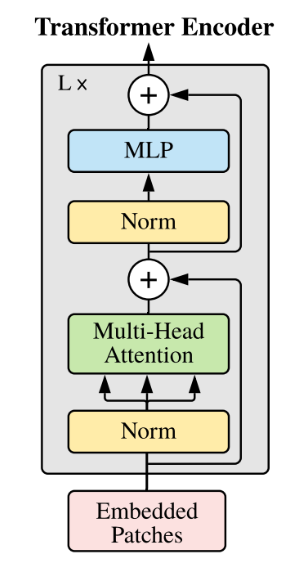
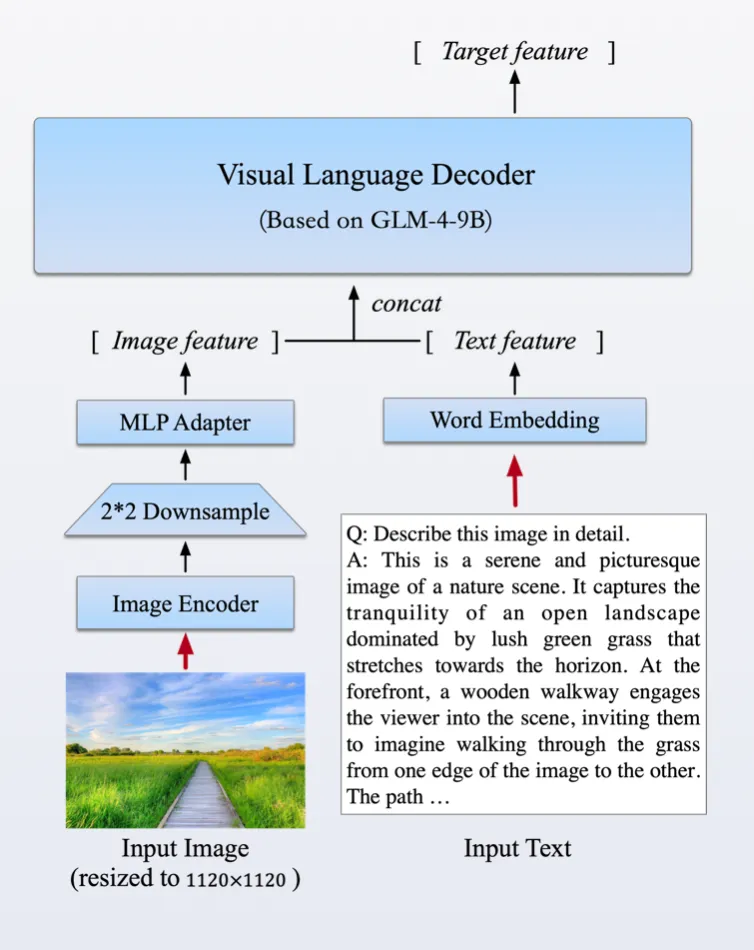
## 模型结构
基于transformer结构
## 算法原理
GLM-4系列是智谱AI推出的最新一代预训练模型的开源版本,在语义、数学、推理、代码和知识等多方面的数据集测评中,GLM-4-9B及其人类偏好对齐的版本GLM-4-9B-Chat均表现出超越Llama-3-8B的卓越性能。GLM-4-32B-0414 系列,320 亿参数,效果比肩 OpenAI 的 GPT 系列和 DeepSeek 的 V3/R1 系列,且支持非常友好的本地部署特性。
## 环境配置
`-v 路径`、`docker_name`和`imageID`根据实际情况修改
### Docker(方法一)
```bash
dcoker pull image.sourcefind.cn:5000/dcu/admin/base/pytorch:2.4.1-ubuntu22.04-dtk25.04-py3.10
docker run -it --shm-size 200g --network=host --name {docker_name} --privileged --device=/dev/kfd --device=/dev/dri --device=/dev/mkfd --group-add video --cap-add=SYS_PTRACE --security-opt seccomp=unconfined -u root -v /path/your_code_data/:/path/your_code_data/ -v /opt/hyhal/:/opt/hyhal/:ro {imageID} bash
cd /your_code_path/glm-4_pytorch
pip install -r inference/requirements.txt
pip install -r finetune/requirements.txt
```
### Dockerfile(方法二)
```bash
cd ./docker
docker build --no-cache -t glm4-9b:latest .
docker run -it --shm-size 200g --network=host --name {docker_name} --privileged --device=/dev/kfd --device=/dev/dri --device=/dev/mkfd --group-add video --cap-add=SYS_PTRACE --security-opt seccomp=unconfined -u root -v /path/your_code_data/:/path/your_code_data/ -v /opt/hyhal/:/opt/hyhal/:ro {imageID} bash
cd /your_code_path/glm-4_pytorch
pip install -r inference/requirements.txt
pip install -r finetune/requirements.txt
```
### Anaconda(方法三)
1、关于本项目DCU显卡所需的特殊深度学习库可从光合开发者社区下载安装: https://developer.sourcefind.cn/tool/
```bash
DTK: 25.04
python: 3.10
torch: 2.4.1
deepspeed: 0.14.2+das.opt2.dtk2504
```
**Tips**:以上dtk软件栈、python、torch等DCU相关工具版本需要严格一一对应
2、其他非特殊库直接按照下面步骤进行安装
```bash
pip install -r inference/requirements.txt
pip install -r finetune/requirements.txt
```
## 数据集
### 准备数据集
本仓库以[ADGEN](https://aclanthology.org/D19-1321.pdf) (广告生成) 数据集为例介绍代码的使用方法,可通过[Google Drive](https://drive.google.com/file/d/13_vf0xRTQsyneRKdD1bZIr93vBGOczrk/view?usp=sharing) 或者 [Tsinghua Cloud](https://cloud.tsinghua.edu.cn/f/b3f119a008264b1cabd1/?dl=1)下载处理好的 ADGEN 数据集。数据集下载完成后,将数据解压到[data](./data)目录下。
数据按路径存放后,执行下面的数据转换代码,生成的`dev.jsonl` `train.jsonl`默认保存在`AdvertiseGen/saves`目录下:
```
python gen_messages_data.py --data_path /path/to/AdvertiseGen
```
数据集目录结构如下:
```
├── data
│ ├── AdvertiseGen
│ ├── saves # 生成的
│ ├── dev.json
│ └── train.json
```
若想生成自己的数据文件,代码可参考[gen_messages_data.py](./gen_messages_data.py)进行修改,样例采用如下格式。
- 这里是一个不带有工具的例子:
```json
{
"messages": [
{
"role": "user",
"content": "类型#裤*材质#牛仔布*风格#性感"
},
{
"role": "assistant",
"content": "3x1的这款牛仔裤采用浅白的牛仔面料为裤身材质,其柔然的手感和细腻的质地,在穿着舒适的同时,透露着清纯甜美的个性气质。除此之外,流畅的裤身剪裁将性感的腿部曲线彰显的淋漓尽致,不失为一款随性出街的必备单品。"
}
]
}
```
- 这是一个带有工具调用的例子:
```json
{
"messages": [
{
"role": "system",
"content": "",
"tools": [
{
"type": "function",
"function": {
"name": "get_recommended_books",
"description": "Get recommended books based on user's interests",
"parameters": {
"type": "object",
"properties": {
"interests": {
"type": "array",
"items": {
"type": "string"
},
"description": "The interests to recommend books for"
}
},
"required": [
"interests"
]
}
}
}
]
},
{
"role": "user",
"content": "Hi, I am looking for some book recommendations. I am interested in history and science fiction."
},
{
"role": "assistant",
"content": "{\"name\": \"get_recommended_books\", \"arguments\": {\"interests\": [\"history\", \"science fiction\"]}}"
},
{
"role": "observation",
"content": "{\"books\": [\"Sapiens: A Brief History of Humankind by Yuval Noah Harari\", \"A Brief History of Time by Stephen Hawking\", \"Dune by Frank Herbert\", \"The Martian by Andy Weir\"]}"
},
{
"role": "assistant",
"content": "Based on your interests in history and science fiction, I would recommend the following books: \"Sapiens: A Brief History of Humankind\" by Yuval Noah Harari, \"A Brief History of Time\" by Stephen Hawking, \"Dune\" by Frank Herbert, and \"The Martian\" by Andy Weir."
}
]
}
```
- `system` 角色为可选角色,但若存在 `system` 角色,其必须出现在 `user`
角色之前,且一个完整的对话数据(无论单轮或者多轮对话)只能出现一次 `system` 角色。
- `tools` 字段为可选字段,若存在 `tools` 字段,其必须出现在 `system`
角色之后,且一个完整的对话数据(无论单轮或者多轮对话)只能出现一次 `tools` 字段。当 `tools` 字段存在时,`system`
角色必须存在并且 `content` 字段为空。
## 训练
通过[预训练权重](#预训练权重)下载预训练模型,当前用例使用[GLM-4-9B-chat](https://huggingface.co/THUDM/glm-4-9b-chat)、[GLM-4-9B-0414](https://huggingface.co/THUDM/GLM-4-9B-0414)模型。
### 原生训练方法
1. 进入`finetune`目录下:
```bash
cd finetune
```
2. 配置文件位于[configs](./finetune/configs/)目录下,包括以下文件:
- `deepspeed配置文件`:[ds_zero_2](./finetune/configs/ds_zero_2.json),[ds_zero_3](./finetune/configs/ds_zero_3.json)
- `lora.yaml/ sft.yaml`: 模型不同方式的配置文件,包括模型参数、优化器参数、训练参数等。部分重要参数解释如下:
+ data_config 部分
+ train_file: 训练数据集的文件路径。
+ val_file: 验证数据集的文件路径。
+ test_file: 测试数据集的文件路径。
+ num_proc: 在加载数据时使用的进程数量。
+ max_input_length: 输入序列的最大长度。
+ max_output_length: 输出序列的最大长度。
+ training_args 部分
+ output_dir: 用于保存模型和其他输出的目录。
+ max_steps: 训练的最大步数。
+ per_device_train_batch_size: 每个设备(如 GPU)的训练批次大小。
+ dataloader_num_workers: 加载数据时使用的工作线程数量。
+ remove_unused_columns: 是否移除数据中未使用的列。
+ save_strategy: 模型保存策略(例如,每隔多少步保存一次)。
+ save_steps: 每隔多少步保存一次模型。
+ log_level: 日志级别(如 info)。
+ logging_strategy: 日志记录策略。
+ logging_steps: 每隔多少步记录一次日志。
+ per_device_eval_batch_size: 每个设备的评估批次大小。
+ evaluation_strategy: 评估策略(例如,每隔多少步进行一次评估)。
+ eval_steps: 每隔多少步进行一次评估。
+ predict_with_generate: 是否使用生成模式进行预测。
+ generation_config 部分
+ max_new_tokens: 生成的最大新 token 数量。
+ peft_config 部分
+ peft_type: 使用的参数有效调整类型 (支持 LORA 和 PREFIX_TUNING)。
+ task_type: 任务类型,这里是因果语言模型 (不要改动)。
+ Lora 参数:
+ r: LoRA 的秩。
+ lora_alpha: LoRA 的缩放因子。
+ lora_dropout: 在 LoRA 层使用的 dropout 概率。
+ P-TuningV2 参数:
+ num_virtual_tokens: 虚拟 token 的数量。
+ num_attention_heads: 2: P-TuningV2 的注意力头数(不要改动)。
+ token_dim: 256: P-TuningV2 的 token 维度(不要改动)。
#### 单机单卡
> 注意:此方法不支持全参微调
```shell
# For Chat Fine-tune
export HIP_VISIBLE_DEVICES=1 # 可自行修改为指定显卡号
export HSA_FORCE_FINE_GRAIN_PCIE=1
export HF_ENDPOINT=https://hf-mirror.com
python finetune.py ../data/AdvertiseGen/saves/ THUDM/GLM-4-9B-0414 configs/lora.yaml
```
#### 单机多卡/多机多卡
这里使用`deepspeed`作为加速方案,请确认当前环境已经根据[环境配置章节](#环境配置)安装好了`deepspeed`库。
```shell
# For Chat Fine-tune
export HIP_VISIBLE_DEVICES=0,1,2,3,4,5,6,7 # 可自行修改为指定显卡号
export HSA_FORCE_FINE_GRAIN_PCIE=1
export HF_ENDPOINT=https://hf-mirror.com
OMP_NUM_THREADS=1 torchrun --standalone --nnodes=1 --nproc_per_node=8 finetune.py ../data/AdvertiseGen/saves THUDM/GLM-4-9B-0414 configs/lora.yaml # For Chat Fine-tune
```
### Llama Factory 微调方法(推荐)
训练库安装(**非glm-4_pytorch目录下**),安装版本**大于 v0.9.2**,`Llama-Factory`具体安装方法请参考仓库的README。
```
git clone https://developer.sourcefind.cn/codes/OpenDAS/llama-factory
```
#### 全参微调
SFT训练脚本示例,参考`llama-factory/train_full`下对应yaml文件。
**参数修改**:
- **--model_name_or_path**: 修改为待训练模型地址,如 `/data/GLM-4-9B-0414`
- **--dataset**: 微调训练集名称,可选数据集请参考 `llama-factory/data/dataset_info.json`
- **--template**: 将 default 修改为 `glm4`
- **--output_dir**: 模型保存地址
其他参数如:`--learning_rate`、`--save_steps`可根据自身硬件及需求进行修改。
#### lora微调
SFT训练脚本示例,参考`llama-factory/train_lora`下对应yaml文件。
参数解释同[#全参微调](#全参微调)
## 推理
```shell
cd inference
```
### 使用 transformers 后端代码
#### 使用命令行与 GLM-4-9B 模型进行对话
```shell
# 修改代码中的MODEL_PATH为测试模型地址
# 当前默认GLM-4-9B-0414模型
python trans_cli_demo.py
```
#### 使用 Gradio 网页端与 GLM-4-9B-Chat 模型进行对话
```shell
# 修改代码中的MODEL_PATH为测试模型地址
# 当前默认GLM-4-9B-0414模型
python trans_web_demo.py
```
### GLM-4-9B-0414/GLM-4-32B-0414/GLM-4-32B-Base-0414 模型推理脚本
```shell
python infer_glm4.py --model_path /path/of/model/ --message "你好"
```
## result
- GLM-4-9B-Chat 推理结果
- GLM-4-9B-0414 推理结果
### 精度
数据集:AdvertiseGen
模型:GLM-4-9B-Chat
| device | iters | train_loss |
| :------: | :------: | :------: |
| A800 | 1000 | 3.0219 |
| K100 | 1000 | 3.0205 |
## 应用场景
### 算法类别
对话问答
### 热点应用行业
家居,教育,科研
## 预训练权重
- [GLM-4-9B](https://huggingface.co/THUDM/glm-4-9b)
- [GLM-4-9B-chat](https://huggingface.co/THUDM/glm-4-9b-chat)
- [GLM-4-9B-0414](https://huggingface.co/THUDM/GLM-4-9B-0414)
- [GLM-4-32B-0414](https://huggingface.co/THUDM/GLM-4-32B-0414)
- [GLM-4-32B-Base-0414](https://huggingface.co/THUDM/GLM-4-32B-Base-0414)
## 源码仓库及问题反馈
- https://developer.sourcefind.cn/codes/modelzoo/glm-4_pytorch
## 参考资料
- https://github.com/THUDM/GLM-4