# EfficientSAM
## 论文
`EfficientSAM: Leveraged Masked Image Pretraining for Efficient Segment Anything`
- https://arxiv.org/abs/2312.00863
## 模型结构
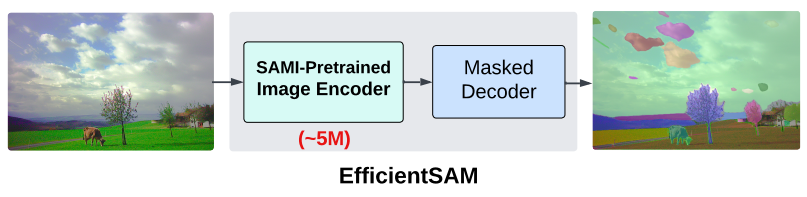
EfficientSAM模型利用掩码图像预训练(SAMI),该预训练学习从SAM图像编码器重构特征,以进行有效的视觉表示学习。然后采用SAMI预训练的轻量级图像编码器和掩码解码器来构建EfficientSAMs ,并在SA-1B数据集上对模型进行微调以执行分割一切的任务。EfficientSAM-S将SAM的推理时间减少了约20倍,参数大小减少了约20倍,性能下降很小。
## 算法原理
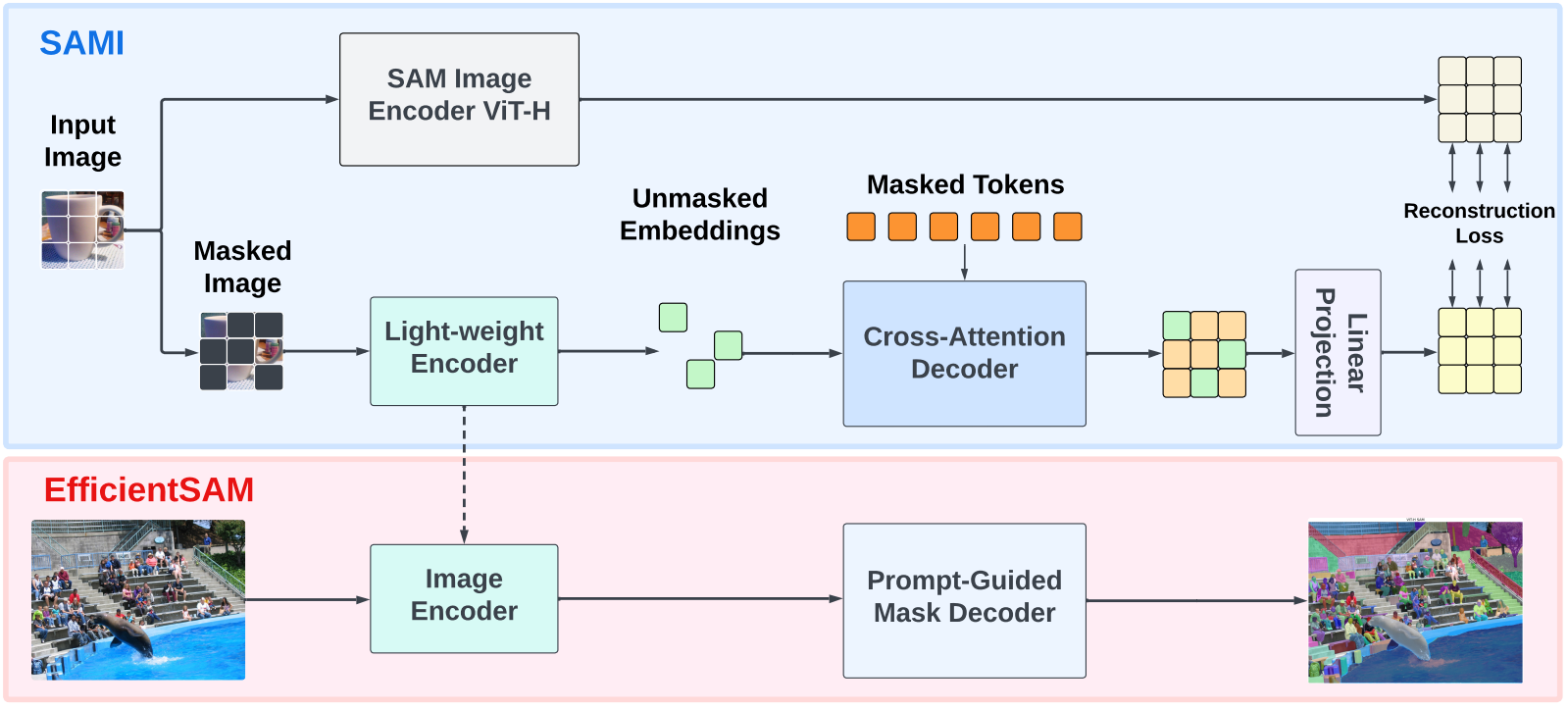
模型包含两个阶段:ImageNet上的SAMI预训练和SA-1B上的SAM微调。EfficientSAM的核心组件包括:交叉注意力解码器、线性投影头、重建损失。
交叉注意力解码器:在SAM特征监督下,解码器重构掩蔽令牌,同时编码器输出作为重构锚点。解码器查询来自掩码令牌,键和值来自编码器和未掩码特征。结合编解码器两者输出特征,用于MAE输出嵌入,并重新排序至原始图像位置。
线性投影头:将编码器和解码器输出特征输入到线性投影头,以对齐SAM图像编码器特征并解决特征维数不匹配问题。
重建损失:在每次训练迭代中,SAMI由从SAM图像编码器中提取的前馈特征,以及MAE的前馈和反向传播过程组成。比较了SAM图像编码器和MAE线性投影头的输出,计算了重建损失。
## 环境配置
### Docker(方法一)
此处提供[光源](https://www.sourcefind.cn/#/service-details)拉取docker镜像的地址与使用步骤
```
docker pull image.sourcefind.cn:5000/dcu/admin/base/pytorch:2.1.0-ubuntu20.04-dtk24.04.1-py3.10
docker run -it --shm-size=64G -v /path/your_code_data/:/path/your_code_data/ -v /opt/hyhal:/opt/hyhal --privileged=true --device=/dev/kfd --device=/dev/dri/ --group-add video --name efficientsam_pytorch bash # 为以上拉取的docker的镜像ID替换,本镜像为:ffa1f63239fc
cd /path/your_code_data/efficientsam_pytorch
pip install -e .
pip install -r requirements.txt -i https://mirrors.aliyun.com/pypi/simple/ --trusted-host mirrors.aliyun.com
git clone https://github.com/facebookresearch/segment-anything.git
cd segment-anything
pip install -e .
```
### Dockerfile(方法二)
此处提供dockerfile的使用方法
```
docker build --no-cache -t efficientsam:latest .
docker run -it --shm-size=64G -v /path/your_code_data/:/path/your_code_data/ -v /opt/hyhal:/opt/hyhal --privileged=true --device=/dev/kfd --device=/dev/dri/ --group-add video --name efficientsam_pytorch efficientsam:latest bash
cd /path/your_code_data/efficientsam_pytorch
pip install -e .
pip install -r requirements.txt -i https://mirrors.aliyun.com/pypi/simple/ --trusted-host mirrors.aliyun.com
git clone https://github.com/facebookresearch/segment-anything.git
cd segment-anything
pip install -e .
```
### Anaconda(方法三)
此处提供本地配置、编译的详细步骤,例如:
关于本项目DCU显卡所需的特殊深度学习库可从[光合](https://developer.sourcefind.cn/tool/)开发者社区下载安装。
```
DTK驱动:dtk24.04.1
python:python3.10
torch: 2.1.0
torchvision: 0.16.0
triton:2.1.0
```
`Tips:以上dtk驱动、python、torch等DCU相关工具版本需要严格一一对应`
其它依赖环境安装如下:
```
cd /path/your_code_data/efficientsam_pytorch
pip install -e .
pip install -r requirements.txt -i https://mirrors.aliyun.com/pypi/simple/ --trusted-host mirrors.aliyun.com
git clone https://github.com/facebookresearch/segment-anything.git
cd segment-anything
pip install -e .
```
## 数据集
预训练阶段数据集为数据集为
[ImageNet](https://image-net.org/)
微调阶段数据集为数据集为
[SA-1B](https://ai.meta.com/datasets/segment-anything/)
## 训练
官方暂未开放
## 推理
模型的权重可以通过以下表格链接获得,推理时将其下载放置于weights文件夹下。
| EfficientSAM-S | EfficientSAM-Ti |
|------------------------------|------------------------------|
| [Download](https://github.com/yformer/EfficientSAM/blob/main/weights/efficient_sam_vits.pt.zip) |[Download](https://github.com/yformer/EfficientSAM/blob/main/weights/efficient_sam_vitt.pt)|
### 单卡推理
进入代码文件夹
```
cd /path/your_code_data/efficientsam_pytorch
```
基于point和box推理,更多细节参考netbooks/EfficientSAM_example.ipynb:
基于point推理
```
python inference_point_prompt.py
```
基于box推理
```
python inference_box_prompt.py
```
segment everything推理,更多细节参考netbooks/EfficientSAM_segment_everything_example.ipynb:
```
python inference_segment_everything.py
```
## result
EfficientSAM-S和EfficientSAM-Ti 基于point测试结果如下:
EfficientSAM-S和EfficientSAM-Ti 基于box测试结果如下:
EfficientSAM-S和EfficientSAM-Ti segment_everything测试结果如下:
### 精度
无
## 应用场景
### 算法类别
`图像分割`
### 热点应用行业
`制造,广媒,能源,医疗,家居,教育`
## 源码仓库及问题反馈
- http://developer.sourcefind.cn/codes/modelzoo/efficientsam_pytorch.git
## 参考资料
- https://github.com/yformer/EfficientSAM


