# DragAnything
DragAnything 模型,利用实体表示来实现可控视频生成中任何对象的运动控制。用户可以通过绘制轨迹与SAM进行互动,能够精确控制物体的运动,生成高质量的视频。
## 论文
`DragAnything: Motion Control for Anything using Entity Representation`
- https://arxiv.org/abs/2403.07420/
- ECCV 2024
## 模型结构
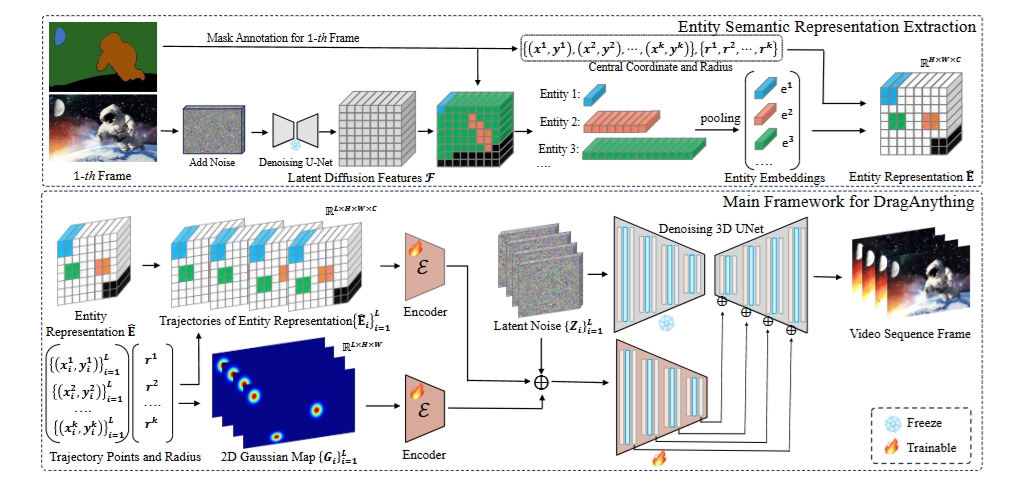
DragAnything
## 算法原理
DragAnything 算法沿用 SVD 框架,主要由三个组件组成:一个去噪扩散模型(3D U-Net),用于学习空间和时间效率的去噪过程,一个编码器和一个解码器,用于将视频编码为潜在空间并将去噪后的潜在特征重建回视频中。\
通过观察以往一些基于轨迹的工作,发现提供的轨迹点可能无法完全代表想要控制的实体;并且靠近拖动点的像素会受到更大的影响。
基于此设计了实体表示提取机制:基于实体掩码指标提取扩散模型的潜在特征作为对应的实体表示。并将其与二维高斯表示相结合,形成最终的有效表示。
## 环境配置
```
mv draganything_pytoch draganything # 去框架名后缀
# docker的-v 路径、docker_name和imageID根据实际情况修改
# pip安装时如果出现下载慢可以尝试别的镜像源
```
### Docker(方法一)
```
docker pull image.sourcefind.cn:5000/dcu/admin/base/pytorch:2.1.0-ubuntu20.04-dtk24.04.2-py3.10 # 本镜像imageID为:2f1f619d0182
docker run -it -v /path/your_code_data/:/path/your_code_data/ -v /opt/hyhal/:/opt/hyhal/:ro --shm-size=16G --privileged=true --device=/dev/kfd --device=/dev/dri/ --group-add video --network=host --name docker_name imageID bash
cd /your_code_path/draganything
pip install -r requirements.txt
# Co-Tracker
cd ./utils/cotracker
pip install -e .
pip install matplotlib flow_vis tqdm tensorboard
```
### Dockerfile(方法二)
```
cd /your_code_path/draganything/docker
docker build --no-cache -t codestral:latest .
docker run -it -v /path/your_code_data/:/path/your_code_data/ -v /opt/hyhal/:/opt/hyhal/:ro --shm-size=16G --privileged=true --device=/dev/kfd --device=/dev/dri/ --group-add video --network=host --name docker_name imageID bash
cd /your_code_path/draganything
pip install -r requirements.txt
# Co-Tracker
cd ./utils/cotracker
pip install -e .
pip install matplotlib flow_vis tqdm tensorboard
```
### Anaconda(方法三)
关于本项目DCU显卡所需的特殊深度学习库可从[光合](https://developer.sourcefind.cn/tool/)开发者社区下载安装。
```
DTK驱动: dtk24.04.2
python: python3.10
pytorch: 2.1.0
```
`Tips:以上DTK驱动、python、pytorch等DCU相关工具版本需要严格一一对应`
其它非深度学习库参照requirements.txt安装:
```
pip install -r requirements.txt
# Co-Tracker
cd ./utils/cotracker
pip install -e .
pip install matplotlib flow_vis tqdm tensorboard
```
## 数据集
测试数据集 [VIPSeg](https://github.com/VIPSeg-Dataset/VIPSeg-Dataset)。\
下载后放在 ./data 并解压。
## 训练
暂无。
## 推理
下载 [sam_vit_h_4b8939.pth](https://github.com/facebookresearch/segment-anything?tab=readme-ov-file#model-checkpoints),并放在 ./script 文件夹下。
下载 cotracker2.pth 权重:
```
mkdir -p utils/cotracker/checkpoints
cd utils/cotracker/checkpoints
wget https://huggingface.co/facebook/cotracker/resolve/main/cotracker2.pth
# wget https://hf-mirror.com/facebook/cotracker/resolve/main/cotracker2.pth
```
,并放在 ./utils/cotracker/checkpoints 文件夹下。
下载 ChilloutMix 权重:
```
mkdir -p utils/pretrained_models
cd utils/pretrained_models
git-lfs clone https://huggingface.co/windwhinny/chilloutmix.git
# git-lfs clone https://hf-mirror.com/windwhinny/chilloutmix.git
```
,并放在 ./utils/pretrained_models 文件夹下。
下载 DragAnything 权重:
```
mkdir -p model_out/DragAnything
cd model_out/DragAnything
git-lfs clone https://huggingface.co/weijiawu/DragAnything
# git-lfs clone https://hf-mirror.com/weijiawu/DragAnything
```
,并放在 ./model_out/DragAnything 文件夹下。
可视化webui推理:
```
python gradio_run.py --listen
```
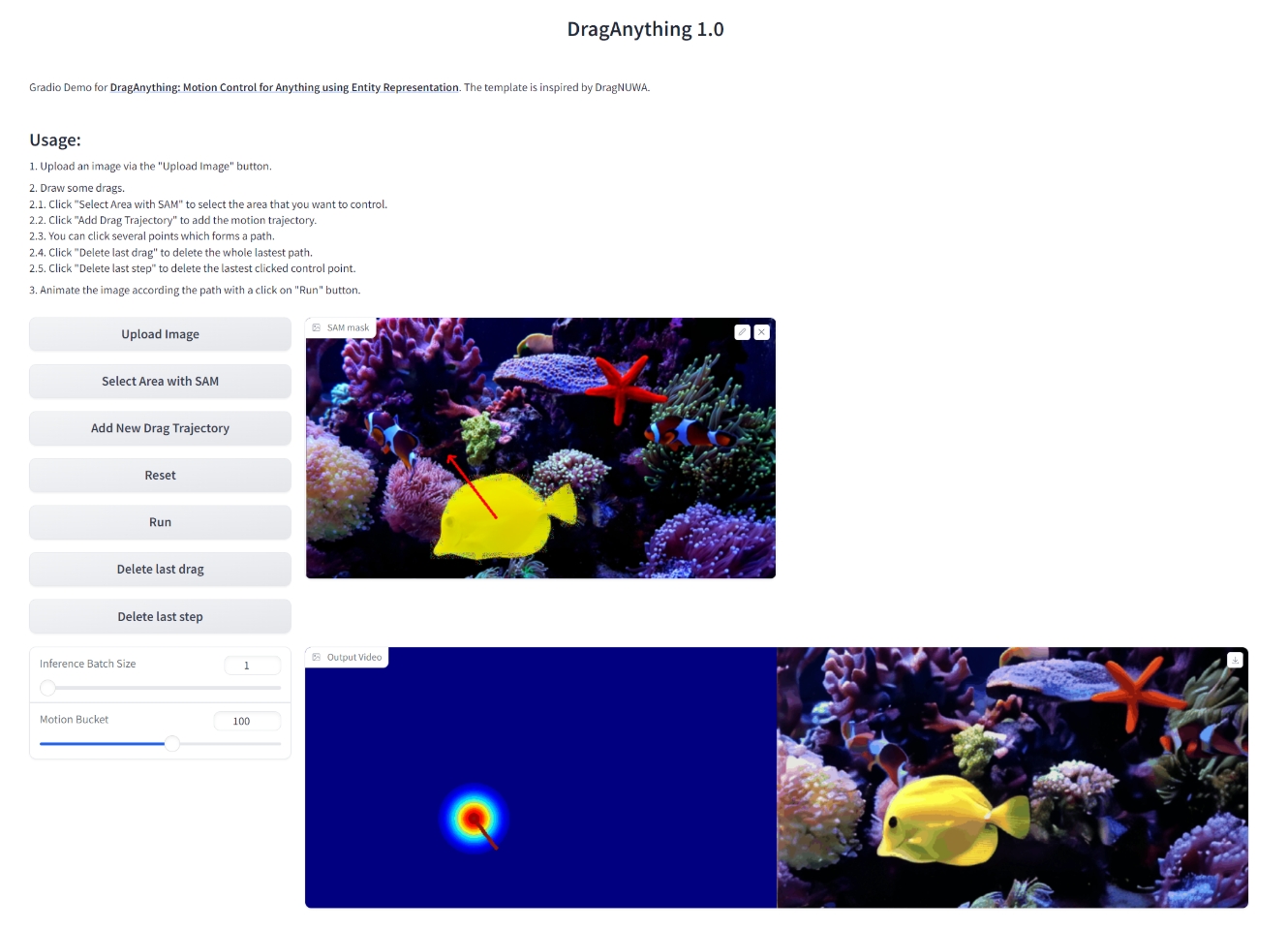
webui界面
1、上传图片;\
2、选择目标或者区域;\
3、设定Drag轨迹;\
4、运行。\
ps:请勿频繁操作;参数自行调整。
## result
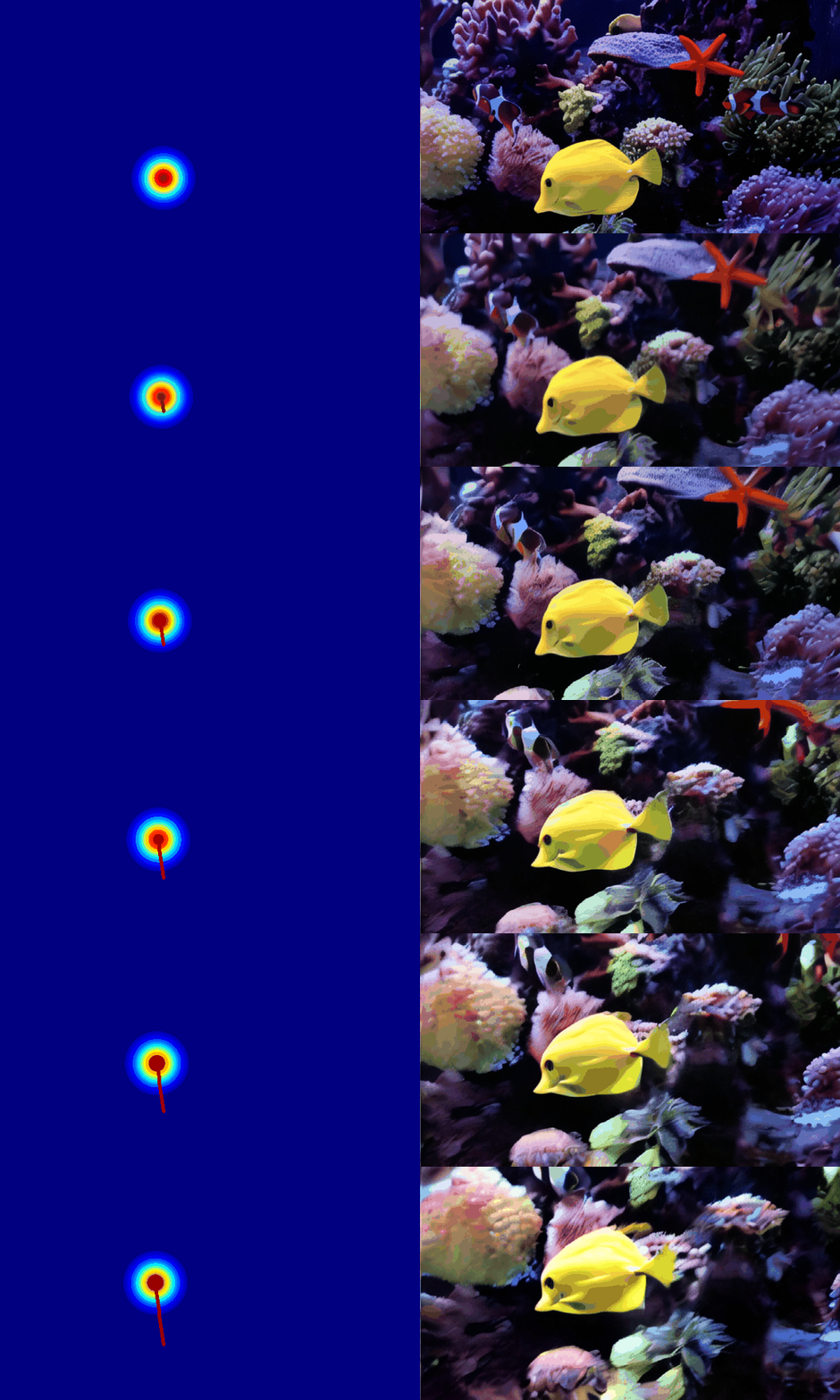
推理结果
### 精度
无
## 应用场景
### 算法类别
`AIGC`
### 热点应用行业
`零售,制造,电商,医疗,教育`
## 源码仓库及问题反馈
- https://developer.sourcefind.cn/codes/modelzoo/draganything_pytorch
## 参考资料
- https://github.com/showlab/DragAnything