# DETR
## 论文
[End-to-End Object Detection with Transformers](https://arxiv.org/abs/2005.12872)
## 模型结构
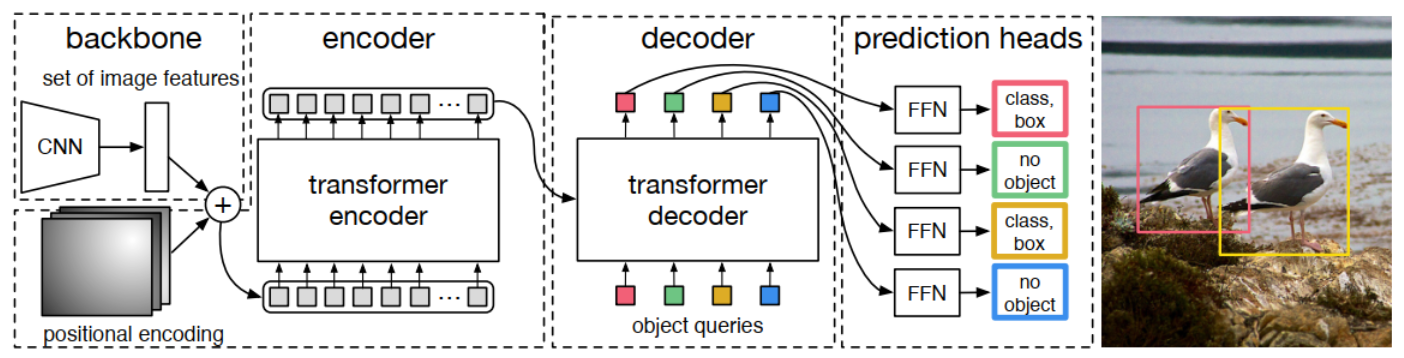
对于输入图像, DETR使用传统的CNN backbone来学习2D特征, 并在将其传递到transformer encoder之前用positional encoding对其进行补充和平滑。然后, transformer decoder将少量固定数量的学习到的positional embeddings(对象查询)作为输入, 额外关注encoder输出。将解码器的每个输出embedding传递到预测检测(类和边界框)或“无对象”类的共享前馈网络(FFN)。
## 算法原理
DETR将目标检测看作一种set prediction问题, 并提出了一个十分简洁的目标检测pipeline, 即CNN提取基础特征, 送入Transformer做关系建模, 得到的输出通过二分图匹配算法与图片上的ground truth做匹配。
## 环境配置
-v 路径、docker_name和imageID根据实际情况修改
### Docker(方法一)
```
docker pull image.sourcefind.cn:5000/dcu/admin/base/pytorch:2.1.0-ubuntu20.04-dtk24.04.1-py3.10
docker run -it -v /path/your_code_data/:/path/your_code_data/ -v /opt/hyhal:/opt/hyhal:ro --shm-size=32G --privileged=true --device=/dev/kfd --device=/dev/dri/ --group-add video --name docker_name imageID bash
cd /your_code_path/detr_pytorch
pip install -r requirements.txt
```
### Dockerfile(方法二)
```
cd ./docker
docker build --no-cache -t detr:latest .
docker run -it -v /path/your_code_data/:/path/your_code_data/ -v /opt/hyhal:/opt/hyhal:ro --shm-size=32G --privileged=true --device=/dev/kfd --device=/dev/dri/ --group-add video --name docker_name imageID bash
cd /your_code_path/detr_pytorch
pip install -r requirements.txt
```
### Anaconda(方法三)
1、关于本项目DCU显卡所需的特殊深度学习库可从光合开发者社区下载安装: https://developer.sourcefind.cn/tool/
```
DTK软件栈: dtk24.04.1
python: python3.10
torch: 2.1.0+das1.1.git3ac1bdd.abi1.dtk2404
torchvision: 0.16.0+das1.1.git7d45932.abi1.dtk2404.torch2.1
```
Tips: 以上dtk软件栈、python、torch等DCU相关工具版本需要严格一一对应
2、其他非特殊库直接按照requirements.txt安装
```bash
pip install -r requirements.txt
```
## 数据集
[COCO2017](https://cocodataset.org/#home)
数据集的目录结构如下:
```bash
├── COCO2017
│ ├── train2017
│ ├── val2017
│ ├── test2017
│ └── annotations
│ ├── instances_train2017.json
│ └── instances_val2017.json
```
训练/验证集数据准备:训练/验证集都是采用的**COCO**的数据格式, 如果使用自己的标注数据, 请先将标注数据转换成**COCO**的格式, 并按照上面的目录结构进行存放。
本项目提供了`coco128`数据集可以进行功能验证使用,目录结构如下:
```bash
├── coco128
│ ├── train2017
│ ├── val2017
│ └── annotations
│ └── instances_train2017.json
```
## 训练
### 单机多卡
```bash
# --nproc_per_node 数据与显卡数量一致
# coco_path是训练数据集地址,数据是coco format
bash train.sh
```
## 推理
验证前需提前准备好预训练模型, 可从[参考资料](#参考资料)项目中提供的模型下载, 并将`coco_path`设置为当前环境中推理数据的对应地址, 数据应为**COCO**数据格式。
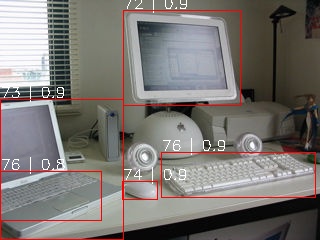
如果想要查看预测效果(预测结果输出到图片上), 请执行(其余参数如`backbone`等需与训练模型参数需一致, 详情请根据训练参数配置):
```bash
python test.py --pre_trained_model --coco_path
```
#### 单卡推理
```bash
bash val.sh
```
## result
### 精度
在COCO2017的val数据集上进行单卡测试, 结果如下表所示:
| device | backbone | schedule | epoch | box AP |
| :------: | :------: | :------: | :------: | :------: |
| Z100L | R50 | 500 | 300 | 41.4 |
| V100 | R50 | 500 | 300 | 42 |
## 应用场景
### 算法类别
目标检测
### 热点应用行业
网安,交通,政府
## 源码仓库及问题反馈
http://developer.sourcefind.cn/codes/modelzoo/detr_pytorch.git
## 参考资料
https://github.com/facebookresearch/detr.git