# CogVLM2
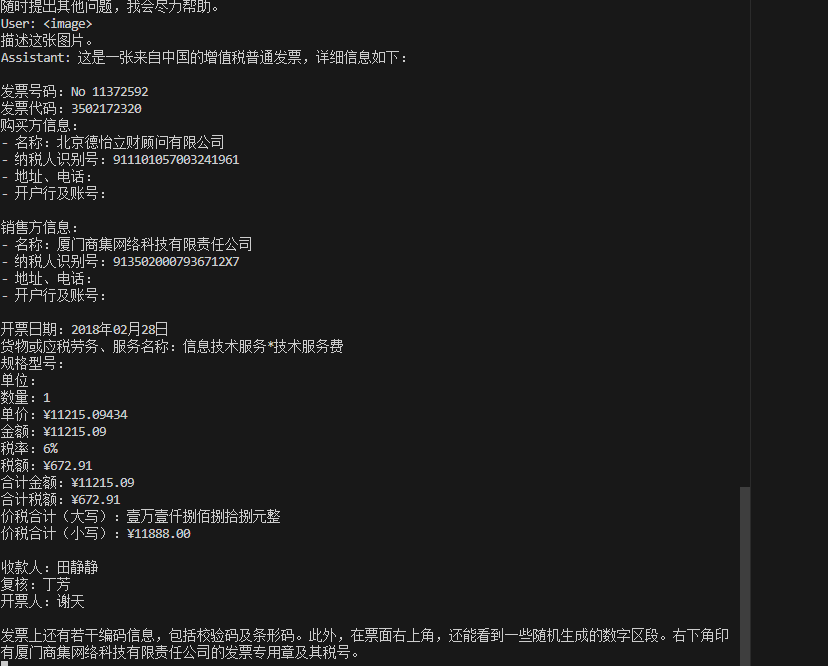
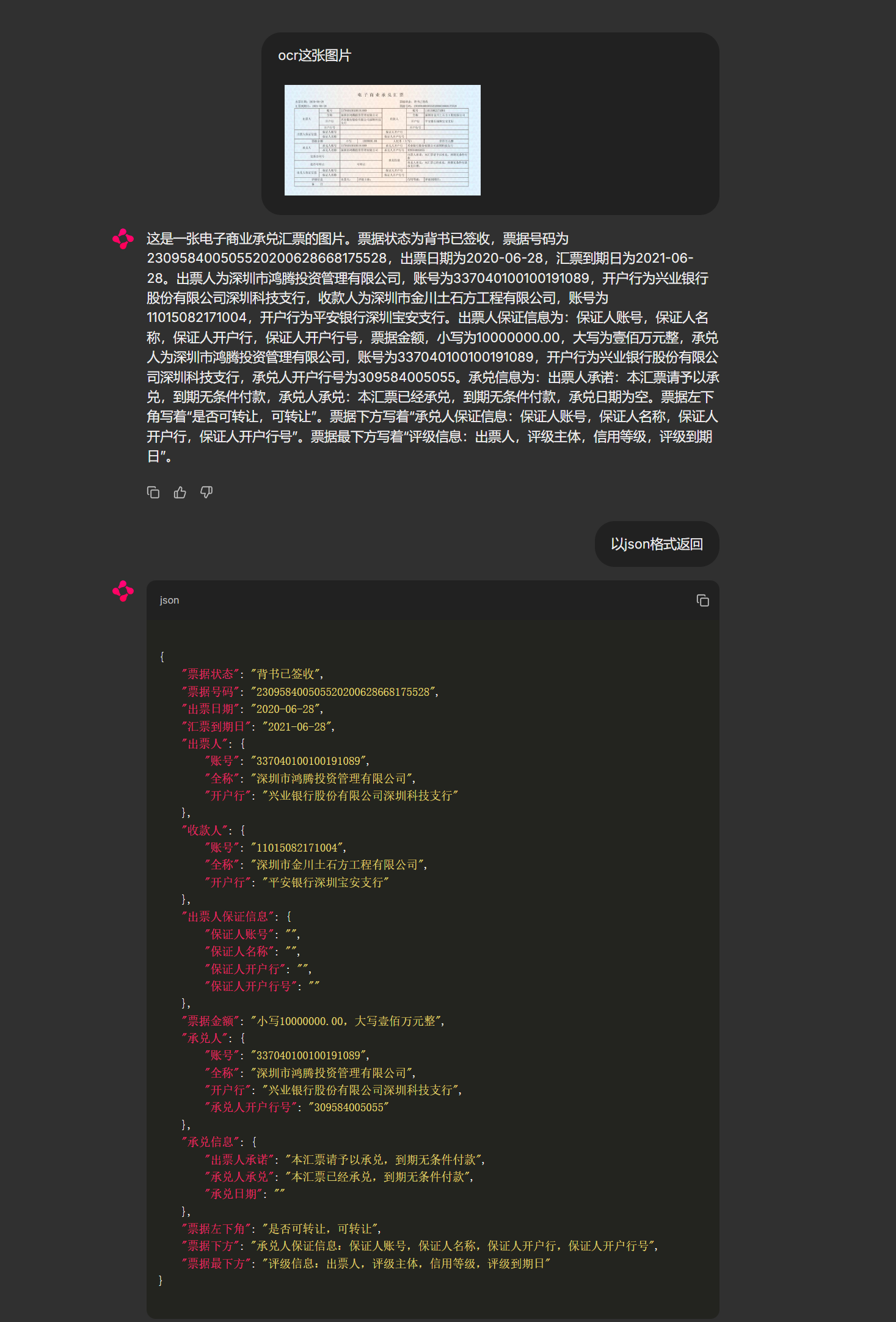
CogVLM2是一个开源的多模态大型语言模型,旨在缩小开源模型与商业专有模型在多模态理解方面的能力差距,19B 即可比肩 GPT-4V, 可用于OCR、视频理解、文档问答。
## 论文
- [CogVLM:Visual Expert for Pretrained Language Models](https://arxiv.org/abs/2311.03079)
## 模型结构
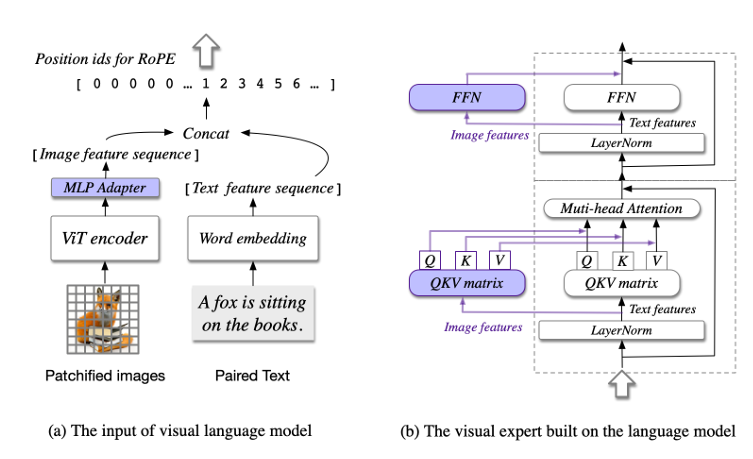
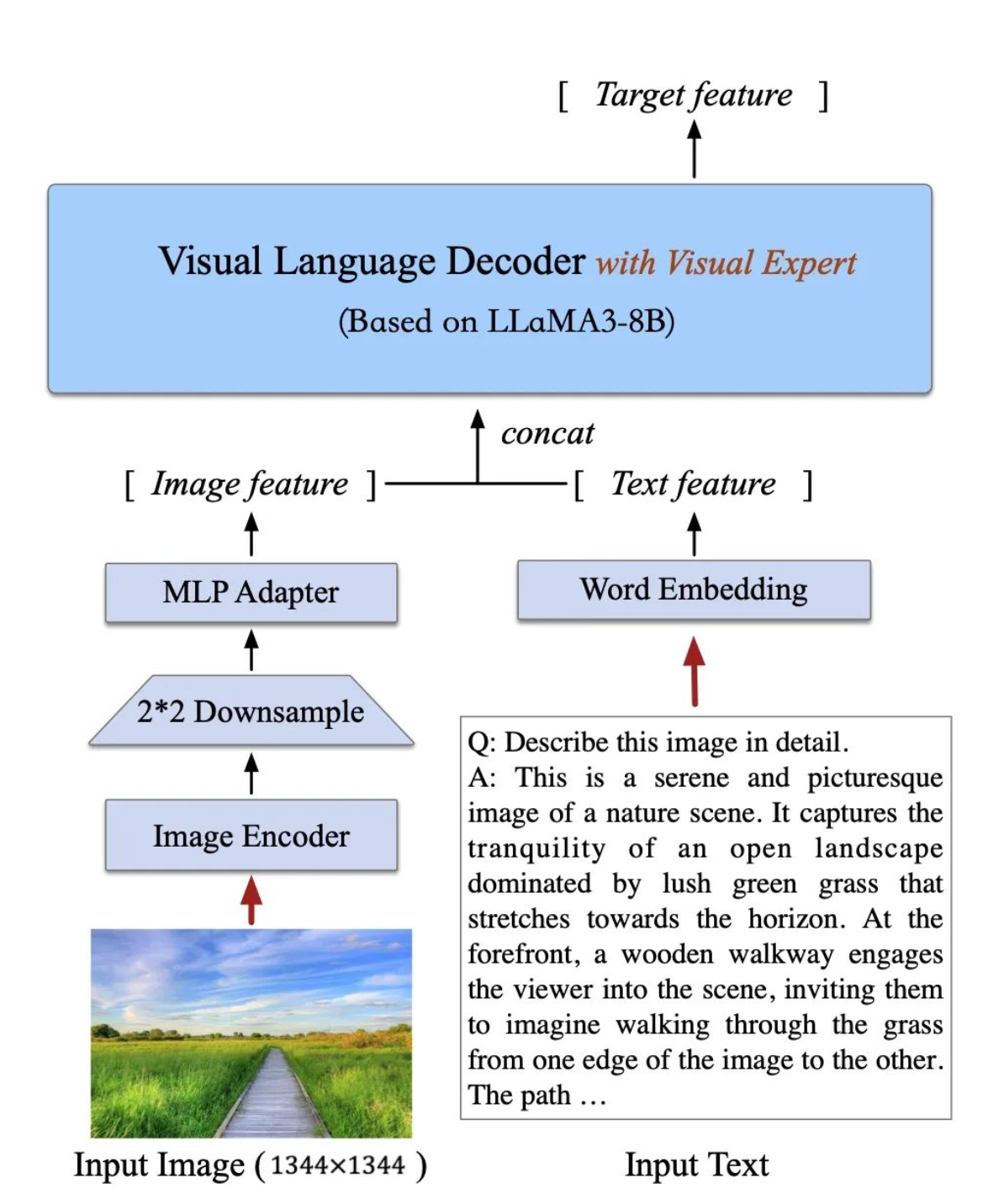
CogVLM2 继承并优化了上一代模型的经典架构,采用了一个拥有50亿参数的强大视觉编码器,并创新性地在大语言模型中整合了一个70亿参数的视觉专家模块。这一模块通过独特的参数设置,精细地建模了视觉与语言序列的交互,确保了在增强视觉理解能力的同时,不会削弱模型在语言处理上的原有优势。这种深度融合的策略,使得视觉模态与语言模态能够更加紧密地结合。Cogvlm模型共包含四个基本组件:ViT 编码器,MLP 适配器,预训练大语言模型(GPT-style)和视觉专家模块。
## 算法原理
当前主流的浅层对齐方法不佳在于视觉和语言信息之间缺乏深度融合,而cogvlm在attention和FFN layers引入一个可训练的视觉专家模块,将图像特征与文本特征分别处理,并在每一层中使用新的QKV矩阵和MLP层。通过引入视觉专家模块弥补预训练语言模型和图像编码器之间的差距,这种设计既保证了模型的强大性能,又显著提高了推理的效率。
为了更好地处理和理解高分辨率的文档或网页图片,CogVLM2能够支持高达1344分辨率的图像输入。为了提高处理此类高分辨率图像的效率,模型在视觉编码器后引入了一个专门的降采样模块。这个模块能够有效地提取视觉序列中的关键信息,大幅减少输入到语言模型中的序列长度,从而在确保模型性能的同时,显著提升了推理速度,实现了性能与效率的最佳平衡。
## 环境配置
### Docker(方法一)
[光源](https://www.sourcefind.cn/#/service-details)拉取docker镜像的地址与使用步骤
```
docker pull image.sourcefind.cn:5000/dcu/admin/base/pytorch:2.1.0-ubuntu20.04-dtk24.04.1-py3.10
docker run -it -v /path/your_code_data/:/path/your_code_data/ -v /opt/hyhal/:/opt/hyhal/:ro --shm-size=128G --privileged=true --device=/dev/kfd --device=/dev/dri/ --group-add video --name cogvlm2 bash
cd /path/your_code_data/
pip install -r requirements.txt -i http://mirrors.aliyun.com/pypi/simple/ --trusted-host mirrors.aliyun.com
```
### Dockerfile(方法二)
```
cd /path/your_code_data/docker
docker build --no-cache -t cogvlm2:latest .
docker run --shm-size=128G --name cogvlm2 -v /opt/hyhal:/opt/hyhal:ro --privileged=true --device=/dev/kfd --device=/dev/dri/ --group-add video -v /path/your_code_data/:/path/your_code_data/ -it cogvlm2 bash
```
### Anaconda(方法三)
关于本项目DCU显卡所需的特殊深度学习库可从[光合](https://developer.sourcefind.cn/tool/)开发者社区下载安装。
```
DTK驱动:dtk24.04.1
python:python3.10
torch:2.1
torchvision: 0.16.0
deepspped: 0.12.3
```
`Tips:以上dtk驱动、python、paddle等DCU相关工具版本需要严格一一对应`
关于本项目DCU显卡所需的特殊深度学习库可从[光合](https://developer.sourcefind.cn/tool/)开发者社区下载安装。
```
conda create -n cogvlm2 python=3.10
conda activate cogvlm2
cd /path/your_code_data/
pip install -r requirements.txt -i http://mirrors.aliyun.com/pypi/simple
```
## 数据集
测试数据集 [CogVLM-SFT-311K](https://huggingface.co/datasets/THUDM/CogVLM-SFT-311K)
数据格式如下:
数据集由 images 和 labels 两个文件夹组成 (在 CogVLM-SFT-311K 中 为 labels_en 和 labels_zh,分别对应中英文标签。 在微调代码中,你可以修改这两行代码来修改文件夹名称。
```
CogVLM-SFT-311K/
├── images
│ │ ├── .....
├── labels_en
│ │ ├── .....
├── labels_zh
│ │ ├── .....
```
images 文件夹中存放了图片文件,labels 文件夹中存放了对应的标签文件。图片和标签文件的名称一一对应。图片文件的格式为 jpg,标签文件的格式为 json。
每个标签文件中包含了一段对话,对话由 user 和 assistant 两个角色组成,每个角色的对话内容由 role 和 content 两个字段组成。如下字段所示。
```
{
"conversations": [
{
"role": "user",
"content": "What can be inferred about the zebras' behavior and surroundings?"
},
{
"role": "assistant",
"content": "Based on the image, we can infer that the two zebras are likely seeking relief from the sun's heat, as they are standing side by side under the branches of a thorny tree. This shade-providing tree offers some respite from the sun, possibly during the hottest part of the day. The zebras are in a green field with grass, providing them with an ideal environment to graze and eat while staying near their source of shelter. This shows that the zebras' behavior is influenced by the conditions and available resources in their surroundings. It also highlights that these animals adopt strategies to adapt to the fluctuating conditions of their environment, such as cooperation and seeking shelter, to survive and thrive in their natural habitat."
}
]
}
```
## 推理
### 单卡推理
推理前需要修改cli_demo.py中的模型路径
MODEL_PATH = "./CogVLM2/cogvlm2-llama3-chinese-chat-19B"
- 步骤1:image path >>>> './path_to_image' (图片路径)
- 步骤2:Human: 描述这张图片
```
sh cli_demo.sh
```
### web 推理
修改 web_demo.py 中模型文件地址
```
sh web_demo.sh
```
## result
### OCR
### 问答
### 精度
暂无
## 应用场景
### 算法类别
`OCR`
### 热点应用行业
`金融,教育,交通,政府`
## 预训练权重
- [THUDM/cogvlm2-llama3-chinese-chat-19B](https://modelscope.cn/models/Duxiaoman-DI/XuanYuan-13B-Chat/files)
## 源码仓库及问题反馈
- https://developer.sourcefind.cn/codes/modelzoo/cogvlm2_pytorch
## 参考资料
- [CogVLM:Visual Expert for Pretrained Language Models](https://arxiv.org/abs/2311.03079)
- [THUDM/CogVLM2](https://github.com/THUDM/CogVLM2?tab=readme-ov-file)