# ChatGLM2-6B
## 论文
`GLM: General Language Model Pretraining with Autoregressive Blank Infilling`
- [https://arxiv.org/abs/2103.10360](https://arxiv.org/abs/2103.10360)
## 模型结构
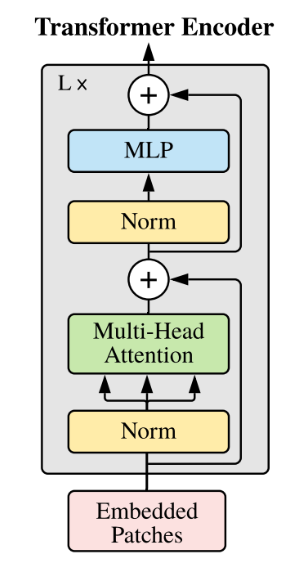
ChatGLM2-6B 是开源中英双语对话模型 ChatGLM-6B 的第二代版本。ChatGLM2-6B同样采用Transformer模型结构:
以下是ChatGLM2-6B的主要网络参数配置:
| 模型名称 | 隐含层维度 | 层数 | 头数 | 词表大小 | 位置编码 | 最大长 |
| -------- | -------- | -------- | -------- | -------- | -------- | -------- |
|ChatGLM-6B | 4,096 | 28 | 32 | 65024 | RoPE | 32768 |
## 算法原理
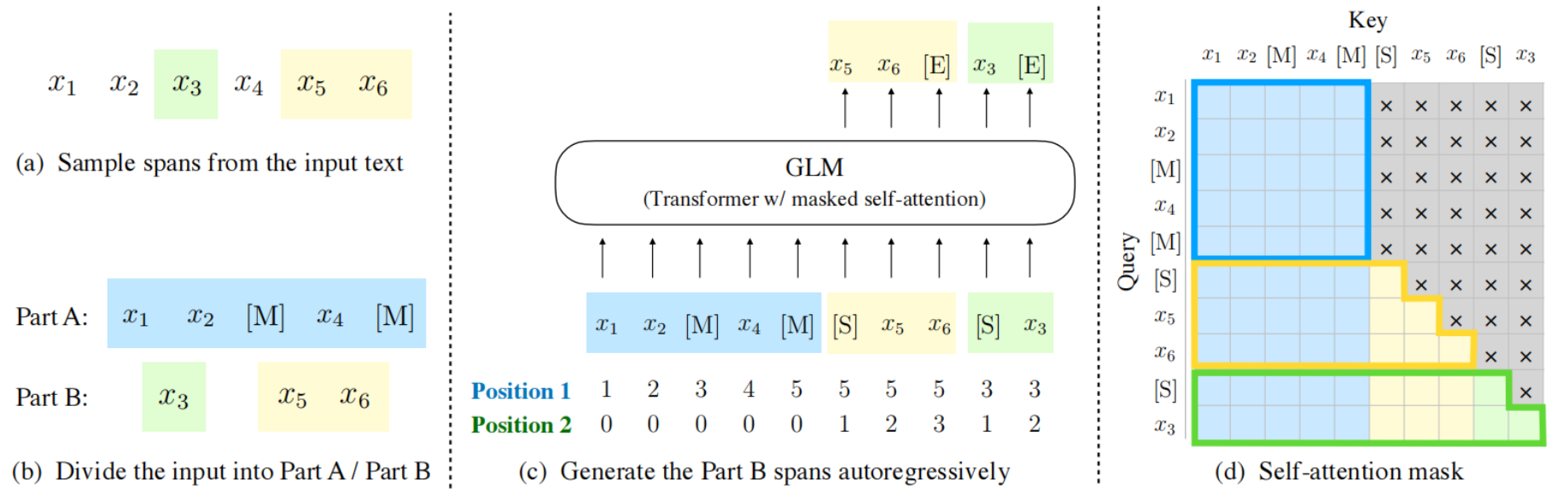
模型基于 [General Language Model (GLM)](https://github.com/THUDM/GLM) 架构,GLM是一种基于Transformer的语言模型,以自回归空白填充为训练目标,同时具备自回归和自编码能力。
## 环境配置
### Docker(方式一)
推荐使用docker方式运行,提供拉取的docker镜像:
```
docker pull image.sourcefind.cn:5000/dcu/admin/base/pytorch:2.1.0-ubuntu20.04-dtk24.04.1-py3.10
```
进入docker,安装docker中没有的依赖:
```
docker run -dit --network=host --name=chatglm --privileged --device=/dev/kfd --device=/dev/dri --ipc=host --shm-size=16G --group-add video --cap-add=SYS_PTRACE --security-opt seccomp=unconfined -u root --ulimit stack=-1:-1 -v /opt/hyhal:/opt/hyhal:ro --ulimit memlock=-1:-1 image.sourcefind.cn:5000/dcu/admin/base/pytorch:2.1.0-ubuntu20.04-dtk24.04.1-py3.10
docker exec -it chatglm /bin/bash
pip install transformers==4.28.0 -i http://mirrors.aliyun.com/pypi/simple/ --trusted-host mirrors.aliyun.com
pip install accelerate sentencepiece mdtex2html gradio rouge_chinese nltk jieba datasets==2.20.0 protobuf peft==0.5.0 pydantic==1.10.9 -i http://mirrors.aliyun.com/pypi/simple/ --trusted-host mirrors.aliyun.com
```
### Dockerfile(方式二)
```
docker build -t chatglm2:latest .
docker run -dit --network=host --name=chatglm2 --privileged --device=/dev/kfd --device=/dev/dri --ipc=host --shm-size=16G --group-add video --cap-add=SYS_PTRACE --security-opt seccomp=unconfined -u root -v /opt/hyhal:/opt/hyhal:ro --ulimit stack=-1:-1 --ulimit memlock=-1:-1 chatglm2:latest
docker exec -it chatglm2 /bin/bash
```
### Conda(方法三)
1. 创建conda虚拟环境:
```
conda create -n chatglm python=3.10
```
2. 关于本项目DCU显卡所需的工具包、深度学习库等均可从[光合](https://developer.sourcefind.cn/tool/)开发者社区下载安装。
- DTK 24.04.1
- Pytorch 2.1.0
- Deepspeed 0.12.3
Tips:以上dtk驱动、python、deepspeed等工具版本需要严格一一对应。
3. 其它依赖库参照requirements.txt安装:
```
pip install -r requirements.txt
```
## 数据集
本仓库以 [ADGEN](https://aclanthology.org/D19-1321.pdf) (广告生成) 数据集为例介绍代码的使用方法,该数据集任务为根据输入(content)生成一段广告词(summary),以下为下载地址:
- [Google Drive](https://drive.google.com/file/d/13_vf0xRTQsyneRKdD1bZIr93vBGOczrk/view?usp=sharing) 或者 [Tsinghua Cloud](https://cloud.tsinghua.edu.cn/f/b3f119a008264b1cabd1/?dl=1)
数据集SCNet快速下载链接[AdvertiseGen](http://113.200.138.88:18080/aidatasets/project-dependency/advertisegen)
下载处理好的 ADGEN 数据集,将解压后的AdvertiseGen目录放到 [ptuning](./ptuning)本目录下。数据集目录结构如下:
```
── AdvertiseGen
│ ├── dev.json
│ └── train.json
```
### 模型下载
Hugging Face模型下载地址:
[ChatGLM2-6B](https://huggingface.co/THUDM/chatglm2-6b)
## 训练
### P-tuning v2 微调训练
本仓库实现了对于ChatGLM-6B模型基于[P-Tuning v2](https://github.com/THUDM/P-tuning-v2)的微调。P-Tuning v2是由清华大学提出的一种高效参数微调方法。
#### 单机多卡训练
```
cd ptuning
bash ptuning_train.sh
```
注意:请根据自己的需求配置其中的模型路径、数据集路径、batchsize、学习率等参数;
如果需要更改指定的显卡编号,可以在ptuning_train.sh脚本中使用--include=localhost,替换CUDA_VISIBLE_DEVICES。
比如使用4,5,6,7号卡,则将CUDA_VISIBLE_DEVICES=0,1,2,3删除,在deepspeed后面增加--include=localhost:4,5,6,7。
#### 推理测评
在 P-tuning v2 训练时模型只保存 PrefixEncoder 部分的参数,所以在推理时需要同时加载原 ChatGLM-6B 模型以及 PrefixEncoder 的权重,可直接运行一下命令:
```
cd ptuning
bash evaluate_ptuning.sh
```
### Finetune全参数微调
#### 单机多卡训练
```
cd ptuning
bash ft_train.sh
```
注意:请根据自己的需求配置其中的模型路径、数据集路径、batchsize、学习率等参数;
#### 集群训练
```
cd ptuning/multi_node
bash run_train.sh
```
注意:请根据自己的需求配置其中的模型路径、数据集路径、batchsize、学习率等参数;
#### 推理测评
```
cd ptuning
bash evaluate_finetune.sh
```
### LoRA 微调训练
#### 单机多卡训练
```
cd ptuning/lora
bash lora_train.sh
```
#### LoRA推理
```
python infer_lora.py
```
## 推理
运行如下命令:
python cli_demo.py
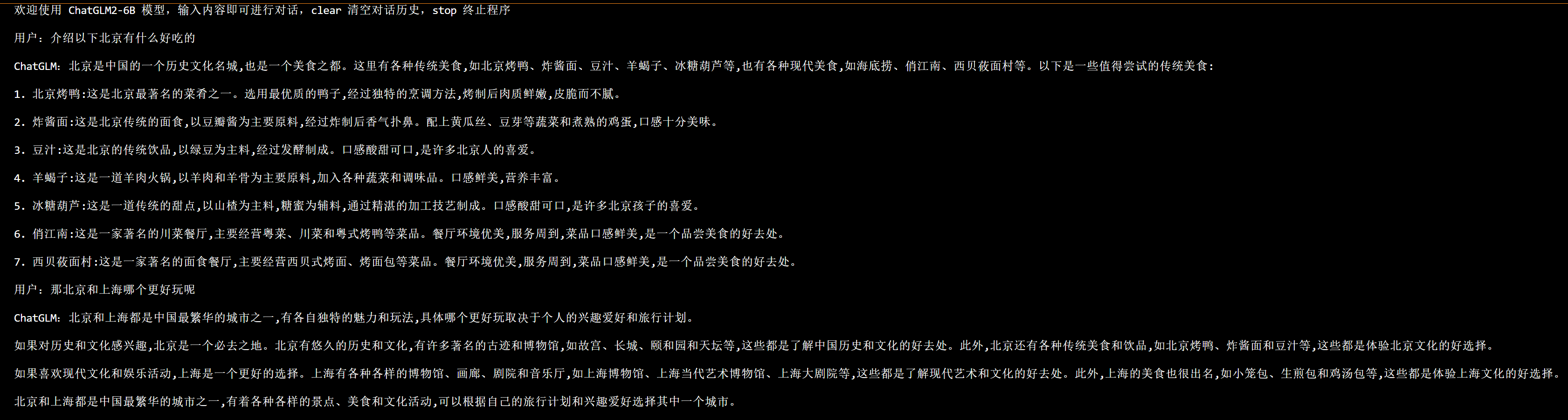
程序会在命令行中进行交互式的对话,在命令行中输入指示并回车即可生成回复,输入 clear 可以清空对话历史,输入 stop 终止程序。
## Result
- 推理效果如下:
### 精度
无
## 应用场景
### 算法类别
`对话问答`
### 热点应用行业
`医疗,教育,科研,金融`
## 源码仓库及问题反馈
- https://developer.sourcefind.cn/codes/modelzoo/chatglm2-6b_pytorch
## 参考
- [THUDM/ChatGLM2-6B](https://github.com/THUDM/ChatGLM2-6B/tree/main)
- [zero_nlp](https://github.com/yuanzhoulvpi2017/zero_nlp/tree/main)