# BLOOM
## 论文
`BLOOM: A 176B-Parameter Open-Access Multilingual Language Model`
- [https://arxiv.org/abs/2211.05100](https://arxiv.org/abs/2211.05100)
## 模型结构
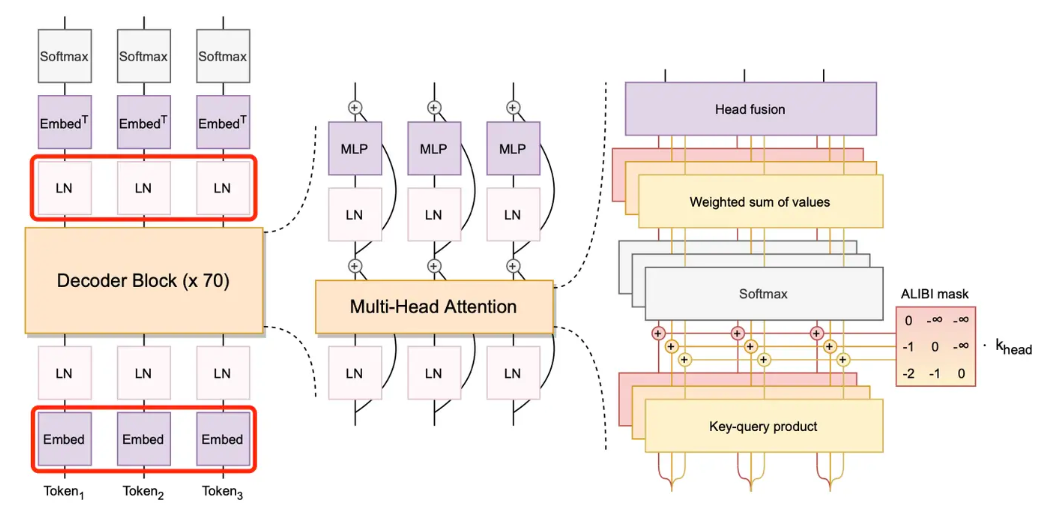
Bloom是一个开源的支持最多59种语言和176B参数的大语言模型。它是在Megatron-LM GPT2的基础上修改训练出来的,主要使用了解码器唯一结构,对词嵌入层的归一化,使用GeLU激活函数的线性偏差注意力位置编码等技术。它的训练集包含了45种自然语言和12种编程语言,1.5TB的预处理文本转化为了350B的唯一token。bigscience在hugging face上发布的bloom模型包含多个参数多个版本。
 ## 算法原理
 当模型规模过于庞大,单个 GPU 设备无法容纳大规模模型参数时,便捷好用的分布式训练和推理需求就相继出现,业内也随之推出相应的工具。
基于 OneFlow 构建的 LiBai 模型库让分布式上手难度降到最低,用户不需要关注模型如何分配在不同的显卡设备,只需要修改几个配置数据就可以设置不同的分布式策略。当然,加速性能更是出众。
用 LiBai 搭建的 BLOOM可以便捷地实现model parallel + pipeline parallel推理, 很好地解决单卡放不下大规模模型的问题。
### 分布式推理具有天然优势
要知道,模型的参数其实就是许多 tensor,也就是以矩阵的形式出现,大模型的参数也就是大矩阵,并行策略就是把大矩阵分为多个小矩阵,并分配到不同的显卡或不同的设备上,基础的 LinearLayer 在LiBai中的实现代码如下:
```python
class Linear1D(nn.Module):
def __init__(self, in_features, out_features, parallel="data", layer_idx=0, ...):
super().__init__()
if parallel == "col":
weight_sbp = dist.get_nd_sbp([flow.sbp.broadcast, flow.sbp.split(0)])
elif parallel == "row":
weight_sbp = dist.get_nd_sbp([flow.sbp.broadcast, flow.sbp.split(1)])
elif parallel == "data":
weight_sbp = dist.get_nd_sbp([flow.sbp.broadcast, flow.sbp.broadcast])
else:
raise KeyError(f"{parallel} is not supported! Only support ('data', 'row' and 'col')")
self.weight = flow.nn.Parameter(
flow.empty(
(out_features, in_features),
dtype=flow.float32,
placement=dist.get_layer_placement(layer_idx), # for pipeline parallelism placement
sbp=weight_sbp,
)
)
init_method(self.weight)
...
def forward(self, x):
...
```
在这里,用户可选择去如何切分 Linear 层的矩阵,如何切分数据矩阵,而OneFlow 中的 SBP 控制竖着切、横着切以及其他拆分矩阵的方案(模型并行、数据并行),以及通过设置 Placement 来控制这个 LinearLayer 是放在第几张显卡上(流水并行)。
所以,根据 LiBai 中各种 layer 的设计原理以及基于 OneFlow 中 tensor 自带的 SBP 和 Placement 属性的天然优势,使得用户搭建的模型能够很简单地就实现数据并行、模型并行以及流水并行操作。
## 环境配置
### Docker
提供[光源](https://www.sourcefind.cn/#/service-details)拉取的训练以及推理的docker镜像:image.sourcefind.cn:5000/dcu/admin/base/oneflow:0.9.1-centos7.6-dtk-22.10.1-py39-latest,关于本项目DCU显卡所需torch库等均可从[光合](https://developer.sourcefind.cn/tool/)开发者社区下载安装
docker pull image.sourcefind.cn:5000/dcu/admin/base/oneflow:0.9.1-centos7.6-dtk-22.10.1-py39-latest
# 用上面拉取docker镜像的ID替换
docker run --shm-size 16g --network=host --name=bloom_oneflow --privileged --device=/dev/kfd --device=/dev/dri --group-add video --cap-add=SYS_PTRACE --security-opt seccomp=unconfined -v $PWD/bloom_oneflow:/home/bloom_oneflow -it bash
cd /home/bloom_oneflow
pip3 install transformers==4.28.1
pip3 install -r requirements.txt -i https://mirrors.aliyun.com/pypi/simple
pip3 install pybind11 -i https://mirrors.aliyun.com/pypi/simple
pip3 install -e . -i https://mirrors.aliyun.com/pypi/simple
pip3 install torch-1.10.0a0+git2040069.dtk2210-cp39-cp39-manylinux2014_x86_64.whl
## 数据集
在下面脚本中生成。
## 权重
需要先准备好模型权重:https://huggingface.co/bigscience/bloomz-7b1/tree/main
模型权重SCNet快速下载链接: https://www.scnet.cn/ui/aihub/models/yiziqinx/Bloomz-7B
### bloomz-7b1的文件结构
```python
$ tree data
path/to/bloomz-7b1
├── tokenizer_config.json
├── tokenizer.json
├── special_tokens_map.json
├── config.json
└── pytorch_model.bin
```
## 推理
采用1节点,4张DCU-Z100-16G,采用tp=4,pp=1的并行配置。
将模型权重放置与demo.py同一目录下,运行以下代码:
cd projects/BLOOM
# 运行前修改 configs/bloom_inference.py 中 `min_length=64`
python3 -m oneflow.distributed.launch --nproc_per_node 4 demo.py
demo.py如下:
# model parallel + pipeline parallel demo
import oneflow as flow
from omegaconf import DictConfig
from transformers import BloomTokenizerFast
from libai.utils import distributed as dist
from projects.BLOOM.configs.bloom_inference import cfg
from projects.BLOOM.modeling.bloom_model import BloomForCausalLM
from projects.BLOOM.utils.model_loader import BlooMLoaderHuggerFace
import time
parallel_config = DictConfig(
dict(
data_parallel_size=1,
tensor_parallel_size=4,
pipeline_parallel_size=1,
pipeline_num_layers=30,
)
)
dist.setup_dist_util(parallel_config)
tokenizer = BloomTokenizerFast.from_pretrained("bloomz-7b1")
res = tokenizer("How to improve sleep quality?")
inputs = {
"input_ids": flow.tensor([res.input_ids]),
"attention_mask": flow.tensor([res.attention_mask]),
}
sbp = dist.get_nd_sbp([flow.sbp.broadcast, flow.sbp.broadcast])
placement = dist.get_layer_placement(0)
loader = BlooMLoaderHuggerFace(BloomForCausalLM, cfg, "bloomz-7b1")
model = loader.load()
start_t = time.time()
outputs = model.generate(
inputs=inputs["input_ids"].to_global(sbp=sbp, placement=placement), max_length=128
)
end_t = time.time()
if dist.is_main_process():
print('model.generate: %s秒' % (end_t - start_t))
res = tokenizer.decode(outputs[0])
if dist.is_main_process():
print(res)
## result
```
>>>
How to improve sleep quality? keep your bedroom dark and quiet. Avoid electronics and bright lights. Keep your bedroom cool. Use a white noise machine. Use a humidifier. Use a diffuser. Use essential oils. Use a sleep aid. Try acupuncture. Try hypnotherapy. Try acupressure.
```
## 应用场景
### 算法类别
`自然语言处理`
### 热点应用行业
`医疗,教育,科研,金融`
## 源码仓库及问题反馈
- https://developer.sourcefind.cn/codes/modelzoo/bloom_oneflow
## 参考
* https://github.com/Oneflow-Inc/libai
* https://huggingface.co/bigscience/bloomz
当模型规模过于庞大,单个 GPU 设备无法容纳大规模模型参数时,便捷好用的分布式训练和推理需求就相继出现,业内也随之推出相应的工具。
基于 OneFlow 构建的 LiBai 模型库让分布式上手难度降到最低,用户不需要关注模型如何分配在不同的显卡设备,只需要修改几个配置数据就可以设置不同的分布式策略。当然,加速性能更是出众。
用 LiBai 搭建的 BLOOM可以便捷地实现model parallel + pipeline parallel推理, 很好地解决单卡放不下大规模模型的问题。
### 分布式推理具有天然优势
要知道,模型的参数其实就是许多 tensor,也就是以矩阵的形式出现,大模型的参数也就是大矩阵,并行策略就是把大矩阵分为多个小矩阵,并分配到不同的显卡或不同的设备上,基础的 LinearLayer 在LiBai中的实现代码如下:
```python
class Linear1D(nn.Module):
def __init__(self, in_features, out_features, parallel="data", layer_idx=0, ...):
super().__init__()
if parallel == "col":
weight_sbp = dist.get_nd_sbp([flow.sbp.broadcast, flow.sbp.split(0)])
elif parallel == "row":
weight_sbp = dist.get_nd_sbp([flow.sbp.broadcast, flow.sbp.split(1)])
elif parallel == "data":
weight_sbp = dist.get_nd_sbp([flow.sbp.broadcast, flow.sbp.broadcast])
else:
raise KeyError(f"{parallel} is not supported! Only support ('data', 'row' and 'col')")
self.weight = flow.nn.Parameter(
flow.empty(
(out_features, in_features),
dtype=flow.float32,
placement=dist.get_layer_placement(layer_idx), # for pipeline parallelism placement
sbp=weight_sbp,
)
)
init_method(self.weight)
...
def forward(self, x):
...
```
在这里,用户可选择去如何切分 Linear 层的矩阵,如何切分数据矩阵,而OneFlow 中的 SBP 控制竖着切、横着切以及其他拆分矩阵的方案(模型并行、数据并行),以及通过设置 Placement 来控制这个 LinearLayer 是放在第几张显卡上(流水并行)。
所以,根据 LiBai 中各种 layer 的设计原理以及基于 OneFlow 中 tensor 自带的 SBP 和 Placement 属性的天然优势,使得用户搭建的模型能够很简单地就实现数据并行、模型并行以及流水并行操作。
## 环境配置
### Docker
提供[光源](https://www.sourcefind.cn/#/service-details)拉取的训练以及推理的docker镜像:image.sourcefind.cn:5000/dcu/admin/base/oneflow:0.9.1-centos7.6-dtk-22.10.1-py39-latest,关于本项目DCU显卡所需torch库等均可从[光合](https://developer.sourcefind.cn/tool/)开发者社区下载安装
docker pull image.sourcefind.cn:5000/dcu/admin/base/oneflow:0.9.1-centos7.6-dtk-22.10.1-py39-latest
# 用上面拉取docker镜像的ID替换
docker run --shm-size 16g --network=host --name=bloom_oneflow --privileged --device=/dev/kfd --device=/dev/dri --group-add video --cap-add=SYS_PTRACE --security-opt seccomp=unconfined -v $PWD/bloom_oneflow:/home/bloom_oneflow -it bash
cd /home/bloom_oneflow
pip3 install transformers==4.28.1
pip3 install -r requirements.txt -i https://mirrors.aliyun.com/pypi/simple
pip3 install pybind11 -i https://mirrors.aliyun.com/pypi/simple
pip3 install -e . -i https://mirrors.aliyun.com/pypi/simple
pip3 install torch-1.10.0a0+git2040069.dtk2210-cp39-cp39-manylinux2014_x86_64.whl
## 数据集
在下面脚本中生成。
## 权重
需要先准备好模型权重:https://huggingface.co/bigscience/bloomz-7b1/tree/main
模型权重SCNet快速下载链接: https://www.scnet.cn/ui/aihub/models/yiziqinx/Bloomz-7B
### bloomz-7b1的文件结构
```python
$ tree data
path/to/bloomz-7b1
├── tokenizer_config.json
├── tokenizer.json
├── special_tokens_map.json
├── config.json
└── pytorch_model.bin
```
## 推理
采用1节点,4张DCU-Z100-16G,采用tp=4,pp=1的并行配置。
将模型权重放置与demo.py同一目录下,运行以下代码:
cd projects/BLOOM
# 运行前修改 configs/bloom_inference.py 中 `min_length=64`
python3 -m oneflow.distributed.launch --nproc_per_node 4 demo.py
demo.py如下:
# model parallel + pipeline parallel demo
import oneflow as flow
from omegaconf import DictConfig
from transformers import BloomTokenizerFast
from libai.utils import distributed as dist
from projects.BLOOM.configs.bloom_inference import cfg
from projects.BLOOM.modeling.bloom_model import BloomForCausalLM
from projects.BLOOM.utils.model_loader import BlooMLoaderHuggerFace
import time
parallel_config = DictConfig(
dict(
data_parallel_size=1,
tensor_parallel_size=4,
pipeline_parallel_size=1,
pipeline_num_layers=30,
)
)
dist.setup_dist_util(parallel_config)
tokenizer = BloomTokenizerFast.from_pretrained("bloomz-7b1")
res = tokenizer("How to improve sleep quality?")
inputs = {
"input_ids": flow.tensor([res.input_ids]),
"attention_mask": flow.tensor([res.attention_mask]),
}
sbp = dist.get_nd_sbp([flow.sbp.broadcast, flow.sbp.broadcast])
placement = dist.get_layer_placement(0)
loader = BlooMLoaderHuggerFace(BloomForCausalLM, cfg, "bloomz-7b1")
model = loader.load()
start_t = time.time()
outputs = model.generate(
inputs=inputs["input_ids"].to_global(sbp=sbp, placement=placement), max_length=128
)
end_t = time.time()
if dist.is_main_process():
print('model.generate: %s秒' % (end_t - start_t))
res = tokenizer.decode(outputs[0])
if dist.is_main_process():
print(res)
## result
```
>>>
How to improve sleep quality? keep your bedroom dark and quiet. Avoid electronics and bright lights. Keep your bedroom cool. Use a white noise machine. Use a humidifier. Use a diffuser. Use essential oils. Use a sleep aid. Try acupuncture. Try hypnotherapy. Try acupressure.
```
## 应用场景
### 算法类别
`自然语言处理`
### 热点应用行业
`医疗,教育,科研,金融`
## 源码仓库及问题反馈
- https://developer.sourcefind.cn/codes/modelzoo/bloom_oneflow
## 参考
* https://github.com/Oneflow-Inc/libai
* https://huggingface.co/bigscience/bloomz