# BERT
## 论文
`Bidirectional Encoder Representation from Transformers`
- https://browse.arxiv.org/pdf/1810.04805.pdf
## 模型结构
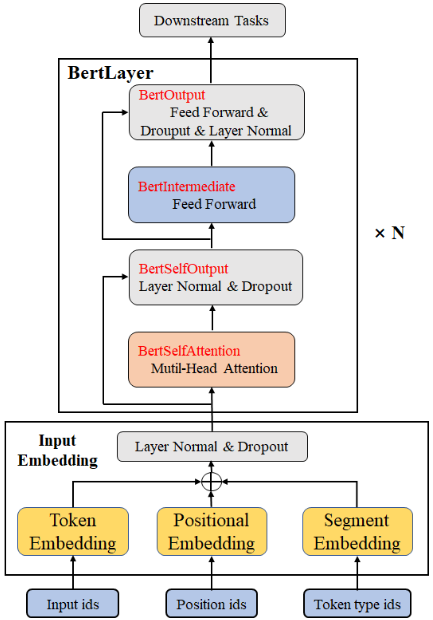
以往的预训练模型的结构会受到单向语言模型(从左到右或者从右到左)的限制,因而也限制了模型的表征能力,使其只能获取单方向的上下文信息。而BERT利用MLM进行预训练并且采用深层的双向Transformer组件(单向的Transformer一般被称为Transformer decoder,其每一个token(符号)只会attend到目前往左的token。而双向的Transformer则被称为Transformer encoder,其每一个token会attend到所有的token)来构建整个模型,因此最终生成能融合左右上下文信息的深层双向语言表征。
 ## 算法原理
BERT的全称为Bidirectional Encoder Representation from Transformers,是一个预训练的语言表征模型。它强调了不再像以往一样采用传统的单向语言模型或者把两个单向语言模型进行浅层拼接的方法进行预训练,而是采用新的masked language model(MLM),以致能生成深度的双向语言表征。bert的输入可以是单一的一个句子或者是句子对,实际的输入值是segment embedding与position embedding相加,BERT的输入词向量是三个向量之和:Token Embedding:WordPiece tokenization subword词向量。
Segment Embedding:表明这个词属于哪个句子(NSP需要两个句子)。Position Embedding:学习出来的embedding向量。
## 算法原理
BERT的全称为Bidirectional Encoder Representation from Transformers,是一个预训练的语言表征模型。它强调了不再像以往一样采用传统的单向语言模型或者把两个单向语言模型进行浅层拼接的方法进行预训练,而是采用新的masked language model(MLM),以致能生成深度的双向语言表征。bert的输入可以是单一的一个句子或者是句子对,实际的输入值是segment embedding与position embedding相加,BERT的输入词向量是三个向量之和:Token Embedding:WordPiece tokenization subword词向量。
Segment Embedding:表明这个词属于哪个句子(NSP需要两个句子)。Position Embedding:学习出来的embedding向量。
## 环境配置
### Docker(方法一)
拉取镜像:
```
docker pull image.sourcefind.cn:5000/dcu/admin/base/migraphx:4.3.0-ubuntu20.04-dtk24.04.1-py3.10
```
创建并启动容器,安装相关依赖:
```
docker run --shm-size 16g --network=host --name=bert_onnxruntime -v /opt/hyhal:/opt/hyhal:ro --privileged --device=/dev/kfd --device=/dev/dri --group-add video --cap-add=SYS_PTRACE --security-opt seccomp=unconfined -v $PWD/bert_onnxruntime:/home/bert_onnxruntime -it /bin/bash
# 激活dtk
source /opt/dtk/env.sh
```
### Dockerfile(方法二)
```
cd ./docker
docker build --no-cache -t bert_onnxruntime:2.0 .
docker run --shm-size 16g --network=host --name=bert_ort --privileged --device=/dev/kfd --device=/dev/dri --group-add video --cap-add=SYS_PTRACE --security-opt seccomp=unconfined -v $PWD/bert_onnxruntime:/home/bert_onnxruntime -it /bin/bash
```
## 数据集
通过对模型提出问题,模型完成问题回答任务。
## 推理
### Python版本推理
本次采用经典的Bert模型完成问题回答任务,模型和分词文件下载链接:https://pan.baidu.com/s/1yc30IzM4ocOpTpfFuUMR0w, 提取码:8f1a, 将bertsquad-10.onnx文件和uncased_L-12_H-768_A-12分词文件保存在Resource/文件夹下。下面介绍如何运行python代码示例,Python示例的详细说明见Doc目录下的Tutorial_Python.md。
#### 设置Python环境变量
```
export PYTHONPATH=/opt/dtk/lib:$PYTHONPATH
```
#### 运行示例
```python
# 进入bert onnxruntime工程根目录
cd
# 进入示例程序目录
cd Python/
# 安装依赖
pip install -r requirements.txt
# 运行示例
python bert.py
```
### C++版本推理
本次采用经典的Bert模型完成问题回答任务,模型和分词文件下载链接:https://pan.baidu.com/s/1yc30IzM4ocOpTpfFuUMR0w, 提取码:8f1a, 将bertsquad-10.onnx文件和uncased_L-12_H-768_A-12分词文件保存在Resource/文件夹下。下面介绍如何运行C++代码示例,C++示例的详细说明见Doc目录下的Tutorial_Cpp.md。
#### 构建工程
```
rbuild build -d depend
```
#### 设置环境变量
将依赖库依赖加入环境变量LD_LIBRARY_PATH,在~/.bashrc中添加如下语句:
```
export LD_LIBRARY_PATH=/depend/lib64/:$LD_LIBRARY_PATH
```
然后执行:
```
source ~/.bashrc
source /opt/dtk/env.sh
```
#### 运行示例
```
# 进入bert onnxruntime工程根目录
cd
# 进入build目录
cd build/
# 执行示例程序
./Bert
```
## result
### python版本
```
“1”:"open-source exascale-class platform for accelerated computing",
"2":"(Tensorflow / PyTorch)",
"3":"scale"
```
### C++版本
```
question:What is ROCm?
answer:open-source exascale-class platform for accelerated computing
question:Which frameworks does ROCmsupport?
answer:tensorflow / pytorch
question:What is ROCm built for?
answer:scale
```
### 精度
无
## 应用场景
### 算法类别
`对话问答`
### 热点应用行业
`零售`,`医疗`,`教育`
## 源码仓库及问题反馈
https://developer.sourcefind.cn/codes/modelzoo/bert_onnxruntime
## 参考资料
https://github.com/ROCmSoftwarePlatform/onnxruntime/blob/81120e9e8b377567daa00d55614c902f35b2ae8f/onnxruntime/python/tools/transformers/onnx_model_bert.py