## MAE in LiBai
**Masked Autoencoders Are Scalable Vision Learners**
Kaiming He, Xinlei Chen, Saining Xie, Yanghao Li, Piotr Dollár, Ross Girshick
[[`arXiv`](https://arxiv.org/abs/2111.06377)] [[`BibTeX`](#Citation)]
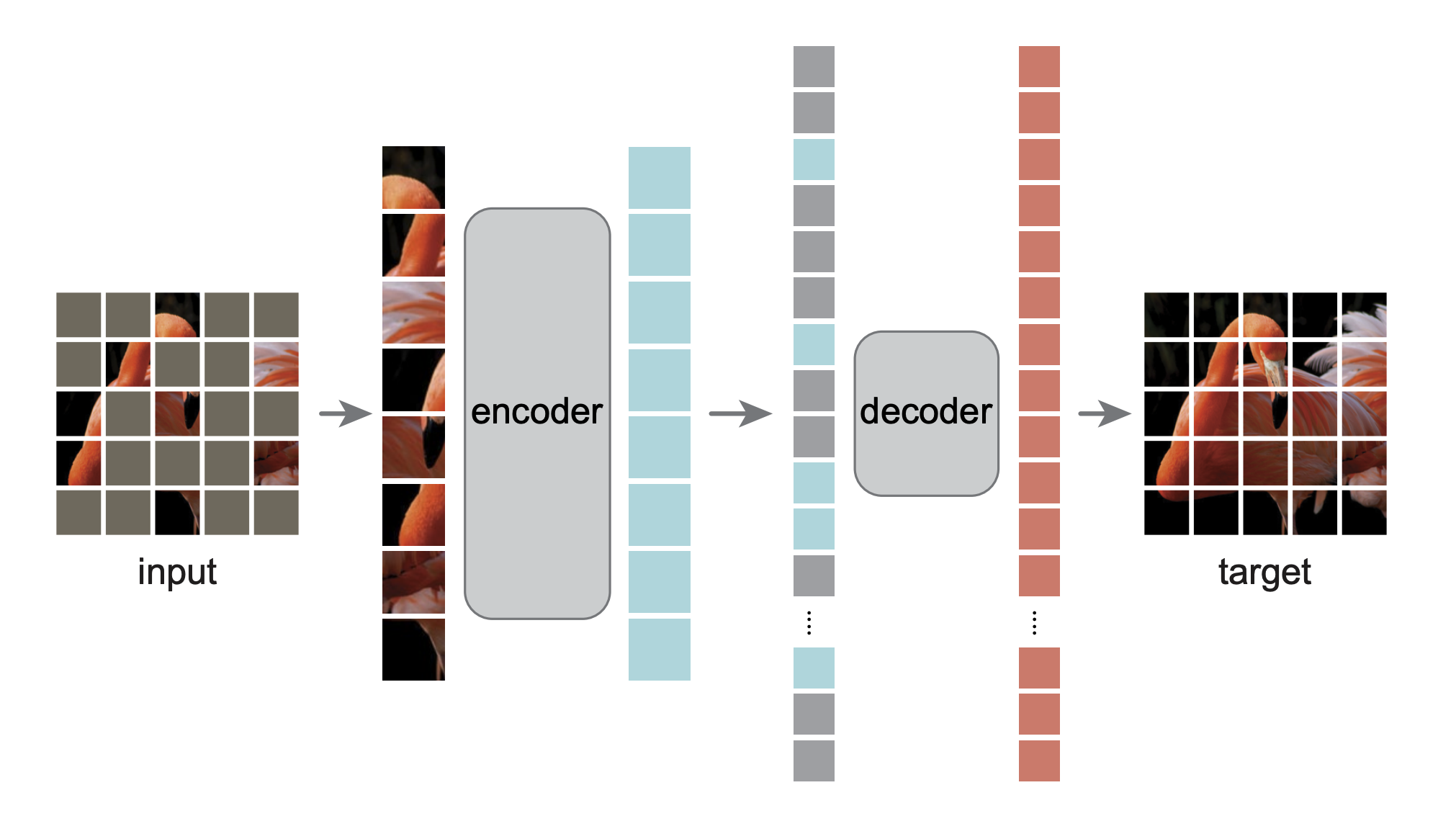
This is the OneFlow re-implementation of MAE based on [LiBai](https://libai.readthedocs.io/).
## Catelog
- [x] MAE pretraining code
- [x] MAE finetune code
## Supported parallel mode and task
Based on [libai.layers](https://libai.readthedocs.io/en/latest/modules/libai.layers.html), MAE model is automatically configured with the following parallelism mode.
| Model |
Data Parallel |
Tensor Parallel |
Pipeline Parallel |
| MAE pretrain |
✔ |
- |
- |
| MAE finetune |
✔ |
✔ |
✔ |
## Usage
### Installation
Please see [LiBai Installation](https://libai.readthedocs.io/en/latest/tutorials/get_started/Installation.html) to install LiBai
### Prepare the Data
Please see [Prepare the Data](https://libai.readthedocs.io/en/latest/tutorials/get_started/quick_run.html#prepare-the-data).
### Pretraining
Pretraining MAE on 8 GPUs using data parallelism.
```bash
cd /path/to/libai
bash tools/train.sh projects/MAE/train_net.py projects/MAE/configs/mae_pretraining.py 8
```
### Finetuning
1. Setup the weights for finetuning in [mae_finetune.py](./configs/mae_finetune.py) as follows:
```python
# mae_funetune.py
finetune.enable = True # only load weight if enable is True
finetune.weight_style = "oneflow" # Set "oneflow" for loading oneflow checkpoints
finetune.path = "/path/to/checkpoint" # the checkpoint directory
```
If you feel confused about the checkpoint format here, please refer to [Load and Save a Checkpoint in LiBai](https://libai.readthedocs.io/en/latest/tutorials/basics/Load_and_Save_Checkpoint.html) for more details.
1. Finetune MAE on 8 GPUs using data parallelism.
```bash
cd /path/to/libai
bash tools/train.sh projects/MAE/train_net.py projects/MAE/configs/mae_finetune.py 8
```
**Notes:** if you want to finetune MAE models using different parallel strategies, please refer to the [Distributed Configuration Tutorial](https://libai.readthedocs.io/en/latest/tutorials/basics/Distributed_Configuration.html)
### Evaluation
Evaluate MAE model under LiBai on 8 GPUs:
```bash
cd /path/to/libai
bash tools/train.sh projects/MAE/train_net.py projects/MAE/configs/mae_finetune.py 8 --eval-only
```
## Advanced Usage
### Finetune MAE with pytorch pretrained checkpoint
You can download pytorch pretrained weight from [MAE official repo](https://github.com/facebookresearch/mae#fine-tuning-with-pre-trained-checkpoints) and finetune them in LiBai by updating the [mae_finetune.py](./configs/mae_finetune.py) as follows:
```python
finetune.enable = True # only load weight if enable is True
finetune.weight_style = "pytorch" # Set "pytorch" for loading torch checkpoints
finetune.path = "/path/to/mae_finetuned_vit_base.pth"
```
Run finetuning on 8 GPUs:
```bash
cd /path/to/libai
bash tools/train.sh projects/MAE/train_net.py projects/MAE/configs/mae_finetune.py 8
```
## Citation
```BibTeX
@article{he2021masked,
title={Masked autoencoders are scalable vision learners},
author={He, Kaiming and Chen, Xinlei and Xie, Saining and Li, Yanghao and Doll{\'a}r, Piotr and Girshick, Ross},
journal={arXiv preprint arXiv:2111.06377},
year={2021}
}
```