# Baichuan2
## 论文
- https://arxiv.org/abs/2309.10305
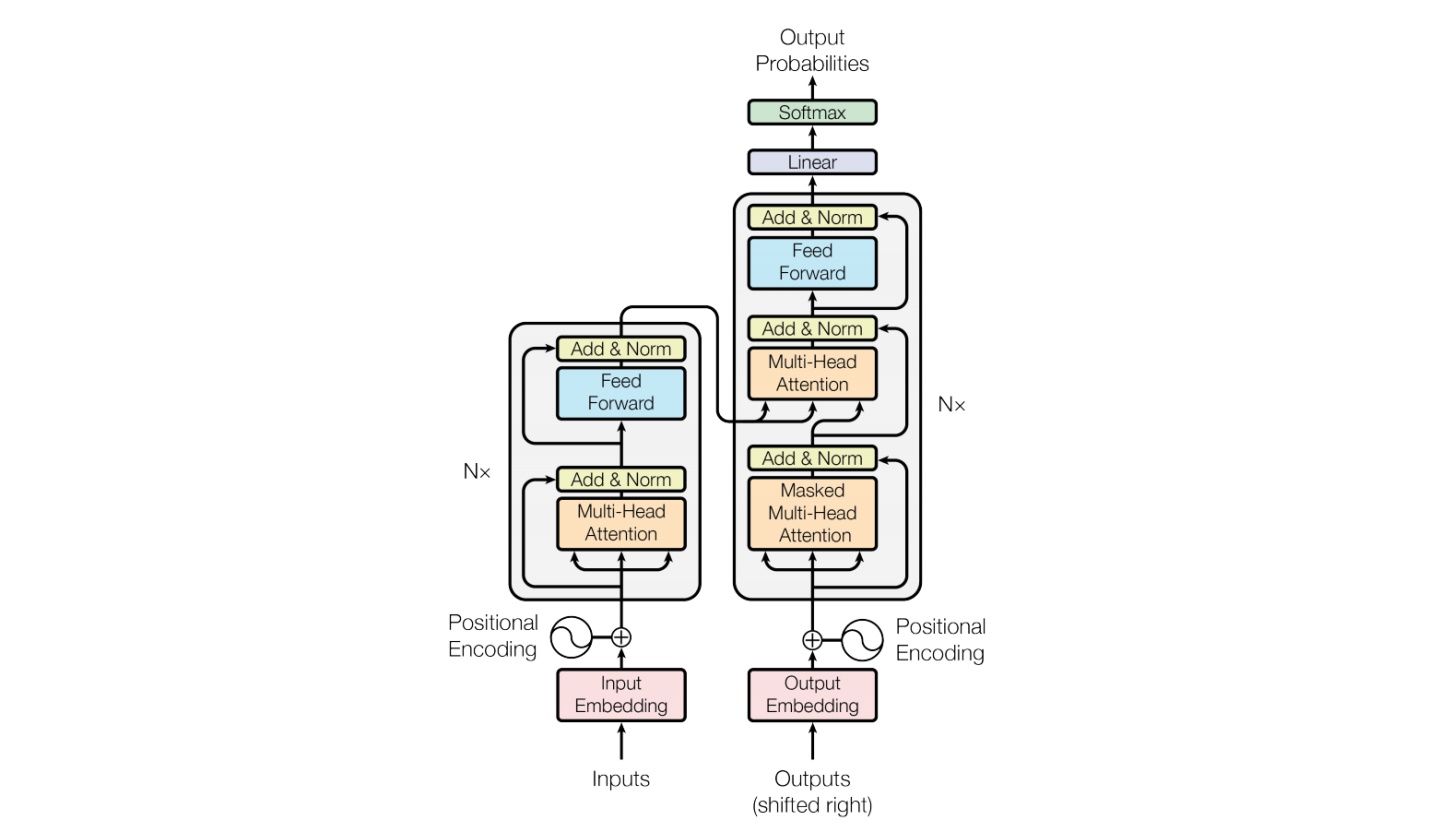
## 模型结构
模型具体参数:
| 模型名称 | 隐含层维度 | 层数 | 头数 | 词表大小 | 位置编码 | 最大长 |
| -------- | -------- | -------- | -------- | -------- | -------- | -------- |
| Baichuan 2-7B | 4,096 | 32 | 32 | 125,696 | RoPE | 4096 |
| Baichuan 2-13B | 5,120 | 40 | 40 | 125,696 | ALiBi | 4096 |
## 算法原理
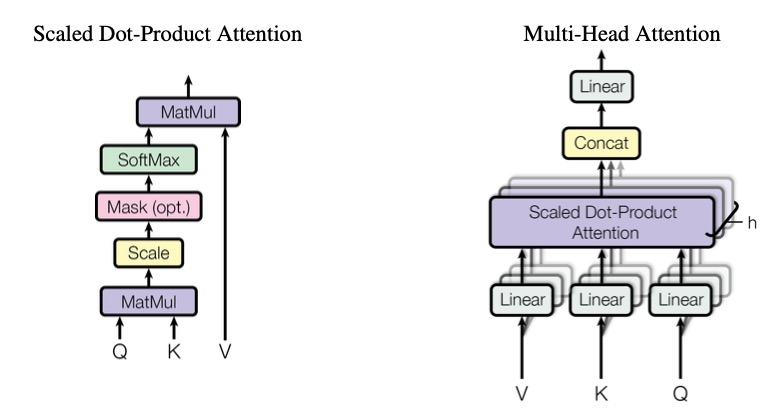
Baichuan整体模型基于标准的Transformer结构,采用了和LLaMA一样的模型设计。其中,Baichuan-7B在结构上采用Rotary Embedding位置编码方案、SwiGLU激活函数、基于RMSNorm的Pre-Normalization。Baichuan-13B使用了ALiBi线性偏置技术,相对于Rotary Embedding计算量更小,对推理性能有显著提升。
## 环境配置
### Docker(方法一)
```
docker pull image.sourcefind.cn:5000/dcu/admin/base/pytorch:2.1.0-ubuntu20.04-dtk24.04.2-py3.10
docker run -it -v /path/your_code_data/:/path/your_code_data/ -v /opt/hyhal:/opt/hyhal:ro --shm-size=32G --privileged=true --device=/dev/kfd --device=/dev/dri/ --group-add video --name docker_name imageID bash
```
1. 安装Rust
```shell
curl --proto '=https' --tlsv1.2 -sSf https://sh.rustup.rs | sh
```
2. 安装Protoc
```shell
PROTOC_ZIP=protoc-21.12-linux-x86_64.zip
curl -OL https://github.com/protocolbuffers/protobuf/releases/download/v21.12/$PROTOC_ZIP
sudo unzip -o $PROTOC_ZIP -d /usr/local bin/protoc
sudo unzip -o $PROTOC_ZIP -d /usr/local 'include/*'
rm -f $PROTOC_ZIP
```
3. 安装TGI Service
```bash
cd baichuan2_tgi
cd text-generation-inference
#安装exllama
cd server
make install-exllama #安装exllama kernels
make install-exllamav2 #安装exllmav2 kernels
cd .. #回到项目根目录
source $HOME/.cargo/env
BUILD_EXTENSIONS=True make install #安装text-generation服务
```
4. 安装benchmark
```bash
cd text-generation-inference
make install-benchmark
```
注意:若安装过程过慢,可以通过如下命令修改默认源提速。
```bash
pip config set global.index-url https://pypi.tuna.tsinghua.edu.cn/simple
```
另外,`cargo install` 太慢也可以通过在`~/.cargo/config`中添加源来提速。
5. 查看安装的版本号
```bash
text-generation-launcher -V #版本号与官方版本同步
```
## 数据集
无
## 推理
### 模型下载
[Baichuan2-7B-Base](https://huggingface.co/baichuan-inc/Baichuan2-7B-Base)
[Baichuan2-7B-Chat](https://huggingface.co/baichuan-inc/Baichuan2-7B-Chat)
### 部署TGI
#### 使用前
```bash
export PYTORCH_TUNABLEOP_ENABLED=0
```
#### 1. 启动TGI服务
```
HIP_VISIBLE_DEVICES=2 text-generation-launcher --dtype=float16 --model-id /models/baichuan2/Baichuan2-7B-Chat --trust-remote-code --port 3001
```
更多参数可使用如下方式查看
```
text-generation-launcher --help
```
#### 2. 请求服务
curl命令方式:
```
curl 127.0.0.1:3001/generate \
-X POST \
-d '{"inputs":"What is deep learning?","parameters":{"max_new_tokens":100,"temperature":0.7}}' \
-H 'Content-Type: application/json'
```
通过python调用的方式:
```
import requests
headers = {
"Content-Type": "application/json",
}
data = {
'inputs': 'What is Deep Learning?',
'parameters': {
'max_new_tokens': 20,
},
}
response = requests.post('http://127.0.0.1:3001/generate', headers=headers, json=data)
print(response.json())
# {'generated_text': ' Deep Learning is a subset of machine learning where neural networks are trained deep within a hierarchy of layers instead'}
```
更多API查看,请参考 [https://huggingface.github.io/text-generation-inference](https://huggingface.github.io/text-generation-inference)
## result

## 精度
无
## 应用场景
### 算法类别
对话问答
### 热点应用行业
金融,科研,教育
## 源码仓库及问题反馈
* [https://developer.sourcefind.cn/codes/modelzoo/baichuan2_tgi](https://developer.sourcefind.cn/codes/modelzoo/baichuan2_tgi)
## 参考资料
* [https://github.com/huggingface/text-generation-inference](https://github.com/huggingface/text-generation-inference)