# ArcFace
## 论文
- https://arxiv.org/pdf/1801.07698.pdf
## 模型结构
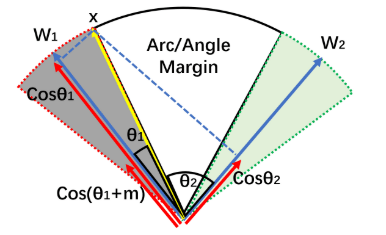
这篇文章提出一种新的用于人脸识别的损失函数:additive angular margin loss,直接在角度空间(angular space)中最大化分类界限,基于该损失函数训练得到人脸识别算法ArcFace。
## 算法原理
通过训练深度卷积神经网络嵌入 (DCNN Embedding) 来进行人脸识别。
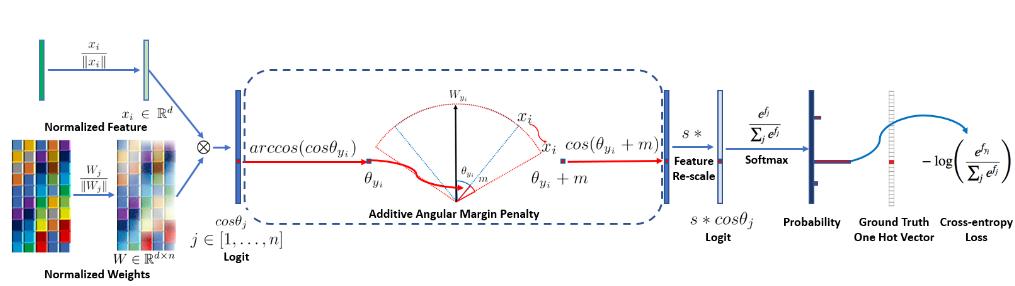
ArcFace训练流程:
设类别数(人脸ID数量)为 $n$,DCNN的最后一个FC 层的权重为$W\subset {\mathbb{R}}^{d \times n}$,输入$W$的特征$x_i$的维度为$d$。
1、分别归一化输入特征$x_i \subset {\mathbb{R}}^{b}$和FC层权重$W_j \in {\mathbb{R}}^{1 \times b}$(张量除以欧几里得范数标量),令所得归一化特征$\frac{x_i}{\|x_i\|}$与第$j \in {1,2,...,y_i,...,n}$个类别的FC层权重$\frac{{W_j}^T}{\|W_j\|} \in {\mathbb{R}}^{1\times d}$点乘得到FC层的第$j$个输出$cos \theta_j \in {\mathbb{R}}^{1\times1}$(数量积公式:${W_j}^{T}\cdot x_i=\|W_j\|\|x_i\|cos\theta_j$),表示**将特征$x_i$预测为第$j$类的预测值**。
2、设特征$x_i$的真实类别为第$y_j$个类别,单独取出Target权重$\frac{{W_{y_j}}^T}{\|W_{y_i}\|}$计算$\theta_{y_i}=arccos(cos\theta_{y_i})=arccos(\frac{{W_{y_j}}^T}{\|W_{y_i}\|}\cdot\frac{x_i}{\|x_i\|})$可得归一化特征$\frac{x_i}{\|x_i\|}$与归一化**target权重**$\frac{{W_{y_j}}^T}{\|W_{y_i}\|}$之间的夹角—— **Target角度$\theta_{y_i}$**
3、通过把一个自定义的**加性角度边距 (additive angular margin)** $m$加到$\theta_{y_i}$,得到$\theta_{y_i}+m$,用于**调整Target角度**。
4、计算经调整的Target角度的余弦,得到仅关于特征$x_i$的真实类别$y_i$的**新Target Logit $cos(\theta_{y_i}+m)$**。
5、通过自定义的特征范数$s$重缩放所有Logit(除Target Logit变为$cos(\theta_{y_i}+m)$)外其余原Logit仍为$cos\theta_j$,矩阵运算时需用相当于 0/1 mask的one-hot labels区分)得到新 Logit $s∗cos \theta_j, j\in{1,2,..,y_i,..,n}$。
6、对上述过程得到的**新Logit**按通常方式计算Softmax Loss。
## 环境配置
### Docker(方法一)
从[光源](https://www.sourcefind.cn/#/service-list)中拉取docker镜像:
```
docker pull image.sourcefind.cn:5000/dcu/admin/base/pytorch:1.13.1-centos7.6-dtk23.10-py310
```
创建容器并挂载目录进行开发:
```
docker run -it --name {name} --shm-size=1024G --device=/dev/kfd --device=/dev/dri/ --privileged --cap-add=SYS_PTRACE --security-opt seccomp=unconfined --ulimit memlock=-1:-1 --ipc=host --network host --group-add video -v /opt/hyhal:/opt/hyhal:ro -v {}:{} {docker_image} /bin/bash
# 修改1 {name} 需要改为自定义名称,建议命名{框架_dtk版本_使用者姓名},如果有特殊用途可在命名框架前添加命名
# 修改2 {docker_image} 需要需要创建容器的对应镜像名称,如: pytorch:1.10.0-centos7.6-dtk-23.04-py37-latest【镜像名称:tag名称】
# 修改3 -v 挂载路径到容器指定路径
pip install -r requirements.txt
```
### Dockerfile(方法二)
```
cd docker
docker build --no-cache -t arcface_pytorch:1.0 .
docker run -it --name {name} --shm-size=1024G --device=/dev/kfd --device=/dev/dri/ --privileged --cap-add=SYS_PTRACE --security-opt seccomp=unconfined --ulimit memlock=-1:-1 --ipc=host --network host --group-add video -v /opt/hyhal:/opt/hyhal:ro -v {}:{} {docker_image} /bin/bash
pip install -r requirements.txt
```
### Anaconda(方法三)
线上节点推荐使用conda进行环境配置。
创建python=3.10的conda环境并激活
```
conda create -n arcface python=3.10
conda activate arcface
```
关于本项目DCU显卡所需的特殊深度学习库可从[光合](https://developer.hpccube.com/tool/)开发者社区下载安装。
```
DTK驱动:dtk23.10
python:python3.10
pytorch:1.13.1
torchvision:0.14.1
```
安装其他依赖包
```
pip install -r requirements.txt
```
## 数据集
`MS1MV2`
- 训练集[face_train.zip](https://pan.baidu.com/s/1S6LJZGdqcZRle1vlcMzHOQ),
下载后解压到当前目录
数据目录结构如下:
```
── faces_emore
| agedb_30.bin
| calfw.bin
| cfp_ff.bin
| cfp_fp.bin
| cplfw.bin
| lfw.bin
| property
| train.idx
| train.rec
| vgg2_fp.bin
```
- 测试集[face_val.zip]()
- 项目中已提供用于试验训练的迷你数据集[datasets](https://pan.baidu.com/s/1oKRgOW7jCLxzPZoQofl1mQ?pwd=0okl),下载后解压即可。
## 训练
Backbone使用ResNet100,在MS1MV3数据机上的预训练权重文件[model.pt](https://pan.baidu.com/s/1W-TisIZtZmRQz32hq5T6Uw?pwd=1234)
### 单机单卡
```
python train_v2.py configs/ms1mv2_r100
```
### 单机多卡
```
torchrun --nproc_per_node=4 train_v2.py configs/ms1mv2_r100
```
## 精度
使用权重文件[model.pt](https://pan.baidu.com/s/1W-TisIZtZmRQz32hq5T6Uw?pwd=1234),测试模型精度:
```
python eval_ijbc.py --model-prefix model.pt --image-path IJB_release/IJBC/ --network r100
```
### 精度
测试数据:[test](http://images.cocodataset.org/zips/test2017.zip)
测试指标:
| 模型 | 数据类型 | map0.5:0.95 | map0.5 |
| :------: | :------: | :------: | :------: |
| yolo9-c-converted | 全精度 | 0.530 | 0.703 |
| yolo9-e-converted | 全精度 | 0.556 | 0.728 |
| yolo9-c | 全精度 | 0.530 | 0.703 |
| yolo9-e | 全精度 | 0.556 | 0.728 |
| gelan-c | 全精度 | 0.526 | 0.695 |
| gelan-e | 全精度 | 0.550 | 0.719 |
## 应用场景
### 算法类别
人脸识别
### 热点应用行业
安防,交通,教育
## 源码仓库及问题反馈
[https://developer.hpccube.com/codes/modelzoo/yolov9_pytorch](https://developer.hpccube.com/codes/modelzoo/yolov9_pytorch)
## 参考资料
[https://github.com/deepinsight/insightface/tree/master/recognition/arcface_torch](https://github.com/deepinsight/insightface/tree/master/recognition/arcface_torch)