# Qwen2.5-VL
## 论文
[ Qwen2.5-VL](https://qwenlm.github.io/zh/blog/qwen2.5-vl/)
## 模型结构
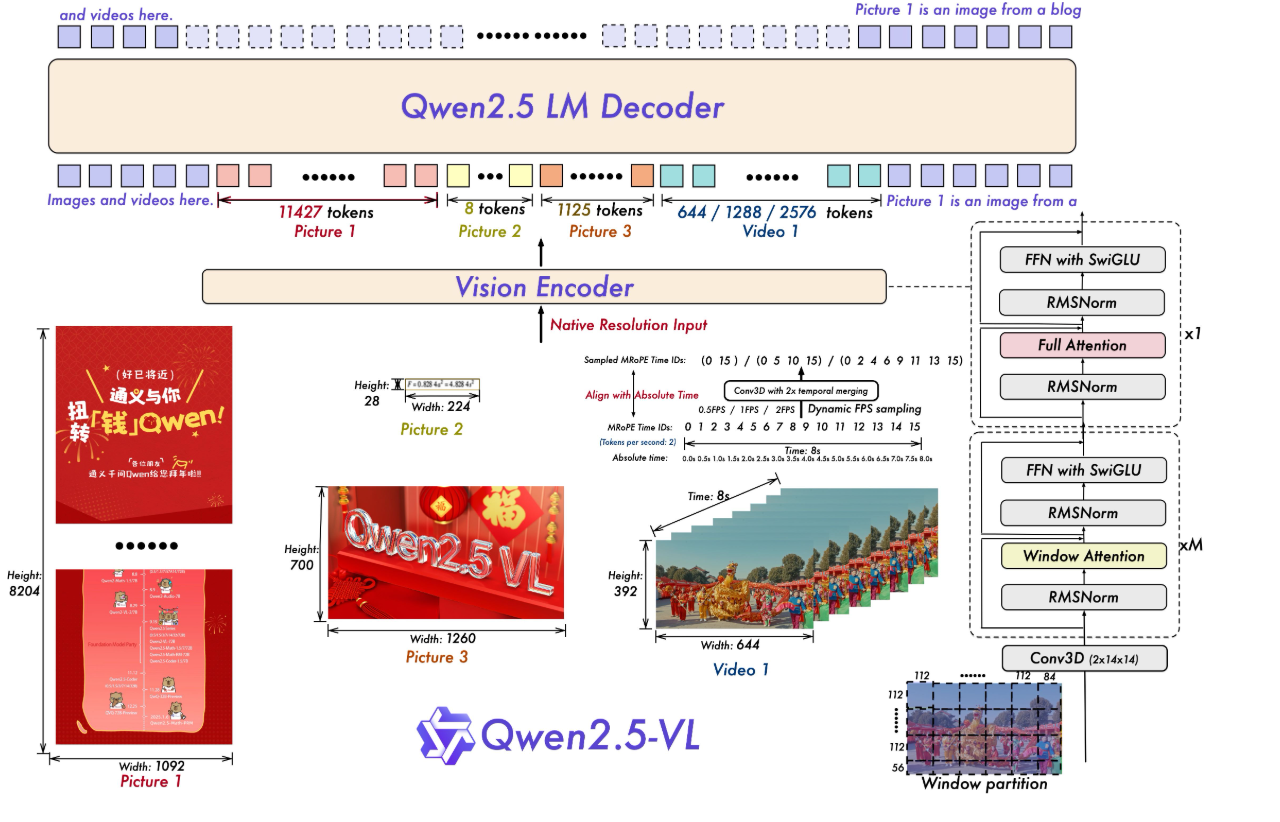
模型结构:Qwen2.5-VL 延续了上一代 Qwen-VL 中 ViT 加 Qwen2 的串联结构,三个不同规模的模型都采用了 600M 规模大小的 VIT,支持图像和视频统一输入。使模型能更好地融合视觉和语言信息,提高对多模态数据的理解能力。
● 多模态旋转位置编码(M-ROPE):Qwen2.5-VL 采用的 M-ROPE 将旋转位置编码分解成时间、空间(高度和宽度)三部分,使大规模语言模型能同时捕捉和整合一维文本、二维视觉和三维视频的位置信息,赋予了模型强大的多模态处理和推理能力。
● 网络结构简化:与 Qwen2-VL 相比,Qwen2.5-VL 增强了模型对时间和空间尺度的感知能力,进一步简化了网络结构以提高模型效率。
## 算法原理
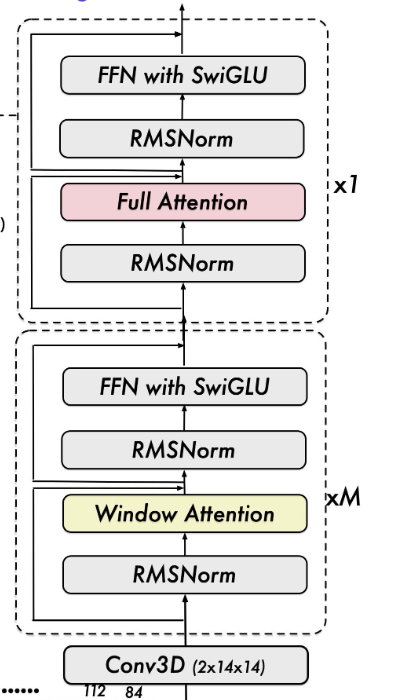
Qwen2.5-VL 从头开始训练了一个原生动态分辨率的 ViT,包括 CLIP、视觉-语言模型对齐和端到端训练等阶段。为了解决多模态大模型在训练和测试阶段 ViT 负载不均衡的问题,我们引入了窗口注意力机制,有效减少了 ViT 端的计算负担。在我们的 ViT 设置中,只有四层是全注意力层,其余层使用窗口注意力。最大窗口大小为 8x8,小于 8x8 的区域不需要填充,而是保持原始尺度,确保模型保持原生分辨率。此外,为了简化整体网络结构,我们使 ViT 架构与 LLMs 更加一致,采用了 RMSNorm 和 SwiGLU 结构。
## 环境配置
### Docker(方法一)
推荐使用docker方式运行, 此处提供[光源](https://www.sourcefind.cn/#/service-details)拉取docker镜像的地址与使用步骤
```
docker pull image.sourcefind.cn:5000/dcu/admin/base/pytorch:2.3.0-py3.10-dtk24.04.3-ubuntu20.04
docker run -it --shm-size=1024G -v /path/your_code_data/:/path/your_code_data/ -v /opt/hyhal:/opt/hyhal --privileged=true --device=/dev/kfd --device=/dev/dri/ --group-add video --name qwen2.5_vl bash # 为以上拉取的docker的镜像ID替换
cd /path/your_code_data/
pip install git+https://github.com/huggingface/transformers
pip install qwen-vl-utils[decord]
# 按照文件夹中的flash_atten-2.6.1和 rotary_emb
pip install flash_attn-2.6.1+das.opt2.dtk24043-cp310-cp310-manylinux_2_28_x86_64.whl
pip install rotary_emb-0.1.0+das.opt2.dtk24043-cp310-cp310-manylinux_2_28_x86_64.whl
```
Tips:以上dtk驱动、python、torch等DCU相关工具版本需要严格一一对应。
### Dockerfile(方法二)
此处提供dockerfile的使用方法
```
docker build -t qwen2.5_vl:latest .
docker run --shm-size 500g --network=host --name=qwen2.5_vl --privileged --device=/dev/kfd --device=/dev/dri --group-add video --cap-add=SYS_PTRACE --security-opt seccomp=unconfined -v 项目地址(绝对路径):/home/ -v /opt/hyhal:/opt/hyhal:ro -it bash
cd /path/your_code_data/
pip install git+https://github.com/huggingface/transformers
pip install qwen-vl-utils[decord]
# 按照文件夹中的flash_atten-2.6.1和 rotary_emb
pip install flash_attn-2.6.1+das.opt2.dtk24043-cp310-cp310-manylinux_2_28_x86_64.whl
pip install rotary_emb-0.1.0+das.opt2.dtk24043-cp310-cp310-manylinux_2_28_x86_64.whl
```
### Anaconda(方法三)
此处提供本地配置、编译的详细步骤,例如:
关于本项目DCU显卡所需的特殊深度学习库可从[光合](https://developer.hpccube.com/tool/)开发者社区下载安装。
```
DTK驱动:dtk24.04.3
python:3.10
torch:2.3.0
flash-attn:2.6.1
```
`Tips:以上dtk驱动、python、torch等DCU相关工具版本需要严格一一对应`
其它非深度学习库参照requirement.txt安装:
```
cd /path/your_code_data/
pip install qwen-vl-utils[decord]
pip install git+https://github.com/huggingface/transformers
# 按照文件夹中的flash_atten-2.6.1和 rotary_emb
pip install flash_attn-2.6.1+das.opt2.dtk24043-cp310-cp310-manylinux_2_28_x86_64.whl
pip install rotary_emb-0.1.0+das.opt2.dtk24043-cp310-cp310-manylinux_2_28_x86_64.whl
```
## 数据集
在LLamaFactor中自带测试数据集,使用mllm_demo,identity,mllm_video_demo数据集,已经包含在data目录中
训练数据目录结构如下,用于正常训练的完整数据集请按此目录结构进行制备:
```
── data
├── mllm_demo.json
├── identity.json
├── mllm_video_demo.json
└── ...
```
如果您正在使用自定义数据集,请按以下方式准备您的数据集。
将数据组织成一个 JSON 文件,并将数据放入 data 文件夹中。LLaMA-Factory 支持以 sharegpt 格式的多模态数据集。 sharegpt 格式的数据集应遵循以下格式:
```
[
{
"messages": [
{
"content": "Who are they?",
"role": "user"
},
{
"content": "They're Kane and Gretzka from Bayern Munich.",
"role": "assistant"
},
{
"content": "What are they doing?",
"role": "user"
},
{
"content": "They are celebrating on the soccer field.",
"role": "assistant"
}
],
"images": [
"mllm_demo_data/1.jpg"
]
},
{
"messages": [
{
"content": "Who is he?",
"role": "user"
},
{
"content": "He's Thomas Muller from Bayern Munich.",
"role": "assistant"
},
{
"content": "Why is he on the ground?",
"role": "user"
},
{
"content": "Because he's sliding on his knees to celebrate.",
"role": "assistant"
}
],
"images": [
"mllm_demo_data/2.jpg"
]
},
]
```
请按照以下格式在 data/dataset_info.json 中提供您的数据集定义。
对于 sharegpt 格式的数据集,dataset_info.json 中的列应包括:
```
"dataset_name": {
"file_name": "dataset_name.json",
"formatting": "sharegpt",
"columns": {
"messages": "messages",
"images": "images"
},
"tags": {
"role_tag": "role",
"content_tag": "content",
"user_tag": "user",
"assistant_tag": "assistant"
}
}
```
## 训练
使用LLaMA-Factory框架微调
```
git clone --depth 1 https://github.com/hiyouga/LLaMA-Factory.git
cd LLaMA-Factory
mkdir saves
mkdir cache
pip install -e ".[torch,metrics]"
```
### 单机单卡
```
torchrun ./LLaMA-Factory/src/train.py \
--deepspeed ./LLaMA-Factory/examples/deepspeed/ds_z3_config.json \
--stage sft \
--trust_remote_code True \
--do_train True \
--model_name_or_path ./Qwen2.5-VL/Qwen2.5-VL-7B-Instruct/ \
--dataset_dir ./LLaMA-Factory/data \
--dataset mllm_demo \
--template qwen2_vl \
--finetuning_type lora \
--lora_rank 64 \
--lora_alpha 64 \
--resize_vocab True \
--optim adamw_torch \
--lora_target all \
--output_dir ./LLaMA-Factory/saves \
--overwrite_cache \
--overwrite_output_dir True \
--cache_dir ./LLaMA-Factory/cache \
--warmup_steps 100 \
--max_grad_norm 1.0 \
--max_samples 1000 \
--weight_decay 0.1 \
--per_device_train_batch_size 1 \
--gradient_accumulation_steps 2 \
--ddp_timeout 120000000 \
--learning_rate 1.0e-4 \
--lr_scheduler_type cosine \
--logging_steps 10 \
--cutoff_len 4096 \
--save_steps 500 \
--eval_steps 100 \
--val_size 0.1 \
--evaluation_strategy steps \
--load_best_model_at_end True \
--plot_loss True \
--num_train_epochs 50 \
--bf16
```
## 推理
### 单机单卡
```
python inference.py
```
### 单机多卡
```
CUDA_VISIBLE_DEVICES=0,1,2,3 python inference.py
```
## result
- text:" OCR 图片中的文字信息 "
### 精度
无
## 应用场景
### 算法类别
`对话问答`
### 热点应用行业
`科研,教育,政府,金融`
## 预训练权重
[ModelScope](https://modelscope.cn/)
- [Qwen2.5-VL-3B-Instruct](https://modelscope.cn/models/Qwen/Qwen2.5-VL-3B-Instruct)
- [Qwen2.5-VL-7B-Instruct](https://modelscope.cn/models/Qwen/Qwen2.5-VL-7B-Instruct)
- [Qwen2.5-VL-72B-Instruct](https://modelscope.cn/models/Qwen/Qwen2.5-VL-72B-Instruct)
## 源码仓库及问题反馈
- https://developer.sourcefind.cn/codes/modelzoo/Qwen2.5-vl_pytorch
## 参考资料
- https://qwenlm.github.io/zh/blog/qwen2.5-vl/
- https://github.com/QwenLM/Qwen2.5-VL
