# Qwen2.5-VL
## 论文
[ Qwen2.5-VL](https://qwenlm.github.io/zh/blog/qwen2.5-vl/)
## 模型简介
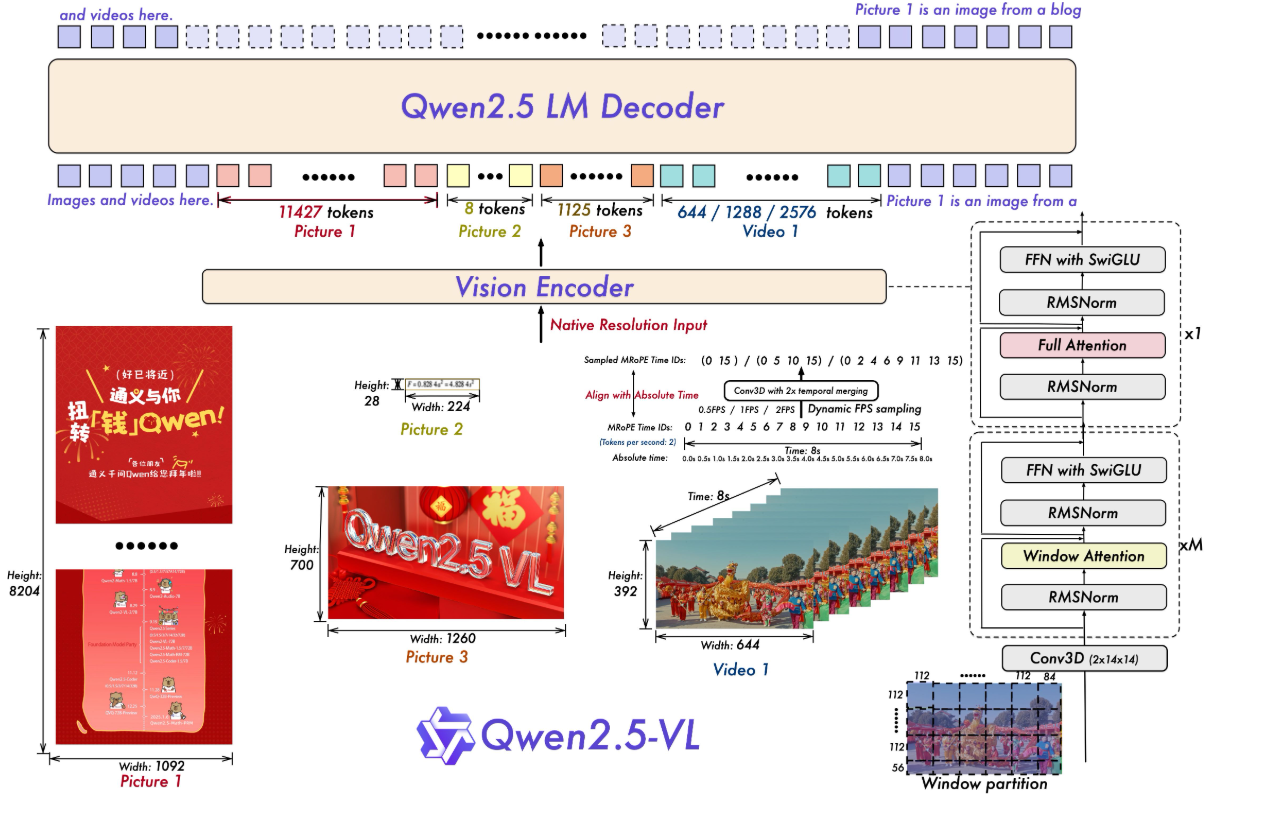
模型结构:Qwen2.5-VL 延续了上一代 Qwen-VL 中 ViT 加 Qwen2 的串联结构,三个不同规模的模型都采用了 600M 规模大小的 VIT,支持图像和视频统一输入。使模型能更好地融合视觉和语言信息,提高对多模态数据的理解能力。
● 多模态旋转位置编码(M-ROPE):Qwen2.5-VL 采用的 M-ROPE 将旋转位置编码分解成时间、空间(高度和宽度)三部分,使大规模语言模型能同时捕捉和整合一维文本、二维视觉和三维视频的位置信息,赋予了模型强大的多模态处理和推理能力。
● 网络结构简化:与 Qwen2-VL 相比,Qwen2.5-VL 增强了模型对时间和空间尺度的感知能力,进一步简化了网络结构以提高模型效率。
### 环境依赖
| 软件 | 版本 |
| :----------: | :--------------------------------------------: |
| DTK | 25.04.2 |
| python | 3.10.12 |
| transformers | 4.57.3 |
| vllm | 0.9.2+das.opt2.dtk25042.20251225.g1663f34c |
| torch | 2.5.1+das.opt1.dtk25042 |
| triton | 3.1.0+das.opt1.dtk25042.20251224.gaa867475 |
| flash_attn | 2.6.1+das.opt1.dtk2504.20251222.g859b5024 |
| flash_mla | 1.0.0+das.opt1.dtk2604.20251218.gb14bad68.rccl |
推荐使用镜像: harbor.sourcefind.cn:5443/dcu/admin/base/vllm:0.9.2-ubuntu22.04-dtk25.04.2-1226-das1.7-py3.10-20251226
- 挂载地址`-v`
```bash
docker run -it \
--shm-size 60g \
--network=host \
--name {docker_name} \
--privileged \
--device=/dev/kfd \
--device=/dev/dri \
--device=/dev/mkfd \
--group-add video \
--cap-add=SYS_PTRACE \
--security-opt seccomp=unconfined \
-u root \
-v /opt/hyhal/:/opt/hyhal/:ro \
-v /path/your_code_data/:/path/your_code_data/ \
{docker_image_name} bash
示例如下:
docker run -it \
--shm-size 60g \
--network=host \
--name qwen3 \
--privileged \
--device=/dev/kfd \
--device=/dev/dri \
--device=/dev/mkfd \
--group-add video \
--cap-add=SYS_PTRACE \
--security-opt seccomp=unconfined \
-u root \
-v /opt/hyhal/:/opt/hyhal/:ro \
-v /path/your_code_data/:/path/your_code_data/ \
image.sourcefind.cn:5000/dcu/admin/base/vllm:0.9.2-ubuntu22.04-dtk25.04.2-py3.10 bash
```
更多镜像可前往[光源](https://sourcefind.cn/#/service-list)下载使用。
关于本项目DCU显卡所需的特殊深度学习库可从[光合](https://developer.sourcefind.cn/tool/)开发者社区下载安装。
## 数据集
在 LLaMA-Factory中自带测试数据集,使用mllm_demo,identity,mllm_video_demo数据集,已经包含在data目录中
训练数据目录结构如下,用于正常训练的完整数据集请按此目录结构进行制备:
```
── data
├── mllm_demo.json
├── identity.json
├── mllm_video_demo.json
└── ...
```
如果您正在使用自定义数据集,请按以下方式准备您的数据集。
将数据组织成一个 JSON 文件,并将数据放入 data 文件夹中。LLaMA-Factory 支持以 sharegpt 格式的多模态数据集。 sharegpt 格式的数据集应遵循以下格式:
```
[
{
"messages": [
{
"content": "Who are they?",
"role": "user"
},
{
"content": "They're Kane and Gretzka from Bayern Munich.",
"role": "assistant"
},
{
"content": "What are they doing?",
"role": "user"
},
{
"content": "They are celebrating on the soccer field.",
"role": "assistant"
}
],
"images": [
"mllm_demo_data/1.jpg"
]
},
{
"messages": [
{
"content": "Who is he?",
"role": "user"
},
{
"content": "He's Thomas Muller from Bayern Munich.",
"role": "assistant"
},
{
"content": "Why is he on the ground?",
"role": "user"
},
{
"content": "Because he's sliding on his knees to celebrate.",
"role": "assistant"
}
],
"images": [
"mllm_demo_data/2.jpg"
]
},
]
```
请按照以下格式在 data/dataset_info.json 中提供您的数据集定义。
对于 sharegpt 格式的数据集,dataset_info.json 中的列应包括:
```
"dataset_name": {
"file_name": "dataset_name.json",
"formatting": "sharegpt",
"columns": {
"messages": "messages",
"images": "images"
},
"tags": {
"role_tag": "role",
"content_tag": "content",
"user_tag": "user",
"assistant_tag": "assistant"
}
}
```
## 训练
使用LLaMA-Factory框架微调
```
git clone --depth 1 https://github.com/hiyouga/LLaMA-Factory.git
cd LLaMA-Factory
mkdir saves
mkdir cache
pip install -e ".[torch,metrics]"
```
### 单机单卡
```
torchrun ./LLaMA-Factory/src/train.py \
--deepspeed ./LLaMA-Factory/examples/deepspeed/ds_z3_config.json \
--stage sft \
--trust_remote_code True \
--do_train True \
--model_name_or_path ./Qwen2.5-VL/Qwen2.5-VL-7B-Instruct/ \
--dataset_dir ./LLaMA-Factory/data \
--dataset mllm_demo \
--template qwen2_vl \
--finetuning_type lora \
--lora_rank 64 \
--lora_alpha 64 \
--resize_vocab True \
--optim adamw_torch \
--lora_target all \
--output_dir ./LLaMA-Factory/saves \
--overwrite_cache \
--overwrite_output_dir True \
--cache_dir ./LLaMA-Factory/cache \
--warmup_steps 100 \
--max_grad_norm 1.0 \
--max_samples 1000 \
--weight_decay 0.1 \
--per_device_train_batch_size 1 \
--gradient_accumulation_steps 2 \
--ddp_timeout 120000000 \
--learning_rate 1.0e-4 \
--lr_scheduler_type cosine \
--logging_steps 10 \
--cutoff_len 4096 \
--save_steps 500 \
--eval_steps 100 \
--val_size 0.1 \
--evaluation_strategy steps \
--load_best_model_at_end True \
--plot_loss True \
--num_train_epochs 50 \
--bf16
```
## 推理
### transformers
### 单机单卡
```
python inference.py
```
### 单机多卡
```
CUDA_VISIBLE_DEVICES=0,1,2,3 python inference.py
```
### vllm
#### 单卡推理
```
# 适用于3B/7B模型
# 启动命令
vllm serve Qwen/Qwen2.5-VL-3B-Instruct \
--trust-remote-code \
--max-model-len 32768 \
--served-model-name qwen-vl \
--dtype bfloat16 \
--tensor-parallel-size 1 \
--gpu-memory-utilization 0.9
## client访问
curl http://localhost:8000/v1/chat/completions \
-H "Content-Type: application/json" \
-d '{
"model": "qwen-vl",
"messages": [
{
"role": "user",
"content": "牛顿提出了哪三大运动定律?请简要说明。"
}
]
}'
# 适用于72B模型
# 启动命令
vllm serve "/home/project/weight_cache/models--Qwen--Qwen2.5-VL-72B-Instruct/models--Qwen--Qwen2.5-VL-72B-Instruct/snapshots/89c86200743eec961a297729e7990e8f2ddbc4c5" \
--served-model-name "qwen-vl" \
--tensor-parallel-size 4 \
--gpu-memory-utilization 0.95 \
--max-model-len 4096 \
--dtype bfloat16 \
--enforce-eager \
--trust-remote-code \
--port 8000
## client访问
curl http://localhost:8000/v1/chat/completions \
-H "Content-Type: application/json" \
-H "Authorization: Bearer EMPTY" \
-d '{
"model": "qwen-vl",
"messages": [
{
"role": "user",
"content": [
{
"type": "image_url",
"image_url": {
"url": "https://qianwen-res.oss-cn-beijing.aliyuncs.com/Qwen-VL/assets/demo.jpeg"
}
},
{
"type": "text",
"text": "描述这张图片的内容。"
}
]
}
],
"max_tokens": 512,
"temperature": 0.7,
"top_p": 0.8
}'
```
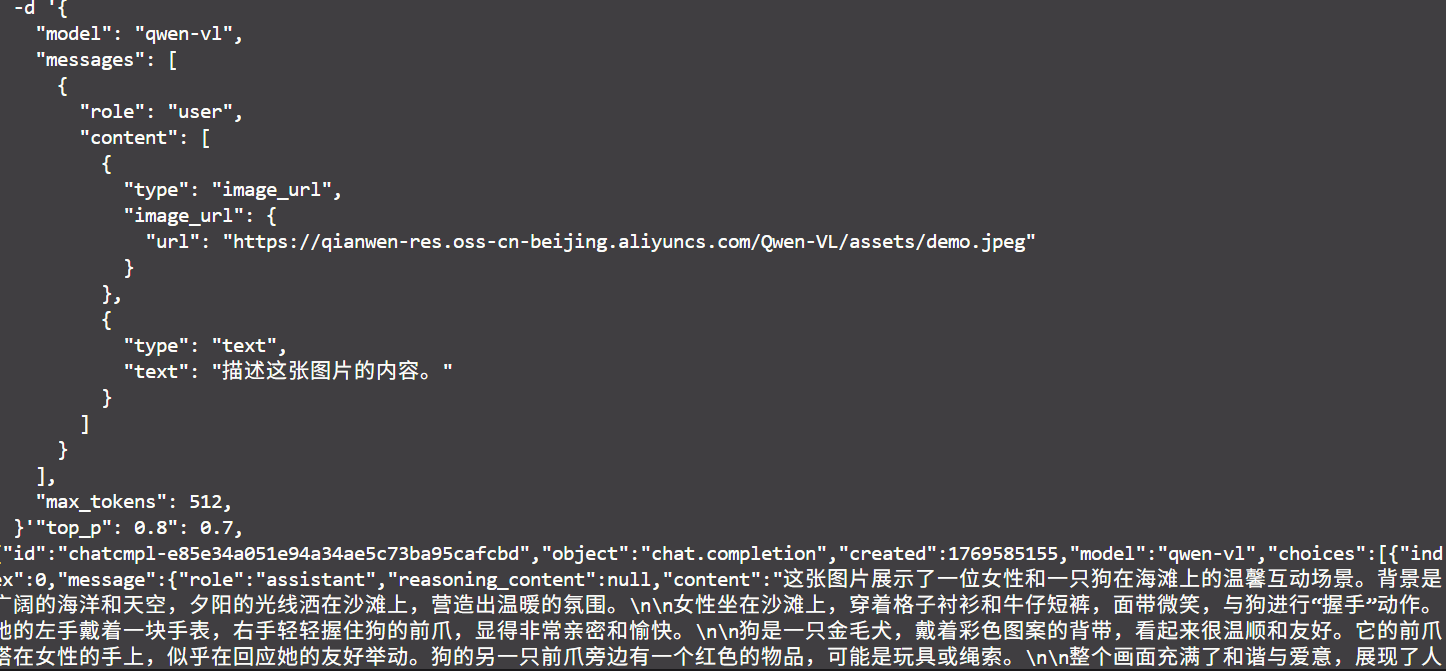
### 效果展示
### 精度
DCU与GPU精度一致,推理框架:vllm。
## 预训练权重
| **模型名称** | **参数量** | **推荐 DCU 型号** | **最低卡数需求** | **下载地址 (Hugging Face)** |
| --------------------------- | ---------- | ----------------- | ---------------- | ------------------------------------------------------------ |
| **Qwen2.5-VL-3B-Instruct** | 3B | K100AI, BW1000 等 | 1 | [Hugging Face](https://huggingface.co/Qwen/Qwen2.5-VL-3B-Instruct) |
| **Qwen2.5-VL-7B-Instruct** | 7B | K100AI, BW1000 等 | 1 | [Hugging Face](https://huggingface.co/Qwen/Qwen2.5-VL-7B-Instruct) |
| **Qwen2.5-VL-72B-Instruct** | 72B | K100AI, BW1000 等 | 4 | [Hugging Face](https://huggingface.co/Qwen/Qwen2.5-VL-72B-Instruct) |
## 源码仓库及问题反馈
源码仓库及问题反馈
- https://developer.sourcefind.cn/codes/modelzoo/Qwen2.5-vl_pytorch
## 参考资料
- https://qwenlm.github.io/zh/blog/qwen2.5-vl/
- https://github.com/QwenLM/Qwen2.5-VL