
中文 | English
💜 Qwen Chat | 🤗 Hugging Face | 🤖 ModelScope | 📑 Blog | 📚 Cookbooks | 📑 Paper
🖥️ Demo | 💬 WeChat (微信) | 🫨 Discord | 📑 API
 ## News
* 2025.03.29: ⭐️⭐️⭐️ Qwen2.5-Omni reaches top-2 on Hugging Face Trending!
* 2025.03.26: Real-time interaction with Qwen2.5-Omni is available on [Qwen Chat](https://chat.qwen.ai/). Let's start this amazing journey now!
* 2025.03.26: We have released the [Qwen2.5-Omni](https://huggingface.co/collections/Qwen/qwen25-omni-67de1e5f0f9464dc6314b36e). For more details, please check our [blog](https://qwenlm.github.io/blog/qwen2.5-omni/)!
## Contents
- [Overview](#overview)
- [Introduction](#introduction)
- [Key Features](#key-features)
- [Model Architecture](#model-architecture)
- [Performance](#performance)
- [Quickstart](#quickstart)
- [Transformers Usage](#--transformers-usage)
- [ModelScope Usage](#-modelscope-usage)
- [Usage Tips](#usage-tips)
- [Cookbooks for More Usage Cases](#cookbooks-for-more-usage-cases)
- [API inference](#api-inference)
- [Chat with Qwen2.5-Omni](#chat-with-qwen25-omni)
- [Online Demo](#online-demo)
- [Launch Local Web UI Demo](#launch-local-web-ui-demo)
- [Real-Time Interaction](#real-time-interaction)
- [Deployment with vLLM](#deployment-with-vllm)
- [Docker](#-docker)
## OverView
### Introduction
Qwen2.5-Omni is an end-to-end multimodal model designed to perceive diverse modalities, including text, images, audio, and video, while simultaneously generating text and natural speech responses in a streaming manner.
## News
* 2025.03.29: ⭐️⭐️⭐️ Qwen2.5-Omni reaches top-2 on Hugging Face Trending!
* 2025.03.26: Real-time interaction with Qwen2.5-Omni is available on [Qwen Chat](https://chat.qwen.ai/). Let's start this amazing journey now!
* 2025.03.26: We have released the [Qwen2.5-Omni](https://huggingface.co/collections/Qwen/qwen25-omni-67de1e5f0f9464dc6314b36e). For more details, please check our [blog](https://qwenlm.github.io/blog/qwen2.5-omni/)!
## Contents
- [Overview](#overview)
- [Introduction](#introduction)
- [Key Features](#key-features)
- [Model Architecture](#model-architecture)
- [Performance](#performance)
- [Quickstart](#quickstart)
- [Transformers Usage](#--transformers-usage)
- [ModelScope Usage](#-modelscope-usage)
- [Usage Tips](#usage-tips)
- [Cookbooks for More Usage Cases](#cookbooks-for-more-usage-cases)
- [API inference](#api-inference)
- [Chat with Qwen2.5-Omni](#chat-with-qwen25-omni)
- [Online Demo](#online-demo)
- [Launch Local Web UI Demo](#launch-local-web-ui-demo)
- [Real-Time Interaction](#real-time-interaction)
- [Deployment with vLLM](#deployment-with-vllm)
- [Docker](#-docker)
## OverView
### Introduction
Qwen2.5-Omni is an end-to-end multimodal model designed to perceive diverse modalities, including text, images, audio, and video, while simultaneously generating text and natural speech responses in a streaming manner.
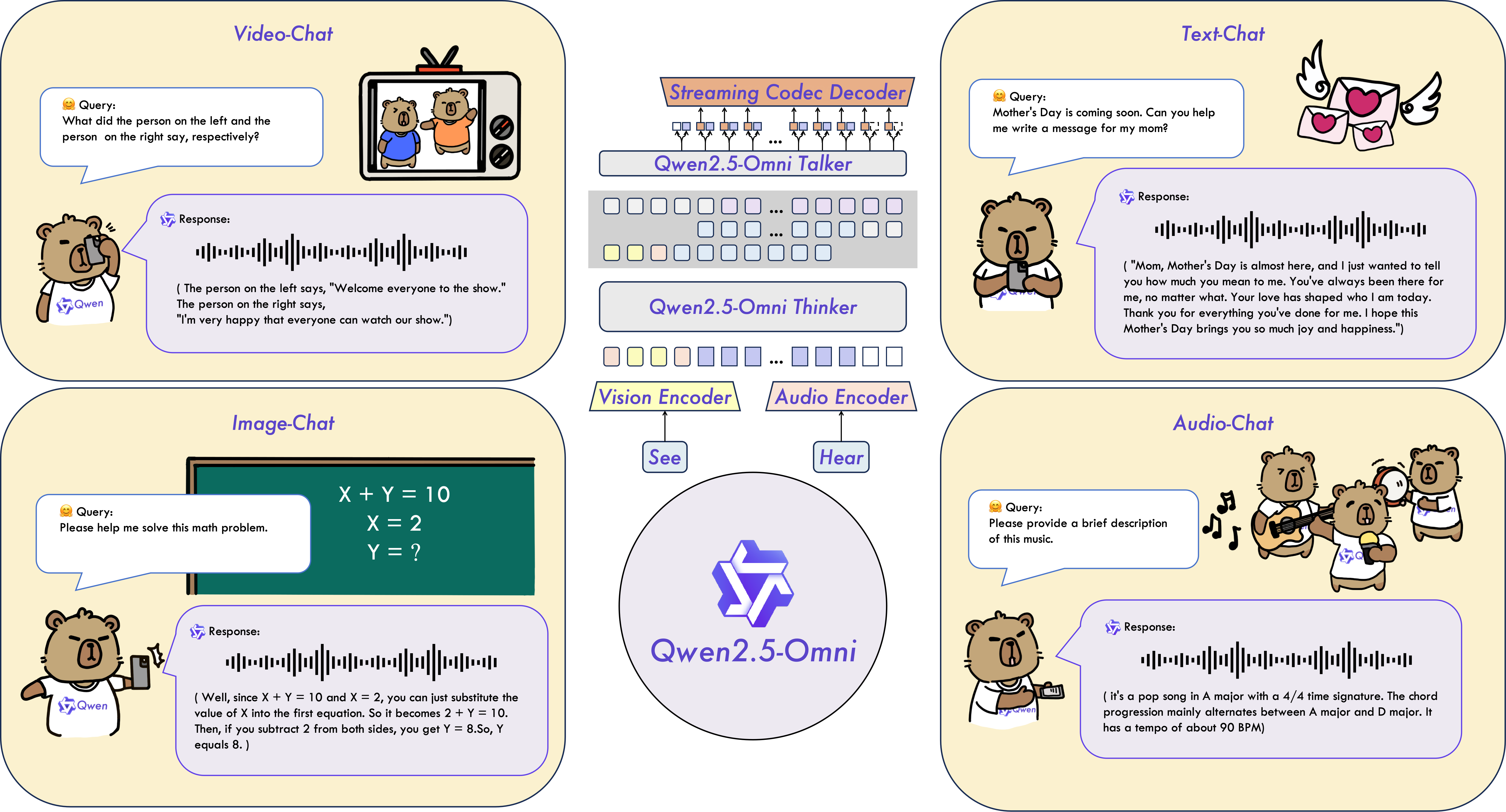
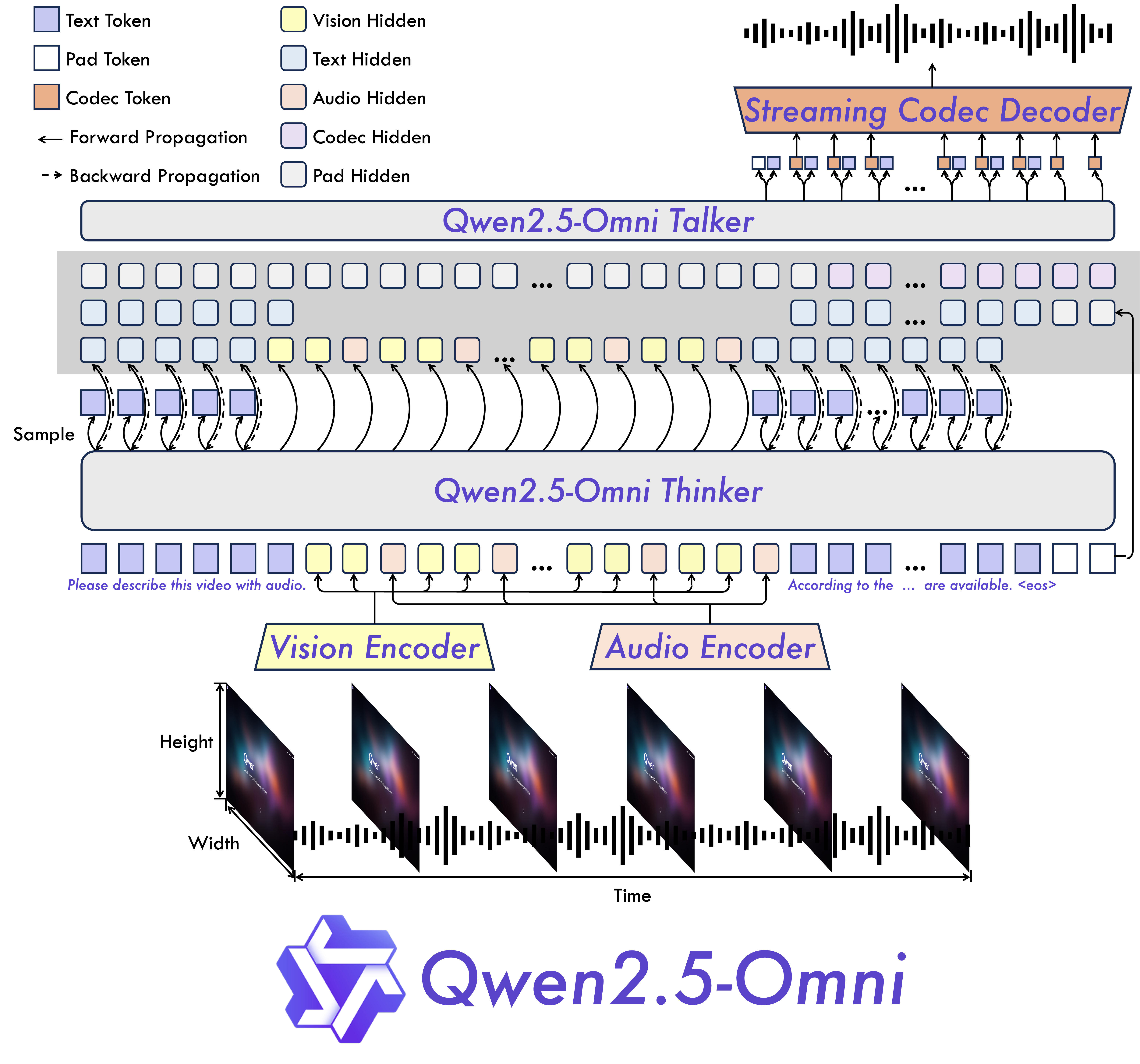
### Key Features * **Omni and Novel Architecture**: We propose Thinker-Talker architecture, an end-to-end multimodal model designed to perceive diverse modalities, including text, images, audio, and video, while simultaneously generating text and natural speech responses in a streaming manner. We propose a novel position embedding, named TMRoPE (Time-aligned Multimodal RoPE), to synchronize the timestamps of video inputs with audio. * **Real-Time Voice and Video Chat**: Architecture designed for fully real-time interactions, supporting chunked input and immediate output. * **Natural and Robust Speech Generation**: Surpassing many existing streaming and non-streaming alternatives, demonstrating superior robustness and naturalness in speech generation. * **Strong Performance Across Modalities**: Exhibiting exceptional performance across all modalities when benchmarked against similarly sized single-modality models. Qwen2.5-Omni outperforms the similarly sized Qwen2-Audio in audio capabilities and achieves comparable performance to Qwen2.5-VL-7B. * **Excellent End-to-End Speech Instruction Following**: Qwen2.5-Omni shows performance in end-to-end speech instruction following that rivals its effectiveness with text inputs, evidenced by benchmarks such as MMLU and GSM8K. ### Model Architecture

### Performance We conducted a comprehensive evaluation of Qwen2.5-Omni, which demonstrates strong performance across all modalities when compared to similarly sized single-modality models and closed-source models like Qwen2.5-VL-7B, Qwen2-Audio, and Gemini-1.5-pro. In tasks requiring the integration of multiple modalities, such as OmniBench, Qwen2.5-Omni achieves state-of-the-art performance. Furthermore, in single-modality tasks, it excels in areas including speech recognition (Common Voice), translation (CoVoST2), audio understanding (MMAU), image reasoning (MMMU, MMStar), video understanding (MVBench), and speech generation (Seed-tts-eval and subjective naturalness).
Multimodality -> Text
Datasets
Model
Performance
OmniBench
Speech | Sound Event | Music | AvgGemini-1.5-Pro
42.67%|42.26%|46.23%|42.91%
MIO-Instruct
36.96%|33.58%|11.32%|33.80%
AnyGPT (7B)
17.77%|20.75%|13.21%|18.04%
video-SALMONN
34.11%|31.70%|56.60%|35.64%
UnifiedIO2-xlarge
39.56%|36.98%|29.25%|38.00%
UnifiedIO2-xxlarge
34.24%|36.98%|24.53%|33.98%
MiniCPM-o
-|-|-|40.50%
Baichuan-Omni-1.5
-|-|-|42.90%
Qwen2.5-Omni-7B
55.25%|60.00%|52.83%|56.13%
Audio -> Text
Datasets
Model
Performance
ASR
Librispeech
dev-clean | dev other | test-clean | test-otherSALMONN
-|-|2.1|4.9
SpeechVerse
-|-|2.1|4.4
Whisper-large-v3
-|-|1.8|3.6
Llama-3-8B
-|-|-|3.4
Llama-3-70B
-|-|-|3.1
Seed-ASR-Multilingual
-|-|1.6|2.8
MiniCPM-o
-|-|1.7|-
MinMo
-|-|1.7|3.9
Qwen-Audio
1.8|4.0|2.0|4.2
Qwen2-Audio
1.3|3.4|1.6|3.6
Qwen2.5-Omni-7B
1.6|3.5|1.8|3.4
Common Voice 15
en | zh | yue | frWhisper-large-v3
9.3|12.8|10.9|10.8
MinMo
7.9|6.3|6.4|8.5
Qwen2-Audio
8.6|6.9|5.9|9.6
Qwen2.5-Omni-7B
7.6|5.2|7.3|7.5
Fleurs
zh | enWhisper-large-v3
7.7|4.1
Seed-ASR-Multilingual
-|3.4
Megrez-3B-Omni
10.8|-
MiniCPM-o
4.4|-
MinMo
3.0|3.8
Qwen2-Audio
7.5|-
Qwen2.5-Omni-7B
3.0|4.1
Wenetspeech
test-net | test-meetingSeed-ASR-Chinese
4.7|5.7
Megrez-3B-Omni
-|16.4
MiniCPM-o
6.9|-
MinMo
6.8|7.4
Qwen2.5-Omni-7B
5.9|7.7
Voxpopuli-V1.0-en
Llama-3-8B
6.2
Llama-3-70B
5.7
Qwen2.5-Omni-7B
5.8
S2TT
CoVoST2
en-de | de-en | en-zh | zh-enSALMONN
18.6|-|33.1|-
SpeechLLaMA
-|27.1|-|12.3
BLSP
14.1|-|-|-
MiniCPM-o
-|-|48.2|27.2
MinMo
-|39.9|46.7|26.0
Qwen-Audio
25.1|33.9|41.5|15.7
Qwen2-Audio
29.9|35.2|45.2|24.4
Qwen2.5-Omni-7B
30.2|37.7|41.4|29.4
SER
Meld
WavLM-large
0.542
MiniCPM-o
0.524
Qwen-Audio
0.557
Qwen2-Audio
0.553
Qwen2.5-Omni-7B
0.570
VSC
VocalSound
CLAP
0.495
Pengi
0.604
Qwen-Audio
0.929
Qwen2-Audio
0.939
Qwen2.5-Omni-7B
0.939
Music
GiantSteps Tempo
Llark-7B
0.86
Qwen2.5-Omni-7B
0.88
MusicCaps
LP-MusicCaps
0.291|0.149|0.089|0.061|0.129|0.130
Qwen2.5-Omni-7B
0.328|0.162|0.090|0.055|0.127|0.225
Audio Reasoning
MMAU
Sound | Music | Speech | AvgGemini-Pro-V1.5
56.75|49.40|58.55|54.90
Qwen2-Audio
54.95|50.98|42.04|49.20
Qwen2.5-Omni-7B
67.87|69.16|59.76|65.60
Voice Chatting
VoiceBench
AlpacaEval | CommonEval | SD-QA | MMSUUltravox-v0.4.1-LLaMA-3.1-8B
4.55|3.90|53.35|47.17
MERaLiON
4.50|3.77|55.06|34.95
Megrez-3B-Omni
3.50|2.95|25.95|27.03
Lyra-Base
3.85|3.50|38.25|49.74
MiniCPM-o
4.42|4.15|50.72|54.78
Baichuan-Omni-1.5
4.50|4.05|43.40|57.25
Qwen2-Audio
3.74|3.43|35.71|35.72
Qwen2.5-Omni-7B
4.49|3.93|55.71|61.32
VoiceBench
OpenBookQA | IFEval | AdvBench | AvgUltravox-v0.4.1-LLaMA-3.1-8B
65.27|66.88|98.46|71.45
MERaLiON
27.23|62.93|94.81|62.91
Megrez-3B-Omni
28.35|25.71|87.69|46.25
Lyra-Base
72.75|36.28|59.62|57.66
MiniCPM-o
78.02|49.25|97.69|71.69
Baichuan-Omni-1.5
74.51|54.54|97.31|71.14
Qwen2-Audio
49.45|26.33|96.73|55.35
Qwen2.5-Omni-7B
81.10|52.87|99.42|74.12
Image -> Text
| Dataset | Qwen2.5-Omni-7B | Other Best | Qwen2.5-VL-7B | GPT-4o-mini |
|--------------------------------|--------------|------------|---------------|-------------|
| MMMUval | 59.2 | 53.9 | 58.6 | **60.0** |
| MMMU-Prooverall | 36.6 | - | **38.3** | 37.6 |
| MathVistatestmini | 67.9 | **71.9** | 68.2 | 52.5 |
| MathVisionfull | 25.0 | 23.1 | **25.1** | - |
| MMBench-V1.1-ENtest | 81.8 | 80.5 | **82.6** | 76.0 |
| MMVetturbo | 66.8 | **67.5** | 67.1 | 66.9 |
| MMStar | **64.0** | **64.0** | 63.9 | 54.8 |
| MMEsum | 2340 | **2372** | 2347 | 2003 |
| MuirBench | 59.2 | - | **59.2** | - |
| CRPErelation | **76.5** | - | 76.4 | - |
| RealWorldQAavg | 70.3 | **71.9** | 68.5 | - |
| MME-RealWorlden | **61.6** | - | 57.4 | - |
| MM-MT-Bench | 6.0 | - | **6.3** | - |
| AI2D | 83.2 | **85.8** | 83.9 | - |
| TextVQAval | 84.4 | 83.2 | **84.9** | - |
| DocVQAtest | 95.2 | 93.5 | **95.7** | - |
| ChartQAtest Avg | 85.3 | 84.9 | **87.3** | - |
| OCRBench_V2en | **57.8** | - | 56.3 | - |
| Dataset | Qwen2.5-Omni-7B | Qwen2.5-VL-7B | Grounding DINO | Gemini 1.5 Pro |
|--------------------------|--------------|---------------|----------------|----------------|
| Refcocoval | 90.5 | 90.0 | **90.6** | 73.2 |
| RefcocotextA | **93.5** | 92.5 | 93.2 | 72.9 |
| RefcocotextB | 86.6 | 85.4 | **88.2** | 74.6 |
| Refcoco+val | 85.4 | 84.2 | **88.2** | 62.5 |
| Refcoco+textA | **91.0** | 89.1 | 89.0 | 63.9 |
| Refcoco+textB | **79.3** | 76.9 | 75.9 | 65.0 |
| Refcocog+val | **87.4** | 87.2 | 86.1 | 75.2 |
| Refcocog+test | **87.9** | 87.2 | 87.0 | 76.2 |
| ODinW | 42.4 | 37.3 | **55.0** | 36.7 |
| PointGrounding | 66.5 | **67.3** | - | - |
Video(without audio) -> Text
| Dataset | Qwen2.5-Omni-7B | Other Best | Qwen2.5-VL-7B | GPT-4o-mini |
|-----------------------------|--------------|------------|---------------|-------------|
| Video-MMEw/o sub | 64.3 | 63.9 | **65.1** | 64.8 |
| Video-MMEw sub | **72.4** | 67.9 | 71.6 | - |
| MVBench | **70.3** | 67.2 | 69.6 | - |
| EgoSchematest | **68.6** | 63.2 | 65.0 | - |
Zero-shot Speech Generation
Datasets
Model
Performance
Content Consistency
SEED
test-zh | test-en | test-hard Seed-TTS_ICL
1.11 | 2.24 | 7.58
Seed-TTS_RL
1.00 | 1.94 | 6.42
MaskGCT
2.27 | 2.62 | 10.27
E2_TTS
1.97 | 2.19 | -
F5-TTS
1.56 | 1.83 | 8.67
CosyVoice 2
1.45 | 2.57 | 6.83
CosyVoice 2-S
1.45 | 2.38 | 8.08
Qwen2.5-Omni-7B_ICL
1.70 | 2.72 | 7.97
Qwen2.5-Omni-7B_RL
1.42 | 2.32 | 6.54
Speaker Similarity
SEED
test-zh | test-en | test-hard Seed-TTS_ICL
0.796 | 0.762 | 0.776
Seed-TTS_RL
0.801 | 0.766 | 0.782
MaskGCT
0.774 | 0.714 | 0.748
E2_TTS
0.730 | 0.710 | -
F5-TTS
0.741 | 0.647 | 0.713
CosyVoice 2
0.748 | 0.652 | 0.724
CosyVoice 2-S
0.753 | 0.654 | 0.732
Qwen2.5-Omni-7B_ICL
0.752 | 0.632 | 0.747
Qwen2.5-Omni-7B_RL
0.754 | 0.641 | 0.752
## Quickstart
Below, we provide simple examples to show how to use Qwen2.5-Omni with 🤖 ModelScope and 🤗 Transformers.
The codes of Qwen2.5-Omni on Hugging Face Transformers are in pull request stage and not merged into the main branch yet. Therefore, you may need to build from source to use it with command:
```
pip uninstall transformers
pip install git+https://github.com/huggingface/transformers@f742a644ca32e65758c3adb36225aef1731bd2a8
pip install accelerate
```
or you might encounter the following error:
```
KeyError: 'qwen2_5_omni'
```
and you can also use our [official docker image](#-docker) to start without building from source.
We offer a toolkit to help you handle various types of audio and visual input more conveniently, as if you were using an API. This includes base64, URLs, and interleaved audio, images and videos. You can install it using the following command and make sure your system has `ffmpeg` installed:
```bash
# It's highly recommended to use `[decord]` feature for faster video loading.
pip install qwen-omni-utils[decord]
```
If you are not using Linux, you might not be able to install `decord` from PyPI. In that case, you can use `pip install qwen-omni-utils` which will fall back to using torchvision for video processing. However, you can still [install decord from source](https://github.com/dmlc/decord?tab=readme-ov-file#install-from-source) to get decord used when loading video.
We are preparing [cookbooks](https://github.com/QwenLM/Qwen2.5-Omni/tree/main/cookbooks) for many capabilities, including audio understanding, voice chatting, screen recording interaction, video information extracting, omni chatting and more. Welcome to learn more!
### 🤗 Transformers Usage
Here we show a code snippet to show you how to use the chat model with `transformers` and `qwen_omni_utils`:
```python
import soundfile as sf
from transformers import Qwen2_5OmniModel, Qwen2_5OmniProcessor
from qwen_omni_utils import process_mm_info
# default: Load the model on the available device(s)
model = Qwen2_5OmniModel.from_pretrained("Qwen/Qwen2.5-Omni-7B", torch_dtype="auto", device_map="auto")
# We recommend enabling flash_attention_2 for better acceleration and memory saving.
# model = Qwen2_5OmniModel.from_pretrained(
# "Qwen/Qwen2.5-Omni-7B",
# torch_dtype="auto",
# device_map="auto",
# attn_implementation="flash_attention_2",
# )
processor = Qwen2_5OmniProcessor.from_pretrained("Qwen/Qwen2.5-Omni-7B")
conversation = [
{
"role": "system",
"content": "You are Qwen, a virtual human developed by the Qwen Team, Alibaba Group, capable of perceiving auditory and visual inputs, as well as generating text and speech.",
},
{
"role": "user",
"content": [
{"type": "video", "video": "https://qianwen-res.oss-cn-beijing.aliyuncs.com/Qwen2.5-Omni/draw.mp4"},
],
},
]
# set use audio in video
USE_AUDIO_IN_VIDEO = True
# Preparation for inference
text = processor.apply_chat_template(conversation, add_generation_prompt=True, tokenize=False)
audios, images, videos = process_mm_info(conversation, use_audio_in_video=USE_AUDIO_IN_VIDEO)
inputs = processor(text=text, audios=audios, images=images, videos=videos, return_tensors="pt", padding=True, use_audio_in_video=USE_AUDIO_IN_VIDEO)
inputs = inputs.to(model.device).to(model.dtype)
# Inference: Generation of the output text and audio
text_ids, audio = model.generate(**inputs, use_audio_in_video=USE_AUDIO_IN_VIDEO)
text = processor.batch_decode(text_ids, skip_special_tokens=True, clean_up_tokenization_spaces=False)
print(text)
sf.write(
"output.wav",
audio.reshape(-1).detach().cpu().numpy(),
samplerate=24000,
)
```
Text -> Text
| Dataset | Qwen2.5-Omni-7B | Qwen2.5-7B | Qwen2-7B | Llama3.1-8B | Gemma2-9B |
|-----------------------------------|-----------|------------|----------|-------------|-----------|
| MMLU-Pro | 47.0 | **56.3** | 44.1 | 48.3 | 52.1 |
| MMLU-redux | 71.0 | **75.4** | 67.3 | 67.2 | 72.8 |
| LiveBench0831 | 29.6 | **35.9** | 29.2 | 26.7 | 30.6 |
| GPQA | 30.8 | **36.4** | 34.3 | 32.8 | 32.8 |
| MATH | 71.5 | **75.5** | 52.9 | 51.9 | 44.3 |
| GSM8K | 88.7 | **91.6** | 85.7 | 84.5 | 76.7 |
| HumanEval | 78.7 | **84.8** | 79.9 | 72.6 | 68.9 |
| MBPP | 73.2 | **79.2** | 67.2 | 69.6 | 74.9 |
| MultiPL-E | 65.8 | **70.4** | 59.1 | 50.7 | 53.4 |
| LiveCodeBench2305-2409 | 24.6 | **28.7** | 23.9 | 8.3 | 18.9 |
Minimum GPU memory requirements
| Precision | 15(s) Video | 30(s) Video | 60(s) Video |
|-----------| ------------- | --------- | -------------- |
| FP32 | 93.56 GB | Not Recommend | Not Recommend |
| BF16 | 31.11 GB | 41.85 GB | 60.19 GB |
Note: The table above presents the theoretical minimum memory requirements for inference with `transformers` and `BF16` is test with `attn_implementation="flash_attention_2"`; however, in practice, the actual memory usage is typically at least 1.2 times higher. For more information, see the linked resource [here](https://huggingface.co/docs/accelerate/main/en/usage_guides/model_size_estimator).
Video URL resource usage
Video URL compatibility largely depends on the third-party library version. The details are in the table below. Change the backend by `FORCE_QWENVL_VIDEO_READER=torchvision` or `FORCE_QWENVL_VIDEO_READER=decord` if you prefer not to use the default one.
| Backend | HTTP | HTTPS |
|-------------|------|-------|
| torchvision >= 0.19.0 | ✅ | ✅ |
| torchvision < 0.19.0 | ❌ | ❌ |
| decord | ✅ | ❌ |
### 🤖 ModelScope Usage
We strongly advise users especially those in mainland China to use ModelScope, `snapshot_download` can help you solve issues concerning downloading checkpoints.
### Usage Tips
#### Prompt for audio output
If users need audio output, the system prompt must be set as "You are Qwen, a virtual human developed by the Qwen Team, Alibaba Group, capable of perceiving auditory and visual inputs, as well as generating text and speech.", otherwise the audio output may not work as expected.
```
{
"role": "system",
"content": "You are Qwen, a virtual human developed by the Qwen Team, Alibaba Group, capable of perceiving auditory and visual inputs, as well as generating text and speech.",
}
```
#### Use audio in video
In the process of multimodal interaction, the videos provided by users are often accompanied by audio (such as questions about the content in the video, or sounds generated by certain events in the video). This information is conducive to the model providing a better interactive experience. So we provide the following options for users to decide whether to use audio in video.
```python
# first place, in data preprocessing
audios, images, videos = process_mm_info(conversations, use_audio_in_video=True)
```
```python
# second place, in model processor
inputs = processor(text=text, audios=audios, images=images, videos=videos, return_tensors="pt",
padding=True, use_audio_in_video=True)
```
```python
# third place, in model inference
text_ids, audio = model.generate(**inputs, use_audio_in_video=True)
```
It is worth noting that during a multi-round conversation, the `use_audio_in_video` parameter in these places must be set to the same, otherwise unexpected results will occur.
#### Use audio output or not
The model supports both text and audio outputs, if users do not need audio outputs, they can set `enable_audio_output=False` in the `from_pretrained` function. This option will save about `~2GB` of GPU memory but the `return_audio` option for `generate` function will only allow to be set at `False`.
```python
model = Qwen2_5OmniModel.from_pretrained(
"Qwen/Qwen2.5-Omni-7B",
torch_dtype="auto",
device_map="auto",
enable_audio_output=False,
)
```
In order to obtain a flexible experience, we recommend that users set `enable_audio_output` at `True` when initializing the model through `from_pretrained` function, and then decide whether to return audio when `generate` function is called. When `return_audio` is set to `False`, the model will only return text outputs to get text responses faster.
```python
model = Qwen2_5OmniModel.from_pretrained(
"Qwen/Qwen2.5-Omni-7B",
torch_dtype="auto",
device_map="auto",
enable_audio_output=True,
)
...
text_ids = model.generate(**inputs, return_audio=False)
```
#### Change voice type of output audio
Qwen2.5-Omni supports the ability to change the voice of the output audio. The `"Qwen/Qwen2.5-Omni-7B"` checkpoint supports two voice types as follows:
| Voice Type | Gender | Description |
|------------|--------|-------------|
| Chelsie | Female | A honeyed, velvety voice that carries a gentle warmth and luminous clarity.|
| Ethan | Male | A bright, upbeat voice with infectious energy and a warm, approachable vibe.|
Users can use the `spk` parameter of `generate` function to specify the voice type. By defalut, if `spk` is not specified, the default voice type is `Chelsie`.
```python
text_ids, audio = model.generate(**inputs, spk="Chelsie")
```
```python
text_ids, audio = model.generate(**inputs, spk="Ethan")
```
#### Flash-Attention 2 to speed up generation
First, make sure to install the latest version of Flash Attention 2:
```bash
pip install -U flash-attn --no-build-isolation
```
Also, you should have hardware that is compatible with FlashAttention 2. Read more about it in the official documentation of the [flash attention repository](https://github.com/Dao-AILab/flash-attention). FlashAttention-2 can only be used when a model is loaded in `torch.float16` or `torch.bfloat16`.
To load and run a model using FlashAttention-2, add `attn_implementation="flash_attention_2"` when loading the model:
```python
from transformers import Qwen2_5OmniModel
model = Qwen2_5OmniModel.from_pretrained(
"Qwen/Qwen2.5-Omni-7B",
device_map="auto",
torch_dtype=torch.bfloat16,
attn_implementation="flash_attention_2",
)
```
### Cookbooks for More Usage Cases
| Cookbook | Description | Open |
| -------- | ----------- | ---- |
| [Universal Audio Understanding](https://github.com/QwenLM/Qwen2.5-Omni/blob/main/cookbooks/universal_audio_understanding.ipynb) | Speech recongnition, speech-to-text translation and audio analysis. | [](https://github.com/QwenLM/Qwen2.5-Omni/blob/main/cookbooks/universal_audio_understanding.ipynb) |
| [Voice Chatting](https://github.com/QwenLM/Qwen2.5-Omni/blob/main/cookbooks/voice_chatting.ipynb) | Chatting with Qwen2.5-Omni by voice input and output. | [](https://github.com/QwenLM/Qwen2.5-Omni/blob/main/cookbooks/voice_chatting.ipynb) |
| [Screen Recording Interaction](https://github.com/QwenLM/Qwen2.5-Omni/blob/main/cookbooks/screen_recording_interaction.ipynb) | Get the information and content you want to know by asking questions in real time on the recording screen. | [](https://github.com/QwenLM/Qwen2.5-Omni/blob/main/cookbooks/screen_recording_interaction.ipynb) |
| [Video Information Extracting](https://github.com/QwenLM/Qwen2.5-Omni/blob/main/cookbooks/video_information_extracting.ipynb) | Obtaining information from the video stream. | [](https://github.com/QwenLM/Qwen2.5-Omni/blob/main/cookbooks/video_information_extracting.ipynb) |
| [Omni Chatting for Music](https://github.com/QwenLM/Qwen2.5-Omni/blob/main/cookbooks/omni_chatting_for_music.ipynb) | Chat with Qwen2.5-Omni about music content in a audio and video stream. | [](https://github.com/QwenLM/Qwen2.5-Omni/blob/main/cookbooks/omni_chatting_for_music.ipynb) |
| [Omni Chatting for Math](https://github.com/QwenLM/Qwen2.5-Omni/blob/main/cookbooks/omni_chatting_for_math.ipynb) | Chat with Qwen2.5-Omni about math content in a audio and video stream. | [](https://github.com/QwenLM/Qwen2.5-Omni/blob/main/cookbooks/omni_chatting_for_math.ipynb) |
| [Multi Round Omni Chatting](https://github.com/QwenLM/Qwen2.5-Omni/blob/main/cookbooks/multi_round_omni_chatting.ipynb) | Conducted multiple rounds of audio and video dialogues with Qwen2.5-Omni to provide the most comprehensive ability demonstration. | [](https://github.com/QwenLM/Qwen2.5-Omni/blob/main/cookbooks/multi_round_omni_chatting.ipynb) |
### API Inference
To explore Qwen2.5-Omni, we encourage you to test our cutting-edge API service for a faster and efficient experience.
#### Installation
```bash
pip install openai
```
#### Examples
You can use the OpenAI API service to interact with Qwen2.5-Omni like below. And for more usage, please refer to the tutorial at [aliyun](https://help.aliyun.com/zh/model-studio/user-guide/qwen-omni).
```python
import base64
import numpy as np
import soundfile as sf
from openai import OpenAI
client = OpenAI(
api_key="your_api_key",
base_url="https://dashscope.aliyuncs.com/compatible-mode/v1",
)
messages = [
{
"role": "system",
"content": "You are Qwen, a virtual human developed by the Qwen Team, Alibaba Group, capable of perceiving auditory and visual inputs, as well as generating text and speech.",
},
{
"role": "user",
"content": [
{"type": "video_url", "video_url": "https://qianwen-res.oss-cn-beijing.aliyuncs.com/Qwen2.5-Omni/draw.mp4"},
],
},
]
# Qwen-Omni only supports stream mode
completion = client.chat.completions.create(
model="qwen-omni-turbo",
messages=messages,
modalities=["text", "audio"],
audio={
"voice": "Cherry", # Cherry, Ethan, Serena, Chelsie is available
"format": "wav"
},
stream=True,
stream_options={"include_usage": True}
)
text = []
audio_string = ""
for chunk in completion:
if chunk.choices:
if hasattr(chunk.choices[0].delta, "audio"):
try:
audio_string += chunk.choices[0].delta.audio["data"]
except Exception as e:
text.append(chunk.choices[0].delta.audio["transcript"])
else:
print(chunk.usage)
print("".join(text))
wav_bytes = base64.b64decode(audio_string)
wav_array = np.frombuffer(wav_bytes, dtype=np.int16)
sf.write("output.wav", wav_array, samplerate=24000)
```
## Chat with Qwen2.5-Omni
### Online Demo
Without deployment, you can experience online web demo directly by visiting our [Hugginface Spaces](https://huggingface.co/spaces/Qwen/Qwen2.5-Omni-7B-Demo) and [Modelscope Studio](https://modelscope.cn/studios/Qwen/Qwen2.5-Omni-Demo).
### Launch Local Web UI Demo
In this section, we provide instructions for users to build a web-based user interface (UI) demo. This UI demo allows users to interact with a predefined model or application through a web browser. Follow the steps below to get started or you can launch the web demo directly from our [official docker image](#-docker).
#### Installation
Before you begin, ensure that you have the required dependencies installed on your system. You can install them by running the following command:
```bash
pip install -r requirements_web_demo.txt
```
#### Running the Demo with FlashAttention-2
Once the required packages are installed, you can launch the web demo using the following command. This command will start a web server and provide you with a link to access the UI in your web browser.
**Recommended**: For enhanced performance and efficiency, especially in multi-image and video processing scenarios, we strongly recommend using [FlashAttention-2](https://github.com/Dao-AILab/flash-attention). FlashAttention-2 provides significant improvements in memory usage and speed, making it ideal for handling large-scale models and data processing.
To enable FlashAttention-2, use the following command:
```bash
python web_demo.py --flash-attn2
```
This will load the model with FlashAttention-2 enabled.
**Default Usage**: If you prefer to run the demo without FlashAttention-2 or if you do not specify the `--flash-attn2` option, the demo will load the model using the standard attention implementation:
```bash
python web_demo.py
```
After running the command, you’ll see a link generated in the terminal similar to this:
```
Running on local: http://127.0.0.1:7860/
```
Copy this link and paste it into your browser to access the web UI, where you can interact with the model by inputting text, uploading audios/images/videos, changing voice type or using any other provided functionalities.
### Real-Time Interaction
The streaming Real-time interaction with Qwen2.5-Omni is available now, please visit [Qwen Chat](https://chat.qwen.ai/) and select the voice/video calls in the chat box to experience.
## Deployment with vLLM
We recommend using vLLM for fast Qwen2.5-Omni deployment and inference. You need to install from our provided [source](https://github.com/fyabc/vllm/tree/qwen2_omni_public_v1) to get vLLM support for Qwen2.5-Omni or use our [official docker image](#-docker). You can also check [vLLM official documentation](https://docs.vllm.ai/en/latest/serving/multimodal_inputs.html) for more details about online serving and offline inference.
### Installation
```bash
pip install git+https://github.com/huggingface/transformers@d40f54fc2f1524458669048cb40a8d0286f5d1d2
pip install accelerate
pip install qwen-omni-utils
git clone -b qwen2_omni_public_v1 https://github.com/fyabc/vllm.git
cd vllm
pip install .
```
### Inference Locally
You can use vLLM to inference Qwen2.5-Omni locally, and currently we only supports the thinker part in vllm, so the output of model can only be text. We will support other parts of the model in the near future to achieve audio output.
```python
import os
import torch
from transformers import Qwen2_5OmniProcessor
from vllm import LLM, SamplingParams
from qwen_omni_utils import process_mm_info
# vLLM engine v1 not supported yet
os.environ['VLLM_USE_V1'] = '0'
MODEL_PATH = "Qwen/Qwen2.5-Omni-7B"
llm = LLM(
model=MODEL_PATH, trust_remote_code=True, gpu_memory_utilization=0.9,
tensor_parallel_size=torch.cuda.device_count(),
limit_mm_per_prompt={'image': 1, 'video': 1, 'audio': 1},
seed=1234,
)
sampling_params = SamplingParams(
temperature=1e-6,
max_tokens=512,
)
processor = Qwen2_5OmniProcessor.from_pretrained(MODEL_PATH)
messages = [
{
"role": "system",
"content": "You are Qwen, a virtual human developed by the Qwen Team, Alibaba Group, capable of perceiving auditory and visual inputs, as well as generating text and speech.",
},
{
"role": "user",
"content": [
{"type": "video", "video": "https://qianwen-res.oss-cn-beijing.aliyuncs.com/Qwen2.5-Omni/draw.mp4"},
],
},
]
text = processor.apply_chat_template(
messages,
tokenize=False,
add_generation_prompt=True,
)
audios, images, videos = process_mm_info(messages, use_audio_in_video=True)
inputs = {
'prompt': text[0],
'multi_modal_data': {},
"mm_processor_kwargs": {
"use_audio_in_video": True,
},
}
if images is not None:
inputs['multi_modal_data']['image'] = images
if videos is not None:
inputs['multi_modal_data']['video'] = videos
if audios is not None:
inputs['multi_modal_data']['audio'] = audios
outputs = llm.generate(inputs, sampling_params=sampling_params)
print(outputs[0].outputs[0].text)
```
We also provide some examples in [vLLM repo](https://github.com/fyabc/vllm/tree/qwen2_omni_public_v1/examples/offline_inference):
```bash
cd vllm
# Audio + image + video
python examples/offline_inference/qwen2_5_omni/only_thinker.py -q mixed_modalities
# Read vision and audio inputs from a single video file
# NOTE: V1 engine not supported yet.
VLLM_USE_V1=0 python examples/offline_inference/qwen2_5_omni/only_thinker.py -q use_audio_in_video
# Process audio inputs
python examples/offline_inference/audio_language.py --model-type qwen2_5_omni
# Process image inputs
python examples/offline_inference/vision_language.py --modality image --model-type qwen2_5_omni
# Process video inputs
python examples/offline_inference/vision_language.py --modality video --model-type qwen2_5_omni
```
## 🐳 Docker
To simplify the deploy process, we provide docker images with pre-build environments: [qwenllm/qwen-omni](https://hub.docker.com/r/qwenllm/qwen-omni). You only need to install the driver and download model files to launch demos.
```bash
docker run --gpus all --ipc=host --network=host --rm --name qwen2.5-omni -it qwenllm/qwen-omni:2.5-cu121 bash
```
And you can also launch the web demo by:
```bash
bash docker/docker_web_demo.sh --checkpoint /path/to/Qwen2.5-Omni-7B
```
To enable FlashAttention-2, use the following command:
```bash
bash docker/docker_web_demo.sh --checkpoint /path/to/Qwen2.5-Omni-7B --flash-attn2
```
## Citation
If you find our paper and code useful in your research, please consider giving a star :star: and citation :pencil: :)
```BibTeX
@article{Qwen2.5-Omni,
title={Qwen2.5-Omni Technical Report},
author={Jin Xu, Zhifang Guo, Jinzheng He, Hangrui Hu, Ting He, Shuai Bai, Keqin Chen, Jialin Wang, Yang Fan, Kai Dang, Bin Zhang, Xiong Wang, Yunfei Chu, Junyang Lin},
journal={arXiv preprint arXiv:2503.20215},
year={2025}
}
```
Batch inference
The model can batch inputs composed of mixed samples of various types such as text, images, audio and videos as input when `return_audio=False` is set. Here is an example.
```python
# Sample messages for batch inference
# Conversation with video only
conversation1 = [
{
"role": "system",
"content": "You are Qwen, a virtual human developed by the Qwen Team, Alibaba Group, capable of perceiving auditory and visual inputs, as well as generating text and speech.",
},
{
"role": "user",
"content": [
{"type": "video", "video": "/path/to/video.mp4"},
]
}
]
# Conversation with audio only
conversation2 = [
{
"role": "system",
"content": "You are Qwen, a virtual human developed by the Qwen Team, Alibaba Group, capable of perceiving auditory and visual inputs, as well as generating text and speech.",
},
{
"role": "user",
"content": [
{"type": "audio", "audio": "/path/to/audio.wav"},
]
}
]
# Conversation with pure text
conversation3 = [
{
"role": "system",
"content": "You are Qwen, a virtual human developed by the Qwen Team, Alibaba Group, capable of perceiving auditory and visual inputs, as well as generating text and speech.",
},
{
"role": "user",
"content": "who are you?"
}
]
# Conversation with mixed media
conversation4 = [
{
"role": "system",
"content": "You are Qwen, a virtual human developed by the Qwen Team, Alibaba Group, capable of perceiving auditory and visual inputs, as well as generating text and speech.",
},
{
"role": "user",
"content": [
{"type": "image", "image": "/path/to/image.jpg"},
{"type": "video", "video": "/path/to/video.mp4"},
{"type": "audio", "audio": "/path/to/audio.wav"},
{"type": "text", "text": "What are the elements can you see and hear in these medias?"},
],
}
]
# Combine messages for batch processing
conversations = [conversation1, conversation2, conversation3, conversation4]
# set use audio in video
USE_AUDIO_IN_VIDEO = True
# Preparation for batch inference
text = processor.apply_chat_template(conversations, add_generation_prompt=True, tokenize=False)
audios, images, videos = process_mm_info(conversations, use_audio_in_video=USE_AUDIO_IN_VIDEO)
inputs = processor(text=text, audios=audios, images=images, videos=videos, return_tensors="pt", padding=True, use_audio_in_video=USE_AUDIO_IN_VIDEO)
inputs = inputs.to(model.device).to(model.dtype)
# Batch Inference
text_ids = model.generate(**inputs, use_audio_in_video=USE_AUDIO_IN_VIDEO, return_audio=False)
text = processor.batch_decode(text_ids, skip_special_tokens=True, clean_up_tokenization_spaces=False)
print(text)
```
