# OmniGen2
引入反思机制,多模态任务生成屠榜,一键解锁AI绘图「哆啦 A 梦」任意门。
## 论文
`OmniGen2: Exploration to Advanced Multimodal Generation`
- https://arxiv.org/pdf/2506.18871
## 模型结构
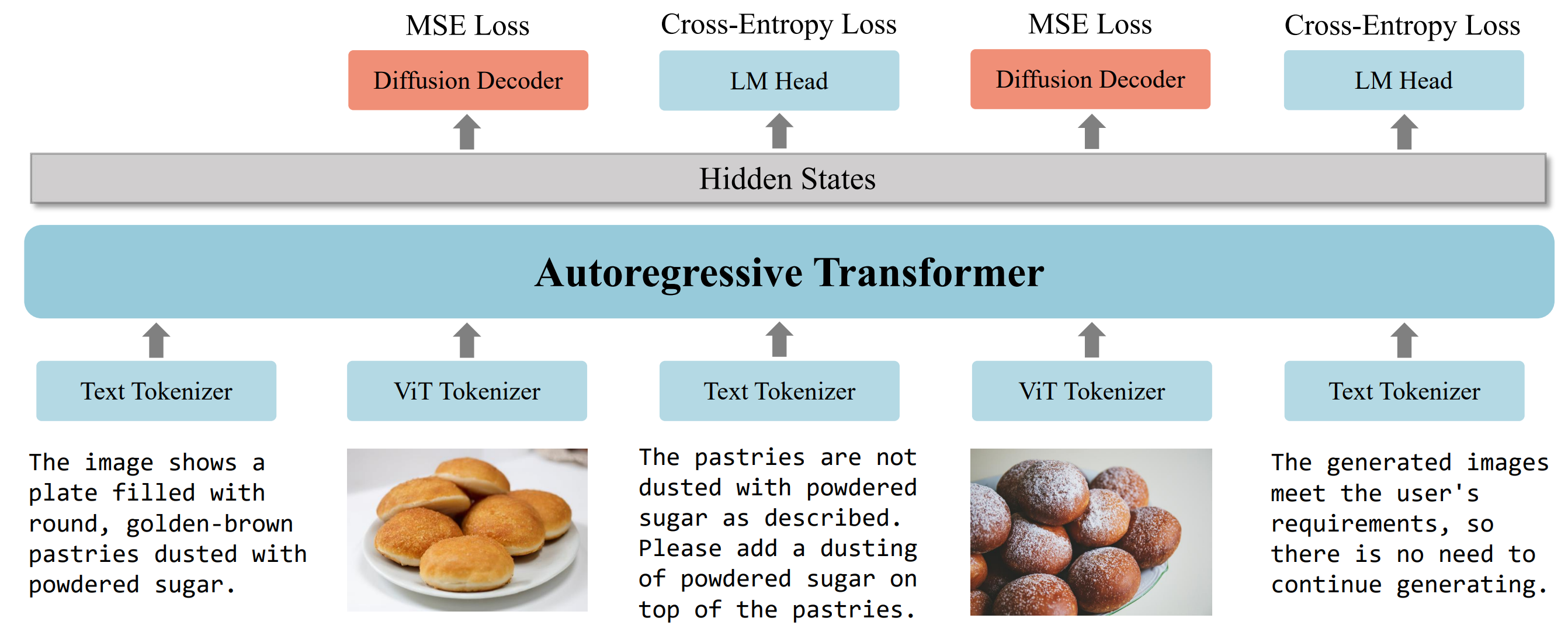
OmniGen2 利用一个基础的多模态大语言模型Transformer来处理文本与图像输入,对于文本生成任务,采用自回归语言头,而图像生成则通过专用的扩散模块完成,Transformer主干由Qwen2.5-VL-3B初始化。

## 算法原理
MLLM在训练过程中其大部分参数保持冻结状态,以保留其多模态理解能力,仅新引入的特殊 token “<|img|>” 被更新,扩散模型从零开始训练,初期专注于文本到图像(T2I)生成任务,随后采用混合任务训练策略以适应多种目标,在反思训练阶段,所有模型参数解冻,允许模型生成反思性的文本描述并迭代优化图像输出。
## 环境配置
```
mv OmniGen2_pytorch OmniGen2
```
### 硬件需求
DCU型号:K100AI,节点数量:1 台,卡数:1 张。
### Docker(方法一)
```
docker pull image.sourcefind.cn:5000/dcu/admin/base/pytorch:2.4.1-ubuntu22.04-dtk25.04.1-py3.10
# 为以上拉取的docker的镜像ID替换,本镜像为:e50d644287fd
docker run -it --shm-size=64G -v $PWD/OmniGen2:/home/OmniGen2 -v /opt/hyhal:/opt/hyhal:ro --privileged=true --device=/dev/kfd --device=/dev/dri/ --group-add video --name og2 bash
cd /home/OmniGen2
pip install -r requirements.txt # requirements.txt
```
### Dockerfile(方法二)
```
cd /home/OmniGen2/docker
docker build --no-cache -t og2:latest .
docker run --shm-size=64G --name yolov13 -v /opt/hyhal:/opt/hyhal:ro --privileged=true --device=/dev/kfd --device=/dev/dri/ --group-add video -v $PWD/../../OmniGen2:/home/OmniGen2 -it og2 bash
# 若遇到Dockerfile启动的方式安装环境需要长时间等待,可注释掉里面的pip安装,启动容器后再安装python库:pip install -r requirements.txt。
```
### Anaconda(方法三)
1、关于本项目DCU显卡所需的特殊深度学习库可从光合开发者社区下载安装:
- https://developer.sourcefind.cn/tool/
```
DTK驱动:25.04.1
python:python3.10
torch:2.4.1
torchvision:0.19.1
triton:3.0.0
flash-attn:2.6.1
deepspeed:0.14.2
apex:1.4.0
onnxruntime:1.19.2
```
不同深度学习库可支持的DCU型号可在此处查询:[DAS资源下载](https://das.sourcefind.cn:55011/portal/#/home)
`Tips:以上dtk驱动、python、torch等DCU相关工具版本需要严格一一对应。`
2、其它非特殊库参照requirements.txt安装
```
cd /home/OmniGen2
pip install -r requirements.txt # requirements.txt
```
## 数据集
`无`
## 训练
`无`
## 推理
预训练权重目录结构:
```
/home/OmniGen2/
└── OmniGen2/OmniGen2
```
### 单机单卡
```
export HIP_VISIBLE_DEVICES=0
cd /home/OmniGen2
# Visual Understanding
bash example_understanding.sh # 其它功能的推理脚本见run_example.sh
```
更多资料可参考源项目的[`README_origin`](./README_origin.md)
## result
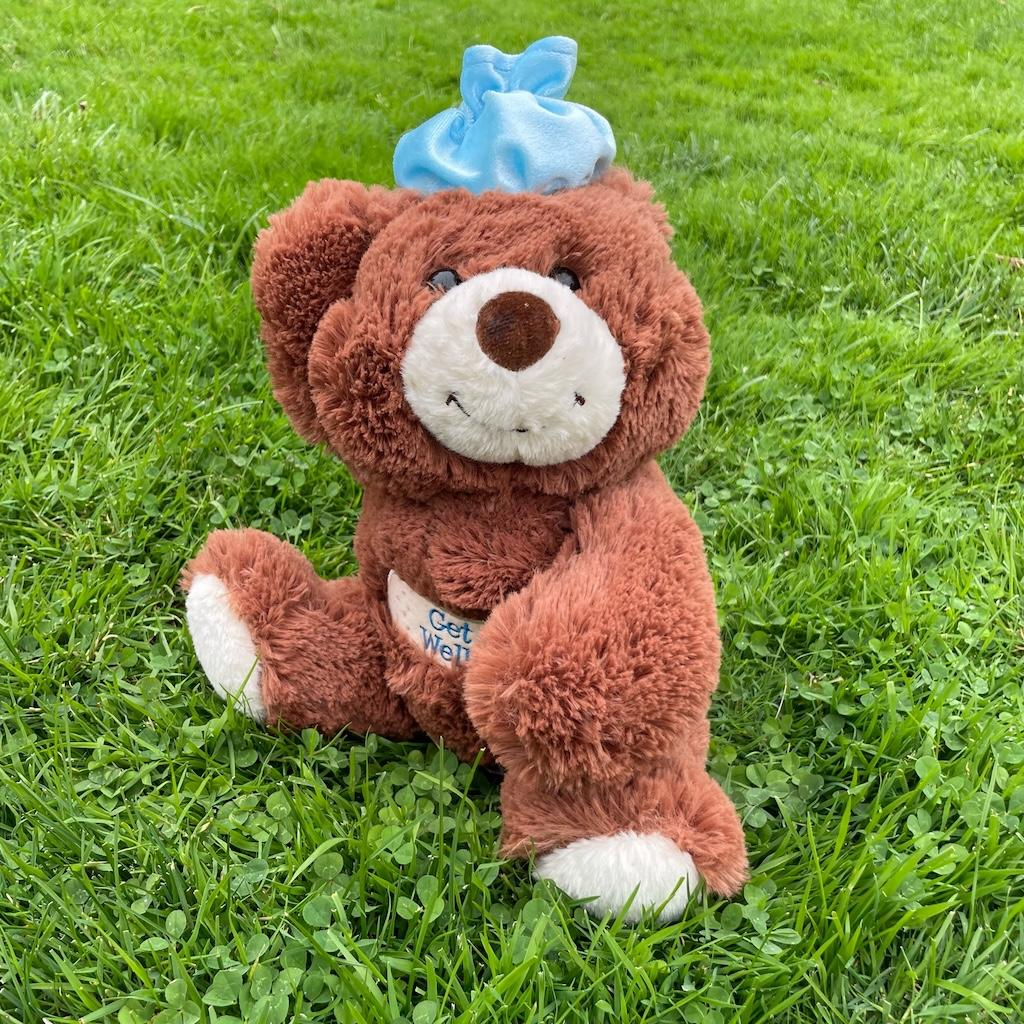
`输入: `
```
instruction: "Please describe this image briefly."
input_image_path: example_images/02.jpg
```
`输出:`
```
Text: The image shows a plush toy bear sitting on a grassy surface. The bear has a brown body with white paws and a white muzzle. It is wearing a blue bow on its head and a white bib with the text "Get Well" written on it. The background consists of green grass with some clover leaves visible.
```
官方其它演示效果示例:
### 精度
DCU与GPU精度一致,推理框架:pytorch。
## 应用场景
### 算法类别
`多模态`
### 热点应用行业
`制造,广媒,金融,能源,医疗,家居,教育`
## 预训练权重
HF下载地址为:[OmniGen2/OmniGen2](https://huggingface.co/OmniGen2/OmniGen2)
## 源码仓库及问题反馈
- http://developer.sourcefind.cn/codes/modelzoo/OmniGen2_pytorch.git
## 参考资料
- https://github.com/VectorSpaceLab/OmniGen2.git